
Google screen

RonBin79

New member
Member
VIP
Local time
9:30 PM
Messages
311
Location
West Sussex
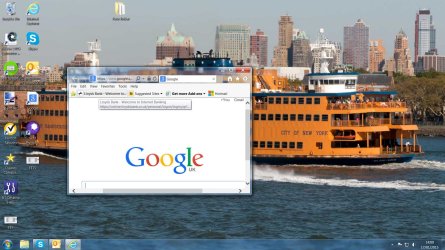
Every time I open Google, its screen is the size of an envelope and I have to either expand it from the corners or click on the square shown on the left hand side. I thought Windows was supposed to remember the screen size and it would automatically resize itself after a time, it's not happening.

Can anyone help please, is it a setting somewhere that needs altering?? Please see screen shot.

RonBin79
 

Attachments
  • google.jpg
    google.jpg
    260.3 KB · Views: 3

My Computer

Computer Manufacturer/Model Number
Dell XP8300
OS
Windows Seven Premium
CPU
Intel Core i5-2300
Motherboard
Unknown
Memory
8GB
Graphics Card(s)
1GB ATI Raedon HD 5450
Sound Card
Integrated 7.1 with THX TrueStudio
Monitor(s) Displays
Dell 17"
Hard Drives
1 Terrabyte Serial ATA
Case
Dell (Metal)
Cooling
None
Keyboard
Dell
Mouse
Dell Laser
Internet Speed
2.8Gb
Every time I open Google, its screen is the size of an envelope and I have to either expand it from the corners or click on the square shown on the left hand side. I thought Windows was supposed to remember the screen size and it would automatically resize itself after a time, it's not happening.

Can anyone help please, is it a setting somewhere that needs altering?? Please see screen shot.

RonBin79

To force Windows to record the size of a window and set it as the default size for that program each time it's opened, simply re-size the window to your preferred size, then depress and hold the CTRL key while you click the red X to close it. The program should use that size as the default size until changed.
 

My Computer

Computer type
PC/Desktop
Computer Manufacturer/Model Number
Custom Built
OS
Windows 7 Professional x64
CPU
Intel i5 quad processor
Motherboard
DP67BG
Memory
16 GB
Graphics Card(s)
Radeon HD 5770
Sound Card
Realtek High Definition Audio
Monitor(s) Displays
Samsung SyncMaster
Screen Resolution
1920X1080
Hard Drives
WD 2TB (SATA Internal)
WD 1TB (USB External)
PSU
Corsair GS800
Case
Tower (Generic)
Cooling
3 Internal Fans
Keyboard
MS Wireless
Mouse
MS Optical Wired
Internet Speed
54 mbps
Antivirus
Emsisoft
Browser
IE-Version 9, Palemoon-Version 24.2.0
Not for nothing, but that's not "Google", but IE showing "http://www.google.com" What happens if you open IE, then type "www.google.com" in the address bar?

You don't simply "open Google". The icon on your desktop is merely a shortcut to IE opening Google.com. My suggestion is to bookmark the Google page, then when you open IE, you open the bookmark to the Google webpage.
 

My Computer

Computer type
PC/Desktop
Computer Manufacturer/Model Number
iBuyPower NZXT
OS
Microsoft Windows 10 Home Build 15036
CPU
Intel(R) Core(TM) i7-860 @ 2.80GHz
Motherboard
Gigabyte Technology Co., Ltd. P55-UD3L
Memory
4.00 GB
Graphics Card(s)
NVIDIA GeForce GTX 750
Sound Card
(1) Line 6 UX2 (2) Realtek High Definition Audio
Monitor(s) Displays
23" acer
Screen Resolution
1920 x 1080 x 32 bits (4294967296 colors) @ 60 Hz
Hard Drives
(1) WDC WD5000AAKS-00D2B0 ATA Device (2) Seagate FreeAgent Go 250G USB Device
Cooling
Corsair H75 liquid cooler (Very easy to install, actually)
Internet Speed
60M cable modem-->Linksys E1200-->1Gbps net card
Browser
Chrome
Other Info
This is probably the longest I've ever had a Windows machine run without having to restore it to scratch. I'm used to restoring to "factory" about every 2 yrs. I've run with Win7 since new in 2009 and only recently (Nov, '14) restored to clean up the machine from all my 'xperimenting. LOL!! I may never need another machine.

Upgraded to 10 when it was still free, then installed 2017 update.
Back
Top