Solved Google Search asks for a captcha authentication

boyboyds

New member
Member
VIP
Local time
3:21 PM
Messages
107
Hi,

This has never happened to me before. I was trying to fix a WordPress website (for the very first time), but now every time I Google something using the word "WordPress" I get the following message -

"Our systems have detected unusual traffic from your computer network. This page checks to see if it's really you sending the requests, and not a robot."

If I search "problem posting WordPress" - I get this message.
If I search "problem posting YouTube" - no message.

What is this......?

Ran Malwarebytes - no issues.

Thanks,
-BBDS
 

My Computer

OS
Windows 7 Home 64bit
I'd never had such a notification until the last 6 months or year.

Since then, I've noticed it 2 or 3 times; most recently yesterday.

Not clear to me what triggers it as I wasn't doing anything out of the ordinary for me.
 

My Computer

Computer type
PC/Desktop
Computer Manufacturer/Model Number
Ignatz Special; 4 speed manual gearbox; factory air conditioning; one of one
OS
Windows 7 Home Premium SP1, 64-bit
CPU
Intel Skylake i5-6600K, not overclocked
Motherboard
AsRock Z170M Extreme 4, micro ATX
Memory
8 GB HyperX DDR4-2666 (2 x 4 GB)
Graphics Card(s)
none; graphics are integrated on CPU
Sound Card
onboard: Realtek ALC1150; external: USB Behringer UF0-202
Monitor(s) Displays
Dell S2340M 23 inch IPS
Screen Resolution
1600 x 900
Hard Drives
System: Crucial MX100 series SSD, 128 GB;
Data: Samsung Spinpoint 103SJ, 1 TB;
Backup: WD Caviar Green WD30EZRX-00D8PB0, 3 TB
PSU
Rosewill SilentNight 500 watt fanless, semi-modular
Case
Antec Solo II
Cooling
Noctua NH-U12S; Noctua F12 intake, Noctua S12A exhaust
Keyboard
Microsoft 200 6JH-00001 USB
Mouse
Dell or Microsoft optical wired; USB
Antivirus
Microsoft Security Essentials and Malwarebytes Premium
Browser
Pale Moon
Other Info
All fans PWM; speeds at idle: CPU circa 500 rpm; intake circa 600 rpm; exhaust circa 600 rpm; CPU temps 27 idle and 47 C load in a warm room (27 C/81 F) when running Intel Extreme Tuning Utility stress test.

My Computer

Computer type
PC/Desktop
Computer Manufacturer/Model Number
Custom assembled by me :}
OS
Win-7-Pro64bit 7-H-Prem-64bit
CPU
i7-5930K 2nd i9-9940x both water blocked VRM's too
Motherboard
ASUS SABERTOOTH X99 2nd ASUS x299 Apex
Memory
Trident-z 3200C14 2nd Trident-z 3600C16
Graphics Card(s)
EVGA 1080ti ftw3 2nd Titan Xp both water blocked
Sound Card
Built-in Realtek
Monitor(s) Displays
1-AOC G2460PG 24"G-Sync 144Hz/ 2nd 1-ASUS VG248QE 24" 144Hz
Screen Resolution
1920 x 1080 144Hz
Hard Drives
2-Samsung M.2 Evo & Evo Plus
2-Samsung 850 EVO 500GB SSD's/ 3-2.5 W.D. Black 1tb-&3-1tb/3-3.5 WD Black 1tb hdd's
PSU
EVGA SuperNOVA 1000-P2 2nd 1200-P2
Case
2-Corsair Obsidian Series 450D Black ATX Mid Tower
Cooling
Custom water loops
Keyboard
Logitech G710+/ 2nd Logitech G910
Mouse
2-RedDragon M901 Perdition 16400 dpi Gaming mouse = wired
Internet Speed
Comcast Ping 19ms 89.31mbps download speed 6.12mbps upload
Antivirus
Malwarebytes Pro/ Superantispyware Pro
Browser
FireFox & Pale moon
Other Info
2nd ASUS X299 Apex/Intel i9-9940x with Custom water loop/7H-Prem-x64/Corsair 450D case/Ram Trident-z 3600C16 4x8gb / Samsung970Evo plus 500gb SSD/Dual ssd EZ swap evo/PSU EVGA SuperNova 1200w-P2 80+Platinum/GPU Titan Xp /8-ML-140 on push-pull on 2-280GTX rads
I'd never had such a notification until the last 6 months or year.

Since then, I've noticed it 2 or 3 times; most recently yesterday.

Not clear to me what triggers it as I wasn't doing anything out of the ordinary for me.
Some ISPs tie several dwellings together on one network before there is a connection to the internet. In those cases, Google sees all of those dwellings as "traffic from your computer network". I see this CAPTCHA at work - usually when I use "site:domain.com" in the search.
 

My Computer

Computer type
Laptop
Computer Manufacturer/Model Number
Employer provided Dell Latitude
OS
W7 Pro SP1 64bit
CPU
i7
Memory
8GB
Graphics Card(s)
Intel HD Graphics
Hard Drives
crappy SSD
Antivirus
Employer mandated Symantec Endpoint Protection
Browser
Pale Moon 64bit, IE11 64bit & Chrome 64bit
@TrashZone .... this message only pups up on my PC, my wife's laptop has no issues, though I was first working on that website from her machine and also Googled from her machine for some advise.

This is the first time I dealt with the WordPress, and it is kind of buggy.

Thanks,
-BH
 

My Computer

OS
Windows 7 Home 64bit
Well I had the same problem for the last week or so. Mostly when performing searches like Usernameissues describes.

MBAM scan - clean
Comodo AV scan -clean
Emisisoft Emergency Kit scan - clean

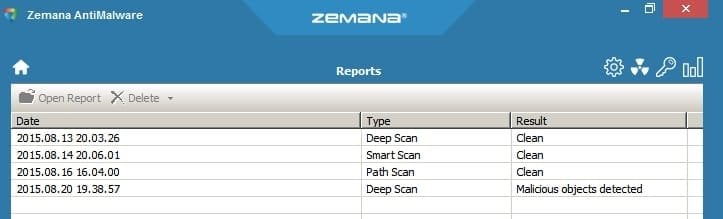
Zemana Antimalware scan - malicious objects detected

Zemana AntiMalware.jpg

Code:
stflt.sys
Status             : Scanned
Object             : %systemroot%\system32\drivers\stflt.sys
MD5                : B9657A0AFF28C1CB114ACC0CB93EE4BB
Publisher          : Crawler, LLC
Size               : 51496
Version            : 4.0.1.1
Detection          : Win32/Browser.Hijacker.Crawler!Ep
Cleaning Action    : Delete
Traces             :
                File - %systemroot%\system32\drivers\stflt.sys

Since removal I don't see that captcha anymore. I was also seeing a similar captcha on a few occasions using other search engines. Most notably:

zoeken dot nl (dutch)

iZito - English equivalent

I cannot say for sure that removal of the file is the reason why I no longer see the captcha.
 
Last edited:

My Computer

Computer type
Laptop
Computer Manufacturer/Model Number
ASUS
OS
Microsoft Windows 7 Home Premium 64-bit 7601 Multiprocessor Free Service Pack 1
CPU
AMD C-60 APU with Radeon(tm) HD Graphics
Motherboard
ASUSTeK COMPUTER INC. X501U
Memory
4.00 GB
Graphics Card(s)
AMD Radeon HD 6290 Graphics
Sound Card
(1) AMD High Definition Audio Device (2) Realtek High Defi
Screen Resolution
1366 x 768 x 32 bits (4294967296 colors) @ 60 Hz
Hard Drives
Hitachi HTS545050A7E380 SATA Disk Device
Antivirus
Comodo CIS & FW, SecureAplus App Whitelisting, Threatfire
Browser
Cyberfox 64bit, Opera 64bit, Airfox
Other Info
Spy-The-Spy, HitmanPro.Alert, Norton Connect Safe, MJRegWatcher, BitDefender TrafficLight, Voodoo Shield, Zemana AntiMalware
Callender,
I don't want to derail this thread, but hopefully the OP won't mind this excursion/rant:

This is what I hate about antivirus apps. Your Comodo app should have flagged this and let you decide if it is a PUP. The file has been listed on VirusTotal for a month now. I know that Comodo uses VirusTotal info, so Comodo knows about that PUP. IMO, antivirus apps should offer a setting that lets users opt to see every possible warning.

BTW, I'm guessing that the file that you had is the same file that I linked to in VirusTotal based on the MD5 info. Odds are, this is not an MD5 collision.
 

My Computer

Computer type
Laptop
Computer Manufacturer/Model Number
Employer provided Dell Latitude
OS
W7 Pro SP1 64bit
CPU
i7
Memory
8GB
Graphics Card(s)
Intel HD Graphics
Hard Drives
crappy SSD
Antivirus
Employer mandated Symantec Endpoint Protection
Browser
Pale Moon 64bit, IE11 64bit & Chrome 64bit
Yes Comodo should have picked it up. Not sure why it didn't because it usually alerts on anything suspicious.

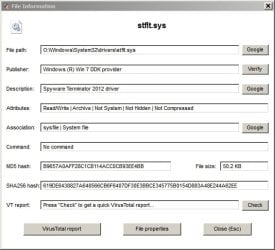
It is the same file listed on Virustotal:

From my system image backup.

File Information.jpg

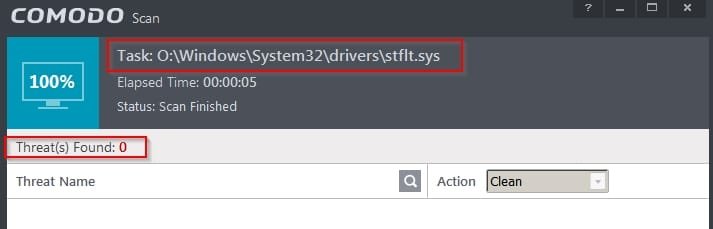
Comodo re-scan comes up clean!

COMODO Scan.jpg

I suppose I'd better report it!
 

My Computer

Computer type
Laptop
Computer Manufacturer/Model Number
ASUS
OS
Microsoft Windows 7 Home Premium 64-bit 7601 Multiprocessor Free Service Pack 1
CPU
AMD C-60 APU with Radeon(tm) HD Graphics
Motherboard
ASUSTeK COMPUTER INC. X501U
Memory
4.00 GB
Graphics Card(s)
AMD Radeon HD 6290 Graphics
Sound Card
(1) AMD High Definition Audio Device (2) Realtek High Defi
Screen Resolution
1366 x 768 x 32 bits (4294967296 colors) @ 60 Hz
Hard Drives
Hitachi HTS545050A7E380 SATA Disk Device
Antivirus
Comodo CIS & FW, SecureAplus App Whitelisting, Threatfire
Browser
Cyberfox 64bit, Opera 64bit, Airfox
Other Info
Spy-The-Spy, HitmanPro.Alert, Norton Connect Safe, MJRegWatcher, BitDefender TrafficLight, Voodoo Shield, Zemana AntiMalware
Comodo AV PUP Detection

Callender,
Your Comodo app should have flagged this and let you decide if it is a PUP. The file has been listed on VirusTotal for a month now. I know that Comodo uses VirusTotal info, so Comodo knows about that PUP. IMO, antivirus apps should offer a setting that lets users opt to see every possible warning.
[/URL].

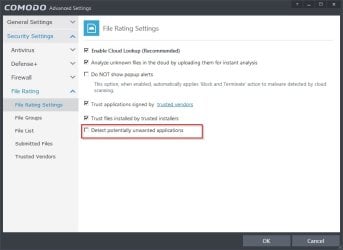
Okay I've looked into it. Thanks for the post otherwise I probably woul not have gone digging through the settings. It seems that there was a mis-configutation and PUP detection was switched off!

COMODO Advanced Settings.jpg
 

My Computer

Computer type
Laptop
Computer Manufacturer/Model Number
ASUS
OS
Microsoft Windows 7 Home Premium 64-bit 7601 Multiprocessor Free Service Pack 1
CPU
AMD C-60 APU with Radeon(tm) HD Graphics
Motherboard
ASUSTeK COMPUTER INC. X501U
Memory
4.00 GB
Graphics Card(s)
AMD Radeon HD 6290 Graphics
Sound Card
(1) AMD High Definition Audio Device (2) Realtek High Defi
Screen Resolution
1366 x 768 x 32 bits (4294967296 colors) @ 60 Hz
Hard Drives
Hitachi HTS545050A7E380 SATA Disk Device
Antivirus
Comodo CIS & FW, SecureAplus App Whitelisting, Threatfire
Browser
Cyberfox 64bit, Opera 64bit, Airfox
Other Info
Spy-The-Spy, HitmanPro.Alert, Norton Connect Safe, MJRegWatcher, BitDefender TrafficLight, Voodoo Shield, Zemana AntiMalware
Most welcome ...
 

My Computer

Computer Manufacturer/Model Number
W530-3630QM1
OS
windows 7 home 64bit
CPU
INTEL-CORE I7
Memory
16GB
Hard Drives
750GB
Browser
Chrome
Back
Top