

There are a lot of ways that Search helps you discover visual, textual, and even audio information, from finding the most useful podcasts to understanding elements within images. But what if what you’re searching for is inside a video? Videos aren’t skimmable like text, meaning it can be easy to overlook video content altogether.
Now, just like we’ve worked to make other types of information more easily accessible, we’re developing new ways to understand and organize video content in Search to make it more useful for you.
Starting today you can find key moments within videos and get to the information you’re looking for faster, with help from content creators. When you search for things like how-to videos that have multiple steps, or long videos like speeches or a documentary, Search will provide links to key moments within the video, based on timestamps provided by content creators. You’ll be able to easily scan to see whether a video has what you’re looking for, and find the relevant section of the content. For people who use screen readers, this change also makes video content more accessible.
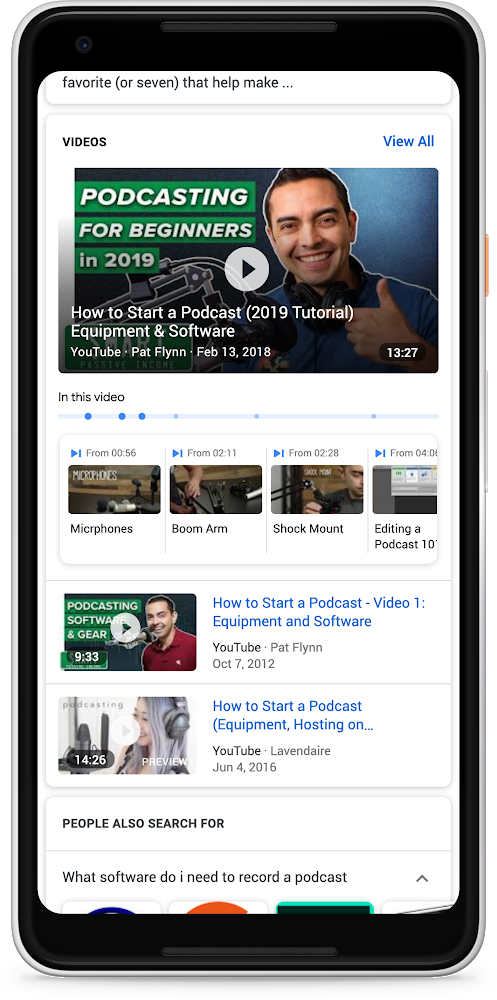
These links to key moments will appear in Search in English for YouTube videos where creators have provided timestamp information in the video description. We’re also introducing a way for more content creators across the web to mark up their videos so they can be more easily searchable. Soon you’ll be able to find these key moments from video publishers around the world, such as CBS Sports and NDTV, as they add markup to their videos, and we look forward to more creators adopting this helpful new feature.
Source: Search helps you find key moments in videos
My Computer
At a glance
64-bit Windows 11 Pro for WorkstationsIntel i7-8700K OC'd to 5 GHz64 GB (4x16GB) G.SKILL TridentZ RGB DDR4 3600...ASUS ROG-STRIX-GTX1080TI-O11G-GAMING
- Computer type
- PC/Desktop
- Computer Manufacturer/Model Number
- Self built custom
- OS
- 64-bit Windows 11 Pro for Workstations
- CPU
- Intel i7-8700K OC'd to 5 GHz
- Motherboard
- ASUS ROG Maximus XI Formula Z390
- Memory
- 64 GB (4x16GB) G.SKILL TridentZ RGB DDR4 3600 MHz
- Graphics Card(s)
- ASUS ROG-STRIX-GTX1080TI-O11G-GAMING
- Sound Card
- Integrated
- Monitor(s) Displays
- 2 x Samsung Odyssey G7 27"
- Screen Resolution
- 2560x1440
- Hard Drives
- 1TB Samsung 990 PRO M.2,
4TB Samsung 990 PRO PRO M.2,
TerraMaster F8 SSD Plus NAS
- PSU
- Seasonic Prime Titanium 850W
- Case
- Thermaltake Core P3
- Cooling
- Corsair Hydro H115i
- Keyboard
- Logitech wireless K800
- Mouse
- Logitech MX Master 4
- Internet Speed
- 2 Gb/s Download and 100 Mb/s Upload
- Antivirus
- Malwarebyte Anti-Malware Premium
- Browser
- Google Chrome
- Other Info
- Logitech Z625 speaker system,
Logitech BRIO 4K Pro webcam,
HP Color LaserJet Pro MFP M477fdn,
APC SMART-UPS RT 1000 XL - SURT1000XLI,
Galaxy S23 Plus phone


