Google searches in IE11 cant be changed/modified once submitted

Virtualbird

New member
Local time
10:49 PM
Messages
15
Team
In recent months, we have an issue at work where an update from MS has stopped my users adding to or changing a google search subject once submitted using Internet Explorer 11.
I also have this issue at home on 4 different machines with Google and IE11.

Basically go to
www.google.com.au
Search for
going diving (or any subject really)

it comes up with numerous finds as it should... but if I try and change it to
going scuba diving (or change it to anything else)

it wont let me type in the word Scuba, or any words at the start/middle/end of the search bar.
Sometimes, I see the cursor moving without typing letters, other times it isn't moving at all.
I also make sure the search bar is 'in focus', so it should work.

Cleared cache by Internet options and manually. :)

I today changed a the HR Managers (of all people :o) IE from not automatically updating, to 'automatically update IE11' and it has now created this issue for her.
And she already has it in for me :cry::cry:

Anyone else found this - I've tried searching for it, but cant see much apart from cant add google as default search engine... :mad:

I could go over and uninstall the recent patches (which I will for her), but has anyone found a solution? As this is affecting over 100 machines at work, and would suck to have to remove from all one by one.

<3yr old Dell Laptop/Workstations
Windows 7 Pro Fully Patched
IE11

Thanks
Bird.
 

My Computer My Computer

At a glance

Win 7 64bit
Computer type
PC/Desktop
Computer Manufacturer/Model Number
Dell at work - Home built at home
OS
Win 7 64bit
Also you can't click on the search finds. Well none that aren't in the top few (when the results first come up)..

If I scroll down the search results, and try and click on one that isn't in the 'main view of the search results - without scrolling at all) of the page just jumps back to the top of the page... I cant even drag the mouse curser across anything that isn't in that first view.

Very strange..
 

My Computer My Computer

At a glance

Win 7 64bit
Computer type
PC/Desktop
Computer Manufacturer/Model Number
Dell at work - Home built at home
OS
Win 7 64bit
Hi I have no idea,
You might try to edit the landing page url,
Code:
https://www.google.com.au/
 

My Computer My Computer

At a glance

Win-7-Pro64bit 7-H-Prem-64biti7-5930K 2nd i9-9940x both water blocked VRM'...Trident-z 3200C14 2nd Trident-z 3600C16EVGA 1080ti ftw3 2nd Titan Xp both water blocked
Computer type
PC/Desktop
Computer Manufacturer/Model Number
Custom assembled by me :}
OS
Win-7-Pro64bit 7-H-Prem-64bit
CPU
i7-5930K 2nd i9-9940x both water blocked VRM's too
Motherboard
ASUS SABERTOOTH X99 2nd ASUS x299 Apex
Memory
Trident-z 3200C14 2nd Trident-z 3600C16
Graphics Card(s)
EVGA 1080ti ftw3 2nd Titan Xp both water blocked
Sound Card
Built-in Realtek
Monitor(s) Displays
1-AOC G2460PG 24"G-Sync 144Hz/ 2nd 1-ASUS VG248QE 24" 144Hz
Screen Resolution
1920 x 1080 144Hz
Hard Drives
2-Samsung M.2 Evo & Evo Plus
2-Samsung 850 EVO 500GB SSD's/ 3-2.5 W.D. Black 1tb-&3-1tb/3-3.5 WD Black 1tb hdd's
PSU
EVGA SuperNOVA 1000-P2 2nd 1200-P2
Case
2-Corsair Obsidian Series 450D Black ATX Mid Tower
Cooling
Custom water loops
Keyboard
Logitech G710+/ 2nd Logitech G910
Mouse
2-RedDragon M901 Perdition 16400 dpi Gaming mouse = wired
Internet Speed
Comcast Ping 19ms 89.31mbps download speed 6.12mbps upload
Antivirus
Malwarebytes Pro/ Superantispyware Pro
Browser
FireFox & Pale moon
Other Info
2nd ASUS X299 Apex/Intel i9-9940x with Custom water loop/7H-Prem-x64/Corsair 450D case/Ram Trident-z 3600C16 4x8gb / Samsung970Evo plus 500gb SSD/Dual ssd EZ swap evo/PSU EVGA SuperNova 1200w-P2 80+Platinum/GPU Titan Xp /8-ML-140 on push-pull on 2-280GTX rads
Do those four machines have KB3038314 installed by any chance?

Are you using the latest version of Google Search?

Does the icon that appears when you click the drop down arrow at the end of the address bar look like this? (New Google Logo)

Google - Internet Explorer 2.jpg

Or does it still show the old dark blue logo with the white letter G ?

Google - Internet Explorer.jpg
 

My Computer My Computer

At a glance

Microsoft Windows 7 Home Premium 64-bit 7601 ...AMD C-60 APU with Radeon(tm) HD Graphics4.00 GBAMD Radeon HD 6290 Graphics
Computer type
Laptop
Computer Manufacturer/Model Number
ASUS
OS
Microsoft Windows 7 Home Premium 64-bit 7601 Multiprocessor Free Service Pack 1
CPU
AMD C-60 APU with Radeon(tm) HD Graphics
Motherboard
ASUSTeK COMPUTER INC. X501U
Memory
4.00 GB
Graphics Card(s)
AMD Radeon HD 6290 Graphics
Sound Card
(1) AMD High Definition Audio Device (2) Realtek High Defi
Screen Resolution
1366 x 768 x 32 bits (4294967296 colors) @ 60 Hz
Hard Drives
Hitachi HTS545050A7E380 SATA Disk Device
Antivirus
Comodo CIS & FW, SecureAplus App Whitelisting, Threatfire
Browser
Cyberfox 64bit, Opera 64bit, Airfox
Other Info
Spy-The-Spy, HitmanPro.Alert, Norton Connect Safe, MJRegWatcher, BitDefender TrafficLight, Voodoo Shield, Zemana AntiMalware
Thanks for the replies....

I'll try the landing page and see if it makes a difference...

Callender - it shows the newer icon.

It must be one of the recent updates, just which one I need to work out :(

It almost feels like the page isn't loading properly.. Sometimes I've noticed when it doesn't allow you to type in the search field, if you hit the back space key, it actually goes back a page, but still wont allow you to search again until you type in www.google.com www.google.com.au again.. :(

Thanks
 

My Computer My Computer

At a glance

Win 7 64bit
Computer type
PC/Desktop
Computer Manufacturer/Model Number
Dell at work - Home built at home
OS
Win 7 64bit
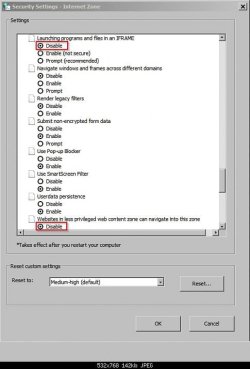
Maybe this will work?

Control Panel > Internet Options > Security tab

Then set options highlighted:

Internet Properties.jpg

Security Settings - Internet Zone.jpg
 

My Computer My Computer

At a glance

Microsoft Windows 7 Home Premium 64-bit 7601 ...AMD C-60 APU with Radeon(tm) HD Graphics4.00 GBAMD Radeon HD 6290 Graphics
Computer type
Laptop
Computer Manufacturer/Model Number
ASUS
OS
Microsoft Windows 7 Home Premium 64-bit 7601 Multiprocessor Free Service Pack 1
CPU
AMD C-60 APU with Radeon(tm) HD Graphics
Motherboard
ASUSTeK COMPUTER INC. X501U
Memory
4.00 GB
Graphics Card(s)
AMD Radeon HD 6290 Graphics
Sound Card
(1) AMD High Definition Audio Device (2) Realtek High Defi
Screen Resolution
1366 x 768 x 32 bits (4294967296 colors) @ 60 Hz
Hard Drives
Hitachi HTS545050A7E380 SATA Disk Device
Antivirus
Comodo CIS & FW, SecureAplus App Whitelisting, Threatfire
Browser
Cyberfox 64bit, Opera 64bit, Airfox
Other Info
Spy-The-Spy, HitmanPro.Alert, Norton Connect Safe, MJRegWatcher, BitDefender TrafficLight, Voodoo Shield, Zemana AntiMalware
You're not the only one having google search problems:

This thread was started on 10-28-2015 and on 11-02-2015 the google team pushed out a fix, but its still happening, scrolling down I found one respondent mention that turning off javascript (JS) fixed all the problems, but without JS the searches were not as good.
https://Google search not working | productforums.google.com

Here's one from our sister, Tenforums, z3r010 has a link to an article about recent google glitches at post #28.

Myself, using google.au with IE11? With JS on, no problems; With JS off it took a few extra seconds to load pages.

If you want to try it; To turn off JS in IE11, go like Callender showed you:

  • Control Panel > Internet Options > Security tab >Custom Level,

  • Scroll down to Scripting >Active scripting and change the radio button from Enabled to Disabled,

  • Say yes or ok to back your way out,

  • Restart IE, test google.
 

My Computer My Computer

At a glance

Originally Win 7 Hm Prem x64 Ver 6.1.7600 Bui...Intel i3 530 2.93GHz, 2933MHz 2 Cores 4 Logic...6GB of 1,333MHz DDR3 SDRAM32MB Intel Graphics Media Accelerator HD IGChip
Computer type
PC/Desktop
Computer Manufacturer/Model Number
Gateway DX4831-01e (Mid-Tower Desktop)
OS
Originally Win 7 Hm Prem x64 Ver 6.1.7600 Build 7601-SP1 | Upgraded to Windows 10 December 14, 2019
CPU
Intel i3 530 2.93GHz, 2933MHz 2 Cores 4 Logical Processors
Motherboard
Gateway H57M01 133 megahertz
Memory
6GB of 1,333MHz DDR3 SDRAM
Graphics Card(s)
32MB Intel Graphics Media Accelerator HD IGChip
Sound Card
Realtek High Definition Audio
Monitor(s) Displays
Gateway HX2000 20inch TFT active matrix TN
Screen Resolution
1600 x 900 x 59 hertz
Hard Drives
WDC WD10EADS-00M2B0 [HDD] (1000.20 GB) -- drive 0,
HL-DT-ST DVDRAM GH41N [CD-ROM dr]
Four card readers, and Four USB 2.0
PSU
300watts.
Case
Mid-Tower Desktop
Cooling
Stock from Gateway
Keyboard
Natural Ergonomic Keyboard 4000, see Other Info
Mouse
Orig. Gateway wore out now using Insignia USB wired optical
Internet Speed
Vz FIOS 10ms png 57.64Mbps down 65.53Mbps up Speedtest.org
Antivirus
Zamana Anti-logger with Anti-malware, MSE, Windows Firewall,
Browser
IE11.0.9600.19399-Upd ver11.0.135, Firefox 68.0.1 x64
Other Info
System Specs by Belarc.

BIOS: American Megatrends Inc. P01-A0 11/17/2009

Replaced the MS 'Natural' Standard PS/2 Enhanced 101-102 Keyboard with a new Natural Ergonomic Keyboard 4000 on August 1st 2014.

Canon Pixma MG3222 Printer.

Updated to IE11 on 12102015 | Fios Quantum Router g1100

Additional AV: SpywareBlaster, manual Mbam, SAS
This is an IE11 Patch issue from MSoft... Which I knew from start...

I toasted this laptop and rebuilt it with same Windows 7 Pro Corp Edition I have here at work..

Didn't allow IE to update to later version - and it work normally now.
 

My Computer My Computer

At a glance

Win 7 64bit
Computer type
PC/Desktop
Computer Manufacturer/Model Number
Dell at work - Home built at home
OS
Win 7 64bit
Back
Top