
Goopdate files in Appdata, what are they? Mal or Spyware?

birthdaysuit

New member
Local time
3:24 AM
Messages
7
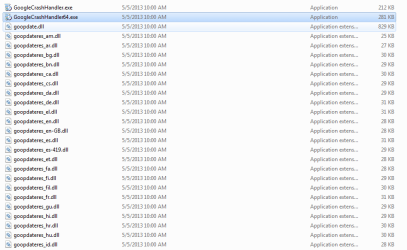
Not sure if this is deemed malware or spyware of if it is legitimate and needed for windows to function. I heard two sides of the story and not really sure what these files do. I believe some are google chrome related, which I deleted and do not use.

Location: C:\Users\AppData\local\Temp amd in the folder named - {5E226664-0C8B-449A-BB47-7DA77B39CCBA}.

The files are named GoogleCrashHandler.exe, goopdate.dll, goopdateres_cs.dll, psmaschine.dll as well as dozens of gooddateres_ files with different letterings at the end.
 

Attachments
  • Capture.PNG
    Capture.PNG
    12.1 KB · Views: 1

My Computer My Computer

At a glance

Windows 7 Home Premium 32bit
Computer type
PC/Desktop
Computer Manufacturer/Model Number
dell
OS
Windows 7 Home Premium 32bit
Welcome to the forum they will all be google files best way to get rid of them is to use UnCleaner - Josh Cell Softwares it will clear loads of rubbish as well as temp files
 

My Computer My Computer

At a glance

win 8 32 bit
Computer type
PC/Desktop
OS
win 8 32 bit
Welcome to the forum they will all be google files best way to get rid of them is to use UnCleaner - Josh Cell Softwares it will clear loads of rubbish as well as temp files
That website comes with a 404 after I click download. I already have Ccleaner.

People are telling me that these files are needed for windows to work, is this true??
 

My Computer My Computer

At a glance

Windows 7 Home Premium 32bit
Computer type
PC/Desktop
Computer Manufacturer/Model Number
dell
OS
Windows 7 Home Premium 32bit
Welcome to the forum they will all be google files best way to get rid of them is to use UnCleaner - Josh Cell Softwares it will clear loads of rubbish as well as temp files
That website comes with a 404 after I click download. I already have Ccleaner.

People are telling me that these files are needed for windows to work, is this true??

NO it is not true. There in a temp folder and can be deleted. This is from your post with one correction by me. So go ahead and blow it away.

"Location: C:\Users\User Name "I added this"\AppData\local\Temp amd in the folder named - {5E226664-0C8B-449A-BB47-7DA77B39CCBA}"
 

My Computer My Computer

At a glance

Windows 10 Pro 64 bitAMD FX 9590 8 Core Black EditionCorsair Vengeance 16GB DDR3AMD Radeon (TM) R9 380 Gaming Series
Computer type
PC/Desktop
Computer Manufacturer/Model Number
Custom Built By Me.
OS
Windows 10 Pro 64 bit
CPU
AMD FX 9590 8 Core Black Edition
Motherboard
MSI 990FXA GAMING (MS-7893)
Memory
Corsair Vengeance 16GB DDR3
Graphics Card(s)
AMD Radeon (TM) R9 380 Gaming Series
Sound Card
AMD High Definition
Monitor(s) Displays
Samsung 32" 60Hz 4ms Curved PLS LED
Screen Resolution
1920 X 1080
Hard Drives
C: 223 GB SSD = E: 465 GB HDD = F: 931 GB HDD = G: 149 GB HDD = H: 931 GB HDD
PSU
EVGA Supernova NEX750B 750W ATX EPS12V 80PLUS Bronze
Case
Cool Master
Cooling
Noctua NH-D15 Premium Cooler with 2x NF-A15 PWM 140mm Fan
Internet Speed
Fiber Optic: Download 332.7 Mbps / Upload 331.5 Mbps
Antivirus
Windows Defender
Browser
Slimjet (64bit)
So basically anything in the Temp folder is fine to delete? By that I mean deleting something on accident in this folder won't cause any harm to the way windows runs.
 

My Computer My Computer

At a glance

Windows 7 Home Premium 32bit
Computer type
PC/Desktop
Computer Manufacturer/Model Number
dell
OS
Windows 7 Home Premium 32bit
I use Ccleaner to clean out things.
I use it at it's default setting.
One of those settings is

only for today.PNG

The reason for this is your system might be using some of those temps, so waiting will to remove a few "temps" for a day is better in my opinion.
Ccleaner will remove the "temps" not in use anytime your run it other than the new ones.

CCleaner - Free Download or try CCleaner Professional - Piriform

Jack
 

My Computer My Computer

At a glance

Windows 10 Pro. 64/ version 1709 Windows 7 Pr...Intel i7-6800K @ 4.3Corsair Platinum 16 gig @2400EVGA GTX 1070 OC
Computer type
PC/Desktop
Computer Manufacturer/Model Number
Home made Desktop
OS
Windows 10 Pro. 64/ version 1709 Windows 7 Pro/64
CPU
Intel i7-6800K @ 4.3
Motherboard
ASUS X-99 Deluxe II
Memory
Corsair Platinum 16 gig @2400
Graphics Card(s)
EVGA GTX 1070 OC
Monitor(s) Displays
Asus 27" LED LCD/VE278Q
Screen Resolution
1920-1080 or 1280-720 HDMI
Hard Drives
INTEL SSD 730-240 Gb Sata 3.0/
PSU
EVGA Platium 1200W
Case
Phanteks Luxe Tempered Glass 8 fans/ one radiator
Cooling
XSPC/ Water Cooled CPU
Keyboard
Das 4 Professional
Mouse
Logitech M705/MX Anywhere 2-S
Internet Speed
100 mbits
Antivirus
Microsoft Security Essentials/ Malwarebytes Premium 3.0/ SAS
Browser
I.E. 11 default/Firefox/ ISP Time Warner Cable/Spectrum
Other Info
LG BluRay Burner/
Sound system-KLipsch-THX/
Icy Dock ssd Hot Swap bays.
Back
Top