Solved How do files in ...\AppData\Local\Temp get deleted?

JohnHa

New member
Member
Local time
5:58 PM
Messages
16
I am debugging an problem with an application which uses ...\AppData\Local\Temp to store its temporary files.

My questions are:

Q1 Does W7 ever automatically delete files from this folder?

Q2 Is each application supposed to delete the files it creates?

Q3 If Q2 is YES, are their known cases where a badly written application goes delete ...\AppData\Local\Temp\*.*? That would cause my problem as it would delete my temporary files.

I ask because the symptom of the problem I am debugging is that the application's temporary files in ...\AppData\Local\Temp suddenly get deleted which causes the application to lose data.

Note that the files being deleted are not "held open by the application" so there is no protection from their being deleted by another program. Also I know that cleaning programs can be scheduled to clean ...\AppData\Local\Temp but I am ignoring that for the moment - I want to know what W7 does.

Thanks
 

My Computer

Computer type
PC/Desktop
Computer Manufacturer/Model Number
HP Pavilion
OS
Windows 7 Home 64 bit
CPU
Intel
Memory
4GB
Graphics Card(s)
Intel
Antivirus
AVG Free
Browser
Firefox
> Q1 Does W7 ever automatically delete files from this folder?
Not that I have ever seen.


> Q2 Is each application supposed to delete the files it creates?
In my opinion, apps should cleanup after themselves, but many apps do not.


> Q3 If Q2 is YES, are their known cases where a badly written application goes delete ...\AppData\Local\Temp\*.*? That would cause my problem as it would delete my temporary files.
I don't know of any "normal" apps that delete temp files that were created by other apps. Of course, apps that are designed to delete some or all temp files (e.g. CCleaner) will delete temp file created by other apps.


You can use Process Monitor to determine which app is removing the temp file of interest.

Set a filter for Path > contains > AppData\Local\Temp > Include

If desired, you can be more specific with the filter above. You can include one of the files that holds data of interest. If desired, you can add a a filter to include entries for every temp file of interest.

If need be, you can temporarily exclude the app that writes the data to these temp files. Right click on the app name and select exclude from the context menu. That should let you see any other apps that are acting on the temp files of interest.

If you need to let Process Monitor run for a long time, set a local backing file.
(Menu bar > Files > Backing Files...)

If you need more help using Process Monitor, search YouTube or post your questions here in this thread.


If need be, we can probably come up with a script that will alert you to when the temp files are deleted. Knowing the exact time of deletion might help you find the entries of interest within Process Monitor.
 

My Computer

Computer type
Laptop
Computer Manufacturer/Model Number
Employer provided Dell Latitude
OS
W7 Pro SP1 64bit
CPU
i7
Memory
8GB
Graphics Card(s)
Intel HD Graphics
Hard Drives
crappy SSD
Antivirus
Employer mandated Symantec Endpoint Protection
Browser
Pale Moon 64bit, IE11 64bit & Chrome 64bit
Thank you. Your reply has confirmed my suspicions.

I have been running some more tests and I found that CCleaner did not delete files - or at least not my application's files - in ...\Local\Temp so I shall have to look elsewhere in the application for my problem.

My initial thought was that it is slightly risky for an application to write temporary data files in such a common location where they can be "deleted by anyone" but on checking I found that the files are only able to be deleted by someone who has, or some application which has, Administrator privilege. Ordinary users only have Read and Execute permissions on my application's files.
 

My Computer

Computer type
PC/Desktop
Computer Manufacturer/Model Number
HP Pavilion
OS
Windows 7 Home 64 bit
CPU
Intel
Memory
4GB
Graphics Card(s)
Intel
Antivirus
AVG Free
Browser
Firefox
They are not automatically deleted unless your written app does it or programs like CCleaner
or Disk Cleanup specifically target those temporary files. :cool:
 

My Computer

Computer type
Laptop
OS
Windows 7
I don't believe that Windows would ever delete any of this folders contents except when requested by the user. I would consider it highly highly inappropriate to do otherwise. This folder is used by applications and it is their responsibility to manage their one temp files. Applications have varying definitions of what "temporary" means and may expect such files to exist for long periods of time. This is not recommended behavior but some do so.

My initial thought was that it is slightly risky for an application to write temporary data files in such a common location where they can be "deleted by anyone" but on checking I found that the files are only able to be deleted by someone who has, or some application which has, Administrator privilege. Ordinary users only have Read and Execute permissions on my application's files.

It's somewhat more complicated than that. A standard user can delete temporary files created by their own applications. An account is considered the owner of files they create and have full control over them, at least in this context. This is good, otherwise an application run under a standard account could not delete it's own temp files. There is nothing to prevent an application from deleting or overwriting files created by other applications run under the same account. Administrators can delete any temp files created by any account, including other administrators.

While an application is running it can lock a temp file for exclusive access. In that case even an admin could not delete them.
 

My Computer

Computer type
PC/Desktop
Computer Manufacturer/Model Number
HP
OS
Windows 7 Pro 64 bit
CPU
Xeon W3520
Memory
8 GB
Graphics Card(s)
Nvidia Geforce 210
Thank you.

I have done some more work on the problem I am debugging (a word processing application where users sometimes lose the images in their document) and I can now replicate the symptoms exactly.

The application writes the images as individual files, one per image; and the text content etc; to ...\AppData\Local\Temp. The text content etc file is locked as being open, preventing it being deleted; the image files are not so locked. If I manually delete all files in ...\AppData\Local\Temp, simulating clearing \Temp, the text content file remains while the images are deleted. When the document is saved, the text content is OK but the images are lost.

This is exactly what users experience - they save a document and on opening it, some or all of the images are missing. Hence my wondering if something could be deleting the files.
 

My Computer

Computer type
PC/Desktop
Computer Manufacturer/Model Number
HP Pavilion
OS
Windows 7 Home 64 bit
CPU
Intel
Memory
4GB
Graphics Card(s)
Intel
Antivirus
AVG Free
Browser
Firefox
Is this computer running any sort of PC-cleaner and/or any sort of bulldog-level privacy-guard software?
 
Last edited:

My Computer

Computer type
PC/Desktop
Computer Manufacturer/Model Number
Antec desktop; Acer Aspire laptops
OS
Windows 7 Professional 64-bit
CPU
Desktop i5; Acers i5 & i7
Memory
desktop 16GB; 1 Acer 8GB & 1 Acer 16GB
Hard Drives
1TB split into 2 equal partitions [OS and data] usable by RJS
Internet Speed
AT&T DSL
Browser
FF, GChrome, msIE
Other Info
Windows 7 Firewall, Emsisoft AM/AV, MSE [scan-only], SpywareBlaster, Ruiware/BillP combine
You can add that specific folder to CCleaner's cleanup list if you want.
 

My Computer

Computer type
PC/Desktop
Computer Manufacturer/Model Number
Lenovo IdeaCenter 450
OS
Windows 10 Pro X64
CPU
Intel Quad Core i7-4770 @ 3.4Ghz
Memory
16.0GB PC3-12800 DDR3 SDRAM 1600 MHz
Graphics Card(s)
Intel Integrated HD Graphics
Sound Card
Realtek HD Audio
Monitor(s) Displays
HP 22" LCD
Screen Resolution
1680 x 1050
Hard Drives
250GB Samsung EVO SATA-3 SSD
2TB Seagate ST2000DM001 SATA-2
1.5TB Seagate ST3150041AS SATA
Keyboard
Dell USB
Mouse
Lenovo USB
Internet Speed
Cable via Road Runner 3MB Upload, 30MB Download
Antivirus
Windows Defender, MBAM Pro, MBAE
Browser
Seamonkey
Other Info
UEFI/GPT
PLDS DVD-RW DH16AERSH
Thank you.

I respond to forum posts from users so I unfortunately have little information about exactly what they did or are doing, or how their PCs are configured. They just report - very occasionally - they have lost images. It has been impossible to reproduce the fault.

I only thought of this as a possible mechanism today and am progressing it. I have about 25,000 WP files on my PC having used the s/w for many years and it has never happened to me, so I am grasping at straws.

I tried CCleaner, which I have, but the as delivered configuration it does not clear the ...\AppData\Local\Temp\ folder. I realise that other cleaning utilities might clear the folder.
 

My Computer

Computer type
PC/Desktop
Computer Manufacturer/Model Number
HP Pavilion
OS
Windows 7 Home 64 bit
CPU
Intel
Memory
4GB
Graphics Card(s)
Intel
Antivirus
AVG Free
Browser
Firefox
You can add that specific folder to CCleaner's cleanup list if you want.

:-)) That is exactly what I do not want the users to do!!!
 

My Computer

Computer type
PC/Desktop
Computer Manufacturer/Model Number
HP Pavilion
OS
Windows 7 Home 64 bit
CPU
Intel
Memory
4GB
Graphics Card(s)
Intel
Antivirus
AVG Free
Browser
Firefox
... apps that are designed to delete some or all temp files (e.g. CCleaner) will delete temp file created by other apps....

...I tried CCleaner, which I have, but the as delivered configuration it does not clear the ...\AppData\Local\Temp\ folder. I realise that other cleaning utilities might clear the folder.

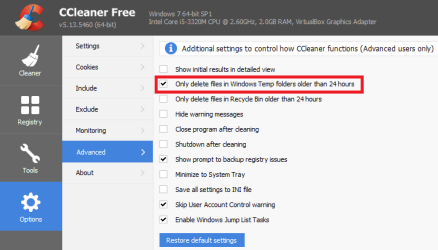
The "as delivered configuration" should clear the ...\AppData\Local\Temp\ folder...
...but only if the files are older than 24hrs old.

CC1.PNG

CC2.PNG


CC3.PNG


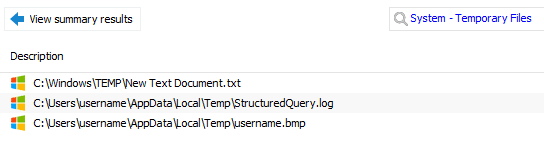
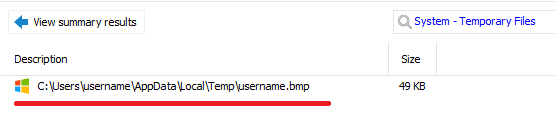
If I clear the option highlighted above, the files shown below will be deleted:

CC4.PNG


You should tell forum members to avoid clearing the folder via CCleaner.
 

My Computer

Computer type
Laptop
Computer Manufacturer/Model Number
Employer provided Dell Latitude
OS
W7 Pro SP1 64bit
CPU
i7
Memory
8GB
Graphics Card(s)
Intel HD Graphics
Hard Drives
crappy SSD
Antivirus
Employer mandated Symantec Endpoint Protection
Browser
Pale Moon 64bit, IE11 64bit & Chrome 64bit
Thank you for that correction. I had cleaned it manually myself before starting testing, so as not to confuse myself, so when I ran the CCleaner test, everything was less than 24 hours old. I have just placed an old file in it and CCleaner does indeed delete it.
 

My Computer

Computer type
PC/Desktop
Computer Manufacturer/Model Number
HP Pavilion
OS
Windows 7 Home 64 bit
CPU
Intel
Memory
4GB
Graphics Card(s)
Intel
Antivirus
AVG Free
Browser
Firefox
No problem.

Let's hope that you can help others not lose their data in that temp folder :-)
 

My Computer

Computer type
Laptop
Computer Manufacturer/Model Number
Employer provided Dell Latitude
OS
W7 Pro SP1 64bit
CPU
i7
Memory
8GB
Graphics Card(s)
Intel HD Graphics
Hard Drives
crappy SSD
Antivirus
Employer mandated Symantec Endpoint Protection
Browser
Pale Moon 64bit, IE11 64bit & Chrome 64bit
Found it! It's Norton.

JohnHa: Did you ever find the solution?
I have exactly the same problem, and in my case it is caused by Norton Antivirus.

At irregular times, the temporary files of an application I develop get removed while it is running, and data are lost. Today it happened again, I once again searched the web for help and found this page, which notes that running Disk Cleanup will clear AppData temp folders. This alerted me to the fact that Norton AntiVirus had notified running in the background to improve system performance...

So I again started my application, opened the temp folder to watch, started Norton manually, ran Performance > File Cleanup and ... zap! Gone were the temp files.

This also explains why most of my users did not report the problem: fortunately most do not use Norton. Better antivirus software probably looks at the timestamps before removing temp files.

My solution will be to set work files read-only each time they are closed. (The application removes the temp files itself when ready.)
 

My Computer

Computer type
PC/Desktop
OS
Win 10
My not be a good idea. To set work files read-only each time they are closed my prevent them to be updated. And Norton may also delete read-only and even system and hidden.
If the problem is Norton, disable the function on it.
 

My Computers

System One System Two

  • Computer type
    PC/Desktop
    Computer Manufacturer/Model Number
    custom build
    OS
    Windows 7 HP 64
    CPU
    i5 6600K - 800MHz to 4200MHz
    Motherboard
    GA-Z170-HD3P
    Memory
    4+4G GSkill DDR4 3000
    Graphics Card(s)
    IG - Intel 530
    Monitor(s) Displays
    Samsung 226BW
    Screen Resolution
    1680x1050
    Hard Drives
    (1) -1 SM951 – 128GB M.2 AHCI PCIe SSD drive for Windows 7 and Lubuntu
    (2) -1 WD SATA 3 - 1T for Data
    (3) -1 WD SATA 3 - 1T for backup
    PSU
    Thermaltake 450W TR2 gold
    Keyboard
    Old and good Chicony mechanical keyboard
    Mouse
    Logitech mX performance - 9 buttons (had to disable some)
    Internet Speed
    500Mb/s
    Browser
    Firefox 64
    Other Info
    TinyWall firewall
  • Computer type
    Laptop
    System Manufacturer/Model Number
    Asus Q550LF
    OS
    Windows 7 Pro
    CPU
    i7-4500U 800MHz to 3.0GHz
    Motherboard
    Asus Q550LF
    Memory
    (4+4)G DDR3 1600
    Graphics Card(s)
    IG intel 4400 + NVIDIA GeForce GT 745M
    Sound Card
    Realtek
    Monitor(s) Displays
    LG Display LP156WF4-SPH1
    Screen Resolution
    1920 x 1080
    Hard Drives
    BX500 120G SSD for Windows and programs +
    1T HDD for data
    Internet Speed
    500 Mb/s
    Browser
    Firefox
    Other Info
    TinyWall firewall
My application will set read-write permission when needed. Norton does not remove read-only files (I tested this). Also note that disabling the function in Norton is not the solution: I would have to tell all users of my application to do that.
 

My Computer

Computer type
PC/Desktop
OS
Win 10
Back
Top