Solved Got 8GB ram but can only use 3.44GB i am using Windows 7 Ultimate x64

Nyteblayde

New member
Local time
10:28 PM
Messages
5
Location
Denmark
Hello, i got a problem. I got 8Gigs ram, but it says i can only use 3.44gigs of them. Don't know if i should ignore it or what. Help me please! :-D

mvrm81.png


- If anyone should ask, the lang is Danish :-)
 

My Computer My Computer

At a glance

Windows 7 Ultimate x64Intel(R) Pentium(R) D CPU 3.40Ghz4x 2GB Kingston HyperX DDR2NVIDIA GeForce 9800 GT
Computer Manufacturer/Model Number
Self made
OS
Windows 7 Ultimate x64
CPU
Intel(R) Pentium(R) D CPU 3.40Ghz
Motherboard
AsRock P5B-DE
Memory
4x 2GB Kingston HyperX DDR2
Graphics Card(s)
NVIDIA GeForce 9800 GT
Sound Card
Realtek High Definition Audio
Monitor(s) Displays
22" Samsung SyncMaster T220
Screen Resolution
1680x1050
Hard Drives
Primary: Hitachi Deskstar HDS725050KLA360, 500GB SATA
Secondary: MAXTOR STM3250820AS, 250GB SATA
PSU
230W
Case
Fujitsu Siemens
Cooling
2x Air Coolers
Keyboard
Razor Lyctosa
Mouse
Logitech G500 Gaming
Internet Speed
30/10

My Computer My Computer

At a glance

Windows 7 Ultimate 64 bitAMD Phenom II X4 965 Black EditionGSkill 4 X 2 GB PC 8500XFX Radeon HD 6790 D
Computer Manufacturer/Model Number
Custom built
OS
Windows 7 Ultimate 64 bit
CPU
AMD Phenom II X4 965 Black Edition
Motherboard
Gigabyte GA-MA790X-DS4
Memory
GSkill 4 X 2 GB PC 8500
Graphics Card(s)
XFX Radeon HD 6790 D
Sound Card
On board RealTek HD
Monitor(s) Displays
Dual monitors:Samsung SyncMaster S20B300
Screen Resolution
1600 X 900
Hard Drives
Seagate Barracuda 1TB (primary)
Seagate Barracuda 2 X 320 GB
PSU
Ultra X4 750 watt fully modular
Case
Thermaltake Overseer RX 1 full tower
Cooling
Core-Contact 92 mm CPU Cooler
Keyboard
Logitech G510
Mouse
Razor DeathAdder
Internet Speed
50/5 Mbps UL/DL
Other Info
Optical: Super Muliti DVD burner w/lightscribe, Hauppauge WinTV HVR-1800
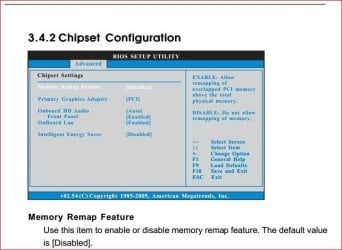
If you haven't yet, check the bios and make sure that the "memory remap" option is set to enabled,

memremap.JPG
 

My Computer My Computer

At a glance

Win 7 Ultimate x64FX-8350 @ 4.6 GHz so farADATA XPG V1 Series Black 8GB DDR3 1600Sapphire R9 270x Dual-X
Computer type
PC/Desktop
Computer Manufacturer/Model Number
Me
OS
Win 7 Ultimate x64
CPU
FX-8350 @ 4.6 GHz so far
Motherboard
Asus M5A97 EVO
Memory
ADATA XPG V1 Series Black 8GB DDR3 1600
Graphics Card(s)
Sapphire R9 270x Dual-X
Sound Card
Xonar DGX w/ Corsair Vengence 1300
Monitor(s) Displays
Acer S232HL Abid
Screen Resolution
1920x1080
Hard Drives
120 GB OCZ Vertex 3
500 GB Seagate 7200.12
PSU
Antec Earthwatts 650W Green
Case
Antec Three Hundred
Cooling
Cooler Master 212 EVO
Keyboard
Logitech G510
Mouse
Logitech G500s
Internet Speed
35000/3000

Didnt work..

If you haven't yet, check the bios and make sure that the "memory remap" option is set to enabled,

View attachment 219305

It worked... But now it says that only 7.44gigs can be used, but i guess that's normal? :-)
 

My Computer My Computer

At a glance

Windows 7 Ultimate x64Intel(R) Pentium(R) D CPU 3.40Ghz4x 2GB Kingston HyperX DDR2NVIDIA GeForce 9800 GT
Computer Manufacturer/Model Number
Self made
OS
Windows 7 Ultimate x64
CPU
Intel(R) Pentium(R) D CPU 3.40Ghz
Motherboard
AsRock P5B-DE
Memory
4x 2GB Kingston HyperX DDR2
Graphics Card(s)
NVIDIA GeForce 9800 GT
Sound Card
Realtek High Definition Audio
Monitor(s) Displays
22" Samsung SyncMaster T220
Screen Resolution
1680x1050
Hard Drives
Primary: Hitachi Deskstar HDS725050KLA360, 500GB SATA
Secondary: MAXTOR STM3250820AS, 250GB SATA
PSU
230W
Case
Fujitsu Siemens
Cooling
2x Air Coolers
Keyboard
Razor Lyctosa
Mouse
Logitech G500 Gaming
Internet Speed
30/10
But now it says that only 7.44gigs can be used, but i guess that's normal? :-) 1 Hour Ago 10:46 AM

Yep. What you have run into is this,

The system memory that is reported in the System Information dialog box in Windows Vista is less than you expect if 4 GB of RAM is installed

Note When the physical RAM that is installed on a computer equals the address space that is supported by the chipset, the total system memory that is available to the operating system is always less than the physical RAM that is installed. For example, consider a computer that has an Intel 975X chipset that supports 8 GB of address space. If you install 8 GB of RAM, the system memory that is available to the operating system will be reduced by the PCI configuration requirements. In this scenario, PCI configuration requirements reduce the memory that is available to the operating system by an amount that is between approximately 200 MB and approximately 1 GB. The reduction depends on the configuration.

Main thing is that most of the 8 GB is now available.
 

My Computer My Computer

At a glance

Win 7 Ultimate x64FX-8350 @ 4.6 GHz so farADATA XPG V1 Series Black 8GB DDR3 1600Sapphire R9 270x Dual-X
Computer type
PC/Desktop
Computer Manufacturer/Model Number
Me
OS
Win 7 Ultimate x64
CPU
FX-8350 @ 4.6 GHz so far
Motherboard
Asus M5A97 EVO
Memory
ADATA XPG V1 Series Black 8GB DDR3 1600
Graphics Card(s)
Sapphire R9 270x Dual-X
Sound Card
Xonar DGX w/ Corsair Vengence 1300
Monitor(s) Displays
Acer S232HL Abid
Screen Resolution
1920x1080
Hard Drives
120 GB OCZ Vertex 3
500 GB Seagate 7200.12
PSU
Antec Earthwatts 650W Green
Case
Antec Three Hundred
Cooling
Cooler Master 212 EVO
Keyboard
Logitech G510
Mouse
Logitech G500s
Internet Speed
35000/3000
But now it says that only 7.44gigs can be used, but i guess that's normal? :-) 1 Hour Ago 10:46 AM

Yep. What you have run into is this,

The system memory that is reported in the System Information dialog box in Windows Vista is less than you expect if 4 GB of RAM is installed

Note When the physical RAM that is installed on a computer equals the address space that is supported by the chipset, the total system memory that is available to the operating system is always less than the physical RAM that is installed. For example, consider a computer that has an Intel 975X chipset that supports 8 GB of address space. If you install 8 GB of RAM, the system memory that is available to the operating system will be reduced by the PCI configuration requirements. In this scenario, PCI configuration requirements reduce the memory that is available to the operating system by an amount that is between approximately 200 MB and approximately 1 GB. The reduction depends on the configuration.

Main thing is that most of the 8 GB is now available.


Okay, thanks for your help dude! :-)
 

My Computer My Computer

At a glance

Windows 7 Ultimate x64Intel(R) Pentium(R) D CPU 3.40Ghz4x 2GB Kingston HyperX DDR2NVIDIA GeForce 9800 GT
Computer Manufacturer/Model Number
Self made
OS
Windows 7 Ultimate x64
CPU
Intel(R) Pentium(R) D CPU 3.40Ghz
Motherboard
AsRock P5B-DE
Memory
4x 2GB Kingston HyperX DDR2
Graphics Card(s)
NVIDIA GeForce 9800 GT
Sound Card
Realtek High Definition Audio
Monitor(s) Displays
22" Samsung SyncMaster T220
Screen Resolution
1680x1050
Hard Drives
Primary: Hitachi Deskstar HDS725050KLA360, 500GB SATA
Secondary: MAXTOR STM3250820AS, 250GB SATA
PSU
230W
Case
Fujitsu Siemens
Cooling
2x Air Coolers
Keyboard
Razor Lyctosa
Mouse
Logitech G500 Gaming
Internet Speed
30/10

My Computer My Computer

At a glance

Windows 8.1 x64 Enterprise & Windows 7 x86 Ul...Core™2 Duo E84004GBbuilt in
Computer type
PC/Desktop
Computer Manufacturer/Model Number
Gigabyte g41 Combo
OS
Windows 8.1 x64 Enterprise & Windows 7 x86 Ultimate Dual boot.
CPU
Core™2 Duo E8400
Motherboard
Gigabyte g41m combo
Memory
4GB
Graphics Card(s)
built in
Sound Card
built in
Monitor(s) Displays
Samsung syncmaster 794mg
Screen Resolution
1024x768
Hard Drives
WD-500GB
Antivirus
MSE
Browser
Firefox and chrome.
Back
Top