Solved GPT HD won't assign letters in Ext enclosure

gregrocker

New member
Guru
Local time
12:38 AM
Messages
50,634
I replaced the 1tb Seagate 2.5" HD in Lenovo laptop with SSD. Bought this enclosure which has excellent reviews, SATA III and USB 3.0 support: Amazon.com: [Optimized For SSD, Support UASP SATA III] Inateck 2.5 Inch USB 3.0 Hard Drive Disk HDD External Enclosure Case with usb 3.0 Cable for 9.5mm 7mm 2.5" SATA HDD and SSD, Tool-free HDD Installation, Compatible With Windows 2000/ XP /Vista/ 7

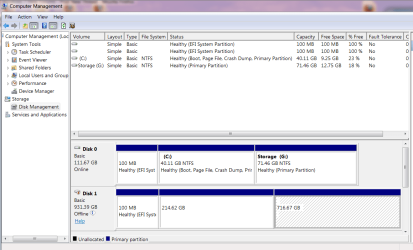
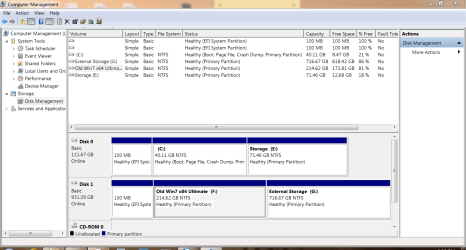
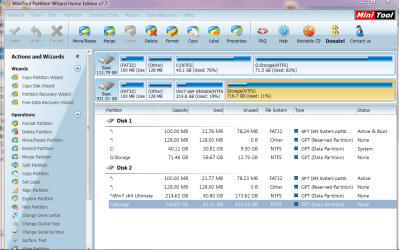
Installed 1tb easily (just slide drive in and snap closed), loads drivers in USB 3 port, shows up in Disk Mgmt and PW Home (where files can be Explored only) but will not take a drive letter so files are inaccessible.

Any suggestions are appreciated. I'd like access to the files but can format it if the problem is the UEFI or GPT formatting. If necessary how would you reformat?
 

Attachments

  • Capture.PNG
    Capture.PNG
    74.1 KB · Views: 2
  • Capture2.PNG
    Capture2.PNG
    33.7 KB · Views: 2
Solved by upgrading to Partition Wizard Home Edition 8 which will apply the letter to each external partition.

I rarely use Home Edition but instead use the Boot Disk, which in this case is not able to support drive letters from WinRe. So I got caught out by using PW 7 which apparently doesn't have enough GPT/UEFI support.
 
Good news Greg. The screenshots are confusing. In the PW shot w7 is on the 1TB HDD, Disk Management says it's on the SSD. ;)
 

My Computer My Computer

At a glance

Windows 7 Ultimate X64 SP1Intel i5-2550K, Differing ~4.4-4.8GHz No buil...16GB G.Skill Sniper 1866MHz @ 2133MHz 2x8GBASUS GTX650TIB-DC2OC-2GD5, (650TI Boost)
Computer type
PC/Desktop
Computer Manufacturer/Model Number
Home Built Desktop By DataTech
OS
Windows 7 Ultimate X64 SP1
CPU
Intel i5-2550K, Differing ~4.4-4.8GHz No built in GPU
Motherboard
ASUS P8Z68-V PRO/GEN3
Memory
16GB G.Skill Sniper 1866MHz @ 2133MHz 2x8GB
Graphics Card(s)
ASUS GTX650TIB-DC2OC-2GD5, (650TI Boost)
Sound Card
Onboard Realtek 5-1
Monitor(s) Displays
Samsung P2570HD
Screen Resolution
1920x1080
Hard Drives
Samsung 840 Pro 256GB SSD for OS, 500GB Seagate Constellation (Enterprise drive) for Data
PSU
Corsair HX650W
Case
Inwin Dragon Rider
Cooling
Hyper 212 EVO w/two Noctua fans, push-pull, @1300 RPM
Keyboard
E-Z Eyes, bright yellow keys with large characters
Mouse
steelseries SENSEI Laser Pro Gaming
Internet Speed
48-51Mbs Mbs down, 11 Mbs up Xfinity Cable
Antivirus
Norton Internet Security 2013
Browser
IE 10, Opera, Pale Moon if needed
Other Info
4 case fans, LG BluRay-RE, ASUS DVD-RW, Mr. Fusion power supply, 1.21 gigawatts.
The 7 install is on both, Gary. I just pulled out the working HD from the laptop (DISK 1 and Disk 2 shown) and reinstalled WIn7 on the smaller SSD.

I think since it's so big I'll leave that old Win7 install on HDD so if SSD dies I can just slip the HD back in, yet still have plenty of storage space while in the external.

Current config:
 

Attachments

  • Capture.PNG
    Capture.PNG
    39.3 KB · Views: 1
Last edited:
Looks like you sorted it out Greg. We are fortunate to have PW and other disk management/imaging tools freely available.
 

My Computers My Computers

  • At a glance

    7 X64i5 84002x8gb 3200mhz
    Computer type
    PC/Desktop
    OS
    7 X64
    CPU
    i5 8400
    Motherboard
    gigabyte b365m ds3h
    Memory
    2x8gb 3200mhz
    Hard Drives
    various
    PSU
    pure power 11 400w cm
    Case
    Coolermaster
    Cooling
    cryorig m9i
  • At a glance

    7x64g54008gb ddr4 2400
    Computer type
    PC/Desktop
    OS
    7x64
    CPU
    g5400
    Motherboard
    ga b365m ds3h
    Memory
    8gb ddr4 2400
    PSU
    xfx pro 450w
Back
Top