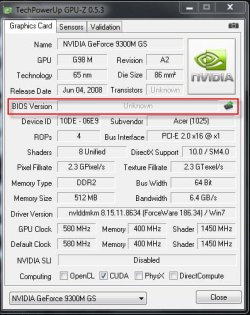
GPU bios - unknown?

Pckicker

New member
Local time
1:38 PM
Messages
62
here i attach image in GPU-Z stat.

Wonder why at BIOS unknown? is this normal?:cry:
 

Attachments

  • 4-15-2011 7-14-15 AM.jpg
    4-15-2011 7-14-15 AM.jpg
    44.8 KB · Views: 14

My Computer

Computer Manufacturer/Model Number
aspire 4935g Acer
OS
Window 7 home basic 32bit
CPU
Core 2 Duo P8400 2.26Ghz, 1066Mhz FSB, 3MB L2 Cache
Memory
2GB ddr2
Graphics Card(s)
Gforce 9300M GS
Hard Drives
320GB HDD

My Computer

Computer Manufacturer/Model Number
Custom
OS
Windows 7 ultimate X64
CPU
Core i7 870 Lynnfield
Motherboard
MSI P55-GD55
Memory
4GB Corsair XMS 3 1600Mhz
Graphics Card(s)
GeForce 8800 GTS (for the time being)
Sound Card
Onboard 7.1 digital
Monitor(s) Displays
Dell 19"
Screen Resolution
1280x1024
Hard Drives
Barracuda 750Gb
PSU
Corsair TX 650w
Case
Thermaltake Armour Extreme Edition
Cooling
Corsair H50
Keyboard
Dell XPS slim
Mouse
Dell XPS mouse (only good product)
Internet Speed
100 Mbps +/-
thx for the reply Dream will try the link.

Just to inform i tot maybe kinda old version so i download latest driver 267.76. I pick the clean install and the physx, driver and HD audio selected. Sadly after restart and the installation begin but it fail all three of it. What i do next is i only select the driver only and no clean install it complete but still show Bios unknown.

3XXmb for the driver. Omg what are they put in this NVIDIA? Buffalo? just kidding. :eek:

Is GPU BIOS is difrent than MOBO BIOS?
 

My Computer

Computer Manufacturer/Model Number
aspire 4935g Acer
OS
Window 7 home basic 32bit
CPU
Core 2 Duo P8400 2.26Ghz, 1066Mhz FSB, 3MB L2 Cache
Memory
2GB ddr2
Graphics Card(s)
Gforce 9300M GS
Hard Drives
320GB HDD
Yep.

They are two separate entities.

It's probably just an issue with GPU-Z and some mobility chips - it's nothing to be fazed about.
 

My Computer

Computer type
PC/Desktop
Computer Manufacturer/Model Number
Systems by SmartEyeball
OS
8 Pro x64
CPU
i7 3770K 4.6GHz
Motherboard
ASUS P8Z77 WS
Memory
16GB G.Skill Trident X 2666mhz
Graphics Card(s)
x2 EVGA 780 Ti Superclocked SLI
Sound Card
SB X-FI Surround 5.1 PRO USB / ATH-AD900 Headphones
Monitor(s) Displays
x3 Dell U2410 / 58" Samsung
Screen Resolution
5760*1200/ 1920*1200
Hard Drives
2x Intel 520 240GB (RAID 0) * 2x WD Caviar Blacks 2TB (RAID 0) * 2TB WD Caviar Black * Sony Optirac DVD
PSU
Silverstone Strider Evolution 1200W
Case
Thermaltake Level 10 GT Snow Edition
Cooling
Noctua NH-D14
Keyboard
Topre Realforce // Ducky Shine MX Black // Filco Ninja TKL
Mouse
Thermaltake Theron (Highly Recommended) + Razer Imperator
Antivirus
MSE
Browser
IE, FF, WaterFox
Other Info
GT Extreme V2 Sim Racing Cockpit + 40" LCD and K/B Mouse stand ▼
Fanatec CSR Elite Wheel + Clubsport V1 Pedals + CSR shifter/7G-H ▼Saitek X52 Pro ▼ TrackIR 5 Pro
Buttkicker v2 Seat Rumbler with Dedicated 5.1 and Sub Woofer attached to frame ▼
=
Bloody Big Grin
It's probably just an issue with GPU-Z and some mobility chips - it's nothing to be fazed about.

Or to take it a step further, can also depend on the laptop manufacturer and whether they allow for that sort of thing to be read (sort of like how they like to hide normal bios features that those that build their own computers take for granted). Looking at most of the links here for the GPU-Z validation for the 9300M some do and some don't,

9300m - Google Search

As smarteyeball said, nothing to be fazed about.
 

My Computer

Computer type
PC/Desktop
Computer Manufacturer/Model Number
Me
OS
Win 7 Ultimate x64
CPU
FX-8350 @ 4.6 GHz so far
Motherboard
Asus M5A97 EVO
Memory
ADATA XPG V1 Series Black 8GB DDR3 1600
Graphics Card(s)
Sapphire R9 270x Dual-X
Sound Card
Xonar DGX w/ Corsair Vengence 1300
Monitor(s) Displays
Acer S232HL Abid
Screen Resolution
1920x1080
Hard Drives
120 GB OCZ Vertex 3
500 GB Seagate 7200.12
PSU
Antec Earthwatts 650W Green
Case
Antec Three Hundred
Cooling
Cooler Master 212 EVO
Keyboard
Logitech G510
Mouse
Logitech G500s
Internet Speed
35000/3000
can't install the bios from the link -minimum requirement not meet.

oh, hope GPU-z false alarm or buggy. Im trying to solve my BSOD thing. I tried to check 1 by 1 hardware stat.
 

My Computer

Computer Manufacturer/Model Number
aspire 4935g Acer
OS
Window 7 home basic 32bit
CPU
Core 2 Duo P8400 2.26Ghz, 1066Mhz FSB, 3MB L2 Cache
Memory
2GB ddr2
Graphics Card(s)
Gforce 9300M GS
Hard Drives
320GB HDD
Back
Top