
GPU dying? Other possibilities?

Zoloft

New member
Power User
VIP
Local time
2:33 AM
Messages
226
Location
Las Vegas
Recently, noticed poor video playback (not streaming, vids on harddrive), video gets stuttery, out of sycn, and when attempting to close (MPC - BE) difficult to even close the program. Also, though not as pronounced, occasional jerkiness while web browsing (current FF).


MBE Pro and MSE both show system clean
ckdsk no problems
sfc /scannow no problems

ran array of Tweaking tools, no major issues


Thru other trouble shooting, noticed GPU running very hot. Nvidia 9500 GT is rated up to 105C, but while video is playing, it gets 10 to 15 degrees hotter than that, and when it gets 110C plus, is when performance starts to suffer. Both internal fans seem to be working fine. Placed two additional room fans near case, for additional cooling (it is summer, in Las Vegas), but have not made an impact.


Cleaned everything inside, made sure GPU is seated correctly, from a cold start (internal temp of home is 21 C), five minutes into 720p video playback, temp was 111 again, at which point I stopped playback.


Might there be another problem that I've not considered, tests that I should run, or, is it likely that, for the second time in 6 months, I've found myself with a dead/dying GPU?


Thanks, as always, for reading!


R
 

My Computer

Computer type
PC/Desktop
Computer Manufacturer/Model Number
HP Pavillion Elite HPE-590t
OS
Win7 Home Premium x64
CPU
Intel Core i7 Extreme 990X @ 3.47GHz x6
Motherboard
PEGATRON CORPORATION 2A86
Memory
16GB DDR3
Graphics Card(s)
NVidia GeForce GTX460
Monitor(s) Displays
Samsung SyncMaster 2443ewx
Screen Resolution
1920x1200
Hard Drives
160 GB SSD @ 2 TB 7200 Internal
750 GB HP, 2 TB WD, 2 TB Samsung External & 3 TB G-Tech firewire external
Maybe you'll have to wait until next winter before you know what the problem is - but lets find out if there are any other useful tests that can bring more immediate results.

Is it possible to use your computer with the case lid off? If you are able to take the lid off, then you can point the room fans at the computer and blow in cooler air that way.

Download and run HWmonitor | FileHippo. This software can monitor things like cpu/gpu/hdd temperatures, as well as fan speeds.

Use Device Manager to Double check that you have the most recent Device Drivers installed on the computer, for the graphics card.

Can you try a different Video playback software, other than MPC-BE, temporarily? Windows Media Player/Centre will do.

Can you (temporarily) disable Hardware Acceleration in Firefox?

Make these changes, re-run your tests, and upload any results to your next post.

Are you getting any artefacts appear on the screen when the GPU gets hot?

Run dxdiag from the start search box and check each tab for reported problems.

You can upload screen shots to the Forum, take a picture of HWMonitor, and upload. Here is posting instructions Screenshots and Files - Upload and Post in Seven Forums
 

My Computer

Computer type
PC/Desktop
OS
Windows 7 x64, Vista x64, 8.1 smartphone
CPU
Intel E8400 65W 64-bit
Motherboard
Gigabyte EP45-UD3LR
Memory
DDR2 2 x 2GB, 1GB x 2
Graphics Card(s)
XFX Radeon HD5750
Sound Card
AMD High Definition Audio; Realtek High Definition Audio
Monitor(s) Displays
iiyama prolite X2377HDS
Screen Resolution
1920 x 1080
Hard Drives
500GB 7200 rpm Seagate ST3500413AS 16MB, 500GB 5400 rpm Toshiba MQ02ABF050H 32MB, 200GB 7200 rpm Seagate ST3200820AS 8MB, 2TB 7200 rpm Western Digital WD20EZRX 64MB
PSU
Enermax Liberty Modular
Case
Antec P193 Midi Tower
Keyboard
Mionix ZIBAL 60
Mouse
Razer USB 2.0 Diamondback Mouse or Huion Graphics Tablet
Browser
Internet Explorer, Lunascape, Firefox, Opera, Avast Safezone
Thanks for the reply. I forgot to mention, I did do a clean install of the latest driver, so that is not the issue. I will do the other tests and check back, again, appreciated!
 

My Computer

Computer type
PC/Desktop
Computer Manufacturer/Model Number
HP Pavillion Elite HPE-590t
OS
Win7 Home Premium x64
CPU
Intel Core i7 Extreme 990X @ 3.47GHz x6
Motherboard
PEGATRON CORPORATION 2A86
Memory
16GB DDR3
Graphics Card(s)
NVidia GeForce GTX460
Monitor(s) Displays
Samsung SyncMaster 2443ewx
Screen Resolution
1920x1200
Hard Drives
160 GB SSD @ 2 TB 7200 Internal
750 GB HP, 2 TB WD, 2 TB Samsung External & 3 TB G-Tech firewire external
made sure GPU is seated correctly, from a cold start (internal temp of home is 21 C), five minutes into 720p video playback, temp was 111 again, at which point I stopped playback.
Everything here points to the gpu heatsink not doing its job. I would remove it, put on new thermal paste, then re-attach it. It can appear to be seated correctly to the eye, but the underlying thermal paste may still have migrated away. Also, you mention two internal fans but did not mention the gpu fan itself.
 

My Computer

Computer type
PC/Desktop
Computer Manufacturer/Model Number
diy
OS
Win7 pro x64
CPU
stock i7 7700k
Motherboard
Gigabyte Z270N-WIFI mini-ITX
Memory
Corsair Vengeance LPX 16GB (2x8GB) DDR4 @ 3200MHz
Graphics Card(s)
integrated Intel HD 630
Sound Card
onboard Realtek ALC1220
Monitor(s) Displays
two vertically mounted samsung 55" 4k un55mu8000
Screen Resolution
1920x1280
Hard Drives
256GB Samsung EVO 960 M.2 pci-e NVMe SSD
PSU
SilverStone Nightjar ST45NF 450Watt Fanless
Case
No case. Motherboard is mounted directly onto power supply
Cooling
Evercool low profile 815EP with Panaflow 12L fan at 7v
Keyboard
Ortek MCK-86 mini
Mouse
Belkin 5-button USB
Internet Speed
spectrum 400mbps
I will pick up some thermal paste today. Strangely, the card itself does not have a dedicated fan.
 

My Computer

Computer type
PC/Desktop
Computer Manufacturer/Model Number
HP Pavillion Elite HPE-590t
OS
Win7 Home Premium x64
CPU
Intel Core i7 Extreme 990X @ 3.47GHz x6
Motherboard
PEGATRON CORPORATION 2A86
Memory
16GB DDR3
Graphics Card(s)
NVidia GeForce GTX460
Monitor(s) Displays
Samsung SyncMaster 2443ewx
Screen Resolution
1920x1200
Hard Drives
160 GB SSD @ 2 TB 7200 Internal
750 GB HP, 2 TB WD, 2 TB Samsung External & 3 TB G-Tech firewire external
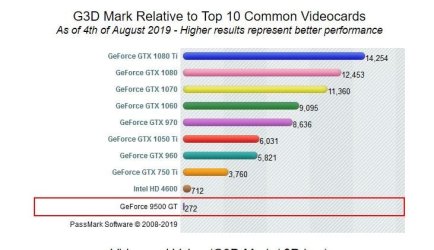
you also might consider a new card. That 9500GT is 11-year old technology, so even a cheap used card will be will be much faster
 

Attachments

  • Clipboard01.jpg
    Clipboard01.jpg
    53.8 KB · Views: 15

My Computer

Computer type
PC/Desktop
Computer Manufacturer/Model Number
diy
OS
Win7 pro x64
CPU
stock i7 7700k
Motherboard
Gigabyte Z270N-WIFI mini-ITX
Memory
Corsair Vengeance LPX 16GB (2x8GB) DDR4 @ 3200MHz
Graphics Card(s)
integrated Intel HD 630
Sound Card
onboard Realtek ALC1220
Monitor(s) Displays
two vertically mounted samsung 55" 4k un55mu8000
Screen Resolution
1920x1280
Hard Drives
256GB Samsung EVO 960 M.2 pci-e NVMe SSD
PSU
SilverStone Nightjar ST45NF 450Watt Fanless
Case
No case. Motherboard is mounted directly onto power supply
Cooling
Evercool low profile 815EP with Panaflow 12L fan at 7v
Keyboard
Ortek MCK-86 mini
Mouse
Belkin 5-button USB
Internet Speed
spectrum 400mbps
Replacing it is definitely an option, I just always have the concern of what would actually fit.
 

My Computer

Computer type
PC/Desktop
Computer Manufacturer/Model Number
HP Pavillion Elite HPE-590t
OS
Win7 Home Premium x64
CPU
Intel Core i7 Extreme 990X @ 3.47GHz x6
Motherboard
PEGATRON CORPORATION 2A86
Memory
16GB DDR3
Graphics Card(s)
NVidia GeForce GTX460
Monitor(s) Displays
Samsung SyncMaster 2443ewx
Screen Resolution
1920x1200
Hard Drives
160 GB SSD @ 2 TB 7200 Internal
750 GB HP, 2 TB WD, 2 TB Samsung External & 3 TB G-Tech firewire external
Replacing it is definitely an option, I just always have the concern of what would actually fit.
find your motherboard at the link below and click add, and then search for video cards. It will only show you the cards that are compatible with your motherboard. You can sort them by price if you want something cheap. Although I bet the prices for cards no longer in new production were the original price, not today's price.
System Builder - PCPartPicker

then you can go here to see how its performance compares to your 9500gt. If I were in your shoes I'd find something like a used fanless radeon hd5450 on ebay. Video cards die of heat and fanless cards do not produce much heat in the first place (except after 11 years, lol)

Compare Graphics cards
 

My Computer

Computer type
PC/Desktop
Computer Manufacturer/Model Number
diy
OS
Win7 pro x64
CPU
stock i7 7700k
Motherboard
Gigabyte Z270N-WIFI mini-ITX
Memory
Corsair Vengeance LPX 16GB (2x8GB) DDR4 @ 3200MHz
Graphics Card(s)
integrated Intel HD 630
Sound Card
onboard Realtek ALC1220
Monitor(s) Displays
two vertically mounted samsung 55" 4k un55mu8000
Screen Resolution
1920x1280
Hard Drives
256GB Samsung EVO 960 M.2 pci-e NVMe SSD
PSU
SilverStone Nightjar ST45NF 450Watt Fanless
Case
No case. Motherboard is mounted directly onto power supply
Cooling
Evercool low profile 815EP with Panaflow 12L fan at 7v
Keyboard
Ortek MCK-86 mini
Mouse
Belkin 5-button USB
Internet Speed
spectrum 400mbps
When I bought my Vista system 11 years ago, it had two GT 8800 cards in SLI. One failed after a few years. When I checked at NVIDIA, I found that they had disabled automatic fan control in the driver. Dumber than nails. Then the other one failed and I had to buy a new graphics card. Don't know if that applies to the 9500.
 

My Computer

Computer type
Laptop
Computer Manufacturer/Model Number
Dell M6500 Precision Work Station
OS
Windows 7 Pro SP1 64 bit
Memory
8 GB
Screen Resolution
1920x
Internet Speed
30 Mbps
Antivirus
Norton Security
Browser
IE 11
Back
Top