
GPU maddness

BladeRy

New member
Local time
5:53 PM
Messages
11
Hi

Couple a days ago i noticed my gpu clocks are jumping all over while i am browsing the net, or using anything really, from total commander to explorer. Since i have dual monitor setup, i keep a few monitoring software's on secondary screen.
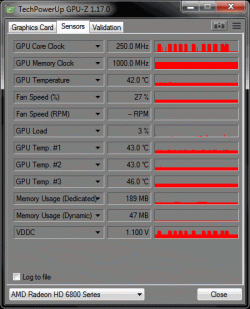
In idle the core clock is 250mhz, as soon as i move the mouse it jumps to 775mhz. Its strange since i didnt have that issue a few days ago.

On a, related issue, my card has gone nuts on YT/Twitch. While watching YT it jumps to 80% gpu usage. I checked if the hardware acc was turned on, it WASNT. I turned it on and gpu usage on YT is 10-20%, while disabled its 80%.
Same on Twitch and YT, same on Firefox and Chrome. This started a few days ago and its driving me nuts, i have less gpu usage playing games than watching YT videos in 720p.

Checked if i had any malware or such, all turned up clean. I restored a partition image 4 months old, when it all worked fine with older drivers. Same problem. Cleaned current windows with DDU and reinstalled new drivers, same problem. Both with gpu clocks and YT/Twitch gpu usage.

PC:
Mobo - Gigabyte GA-EP45C-DS3R
CPU - QuadCore Intel Xeon E5450
Ram - 2x4gb DDR2
VGA - Ati Radeon 6850 1g ram
PSU - Corsair Tx 650w

Strange thing is, that GPU clock rises, but GPU load stays low. As picture shows the clock jumping, this was browsing only, not youtube or any "heavy" content sites.

Any ideas?

Tnx
 

Attachments
  • gpu fun.gif
    gpu fun.gif
    18.1 KB · Views: 36
Last edited:

My Computer

Computer type
PC/Desktop
OS
Win7 x64
CPU
QuadCore Intel Xeon E5450, 3000 MHz (9 x 333)
Motherboard
Gigabyte Technology Co., Ltd. EP45C-DS3R
Memory
8,00 GB
Graphics Card(s)
AMD Radeon HD 6800 Series
Monitor(s) Displays
Samsung 2232BW
Screen Resolution
1680*1050
Hard Drives
Wd 640gb
WD 1tb
Samsung 500gb
PSU
Corsair TX 650w
To be honest, I don't see what the problem is. My Radeon card's clocks go up and down with graphics demand as well, and it's never been a performance issue with it. My card's clock doesn't jump to the extent yours does, but it's a newer generation card. That may be the reason. I tried a couple of YouTube videos and got the same results that you are getting.

As far as my card goes, it's perfectly normal behavior.
 

My Computer

Computer type
PC/Desktop
Computer Manufacturer/Model Number
Mellon Labs (custom build)
OS
Win 7 Pro x64/Win 10 Pro x64 dual boot
CPU
AMD FX 8350 Vishera @ 4200
Motherboard
ASUS M5A97 R2.0
Memory
16 GB Mushkin Blackline DDR3-2400 @ 1866 (9-10-10-10-31)
Graphics Card(s)
XFX Radeon R9 280 Double D Black Edition
Sound Card
Realtek HD Audio on MB. Sounds great.
Monitor(s) Displays
Acer 24", Acer 22"
Screen Resolution
3840 x 1080
Hard Drives
1 x Mushkin Chronos 120 GB SSD (Win 10)
1 x Samsung 850 EVO 250 GB SSD (Win 7)
1 x WD 1TB SATA Blue
1 x WD 1TB SATA Green
PSU
Corsair TX-750
Case
CoolerMaster HAF 912+
Cooling
Coolermaster Seidon 240M Liquid AIO. 6 case fans
Keyboard
Logitech G710+
Mouse
Logitech G500s
Internet Speed
Much better since I got fiber, but still way overpriced.
Antivirus
MSE, Malware Bytes for scanning
Browser
Firefox
Other Info
Corsair VOID USB headphones.

A Mellon Labs X-1 - LCD Smartie driven system status display.

Brought to you by the letter E
I'd have to agree with Mellon. It seems perfectly normal for a GPU to do this. Even CPUs clocks jump up and down depending on the load. Modern CPUs and GPUs are designed to be as energy efficient as they can when not on high load.
 

My Computer

Computer type
PC/Desktop
Computer Manufacturer/Model Number
Custom Built
OS
Windows 10 Pro x64 (UPGRADED - 10/20/2016)
CPU
AMD FX 8350 (OC: 4.48GHz)
Motherboard
ASUS Crosshair V Formula-Z AM3+
Memory
14GB DDR3 Corsair Vengeance
Graphics Card(s)
Asus AMD Radeon R9 280X 3GB
Sound Card
N/A
Monitor(s) Displays
BenQ G2420HD
Screen Resolution
1920x1080
Hard Drives
Internal: 1x 500GB WD Blue SSD | 1TB WD Caviar Black | 3x 500GB WD Caviar Green
External: 500GB Seagate
PSU
Corsair AX1200i
Case
CoolerMaster HAF X
Cooling
Corsair Hydro H90 Water Cooling
Keyboard
Microsoft SideWinder X6 Keyboard
Mouse
Microsoft SideWinder X8 Mouse
Antivirus
MSE / Malwarebytes Anti-Malware
Browser
Mozilla Firefox + Google Chrome
Tnx for the reply guys. I can live with clocks all over the place, it wasnt like that a few days ago, it just started by itself but it is what it is.

On YT/Twitch issue, i was playing youtube on second monitor while I worked/played, and i did it just cause the playback didn't take any resources, i mean, 5-10% is negligible. But all of a sudden it starts with 80% gpu usage, and card temperature goes up by 5-8 degrees Celsius.
Maybe they changed something on their end, i dont know.
All i know is that it wasn't like this before. I played with flash hardware acc. before, and i turned it off since it used more GPU then in software mode, now software mode uses more then hardware mode. Go figure.
 

My Computer

Computer type
PC/Desktop
OS
Win7 x64
CPU
QuadCore Intel Xeon E5450, 3000 MHz (9 x 333)
Motherboard
Gigabyte Technology Co., Ltd. EP45C-DS3R
Memory
8,00 GB
Graphics Card(s)
AMD Radeon HD 6800 Series
Monitor(s) Displays
Samsung 2232BW
Screen Resolution
1680*1050
Hard Drives
Wd 640gb
WD 1tb
Samsung 500gb
PSU
Corsair TX 650w
Hardware acceleration in most cases is best left enabled. Hardware acceleration generally produces more fluid animation and means that means the graphical rendering is done on dedicated hardware such as your GPU instead of putting more stress on your CPU.
 

My Computer

Computer type
PC/Desktop
Computer Manufacturer/Model Number
Custom Built
OS
Windows 10 Pro x64 (UPGRADED - 10/20/2016)
CPU
AMD FX 8350 (OC: 4.48GHz)
Motherboard
ASUS Crosshair V Formula-Z AM3+
Memory
14GB DDR3 Corsair Vengeance
Graphics Card(s)
Asus AMD Radeon R9 280X 3GB
Sound Card
N/A
Monitor(s) Displays
BenQ G2420HD
Screen Resolution
1920x1080
Hard Drives
Internal: 1x 500GB WD Blue SSD | 1TB WD Caviar Black | 3x 500GB WD Caviar Green
External: 500GB Seagate
PSU
Corsair AX1200i
Case
CoolerMaster HAF X
Cooling
Corsair Hydro H90 Water Cooling
Keyboard
Microsoft SideWinder X6 Keyboard
Mouse
Microsoft SideWinder X8 Mouse
Antivirus
MSE / Malwarebytes Anti-Malware
Browser
Mozilla Firefox + Google Chrome
Hi,
Yep just switch to a high performance power plan and boogie on :)
 

My Computer

Computer type
PC/Desktop
Computer Manufacturer/Model Number
Custom assembled by me :}
OS
Win-7-Pro64bit 7-H-Prem-64bit
CPU
i7-5930K 2nd i9-9940x both water blocked VRM's too
Motherboard
ASUS SABERTOOTH X99 2nd ASUS x299 Apex
Memory
Trident-z 3200C14 2nd Trident-z 3600C16
Graphics Card(s)
EVGA 1080ti ftw3 2nd Titan Xp both water blocked
Sound Card
Built-in Realtek
Monitor(s) Displays
1-AOC G2460PG 24"G-Sync 144Hz/ 2nd 1-ASUS VG248QE 24" 144Hz
Screen Resolution
1920 x 1080 144Hz
Hard Drives
2-Samsung M.2 Evo & Evo Plus
2-Samsung 850 EVO 500GB SSD's/ 3-2.5 W.D. Black 1tb-&3-1tb/3-3.5 WD Black 1tb hdd's
PSU
EVGA SuperNOVA 1000-P2 2nd 1200-P2
Case
2-Corsair Obsidian Series 450D Black ATX Mid Tower
Cooling
Custom water loops
Keyboard
Logitech G710+/ 2nd Logitech G910
Mouse
2-RedDragon M901 Perdition 16400 dpi Gaming mouse = wired
Internet Speed
Comcast Ping 19ms 89.31mbps download speed 6.12mbps upload
Antivirus
Malwarebytes Pro/ Superantispyware Pro
Browser
FireFox & Pale moon
Other Info
2nd ASUS X299 Apex/Intel i9-9940x with Custom water loop/7H-Prem-x64/Corsair 450D case/Ram Trident-z 3600C16 4x8gb / Samsung970Evo plus 500gb SSD/Dual ssd EZ swap evo/PSU EVGA SuperNova 1200w-P2 80+Platinum/GPU Titan Xp /8-ML-140 on push-pull on 2-280GTX rads
Back
Top