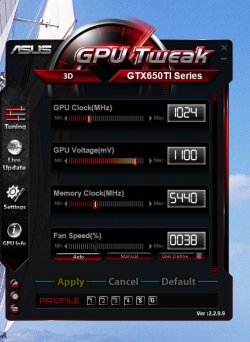
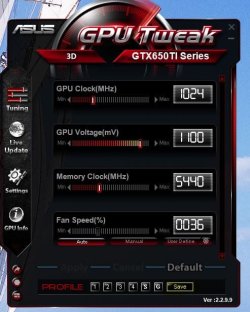
GPU Tweak Profiles Not Set

YoYo155

Up The Thread
Guru
Gold Member
VIP
Local time
6:50 AM
Messages
3,047
Hello :)

I've been using GPU Tweak (from Asus) software in-order to control my GPU's fan curve
it work pretty well except for a pesky little issue.

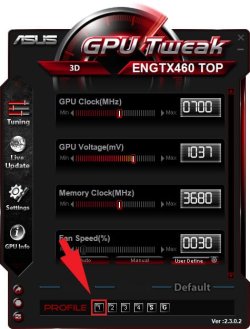
Every time I shutdown (or even just logout) the PC the software
"forgets" to apply my custom profile upon logon.
No matter what I do, I have to select it manually every logon!

I'm using the latest release and reinstalling it didn't help, any suggestions?
 

Attachments
  • neversaves.jpg
    neversaves.jpg
    64.8 KB · Views: 17

My Computer

Computer type
PC/Desktop
OS
Windows 10
CPU
Intel Core i5 3570K
Motherboard
Asus P8Z77V-PRO
Memory
16GB 1600Mhz G.Skill
Graphics Card(s)
Gigabyte GTX 970 G1-Gaming
PSU
Seasonic 1000W Platinum
Case
Fractal Design Define R4
Cooling
Noctua NH-D14
When you make changes to GPU tweak you will see an apply button when you click the apply button you will see a save button next to the numbers click save and then below the save button the profile numbers will appear click the profile you want to save it as and then when you click the corresponding number it should set to what you saved it as
 

Attachments

  • Capture.JPG
    Capture.JPG
    57.1 KB · Views: 15
  • Capture2.JPG
    Capture2.JPG
    53.3 KB · Views: 14

My Computer

Computer type
PC/Desktop
Computer Manufacturer/Model Number
Custom Build
OS
Windows 7 Professional x64 Sp1
CPU
Intel Core i5 650 @ 3.2Ghz
Motherboard
Dell 33FF6 Motherboard
Memory
10GB
Graphics Card(s)
ASUS GTX 650Ti
Sound Card
Nvidia
Monitor(s) Displays
2 Monitors
Screen Resolution
1920 x 1080
Hard Drives
2 1TB 7200RPM
PSU
Thermaltake 600w
Keyboard
Logitech G110
Internet Speed
75Mbs
That's the thing the profile is saved but it isn't getting applied / loaded automatically, it's frustrating!
 

My Computer

Computer type
PC/Desktop
OS
Windows 10
CPU
Intel Core i5 3570K
Motherboard
Asus P8Z77V-PRO
Memory
16GB 1600Mhz G.Skill
Graphics Card(s)
Gigabyte GTX 970 G1-Gaming
PSU
Seasonic 1000W Platinum
Case
Fractal Design Define R4
Cooling
Noctua NH-D14
I am not familiar with Asus GPU Tweak YoYo, but do you have it set to apply OC at restart and do you have it set to load with Windows?
I guess you do, but there are usually a few different settings, one to apply, one to apply OC at restart and another to load program when Windows starts.

Just chucking a few ideas around.

Paul.
 

My Computer

OS
Windows 7 Professional 64 bit
I had the same problem with this when I saved a custom profile on my backup rig, every time I restarted the machine the fans would crank up to 50% on my GPU. I uninstalled the program and installed MSI Afterburner instead (which is actually better than GPU Tweak) but I still have the same problem, I just have to load Profile 1 manually when the fan ramps up which drops it back down to 28%.

If I ever get round to bothering to sort it out I'll let you know, but even though it's mildly annoying considering the fact the fan boost carried over to another program it's not bothering me enough to look into it too much. Plus that rig is on the kids' room now and they're not bothered by the loud fan when they turn it on!
 

My Computer

Computer type
PC/Desktop
Computer Manufacturer/Model Number
Custom Build
OS
W7 Pro x64 SP1 | W10 Pro IP x64 | W8.1 Pro x64 VM | Linux Mint VM
CPU
i7-4790k @ 4GHz (4.4GHz Boost)
Motherboard
ASUS Sabertooth Z87 (BIOS Rev 2004)
Memory
16GB DDR3 Kingston HyperX Fury @ 1600MHz CL 9-9-9-27
Graphics Card(s)
EVGA GTX 980 Classified
Sound Card
Realtek Onboard
Monitor(s) Displays
Samsung S27D390
Screen Resolution
1920 x 1080
Hard Drives
240GB Intel 520 Series SSD |
Samsung 850 EVO 120GB SSD |
2TB WD Caviar Black |
2TB WD Caviar Green
PSU
Corsair HX850-80 Gold Modular
Case
Cooler Master Silencio 650
Cooling
Corsair H80i w/2 x Corsair SP120 | 2 x 120mm Noctua NF-S12B
Keyboard
Microsoft Sidewinder X4
Mouse
Gigabyte M6900 optical
Internet Speed
152mb
Antivirus
F-Secure
Browser
Firefox 38.0
Other Info
Backup Rig: Win 7 Pro 64-bit | AMD A10-5800k | ASUS F2A85-V Pro | 8GB Samsung DDR3 @1600MHz | 120GB Toshiba SDD | 2TB Seagate HDD | Cooler Master Silencio 550
I am not familiar with Asus GPU Tweak YoYo, but do you have it set to apply OC at restart and do you have it set to load with Windows?
I guess you do, but there are usually a few different settings, one to apply, one to apply OC at restart and another to load program when Windows starts.

Just chucking a few ideas around.

Paul.

Yes Paul I do have to manually select it every time I log off (also restart/shutdown).
There is a setting to launch the software at logon but no such mention
as to the profiles being applied or not.

I had the same problem with this when I saved a custom profile on my backup rig, every time I restarted the machine the fans would crank up to 50% on my GPU. I uninstalled the program and installed MSI Afterburner instead (which is actually better than GPU Tweak) but I still have the same problem, I just have to load Profile 1 manually when the fan ramps up which drops it back down to 28%.

If I ever get round to bothering to sort it out I'll let you know, but even though it's mildly annoying considering the fact the fan boost carried over to another program it's not bothering me enough to look into it too much. Plus that rig is on the kids' room now and they're not bothered by the loud fan when they turn it on!

I won't use MSI afterburner its a know troublemaker where Windows 7 is concerned :\.
 

My Computer

Computer type
PC/Desktop
OS
Windows 10
CPU
Intel Core i5 3570K
Motherboard
Asus P8Z77V-PRO
Memory
16GB 1600Mhz G.Skill
Graphics Card(s)
Gigabyte GTX 970 G1-Gaming
PSU
Seasonic 1000W Platinum
Case
Fractal Design Define R4
Cooling
Noctua NH-D14
I won't use MSI afterburner its a know troublemaker where Windows 7 is concerned :\.

I didn't know that to be honest, do you have any more info on that? I haven't had any trouble with as of yet but would like to know what problems it may cause if you don't mind. :)
 

My Computer

Computer type
PC/Desktop
Computer Manufacturer/Model Number
Custom Build
OS
W7 Pro x64 SP1 | W10 Pro IP x64 | W8.1 Pro x64 VM | Linux Mint VM
CPU
i7-4790k @ 4GHz (4.4GHz Boost)
Motherboard
ASUS Sabertooth Z87 (BIOS Rev 2004)
Memory
16GB DDR3 Kingston HyperX Fury @ 1600MHz CL 9-9-9-27
Graphics Card(s)
EVGA GTX 980 Classified
Sound Card
Realtek Onboard
Monitor(s) Displays
Samsung S27D390
Screen Resolution
1920 x 1080
Hard Drives
240GB Intel 520 Series SSD |
Samsung 850 EVO 120GB SSD |
2TB WD Caviar Black |
2TB WD Caviar Green
PSU
Corsair HX850-80 Gold Modular
Case
Cooler Master Silencio 650
Cooling
Corsair H80i w/2 x Corsair SP120 | 2 x 120mm Noctua NF-S12B
Keyboard
Microsoft Sidewinder X4
Mouse
Gigabyte M6900 optical
Internet Speed
152mb
Antivirus
F-Secure
Browser
Firefox 38.0
Other Info
Backup Rig: Win 7 Pro 64-bit | AMD A10-5800k | ASUS F2A85-V Pro | 8GB Samsung DDR3 @1600MHz | 120GB Toshiba SDD | 2TB Seagate HDD | Cooler Master Silencio 550
You might never will, much the like some PCs
don't have any issues with SPTD (SCSI Pass Through Direct)
a.k.a. Daemon Tools is the most common use of it.

But you don't have to take my word for it, Visit Driver Reference Table (DRT)
and search the page for afterburner.
 

My Computer

Computer type
PC/Desktop
OS
Windows 10
CPU
Intel Core i5 3570K
Motherboard
Asus P8Z77V-PRO
Memory
16GB 1600Mhz G.Skill
Graphics Card(s)
Gigabyte GTX 970 G1-Gaming
PSU
Seasonic 1000W Platinum
Case
Fractal Design Define R4
Cooling
Noctua NH-D14
I am not familiar with Asus GPU Tweak YoYo, but do you have it set to apply OC at restart and do you have it set to load with Windows?
I guess you do, but there are usually a few different settings, one to apply, one to apply OC at restart and another to load program when Windows starts.

Just chucking a few ideas around.

Paul.

Yes Paul I do have to manually select it every time I log off (also restart/shutdown).
There is a setting to launch the software at logon but no such mention
as to the profiles being applied or not.

I had the same problem with this when I saved a custom profile on my backup rig, every time I restarted the machine the fans would crank up to 50% on my GPU. I uninstalled the program and installed MSI Afterburner instead (which is actually better than GPU Tweak) but I still have the same problem, I just have to load Profile 1 manually when the fan ramps up which drops it back down to 28%.

If I ever get round to bothering to sort it out I'll let you know, but even though it's mildly annoying considering the fact the fan boost carried over to another program it's not bothering me enough to look into it too much. Plus that rig is on the kids' room now and they're not bothered by the loud fan when they turn it on!

I won't use MSI afterburner its a know troublemaker where Windows 7 is concerned :\.

I have msi afterburner on 2 w7 and 1 vista machine, no problems. Saves 4 profiles and starts and applies OC with win start. YMMV
 

My Computer

Computer type
PC/Desktop
Computer Manufacturer/Model Number
Custom, Dell and Lenono LT's
OS
Win8/8.1,Win7-U64, Vista U64, uncounted Linux distor's
CPU
AMD and Intell, 9590, 8350, i5 3570k
Motherboard
CFVFZ, GA990FXA, Z77e-itx
Memory
Corsair G Skill
Graphics Card(s)
Crossfired Sapphire HD 7950 Vapor-X, ASUS R9 280X TOP
Sound Card
Realtek ALC889
Monitor(s) Displays
ViewSonic VX2770SMH 27" / ViewSonic VX2433 LCD 24"
Screen Resolution
1080i HD
Hard Drives
Samsung SSD 840 Pro
OCZ Agility 3's
OCZ Vector's
WD's Blue, red, green, Velociraptors
Seagate USB3 & Hybrid's
ASUS Blu-Ray
ASUS DVD
PSU
Corsair AX1200i, Seasonice 850 Gold
Case
Cooler Master HAF 922 & HAF 932, Lian Li Train case.
Cooling
Air, Glacer 240L expanded, custom EK loop with duel D5's
Keyboard
Microsoft SideWinder X4 USB Keyboard / Logitech 250 PS2
Mouse
Logitech G500 / MS wireless 5000
Internet Speed
Best of 5ms / 75+ dn / 12+ up More or less.
Antivirus
MS esentials-MalwareBytes
Browser
Firefox Chromebook
I have msi afterburner on 2 w7 and 1 vista machine, no problems. Saves 4 profiles and starts and applies OC with win start. YMMV

That indeed.

Anyone has any ideas :huh:?
 

My Computer

Computer type
PC/Desktop
OS
Windows 10
CPU
Intel Core i5 3570K
Motherboard
Asus P8Z77V-PRO
Memory
16GB 1600Mhz G.Skill
Graphics Card(s)
Gigabyte GTX 970 G1-Gaming
PSU
Seasonic 1000W Platinum
Case
Fractal Design Define R4
Cooling
Noctua NH-D14
The newest version has it.
 

My Computer

Computer type
PC/Desktop
Computer Manufacturer/Model Number
custom build
OS
Windows 7 64 Bit
CPU
3.5 Ghz Haswell
Motherboard
Gigabyte Z87
Memory
8 GB 1600 MHz GSKILL
Graphics Card(s)
Asus 660Ti
Hard Drives
Samsung SSSD 256 GB
Antivirus
ESt Smart Security
Browser
Firefox 30
Back
Top