granting another user access to an account with 'admin' privileges

acerman64

New member
Local time
6:55 PM
Messages
43
I'm going to let a technician have my Windows 7 64bit PC in order to do clone the HDD to a SSD and then replace the HDD with the SSD. I think the techn wants an admin level account. I am concerned that (s)he not gain access to confidential files etc that would be available to me were I logged in. Is there a way to let the tech have admin access (s)he wants w/o having to be concerned about the privacy of the info on it? Can you create an admin level account which deprives its user from gaining access to files on a certain directory under c:\users
 

My Computer My Computer

At a glance

Microsoft Windows 7 Professional , Service Pa...Intel(R) Core(TM) i7-3770S CPU @ 3.10GHz8192 MBIntel(R) HD Graphics 4000
Computer type
PC/Desktop
Computer Manufacturer/Model Number
Acer
OS
Microsoft Windows 7 Professional , Service Pack 1 64 bit
CPU
Intel(R) Core(TM) i7-3770S CPU @ 3.10GHz
Motherboard
Chipset
Memory
8192 MB
Graphics Card(s)
Intel(R) HD Graphics 4000
Sound Card
Realtek High Definition Audio
Monitor(s) Displays
Samsung SyncMaster 204B
Hard Drives
ST1000DM003-1CH162, 931.51 GB
Keyboard
Acer
Mouse
Acer
Antivirus
Norton 360
Browser
IE, Firefox, Chrome
Other Info
Malwarebytes installed
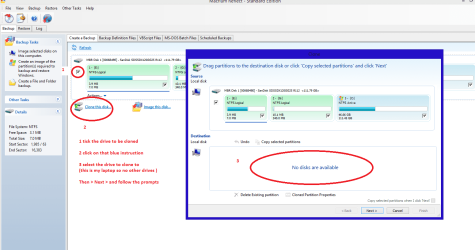
Acerman why don't you clone the drive yourself it is really not that hard with Macrium Macrium Reflect FREE Edition - Information and download

See my pic it shows the process but remember the drive you clone to has to be as large or larger than the drive you are cloning from.

There is a way of dragging and dropping the partitions into a smaller drive but it is not reliable enough for me.

The alternative is to image your drive slip a new one in - install the system using this
http://www.sevenforums.com/tutorials/219487-clean-reinstall-factory-oem-windows-7-a.html#post1839164 and then use the image to get back your data. As you seem to be concerned that you have data that you do not want to be copied or whatever. That is so easy if you know how and I can and I am not a techie so the shop bloke would be more than capable of doing that.
 

Attachments

  • CLONE 4.PNG
    CLONE 4.PNG
    68.5 KB · Views: 1

My Computer My Computer

At a glance

Desk1 7 Home Prem / Desk2 10 Pro / Main lap A...Desk1 i5 3750K / Laptop i7 GTX 860M / Desk2 i...Desk1 8GB (1866) / Desk2 16GB (1333) / Laptop...Desk 1& 2NVidia GTX 650 & Laptops on board Intel
Computer type
PC/Desktop
Computer Manufacturer/Model Number
Own build (new) Desk1 / Asus ROG Win 7 / Desk2 1st build
OS
Desk1 7 Home Prem / Desk2 10 Pro / Main lap Asus ROG 10 Pro 2 laptop Toshiba 7 Pro Asus P2520 7 & 10
CPU
Desk1 i5 3750K / Laptop i7 GTX 860M / Desk2 i5 2500
Motherboard
Desk1 Asus P877-V / Desk2 Gigabyte H67 UD3H / Laptop ?
Memory
Desk1 8GB (1866) / Desk2 16GB (1333) / Laptop 8Gb DDR3
Graphics Card(s)
Desk 1& 2NVidia GTX 650 & Laptops on board Intel
Sound Card
Desk 1 & 2 -XONAR DG Realtek High Def audio Laptop
Monitor(s) Displays
Desk 1 Benq HD 2450 / Desk2 Philips 24" / Laptop 17.5"
Screen Resolution
1920x1080 D1 & D2 & Laptop 1
Hard Drives
Desk1 Samsung 120GB 830 SSD
Asus ROG 256GB 850 Pro SSD
Desk2 Samsung 840 256 SSD
Toshiba 120GB EVO
PSU
Desk 1 Corsair HX 1050/ Laptop ? / Desk 2 Corsair HX 650
Case
Desk 1 Cooler HAF XM ? Toshiba laptop / Desk2 Coolermaster
Cooling
Fans on all Desk1 -2 Desk2 - all Coolermasters 5 Laptop ?
Keyboard
Desk 1 MS Sidewinder X6 Desk 2 MS Sidewinder X 4
Mouse
Desk 1&2 - Gigabyte MS 900 gamer - laptop - Logitec wireless
Internet Speed
ADSL2+
Other Info
One other Desktop (tester) and spare Toshba laptop both with SSD's
Running Kaspersky 2016 ISS on all machines config'd identically
Logitec audio stereo systems on each machine (x3)
Canon MG5250MFC
Router/modem TP-Link running WPA2SK
Can you create an admin level account which deprives its user from gaining access to files on a certain directory under c:\users

No

By it's very nature an admin level account cannot be restricted. Any attempt to do so is doomed to fail.
 

My Computer My Computer

At a glance

Windows 7 Pro 64 bitXeon W35208 GBNvidia Geforce 210
Computer type
PC/Desktop
Computer Manufacturer/Model Number
HP
OS
Windows 7 Pro 64 bit
CPU
Xeon W3520
Memory
8 GB
Graphics Card(s)
Nvidia Geforce 210
ICit2LOL, thanks for your reply. The SSD I have in mind is a 500GB "SATA 6GB/s compatible with 3Gb/s" unit. My current HDD is a 1 TB and has two partitions (attachment). From what you wrote, it appears, at least to me, that this doomed to fail since the 1TB disc > the SSD (unless you see this from the perspective of the fact the 'C:\' drive slash partition < 500 GB).

I am not a techie so opening up the Veriton and fiddling with hardware is not anything I am comfortable with.

I wonder why the techie insists on having unfettered access to my PC away from my premises, or alternatively to charge me for 8 hours if (s)he comes to my place where I would be able to insure my sensitive files were not being accessed. I suspect they are making mountains of molelhills. Neither deal sounds like a very good one to me.

I do have Acronis True Image 2014 on board my PC and have been using it to make backups. I believe it, or its successor, Acronis TI 2015, have some sort of cloning capability.

I suppose I'll have to find a new techie.
 

My Computer My Computer

At a glance

Microsoft Windows 7 Professional , Service Pa...Intel(R) Core(TM) i7-3770S CPU @ 3.10GHz8192 MBIntel(R) HD Graphics 4000
Computer type
PC/Desktop
Computer Manufacturer/Model Number
Acer
OS
Microsoft Windows 7 Professional , Service Pack 1 64 bit
CPU
Intel(R) Core(TM) i7-3770S CPU @ 3.10GHz
Motherboard
Chipset
Memory
8192 MB
Graphics Card(s)
Intel(R) HD Graphics 4000
Sound Card
Realtek High Definition Audio
Monitor(s) Displays
Samsung SyncMaster 204B
Hard Drives
ST1000DM003-1CH162, 931.51 GB
Keyboard
Acer
Mouse
Acer
Antivirus
Norton 360
Browser
IE, Firefox, Chrome
Other Info
Malwarebytes installed
Back
Top