Graphic Designers: Does Your W7 Suck as Much as Mine?

copernicus

New member
Power User
VIP
Local time
12:44 AM
Messages
620
So I'm using W7 on and off for production work. Primarily PS/AI/Corel/ and a few other ram hungry programs.

I have a Core i7 920, 3 gigs of tri channel ram, running two scratch disks in PS(for sata 3 gigs)

This thing slows to a crawl switching between programs. I'm dealing with more of less heaving files 30-600 meg photoshop files. My RIP is running the bg eating up 400-600 gigs of ram during it's processes.

At first I though it was the 64 bit PS that was acting funny, but 32 bit does the same. This is rather frustrating when I'm trying to say head on over to Opera to grab something, cause I have to wait for windows to change focus for 5-10 seconds. For instance right now I have PS/AI/Opera/MSN/foobar open, and the spinning wheel just showed up when I was switching tabs on Opera.

(Get more ram Dummy!)

Yes that would help, but the issue is, this same computer absolutely FLIES on my XP install doing all of the same things.

Does this have to do with how seven manages superfetch and all that? Cause I can free up my ram on XP by minimizing any program, which doesn't happen on 7.

So any heavy graphic users using w7 for production? I get so frustrated with the sluggishness I usually end up going back to XP to finish my graphic work.
 

My Computer My Computer

At a glance

7264x64/7260x86
OS
7264x64/7260x86
I have the same problem with PS-cs4 (32bit) the "get more ram, dummy" applies to me (1 gig), but i do notice an EXTREME loss of performance compared to XP. Maybe Adobe needs to come up with a patch or something. It could vary well be some kind of compatibility issue with how PS uses system resources.
I've also heard that the new GPU feature is a total bomb. unless you have a Ge-Force Rediculous 1000XXGT graphics card.....
 

My Computer My Computer

At a glance

Windows 7 Ultimate x32Intel Celeron D 3.2 Ghz 533 fsb (LGA 775)1 GB (2x512MB) PC-3200 DDR @ 200MhzNvidia GeForce 9400GT- 1GB
Computer Manufacturer/Model Number
eMachines W3502
OS
Windows 7 Ultimate x32
CPU
Intel Celeron D 3.2 Ghz 533 fsb (LGA 775)
Motherboard
Intel D101GGC
Memory
1 GB (2x512MB) PC-3200 DDR @ 200Mhz
Graphics Card(s)
Nvidia GeForce 9400GT- 1GB
Sound Card
Sound Blaster X-Fi Xtreame Gamer
Monitor(s) Displays
19" LCD HDtv
Screen Resolution
1360x768 @ 60Htz
Hard Drives
SeaGate Barracuda 750GB
SeaGate Barracuda 100GB
Toshiba CD/DVDW/ TS-H552D [DVD+R, DL]
PSU
stock (idk)
Case
The busted remains of the stock case
Cooling
Dust cooled, waitwut?
Keyboard
Stock. Missing a few keys.
Mouse
Logitech LX8 5-btn mouse (wireless)
Internet Speed
TWC 10Mb
Other Info
Keeps going, and going, and going.......
Yeah, I noticed If I turn off the graphics card stuff, my experience is alot better.
 

My Computer My Computer

At a glance

7264x64/7260x86
OS
7264x64/7260x86
Unless you have the newest GPU from Nvidia or ATI I would turn off the new GPU render functions CS4 has. I had to do this on my laptop even tho I have the newest ATI GPU laptop version that supports this fuction. Once I did that the switching went a lot better between windows.
 

My Computer My Computer

At a glance

Windows 7 Ultimate x64 SP1AMD Phenom II 1090 3.2 six core16 gig DDR3MSI R6950 2gig
Computer Manufacturer/Model Number
Custom Build
OS
Windows 7 Ultimate x64 SP1
CPU
AMD Phenom II 1090 3.2 six core
Motherboard
MSI 890FXA-GD65
Memory
16 gig DDR3
Graphics Card(s)
MSI R6950 2gig
Sound Card
on board
Monitor(s) Displays
Acer 23inch led
Screen Resolution
1900x1080 widescreen
Hard Drives
Seagate 1tb SATA6
2x 1tb HITACHI Deskstar
PSU
CORSAIR Enthusiast Series TX750 V2 750W
Case
CoolMaster HAF 922
Cooling
Box AMD Heatsink/Fan
Internet Speed
Cable 12Mbps/3Mbps
I used PS CS 4 64 bit with 4gb of ram for starters. It is definitely the fastest PS yet. Closing the GPU acceleration is right thing if it is not supported. I added more RAM to have more power while editing my 1.32GB DNG RAW scans, because while opening that files the ram goes away but while editing it is not a problem. You might check other options as well. I never had any problems while using PS and Indesign at the same time and I recall playing Assasin's Creed while they were open. I often use lightroom 2 64bit and PS at the same time, and messenger and mail live is open always, and utorrent and on occasions safari 4. I don't think it is a W7 issue but related to some other settings.
 

My Computer My Computer

At a glance

Windows 7 7232b x64Intel Q8300 @ 2500 MhzOCZ 4x2GB DDR2 1066 MhzPalit 512MB 9800GTX+
OS
Windows 7 7232b x64
CPU
Intel Q8300 @ 2500 Mhz
Motherboard
Gigabyte EP45-DS3R
Memory
OCZ 4x2GB DDR2 1066 Mhz
Graphics Card(s)
Palit 512MB 9800GTX+
Sound Card
Realtek HD
Monitor(s) Displays
Samsung T220
Screen Resolution
1680x1050
Hard Drives
WD 500GB 32MB, Samsung 200GB 8MB
PSU
OCZ 600SXS
Case
CoolerMaster Centurion CAC-T05
Cooling
Arctic Cooling Fans
Other Info
Epson v500
I use Photoshop CS4 on my system, and it runs smoothly (check my specs).

Windows 7 uses more RAM than XP. A LOT more RAM if you have more RAM. If your MoBo supports it, then install 8GB of RAM. That, and overclock your processor to i7 Extreme speed (all 3 i7's are the same, they're just set at different factory clocks) if the RAM increase didn't help.
 

My Computer My Computer

At a glance

Windows 7 Professional, Windows Longhorn 4074Intel Centrino Duo T2350 @ 1.87 GHz1GB (2x 512MB DDR2 400Mz)Intel Integrated 945GM Chipset
Computer Manufacturer/Model Number
Acer Aspire 5610
OS
Windows 7 Professional, Windows Longhorn 4074
CPU
Intel Centrino Duo T2350 @ 1.87 GHz
Motherboard
Acer Grapevine
Memory
1GB (2x 512MB DDR2 400Mz)
Graphics Card(s)
Intel Integrated 945GM Chipset
Sound Card
On-Board RealTek HD Audio
Monitor(s) Displays
Generic PnP Monitor
Screen Resolution
1280x800
Hard Drives
160GB SATA HD
PSU
Generic PSU
Case
Acer Aspire 5610 Standard Case (U.S. Version)
Cooling
Air
Keyboard
Built-In / Random Logitech wireless keyboard
Mouse
Synaptics Touchpad / Logitech Click! optical mouse.
Internet Speed
2.57 Mbps Download / 0.29 Mbps Upload / 57ms Ping
Other Info
I call it the craptop.
I use Photoshop CS4 on my system, and it runs smoothly (check my specs).

Windows 7 uses more RAM than XP. A LOT more RAM if you have more RAM. If your MoBo supports it, then install 8GB of RAM. That, and overclock your processor to i7 Extreme speed (all 3 i7's are the same, they're just set at different factory clocks) if the RAM increase didn't help.

lol. an I7 cost's more than my whole computer + upgrades. Think i'll stick with XP for all my Photo-shop needs ;)
 

My Computer My Computer

At a glance

Windows 7 Ultimate x32Intel Celeron D 3.2 Ghz 533 fsb (LGA 775)1 GB (2x512MB) PC-3200 DDR @ 200MhzNvidia GeForce 9400GT- 1GB
Computer Manufacturer/Model Number
eMachines W3502
OS
Windows 7 Ultimate x32
CPU
Intel Celeron D 3.2 Ghz 533 fsb (LGA 775)
Motherboard
Intel D101GGC
Memory
1 GB (2x512MB) PC-3200 DDR @ 200Mhz
Graphics Card(s)
Nvidia GeForce 9400GT- 1GB
Sound Card
Sound Blaster X-Fi Xtreame Gamer
Monitor(s) Displays
19" LCD HDtv
Screen Resolution
1360x768 @ 60Htz
Hard Drives
SeaGate Barracuda 750GB
SeaGate Barracuda 100GB
Toshiba CD/DVDW/ TS-H552D [DVD+R, DL]
PSU
stock (idk)
Case
The busted remains of the stock case
Cooling
Dust cooled, waitwut?
Keyboard
Stock. Missing a few keys.
Mouse
Logitech LX8 5-btn mouse (wireless)
Internet Speed
TWC 10Mb
Other Info
Keeps going, and going, and going.......
Yea, I think I should opt for a little more ram.

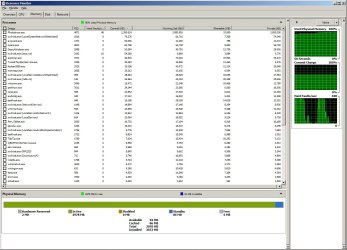
I killed aero, and things are much better off when multitasking with photoshop. For now I'll just switch between two themes I guess. Or splurge on a few hundred gigs of ram. >=D
 

Attachments

  • ram.jpg
    ram.jpg
    134.1 KB · Views: 202

My Computer My Computer

At a glance

7264x64/7260x86
OS
7264x64/7260x86
yes definitely ram is the problem. My brother's editing machine is sporting an i7 920 and has 12 gb of ddr3 and he can run premiere (1080p videos)and after effects simultaneuosly but with Vista, it nearly eats up 9 gb of ram so yeah more ram is the solution.
 

My Computer My Computer

At a glance

Windows 7 x64 ProIntel 990XCORSAIR XMS3 6GB SDRAM DDR3 1600 (7-7-7-20)2 x BFG 285 GTX OCXs in SLI
OS
Windows 7 x64 Pro
CPU
Intel 990X
Motherboard
Asus P6T Deluxe V2
Memory
CORSAIR XMS3 6GB SDRAM DDR3 1600 (7-7-7-20)
Graphics Card(s)
2 x BFG 285 GTX OCXs in SLI
Sound Card
X-fi Elite Pro
Monitor(s) Displays
HP LP 3065
Screen Resolution
2560 x 1600
Hard Drives
2 x 150 gb Velociraptors RAID 0
PSU
PC Power & Cooling 750W
Case
CM Stacker 832
Cooling
Stock cooler
Keyboard
Saitek Eclipse II
Mouse
Logitech MX Revolution
I use Photoshop CS4 on my system, and it runs smoothly (check my specs).

Windows 7 uses more RAM than XP. A LOT more RAM if you have more RAM. If your MoBo supports it, then install 8GB of RAM. That, and overclock your processor to i7 Extreme speed (all 3 i7's are the same, they're just set at different factory clocks) if the RAM increase didn't help.

That's true. Vista and 7 use more RAM compared to XP which used only what was actually needed. Vista and 7 store recently used stuff in case it is needed again.
 

My Computer My Computer

At a glance

Windows 7 x64 / SameIntel Core 2 Duo T7250 / Intel Core i7 9304GB / 6GBNVIDIA GeForce 8400M GS / ASUS 1GB
Computer Manufacturer/Model Number
Dell Inspiron 1520 (Laptop)/ Home (Desktop)
OS
Windows 7 x64 / Same
CPU
Intel Core 2 Duo T7250 / Intel Core i7 930
Motherboard
Intel 945 / Asus P6X58D-E
Memory
4GB / 6GB
Graphics Card(s)
NVIDIA GeForce 8400M GS / ASUS 1GB
Sound Card
Whatever Dell gave me :-( / Onboard
Monitor(s) Displays
15.4" LCD / Crappy CRT
Hard Drives
Seagate 500GB SATA; 7200 RPM / Seagate 1TB SATA; 7200 RPM
PSU
N/A / OCZ Fatal1ty 550W Modular
Case
N/A / Antec 900
Cooling
Air
Mouse
Microsoft Presenter (Bluetooth)
CS4 x64 here and no problems at all. It's the best CS yet and loads massive files without any problems. Layers respond instantly, unlike CS3 x86, which would lag for ever.

One scratch disc (my cache drive) and no pagefile, rest of specs below - but even a modest PC should be able to effectively run CS4.
 

My Computer My Computer

At a glance

Windows 7 Home Premium x64Intel QX9650 Extreme 4.0 GHz8GB (4x2) Corsair Dominator DDR32x Radeon R390X [8GB]
Computer type
PC/Desktop
Computer Manufacturer/Model Number
Custom Build/Mod
OS
Windows 7 Home Premium x64
CPU
Intel QX9650 Extreme 4.0 GHz
Motherboard
ASUS Rampage Extreme Rev2
Memory
8GB (4x2) Corsair Dominator DDR3
Graphics Card(s)
2x Radeon R390X [8GB]
Sound Card
SupremeFX X-Fi
Monitor(s) Displays
Dell 2408WFP 26" Panel
Screen Resolution
1920x1200
Hard Drives
4x WD 2TB (8TB+ Total)
2x Crucial SSD 128GB (RAID-0)
1x LG Blu-ray read/write
1x Phillips LightScribe DVD read/write
PSU
Corsair HX1000
Case
CoolerMaster - Cosmos S
Cooling
Custom Liquid - 320mm rad w/ 3x 80mm fans, CPU/NB/SB Blocks
Keyboard
Logitech Illuminater Pro
Mouse
Logitech
Internet Speed
Fractional T1 - 125Mbps
Antivirus
ESET Security Suite / Microsoft Security Essentials
Browser
Cyberfox Intel x64
Other Info
OC'd to 5.0GHz @ 44c under full load
It's actually not photoshop itself lagging that's the issue, it's switching between different programs while having PS running.

Turning off effects in the appearance/performance section is helping out alot too. Doing a bunch of random non scientific testing with settings today.
 

My Computer My Computer

At a glance

7264x64/7260x86
OS
7264x64/7260x86
Yup, got a great solution for ye :D

So I'm using W7 on and off for production work. Primarily PS/AI/Corel/ and a few other ram hungry programs.

I have a Core i7 920, 3 gigs of tri channel ram, running two scratch disks in PS(for sata 3 gigs)

This thing slows to a crawl switching between programs. I'm dealing with more of less heaving files 30-600 meg photoshop files. My RIP is running the bg eating up 400-600 gigs of ram during it's processes.

At first I though it was the 64 bit PS that was acting funny, but 32 bit does the same. This is rather frustrating when I'm trying to say head on over to Opera to grab something, cause I have to wait for windows to change focus for 5-10 seconds. For instance right now I have PS/AI/Opera/MSN/foobar open, and the spinning wheel just showed up when I was switching tabs on Opera.

(Get more ram Dummy!)

Yes that would help, but the issue is, this same computer absolutely FLIES on my XP install doing all of the same things.

Does this have to do with how seven manages superfetch and all that? Cause I can free up my ram on XP by minimizing any program, which doesn't happen on 7.

So any heavy graphic users using w7 for production? I get so frustrated with the sluggishness I usually end up going back to XP to finish my graphic work.

Actually, Windows 7 is more fast then XP, if you have'nt disable the prefetch fuction. The prefecth function studies you usage behaviour, and loads the files of your program, which you specifically start at a time. Say, you, on a daily basis, use Photoshop at 9 A.M. Then prefetch will automatically load the files necessary to run PS at about 9 A.M. It does makes things faster, and in the same time shoots up Ram Usage.
I also suspect that there might be malware infection on your rig. Try Avg Free and scan your whole rig. ALSO, on 3 gigs of Ram, 64 bit PS is unnecessary, it will decline performance, not increase it. Try to check that you installed compatible versions of PS Addons too. Let me know if it helps.
 

My Computer My Computer

At a glance

Windows 7 Professional 64 Bit EnglishIntel Core i5 540M Processor, 2.53GHz~3.06GHz6 GB ( 1 X4 GB 1 X 2GB ) Dual Channel DDR3 SDRAM1GB ATI Mobility Radeon HD 5670, DirectX 11
Computer Manufacturer/Model Number
Dell Studio 15.6 "
OS
Windows 7 Professional 64 Bit English
CPU
Intel Core i5 540M Processor, 2.53GHz~3.06GHz
Motherboard
Dell
Memory
6 GB ( 1 X4 GB 1 X 2GB ) Dual Channel DDR3 SDRAM
Graphics Card(s)
1GB ATI Mobility Radeon HD 5670, DirectX 11
Sound Card
Creative Xi-Fi
Monitor(s) Displays
15.6 " 1080p WUXGA WLED FullHD Display
Screen Resolution
1920 X 1080 FullHD
Hard Drives
500 GB SATA Hard Drive, 7400 RPM
PSU
Dell 9 Cell Battery
Case
Derek Welch Horizonte in Blue
Cooling
Cooler Master Color Infinite Laptop Cooling Pad
Keyboard
Dell Backlit Keyboard
Mouse
Dell Bluetooth Travel Mouse
Internet Speed
10.0 Mbps Leased Line @ Institute
Other Info
Tune Up Utilities 2010,
Kaspersky Internet Security 2010,
Ashampoo Uninstaller 4,
Microsoft Office Home and Students 2007 ( Free Upgrade to Office 2010 ),
Burn Aware Home Lifetime Upgrade,
WinRar 3.9 64 Bit,
Adobe Photoshop CS4 Extended,
Monodevelop,
Nitro PDF Professional :-D
I am running w7 x64 on 1 gb of ram, and it switches windows fine, if it does get a little slow, then i put 7 into classic theme, it gets rid of all of the aero effects, so it helps things run a bit faster :)
 

My Computer My Computer

At a glance

Windows 7 Ultimate x64Intel Celeron M 1.6 gHz1gbIntel GMA 945
Computer Manufacturer/Model Number
HP Pavillion dv2000
OS
Windows 7 Ultimate x64
CPU
Intel Celeron M 1.6 gHz
Memory
1gb
Graphics Card(s)
Intel GMA 945
I am running w7 x64 on 1 gb of ram, and it switches windows fine, if it does get a little slow, then i put 7 into classic theme, it gets rid of all of the aero effects, so it helps things run a bit faster :)

Is there a reason you needed to post that in a thread that is 2 years old with the last post 13 months ago??
 

My Computer My Computer

At a glance

Windows 7 Ultimate 64bitIntel i7 3770K16GB DDR3 1333 Corsair XMS3XFX HD6950 2GB EyeFinity
Computer Manufacturer/Model Number
HAL-9000
OS
Windows 7 Ultimate 64bit
CPU
Intel i7 3770K
Motherboard
Asus Sabertooth Z77
Memory
16GB DDR3 1333 Corsair XMS3
Graphics Card(s)
XFX HD6950 2GB EyeFinity
Sound Card
Logitech G35 & Sennheiser PC135 & VIA HD
Monitor(s) Displays
23" HP 2310e, 23" Samsung B2230, 21.5" Viewsonic
Screen Resolution
5760x1080
Hard Drives
16TB of Storage
128GB & 256GB Crucial M4 SSD's, 2X 1TB WD Black, 3x 2TB WD, 3x 2TB Samsung F4, 1.5TB Seagate, WD 500GB,
PSU
Antec True Power New 650watt
Case
Cooler Master HAF-932
Cooling
Corsair H60 Hydro Cooler, 3x 230mm Fans, 2x120mm Fan
Keyboard
Logitech G15 and G13
Mouse
Logitech G700 Gaming Mouse
Internet Speed
50/10 Mbit
Other Info
Speakers : Alesis M1 Active Mk2 Studio Monitors , APC RS 1200 UPS, HP 4500DN Color Laser, HP P1006 mono Laser, Kodak 8500 Dye-Sub, Epson 1280 inkjet, Epson Worforce 610 MFC
Back
Top