
You are using an out of date browser. It may not display this or other websites correctly.
You should upgrade or use an alternative browser.
You should upgrade or use an alternative browser.
graphic equalizer
- Thread starter oldfogey
- Start date

- Local time
- 12:51 PM
- Messages
- 1,158

My Computer
- Computer Manufacturer/Model Number
- Custom
- OS
- Win7 HP (x64)/Win7 Ultimate (x64)
- CPU
- Core i7 920
- Motherboard
- Intel X58
- Memory
- 6 x 2GB Corsair XMS3
- Graphics Card(s)
- CF HD4890
- Sound Card
- Asus Xonar
- Monitor(s) Displays
- Dell 2408WFP
- Screen Resolution
- 1920 x 1200
- Hard Drives
- 2 x 150GB WDC Velociraptors (Raid 0)
1 x 1TB Seagate
1 x 1.5TB Seagate
- PSU
- Corsair HX1000W
- Case
- Antec 1200
- Keyboard
- Razer Lycosa/N52te
- Mouse
- Razer Lachesis
- Local time
- 12:51 PM
- Messages
- 1,158
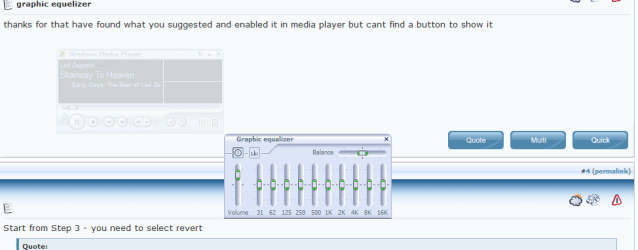
Start from Step 3 - you need to select revert
3. Select ‘Revert’ skin from the skins list (left side) and press the “Apply Button” button.
4. You can now see the “Graphic Equalizer” button at the bottom right of the skinned WMP12.

5. Set the default equalizer options to whatever you like.

My Computer
- Computer Manufacturer/Model Number
- Custom
- OS
- Win7 HP (x64)/Win7 Ultimate (x64)
- CPU
- Core i7 920
- Motherboard
- Intel X58
- Memory
- 6 x 2GB Corsair XMS3
- Graphics Card(s)
- CF HD4890
- Sound Card
- Asus Xonar
- Monitor(s) Displays
- Dell 2408WFP
- Screen Resolution
- 1920 x 1200
- Hard Drives
- 2 x 150GB WDC Velociraptors (Raid 0)
1 x 1TB Seagate
1 x 1.5TB Seagate
- PSU
- Corsair HX1000W
- Case
- Antec 1200
- Keyboard
- Razer Lycosa/N52te
- Mouse
- Razer Lachesis
- Local time
- 12:51 PM
- Messages
- 1,158
My Computer
- Computer Manufacturer/Model Number
- Custom
- OS
- Win7 HP (x64)/Win7 Ultimate (x64)
- CPU
- Core i7 920
- Motherboard
- Intel X58
- Memory
- 6 x 2GB Corsair XMS3
- Graphics Card(s)
- CF HD4890
- Sound Card
- Asus Xonar
- Monitor(s) Displays
- Dell 2408WFP
- Screen Resolution
- 1920 x 1200
- Hard Drives
- 2 x 150GB WDC Velociraptors (Raid 0)
1 x 1TB Seagate
1 x 1.5TB Seagate
- PSU
- Corsair HX1000W
- Case
- Antec 1200
- Keyboard
- Razer Lycosa/N52te
- Mouse
- Razer Lachesis