
Graphic problems with Bullfrog's Dungeon Keeper & Theme Hospital

Jenniwin

New member
Local time
9:22 PM
Messages
2
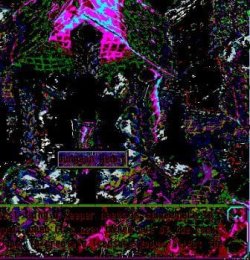
After some trial and error and forum searches I have got both Bullfrog's Theme Hospital and Dungeon Keeper working on my Windows 7 laptop BUT the colours are all wrong as you can see from the attached picture.

I've tried changing the settings to 256 colours but no effect and if I muck about with the compatibility mode Dungeon Keeper will not load at all.

Has any veteran gamers out there managed to solve this at all as I know others must have the same problem!

I have Windows 7 Ultimate 32bit.

Thanks in advance
 

Attachments
  • New Picture.jpg
    New Picture.jpg
    39.7 KB · Views: 40

My Computer My Computer

At a glance

Windows 7 Ultimate 32bit SP1
OS
Windows 7 Ultimate 32bit SP1
I have this same issue with windows 7 and on board graphics card.

The way I resolved it was switching video mode from 32 bit to 16 bit and then launching the game straight after the change. The game worked after this but every time I play the game, I need to switch video modes again or the colour comes back.
 

My Computer My Computer

At a glance

windows 7
OS
windows 7


Took forever to work this one out! Create a windows batch file in the theme hospital folder containing the following text

taskkill /F /IM explorer.exe
Hospital.exe
start explorer.exe

This will sort out the colour/color issue

Happy gaming
 

My Computer My Computer

At a glance

Windows 7 Home Premium 32 bit
Computer type
PC/Desktop
Computer Manufacturer/Model Number
Dell
OS
Windows 7 Home Premium 32 bit
You're not kidding Mr Matty, 3 years later.....
 

My Computer My Computer

At a glance

Windows 7 Ultimate x64 SP1Intel Q6600 @ 2.6Ghz4Gb DDR2 Corsair Dominator @ 800Mhz 5-5-5-15EVGA 560 GTX SC FTW 1GB
Computer type
PC/Desktop
Computer Manufacturer/Model Number
Custom Build
OS
Windows 7 Ultimate x64 SP1
CPU
Intel Q6600 @ 2.6Ghz
Motherboard
Evga NF78-CK-132-A 3-Way SLI
Memory
4Gb DDR2 Corsair Dominator @ 800Mhz 5-5-5-15
Graphics Card(s)
EVGA 560 GTX SC FTW 1GB
Sound Card
Realtek HD 7.1 Audio, Plantronics GameCom780 7.1 Headset
Monitor(s) Displays
Dell S2409W
Screen Resolution
1920 x 1080
Hard Drives
SanDisk SDSSDHII-120G-G25 120GB SSD
Samsung 7200RPM 750Gb SATA
Samsung 850 EVO 120GB SSD
Western Digital Green 1TB 7200RPM
PSU
Xigmatek 750W Quad sli quad core 80% eff
Case
Antec 900 Gaming Case
Cooling
Zalman CNPS9700-NT NVIDIA Tritium
Keyboard
Logitech generic keyboard, MS wireless keyboard
Mouse
Razor Lachesis Banshee V2 Blue, 4000DPI, MS wireless mouse
Internet Speed
152Mb Virgin Media Fibre Optic
Antivirus
Microsoft Security Essentials
Browser
Google Chrome
Other Info
Wireless Gaming Receiver for Windows, Wireless Xbox 360 Pad

My Computer My Computer

At a glance

Windows 7 Home Premium 64-BITAMD A8 7200P8GB 1600mhzRadeon R5 (APU) + Radeon R5 M230 2GB Dual Gra...
Computer type
PC/Desktop
Computer Manufacturer/Model Number
ASUS X550ZE
OS
Windows 7 Home Premium 64-BIT
CPU
AMD A8 7200P
Motherboard
N/A
Memory
8GB 1600mhz
Graphics Card(s)
Radeon R5 (APU) + Radeon R5 M230 2GB Dual Graphics
Sound Card
Realtek ALC269 with SonicMaster
Monitor(s) Displays
Laptop Display
Screen Resolution
1920 x 1080 @60hz
Hard Drives
WDC WD50 00LPVX-80V0TT0 (500GB)
PSU
Laptop Charger
Mouse
ARMAGGEDON TEXTRON SCORPION 7
Internet Speed
100 mbps DOWN / 50 mbps UP
Antivirus
Windows Defender
Browser
Mozzila FireFox, Valve Steam in-game internet browser
Wow, I'd completely forgotten I'd posted this question!

Thanks Mr Matty for the time you took to work out a solution. However, when I run the batch file I get a message saying the 32bit system doesn't support fullscreen mode and I have to close the application.

Any ideas how to fix this?!

Many thanks.
 

My Computer My Computer

At a glance

Windows 7 Ultimate 32bit SP1
OS
Windows 7 Ultimate 32bit SP1
Back
Top