
Graphics card bottleneck

northlondon01

New member
Member
Local time
12:05 AM
Messages
41
Hello chaps,

I'm suffering from graphics card envy after my friend got a 570 and am looking at getting a new PSU and graphics card, but I don't want to spend more on one that is going to be let down by the rest of my set up!

I have a C2Q Q6600 2.4ghz, with 4GB of RAM, although my mobo only lets me use about 3.25GB for system RAM, even on 64bit.

From Google searches, It seems a Q6600 should be ok for the higher 5 series ATIs (something like a 5850, maybe 5870 and would this apply to the 6 series too?), but what about the RAM?

Also, and this might be better in a different thread, or maybe even forum, but what would I need to OC my Q6600 to 3ghz? I wouldn't OC it yet, as my PSU is already pushing it with my 5670. Should I get a better heatsink etc than the standard foxconn one?

Thanks as ever!
 

My Computer

Computer Manufacturer/Model Number
Evesham
OS
Windows 7 Ultimate 32bit
CPU
Intel Core 2 Quad 2.4ghz
Motherboard
Foxconn946 7MA Seris
Memory
4GB (3.25GB usable)
Graphics Card(s)
HD5670
Screen Resolution
1050
Hard Drives
250GB western digital (C)
1TB Samsung F3 (D)
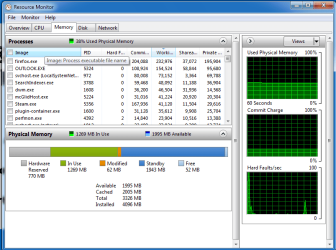
Post a snip of your resource monitor on the memory tab?

The 5670 is a decent card from what I've read... why are you unhappy with it?
 

My Computer

Computer Manufacturer/Model Number
Pugh Technologies
OS
W7 Professional x64
CPU
AMD Athlon II X3 445 Rana 3.10 GHz
Motherboard
MSI 870A-G54
Memory
PNY XLR DDR3 1600 4x2GB
Graphics Card(s)
NVIDIA GeForce GTS 450 (fermi) 1GB GDDR5
Sound Card
Realtek ALC892 onboard
Monitor(s) Displays
ASUS VE205t, Viewsonic VX2035WM
Screen Resolution
1600x900, 1600x1050
Hard Drives
977GB Hitachi Hitachi HDS721010CLA332
244GB Western Digital WDC WD2500AAJS-65B4A0
488GB Western Digital WDC WD5000AAJS-00A8B0
488GB Western Digital WDC WD5000AAKS-00UU3A0
PSU
Antec EarthWatts EA650 650W
Case
ThermalTake Armor A90 Mid Tower
Cooling
3x 120mm in, 1x 120mm & 200mm out, self built hydro-cooler
Keyboard
Logitec 55
Mouse
Razer Deathadder
Internet Speed
20 Mbps D/L, 9 Mbps U/L
Thanks for the reply. The 5670 is ok for Valve games and stuff that's a year or two old, but nothing much new works with any kind of decent settings at a decent FPS!

Here's my memory tab.

Thanks again.
 

Attachments

  • Resource monitor - mem - 110721.png
    Resource monitor - mem - 110721.png
    27.7 KB · Views: 27

My Computer

Computer Manufacturer/Model Number
Evesham
OS
Windows 7 Ultimate 32bit
CPU
Intel Core 2 Quad 2.4ghz
Motherboard
Foxconn946 7MA Seris
Memory
4GB (3.25GB usable)
Graphics Card(s)
HD5670
Screen Resolution
1050
Hard Drives
250GB western digital (C)
1TB Samsung F3 (D)
If you go halfway with the card, you will not be happy, and you will be less happy when you upgrade the motherboard...I would suggest getting the card you want, and not worry about the bottleneck.....
 

My Computer

Computer type
PC/Desktop
Computer Manufacturer/Model Number
Custom
OS
windows 10 pro 64 bit
CPU
i5 4690K@4500 COOLER MASTER Seidon 120M water cooler
Motherboard
ASUS SABERTOOTH Z87 LGA 1150 Intel
Memory
16gb Kingston HyperX DDR3 1600
Graphics Card(s)
EVGA GTX 1070 sc
Monitor(s) Displays
BenQ GL2760H Black 27" 2ms HDMI Widescreen LED 1920X1080
Screen Resolution
DSR 2103X1183
Hard Drives
ADATA 256 gig SSD + 4 junk
PSU
EVGA supernova 750
Case
coolermaster
Cooling
many...
Keyboard
z merc
Mouse
Logitech wireless G602
Internet Speed
2.5mbs cable
When you overclock the Q6600, get the Cooler Master Hyper 212+ if it can fit in your case, otherwise I would get the Arctic Cooling Freezer 7 Pro (I used the Freezer 7 Pro on my Q6600 @ 3.06Ghz)

Btw, the 5850 and 5870 are both faster than the 68xx series cards, which means that the 58xx series cards sell used for more money than new 68xx series cards.
Just keep that in mind if you are looking at buying a used card. The Bitcoin Mining people drove the prices of the 58xx series cards up in the used market, which is great if you want to sell but sucks if you want to buy a used one for a Crossfire setup..
 

My Computer

Computer Manufacturer/Model Number
HAL-9000
OS
Windows 7 Ultimate 64bit
CPU
Intel i7 3770K
Motherboard
Asus Sabertooth Z77
Memory
16GB DDR3 1333 Corsair XMS3
Graphics Card(s)
XFX HD6950 2GB EyeFinity
Sound Card
Logitech G35 & Sennheiser PC135 & VIA HD
Monitor(s) Displays
23" HP 2310e, 23" Samsung B2230, 21.5" Viewsonic
Screen Resolution
5760x1080
Hard Drives
16TB of Storage
128GB & 256GB Crucial M4 SSD's, 2X 1TB WD Black, 3x 2TB WD, 3x 2TB Samsung F4, 1.5TB Seagate, WD 500GB,
PSU
Antec True Power New 650watt
Case
Cooler Master HAF-932
Cooling
Corsair H60 Hydro Cooler, 3x 230mm Fans, 2x120mm Fan
Keyboard
Logitech G15 and G13
Mouse
Logitech G700 Gaming Mouse
Internet Speed
50/10 Mbit
Other Info
Speakers : Alesis M1 Active Mk2 Studio Monitors , APC RS 1200 UPS, HP 4500DN Color Laser, HP P1006 mono Laser, Kodak 8500 Dye-Sub, Epson 1280 inkjet, Epson Worforce 610 MFC
Thanks for the replies chaps.

I think that makes sense to get something that I'd be happy to keep should I get a new set up (which ideally I'd love to do now). I thought the 58xx series were more powerful than the 68xx equivalents and I saw a 5850 for just over £100 recently, so I should be able to get a new heat sink, PSU and 5850 for under £200.

My case has it's own post code, so space for the heat sink shouldn't be a problem!

One last thing, can I OC via my mobo? This is the model?

Foxconn - Products: Motherboard
 

My Computer

Computer Manufacturer/Model Number
Evesham
OS
Windows 7 Ultimate 32bit
CPU
Intel Core 2 Quad 2.4ghz
Motherboard
Foxconn946 7MA Seris
Memory
4GB (3.25GB usable)
Graphics Card(s)
HD5670
Screen Resolution
1050
Hard Drives
250GB western digital (C)
1TB Samsung F3 (D)
Uncheck memory mapping and thn in msconfig, uncheck max memory and cores, and that system reserved memory should go away, then you will be able to utilise all four GB with 64 bit OS
 

My Computer

Computer Manufacturer/Model Number
Pugh Technologies
OS
W7 Professional x64
CPU
AMD Athlon II X3 445 Rana 3.10 GHz
Motherboard
MSI 870A-G54
Memory
PNY XLR DDR3 1600 4x2GB
Graphics Card(s)
NVIDIA GeForce GTS 450 (fermi) 1GB GDDR5
Sound Card
Realtek ALC892 onboard
Monitor(s) Displays
ASUS VE205t, Viewsonic VX2035WM
Screen Resolution
1600x900, 1600x1050
Hard Drives
977GB Hitachi Hitachi HDS721010CLA332
244GB Western Digital WDC WD2500AAJS-65B4A0
488GB Western Digital WDC WD5000AAJS-00A8B0
488GB Western Digital WDC WD5000AAKS-00UU3A0
PSU
Antec EarthWatts EA650 650W
Case
ThermalTake Armor A90 Mid Tower
Cooling
3x 120mm in, 1x 120mm & 200mm out, self built hydro-cooler
Keyboard
Logitec 55
Mouse
Razer Deathadder
Internet Speed
20 Mbps D/L, 9 Mbps U/L
Unfortunately I can't uncheck memory mapping in my BIOS. Which is very annoying, especially as the Foxconn site says up to 4GB but you can't even use the full 4GB! I found this out after trying a 64bit installation - what a waste of time that was!

Thanks for the thought though!
 

My Computer

Computer Manufacturer/Model Number
Evesham
OS
Windows 7 Ultimate 32bit
CPU
Intel Core 2 Quad 2.4ghz
Motherboard
Foxconn946 7MA Seris
Memory
4GB (3.25GB usable)
Graphics Card(s)
HD5670
Screen Resolution
1050
Hard Drives
250GB western digital (C)
1TB Samsung F3 (D)
msconfig, not bios
 

My Computer

Computer Manufacturer/Model Number
Pugh Technologies
OS
W7 Professional x64
CPU
AMD Athlon II X3 445 Rana 3.10 GHz
Motherboard
MSI 870A-G54
Memory
PNY XLR DDR3 1600 4x2GB
Graphics Card(s)
NVIDIA GeForce GTS 450 (fermi) 1GB GDDR5
Sound Card
Realtek ALC892 onboard
Monitor(s) Displays
ASUS VE205t, Viewsonic VX2035WM
Screen Resolution
1600x900, 1600x1050
Hard Drives
977GB Hitachi Hitachi HDS721010CLA332
244GB Western Digital WDC WD2500AAJS-65B4A0
488GB Western Digital WDC WD5000AAJS-00A8B0
488GB Western Digital WDC WD5000AAKS-00UU3A0
PSU
Antec EarthWatts EA650 650W
Case
ThermalTake Armor A90 Mid Tower
Cooling
3x 120mm in, 1x 120mm & 200mm out, self built hydro-cooler
Keyboard
Logitec 55
Mouse
Razer Deathadder
Internet Speed
20 Mbps D/L, 9 Mbps U/L
TBH, I wouldnt put to much into the whole bottlenecking issue.

I think the only time you are going to see any real major bottleneck issue from the CPU may be when running a SLI or Crossfire set up with multiple display setup.
For a single display, Im not sure it would be that much.

Don't get me wrong, there will be some, sure. But I honesty do not think its as bad as its made out to be.
I mean, you may have some CPU bottleneck in a game that very CPU heavy, like in a RTS game that uses all 4 cores.
But in many GPU heavy games, you will still see a huge improvement.


I would just get the card you want. And then, OC the Q6600 to around 3.0Ghz.
 

My Computer

Computer Manufacturer/Model Number
Custom (Self Build)
OS
Windows 7 Home Premium 64bit
CPU
Intel Core i7 2700k
Motherboard
eVGA P67 SLI
Memory
8GB Mushkin Redline Ridgebacks @1866
Graphics Card(s)
EVGA GTX570 SC
Sound Card
XiFi Titanium HD
Monitor(s) Displays
LG W2453V
Screen Resolution
1920x1080
Hard Drives
Intel 320 80GB -- Intel X25-V 40GB --WD Black 1TB x2 -- WD Blue 640GB
PSU
Seasonic x750
Case
Corsair 600T SE White
Cooling
eVGA Superclocked CPU Cooler
Keyboard
Saitek Cyborg
Antivirus
Kaspersky
Browser
IE
Other Info
LG BD/DVD
msconfig, not bios

But I have to do the memory mapping in my BIOS, or this was the consensus when I made a thread on here previously.

Checked my msconfig, cores and mem are already unchecked so I think I'm stuck with it!
 

My Computer

Computer Manufacturer/Model Number
Evesham
OS
Windows 7 Ultimate 32bit
CPU
Intel Core 2 Quad 2.4ghz
Motherboard
Foxconn946 7MA Seris
Memory
4GB (3.25GB usable)
Graphics Card(s)
HD5670
Screen Resolution
1050
Hard Drives
250GB western digital (C)
1TB Samsung F3 (D)
Check the memory box, restart, and post a new snip of resource monitor. If it doesn't work, uncheck the box, and see if that helps.
 

My Computer

Computer Manufacturer/Model Number
Pugh Technologies
OS
W7 Professional x64
CPU
AMD Athlon II X3 445 Rana 3.10 GHz
Motherboard
MSI 870A-G54
Memory
PNY XLR DDR3 1600 4x2GB
Graphics Card(s)
NVIDIA GeForce GTS 450 (fermi) 1GB GDDR5
Sound Card
Realtek ALC892 onboard
Monitor(s) Displays
ASUS VE205t, Viewsonic VX2035WM
Screen Resolution
1600x900, 1600x1050
Hard Drives
977GB Hitachi Hitachi HDS721010CLA332
244GB Western Digital WDC WD2500AAJS-65B4A0
488GB Western Digital WDC WD5000AAJS-00A8B0
488GB Western Digital WDC WD5000AAKS-00UU3A0
PSU
Antec EarthWatts EA650 650W
Case
ThermalTake Armor A90 Mid Tower
Cooling
3x 120mm in, 1x 120mm & 200mm out, self built hydro-cooler
Keyboard
Logitec 55
Mouse
Razer Deathadder
Internet Speed
20 Mbps D/L, 9 Mbps U/L
I've tried both, but it doesn't work unfortunately. Thanks though.

From what I've been told, the memory mapping can only be unlocked in the BIOS, the msconfig stuff is seperate and won't work without the memory mapping being unchecked, which is not possible with my mobo from the looks of things.

This is the thread where I originally queried not getting the full 4GB. http://www.sevenforums.com/performance-maintenance/150500-3-25gb-ram-w7-ultimate-64-bit.html

Thanks again though.
 

My Computer

Computer Manufacturer/Model Number
Evesham
OS
Windows 7 Ultimate 32bit
CPU
Intel Core 2 Quad 2.4ghz
Motherboard
Foxconn946 7MA Seris
Memory
4GB (3.25GB usable)
Graphics Card(s)
HD5670
Screen Resolution
1050
Hard Drives
250GB western digital (C)
1TB Samsung F3 (D)
Back
Top