
Hi all,
A bit of a strange one I can't get my head round.
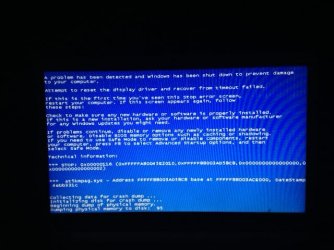
I have recently fired up my laptop after about a year of not using and I was immediately presented with a BSOD with a atikmpag.sys error (it was fine when last used). After reading up on this, the error points to corrupt drivers. So I downloaded the latest drivers from the AMD website, used a third party utility to completely remove the old drivers and the same error occurred. After repeating the process countless times and not getting anywhere I decided to give it a complete clean install of Windows 7.
The install went fine and Windows loaded the WDDM 1.1 drivers for the card and finally it booted up normally with no BSOD. After all the updates had installed I then updated the drivers again from the AMD website and the same BSOD occured. I tried this a second time and they finally worked but a strange artifact appeared round the cursor and some windows and then the machine reset itself.
So it appears my laptop will only take the default WDDM drivers and nothing else. I never had this problem before because I can remember running the latest drivers in the past.
These are drivers I used: Legacy
Any suggestions?
A bit of a strange one I can't get my head round.
I have recently fired up my laptop after about a year of not using and I was immediately presented with a BSOD with a atikmpag.sys error (it was fine when last used). After reading up on this, the error points to corrupt drivers. So I downloaded the latest drivers from the AMD website, used a third party utility to completely remove the old drivers and the same error occurred. After repeating the process countless times and not getting anywhere I decided to give it a complete clean install of Windows 7.
The install went fine and Windows loaded the WDDM 1.1 drivers for the card and finally it booted up normally with no BSOD. After all the updates had installed I then updated the drivers again from the AMD website and the same BSOD occured. I tried this a second time and they finally worked but a strange artifact appeared round the cursor and some windows and then the machine reset itself.
So it appears my laptop will only take the default WDDM drivers and nothing else. I never had this problem before because I can remember running the latest drivers in the past.
These are drivers I used: Legacy
Any suggestions?
Attachments
Last edited:
My Computer
At a glance
Windows 7 Ultimate x64Intel Core 2 Duo T65004GB DDR2512MB ATI Mobility Radeon HD 4570
- Computer type
- Laptop
- Computer Manufacturer/Model Number
- Sony VGN-NW11S
- OS
- Windows 7 Ultimate x64
- CPU
- Intel Core 2 Duo T6500
- Memory
- 4GB DDR2
- Graphics Card(s)
- 512MB ATI Mobility Radeon HD 4570
- Hard Drives
- 320GB
- Antivirus
- Microsoft Security Essentials
- Browser
- Firefox

