Solved Graphics Card Upgrade

  • Thread starter Thread starter MisterActorMan
  • Start date Start date
M

MisterActorMan

Guest
Hi all

I've just decided to upgrade my desktop, which has 64bit capability/hardware, to win7 64 bit. It's part of me investing a small amount of cash in my desktop to make it really strong for another year or so before I retire it (hand it over to my Mom, haha) and upgrade to a strong laptop.

My question is: I have an NVidea 64bit board and an ASUS cpu--should I get an NVidea graphics card, or another brand will be just as good? Thanks.
 
Hi all

I've just decided to upgrade my desktop, which has 64bit capability/hardware, to win7 64 bit. It's part of me investing a small amount of cash in my desktop to make it really strong for another year or so before I retire it (hand it over to my Mom, haha) and upgrade to a strong laptop.

My question is: I have an NVidea 64bit board and an ASUS cpu--should I get an NVidea graphics card, or another brand will be just as good? Thanks.

Well, first off, there are only two companies that make CPU's, thats AMD and Intel. You probably have a Asus motherboard. Now, for you're question, you need to know if you have a 16x PCI-e port in your motherboard for a card, and, you need to tell us what you wanna do with the card.

If you play games, you need a good one. For HD video, it can be not that good, and for just browsing you dont really need one. If you wanna upgrade just for the show, go ahead, even if it wont do anything crucial.

Anyways, There are two companies that design Grahpics cards, thats Nvidia and ATI. These day's ATI has the most powerful cards, but for the more normal cards, either company is cool.
Hope this helps, Coolnes
 

My Computer

Computer Manufacturer/Model Number
Acer Veriton m261 (modded)
OS
Win 7 pro 64-bit, Ubuntu 9.10 64-bit
CPU
Intel Core 2 Duo 2.60 Ghz
Motherboard
Whatever came with the system
Memory
4 gb ddr2 667 Mhz
Graphics Card(s)
NVidia Geforce 9400 GS 1 gb ddr2 550 mhz GPU
Sound Card
Intergrated
Monitor(s) Displays
samsung SyncMaster 2494 24"
Screen Resolution
1080p
Hard Drives
80gb - IDE
750gb - SATA II
PSU
whatever came with the system
Case
whatever came with the system
Cooling
whatever came with the system
Keyboard
Apple Aluminium (Awesome)
Mouse
Some awesome Dell mouse, really good.
Internet Speed
100mbps
  • Like
Reactions: Dom
Howdy howdy Coolness, thanks for your time.

So, I'm currently using an ATI Sapphire X1550 (256mb) DDR up to 800mhz, 16x PCI Express slot.

I do use an AMD Athlon CPU, but my comp device mgr. says the mboard is an NVidea GeForce board...or am I mistaken (ie, that's not possible and I'm reading the wrong thing))?

Anyway, I was looking into something similar to what you have, a GeForce 9000 series, hopefully with at least 512mb.

I intend to be doing video editing and gaming.

Thanks!
 
Howdy howdy Coolness, thanks for your time.

So, I'm currently using an ATI Sapphire X1550 (256mb) DDR up to 800mhz, 16x PCI Express slot.

I do use an AMD Athlon CPU, but my comp device mgr. says the mboard is an NVidea GeForce board...or am I mistaken (ie, that's not possible and I'm reading the wrong thing))?

Anyway, I was looking into something similar to what you have, a GeForce 9000 series, hopefully with at least 512mb.

I intend to be doing video editing and gaming.

Thanks!

If you want to play games with medium gprahics settings, the 9800 could be for you. Its pretty neat. You probably have a Nvidia chipset. you can read about it here
 

My Computer

Computer Manufacturer/Model Number
Acer Veriton m261 (modded)
OS
Win 7 pro 64-bit, Ubuntu 9.10 64-bit
CPU
Intel Core 2 Duo 2.60 Ghz
Motherboard
Whatever came with the system
Memory
4 gb ddr2 667 Mhz
Graphics Card(s)
NVidia Geforce 9400 GS 1 gb ddr2 550 mhz GPU
Sound Card
Intergrated
Monitor(s) Displays
samsung SyncMaster 2494 24"
Screen Resolution
1080p
Hard Drives
80gb - IDE
750gb - SATA II
PSU
whatever came with the system
Case
whatever came with the system
Cooling
whatever came with the system
Keyboard
Apple Aluminium (Awesome)
Mouse
Some awesome Dell mouse, really good.
Internet Speed
100mbps
install an ati HD4890 - they're excellent value for money..
- make sure that the PSU can handle the load..
 

My Computer

Computer type
PC/Desktop
Computer Manufacturer/Model Number
benchtec, built to personal specs
OS
Windows10 Pro - 64Bit vs.10547
CPU
i7-965 Extreme Edition (8 Cores) at 3.3GHz (no OC)
Motherboard
BloodRageX58 (Socket1366)
Memory
12G Corsair Dominator DDR3 - tripled
Graphics Card(s)
2xAMD SapphireNITRO R9 380(4G) crossfire
Sound Card
Sonar(SB)X-Fi onboard
Monitor(s) Displays
SyncMaster P2050 20"
Screen Resolution
1600x900 (widescreen)
Hard Drives
480G\OCZSolid3SSD, 64G\OCZVertex3SSD,60G\OCZVertex2SSD, 1TB\spinpointF1SATAHDD
PSU
1200w Power Station Gold
Case
ANTEC 900/2 all blue lights, etc..
Cooling
Noctua SE1366 NH-U12P - a tight fit, but a monster cooler!!
Keyboard
Logitech G19 (wired)
Mouse
Logitech G9 Laser (wired)
Internet Speed
150mb unlimited
Browser
IE11(RP)
Other Info
Xbox One, Nokia735 Windows10 mobile, LG HD/DVD/Blu-Ray r/w, CyberlinkPowerDVD15, LogitechZ5500-SS(5.1), LogitechG35Phones-SS(7.1),MSOffice 2007,CorelDrawX7,Painter2016, Wacom Intuos Pro-SE
I would give away or junk the system - DDR RAM is not good enough games, your CPU is heavily outdated, and the chipset is average.
 

My Computer

Computer Manufacturer/Model Number
Sony Vaio Z46GDU
OS
Windows 7 Ultimate x86-64
CPU
[email protected] 1066MHz FSB
Motherboard
Sony branded
Memory
6GB DDR3 1066MHz
Graphics Card(s)
9300M GS 256MB Dedicated (Speed) + Intel4500MHD (Stamina)
Sound Card
Realtek HD Audio
Monitor(s) Displays
13.1' WXGA
Screen Resolution
1600x900
Hard Drives
320GB 7200RPM w/ 16MB cache
Internet Speed
1MB/s
I plan on turning it over to my mom within a year, so I'm looking for sufficient upgrades to keep it strong through that time frame. Eventaully I'll upgrade to a ridonkulously-gaming-capable laptop (I suspect one much like yours).
 
Something like one of these,

Newegg.com - SAPPHIRE 100295HDMI Radeon HD 4670 512MB 128-bit GDDR3 PCI Express 2.0 x16 HDCP Ready CrossFireX Support Video Card - Desktop Graphics / Video Cards

would be a nice jump over what you have, and the stock power supply in that Compaq should be OK with it.

install an ati HD4890 - they're excellent value for money..
- make sure that the PSU can handle the load..

Nice idea, but the PSU won't handle the card and the CPU isn't up to feeding a card like that.
 

My Computer

Computer type
PC/Desktop
Computer Manufacturer/Model Number
Me
OS
Win 7 Ultimate x64
CPU
FX-8350 @ 4.6 GHz so far
Motherboard
Asus M5A97 EVO
Memory
ADATA XPG V1 Series Black 8GB DDR3 1600
Graphics Card(s)
Sapphire R9 270x Dual-X
Sound Card
Xonar DGX w/ Corsair Vengence 1300
Monitor(s) Displays
Acer S232HL Abid
Screen Resolution
1920x1080
Hard Drives
120 GB OCZ Vertex 3
500 GB Seagate 7200.12
PSU
Antec Earthwatts 650W Green
Case
Antec Three Hundred
Cooling
Cooler Master 212 EVO
Keyboard
Logitech G510
Mouse
Logitech G500s
Internet Speed
35000/3000
I plan on turning it over to my mom within a year, so I'm looking for sufficient upgrades to keep it strong through that time frame. Eventaully I'll upgrade to a ridonkulously-gaming-capable laptop (I suspect one much like yours).

See if the motherboard manufacturer will support an Athlon X2 and upgrade that if possible along with the mentioned 4670 or a 5450 - both cards are not for high-resolution gaming. As for the laptop in my specs, it isn't built for games; no laptops are. I'd build a gaming desktop.
 

My Computer

Computer Manufacturer/Model Number
Sony Vaio Z46GDU
OS
Windows 7 Ultimate x86-64
CPU
[email protected] 1066MHz FSB
Motherboard
Sony branded
Memory
6GB DDR3 1066MHz
Graphics Card(s)
9300M GS 256MB Dedicated (Speed) + Intel4500MHD (Stamina)
Sound Card
Realtek HD Audio
Monitor(s) Displays
13.1' WXGA
Screen Resolution
1600x900
Hard Drives
320GB 7200RPM w/ 16MB cache
Internet Speed
1MB/s
I think with enough money you can build a laptop (or anything) to do just about whatever you'd like ;)

I'll look into the CPU upgrade. I was considering a new PSu but again would rather not spend a lot of money on the desktop since it will be regulated to *moderate* gaming, media management, and then whatever my mom needs it for (browsing; facepalm). The idea is to give myself an enjoyable PC for when I need it--about another year, and whenever I'm at my mom's in the future.

Thanks SO much for the NewEgg link and suggestion. That is pretty much EXACTLY what I had in mind. It's even under 100. I really, really appreciate it!


My Computer

Computer Manufacturer/Model Number
Sony Vaio Z46GDU
OS
Windows 7 Ultimate x86-64
CPU
[email protected] 1066MHz FSB
Motherboard
Sony branded
Memory
6GB DDR3 1066MHz
Graphics Card(s)
9300M GS 256MB Dedicated (Speed) + Intel4500MHD (Stamina)
Sound Card
Realtek HD Audio
Monitor(s) Displays
13.1' WXGA
Screen Resolution
1600x900
Hard Drives
320GB 7200RPM w/ 16MB cache
Internet Speed
1MB/s

The GPU has a 64-bit interface and 512 megas of ddr2? Even if it supports DirectX11 it wont be able to play games that use it.
 

My Computer

Computer Manufacturer/Model Number
Acer Veriton m261 (modded)
OS
Win 7 pro 64-bit, Ubuntu 9.10 64-bit
CPU
Intel Core 2 Duo 2.60 Ghz
Motherboard
Whatever came with the system
Memory
4 gb ddr2 667 Mhz
Graphics Card(s)
NVidia Geforce 9400 GS 1 gb ddr2 550 mhz GPU
Sound Card
Intergrated
Monitor(s) Displays
samsung SyncMaster 2494 24"
Screen Resolution
1080p
Hard Drives
80gb - IDE
750gb - SATA II
PSU
whatever came with the system
Case
whatever came with the system
Cooling
whatever came with the system
Keyboard
Apple Aluminium (Awesome)
Mouse
Some awesome Dell mouse, really good.
Internet Speed
100mbps

The GPU has a 64-bit interface and 512 megas of ddr2? Even if it supports DirectX11 it wont be able to play games that use it.

He wants to retire the desktop, so gaming doesn't seem to be a priority.
 

My Computer

Computer Manufacturer/Model Number
Sony Vaio Z46GDU
OS
Windows 7 Ultimate x86-64
CPU
[email protected] 1066MHz FSB
Motherboard
Sony branded
Memory
6GB DDR3 1066MHz
Graphics Card(s)
9300M GS 256MB Dedicated (Speed) + Intel4500MHD (Stamina)
Sound Card
Realtek HD Audio
Monitor(s) Displays
13.1' WXGA
Screen Resolution
1600x900
Hard Drives
320GB 7200RPM w/ 16MB cache
Internet Speed
1MB/s
... It's part of me investing a small amount of cash in my desktop to make it really strong for another year or so before I retire it (hand it over to my Mom, haha) and upgrade to a strong laptop.
... I intend to be doing video editing and gaming.

Gaming is going to be a concern for at least a year.
 

My Computer

OS
7 Ultimate x64
CPU
i5-2500k
Motherboard
Asus P8P67 Pro
Memory
8GB G.Skill Ripjaws X F3-12800CL7D-8GBXH 1866MHz 8-9-8-24
Graphics Card(s)
EVGA GTX 570 SC
Sound Card
X-Fi Titanium Fatality
Monitor(s) Displays
Samsung S27A550H 27" LED
Screen Resolution
1920x1080
Hard Drives
OCZ Vertex 3 120GB.
1TB Samsung F3.
2TB Samsung F4.
PSU
PC Power & Cooling Silencer 760
Case
Lian Li Lancool K62
Cooling
Thermalright Venomous X Black/Scythe S-Flex/Shin-Etsu X23
Keyboard
MS Natural Elite 4000 Ergonomic
Mouse
Logitech G500
Internet Speed
6MB/768
Other Info
Logitech Z-5500 505 watts.
D-Link DGL-4500.
Tripp-Lite Smart Pro 1500.

The GPU has a 64-bit interface and 512 megas of ddr2? Even if it supports DirectX11 it wont be able to play games that use it.

He wants to retire the desktop, so gaming doesn't seem to be a priority.

Well whats the point in having the DX11 then, if he's not gonna game? And like Fumz proved, gaming is going to be a priority.
 

My Computer

Computer Manufacturer/Model Number
Acer Veriton m261 (modded)
OS
Win 7 pro 64-bit, Ubuntu 9.10 64-bit
CPU
Intel Core 2 Duo 2.60 Ghz
Motherboard
Whatever came with the system
Memory
4 gb ddr2 667 Mhz
Graphics Card(s)
NVidia Geforce 9400 GS 1 gb ddr2 550 mhz GPU
Sound Card
Intergrated
Monitor(s) Displays
samsung SyncMaster 2494 24"
Screen Resolution
1080p
Hard Drives
80gb - IDE
750gb - SATA II
PSU
whatever came with the system
Case
whatever came with the system
Cooling
whatever came with the system
Keyboard
Apple Aluminium (Awesome)
Mouse
Some awesome Dell mouse, really good.
Internet Speed
100mbps
Howdy all. I decided to get the Sapphire HD4670. It's fantastic. EXCEPT. It is overriding my existing Realtek HiFi Audio drivers with the Graphics Card's HDMI HD audio drivers. I'm not using an HDMI cable to connect to a TV...I'm using a VGA cable to connect to a big monitor...

My volume icon in the tray has a big X on it, and it only detects an HDMI HD Audio Device...no matter what I plug into. I can't even use headphones! (If I could, I'd just run my speakers through that jack). Nothing is detected. At all.

How do I get my computer to re-detect my speakers and use my Realtek Audio instead of the HD Audio? I've tried uninstalling everything, then reinstalling the Realtek Audio drivers. No go, the only device it detects in teh HDMI Audio. Which I'm not using. Even if I did connect my HDMI cable from the graphics card to a TV or HDMI monitor, I don't see how that would change my AUDIO device. The only thing I haven't done yet is pulling out the card, uninstalling, getting audio back, and then trying to do it step by step...

I'll post this same issue elsewhere on the forum, under sound/audio. Halp plx.
 
Howdy all. I decided to get the Sapphire HD4670. It's fantastic. EXCEPT. It is overriding my existing Realtek HiFi Audio drivers with the Graphics Card's HDMI HD audio drivers. I'm not using an HDMI cable to connect to a TV...I'm using a VGA cable to connect to a big monitor...

My volume icon in the tray has a big X on it, and it only detects an HDMI HD Audio Device...no matter what I plug into. I can't even use headphones! (If I could, I'd just run my speakers through that jack). Nothing is detected. At all.

How do I get my computer to re-detect my speakers and use my Realtek Audio instead of the HD Audio? I've tried uninstalling everything, then reinstalling the Realtek Audio drivers. No go, the only device it detects in teh HDMI Audio. Which I'm not using. Even if I did connect my HDMI cable from the graphics card to a TV or HDMI monitor, I don't see how that would change my AUDIO device. The only thing I haven't done yet is pulling out the card, uninstalling, getting audio back, and then trying to do it step by step...

I'll post this same issue elsewhere on the forum, under sound/audio. Halp plx.

Disable the HDMI sound controller in the control panel. I would never use VGA - the quality is crap.
 

My Computer

Computer Manufacturer/Model Number
Sony Vaio Z46GDU
OS
Windows 7 Ultimate x86-64
CPU
[email protected] 1066MHz FSB
Motherboard
Sony branded
Memory
6GB DDR3 1066MHz
Graphics Card(s)
9300M GS 256MB Dedicated (Speed) + Intel4500MHD (Stamina)
Sound Card
Realtek HD Audio
Monitor(s) Displays
13.1' WXGA
Screen Resolution
1600x900
Hard Drives
320GB 7200RPM w/ 16MB cache
Internet Speed
1MB/s
I would use the HDMI but it turns out the monitor only has DVI, not HDMI, input. FAIL, right? Anyway, I figure I can get an HDMI to DVI converter, possibly.

Anyway...do you mean under Sound, disable the HDMI controller? Sorry, but: duh. Tried, and the result is that I still have no sound. For some reason it has ceased to detect my speakers, headphones, etc, which plug into the integrated Realtek Card--because for some reason it does not seem to want to use the Realtek Audio and only recognizes the HDMI Audio.

Did you mean disable the HDMI Sound Controller some other way?

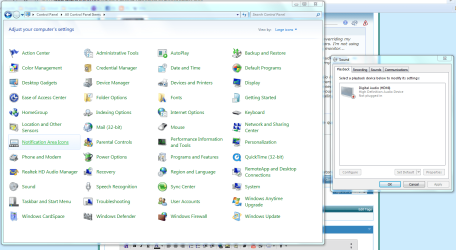
I've attached a screenshot of the control panel and sound controller opened. All disconnected/disabled devices are supposedly shown.

In the control panel, the Realtek HD Audio Manager should be the Realtek software that comes with the system. However, clicking it does nothing. I included an S/N of the Realtek folder in my C: drive.

I'm going to turn off the computer, remove my new vid card, plug my monitor into my integrated vid card >cry< and then uninstall the new vid card and the realtek software. Then I'll reinstall the Realtek software and see if sound plays. Then I'll boot up with the monitor plugged into the new vid card and see where shit gets hairy.

Thanks
 

Attachments

  • sound issue.PNG
    sound issue.PNG
    105.9 KB · Views: 52
  • sound issue 2.PNG
    sound issue 2.PNG
    36.6 KB · Views: 9
Resolved it.

In the BIOS under Audio I turned "Use Onboard Audio" from Auto to Enabled. Then Ran windows Updater, got newest Realtek Drivers (had uninstalled them and every other audio driver to find out problem, so presumably the drivers were not the issue at all, but still had to update), and audio now works.

Seems the problem was that the HD4670 really wanted to control the audio and use only HDMI...for some weird ass reason. Because even if the HDMI cable was used and plugged into my monitor or TV...how would that have affected my audio?
 
I would use the HDMI but it turns out the monitor only has DVI, not HDMI, input. FAIL, right? Anyway, I figure I can get an HDMI to DVI converter, possibly.

Ehemm... DVI is Full HD, made for monitors. Whats the fail in that? Everybody uses DVI. You do not want to convert HDMI to DVI if DVI is awesome. :sarc:
 

My Computer

Computer Manufacturer/Model Number
Acer Veriton m261 (modded)
OS
Win 7 pro 64-bit, Ubuntu 9.10 64-bit
CPU
Intel Core 2 Duo 2.60 Ghz
Motherboard
Whatever came with the system
Memory
4 gb ddr2 667 Mhz
Graphics Card(s)
NVidia Geforce 9400 GS 1 gb ddr2 550 mhz GPU
Sound Card
Intergrated
Monitor(s) Displays
samsung SyncMaster 2494 24"
Screen Resolution
1080p
Hard Drives
80gb - IDE
750gb - SATA II
PSU
whatever came with the system
Case
whatever came with the system
Cooling
whatever came with the system
Keyboard
Apple Aluminium (Awesome)
Mouse
Some awesome Dell mouse, really good.
Internet Speed
100mbps
Back
Top