Graphics Display Issues

jdixon

New member
Local time
7:48 PM
Messages
6
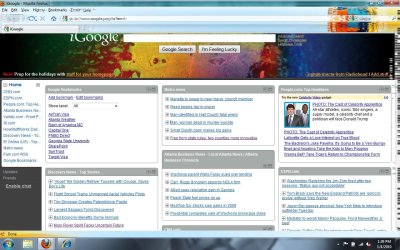
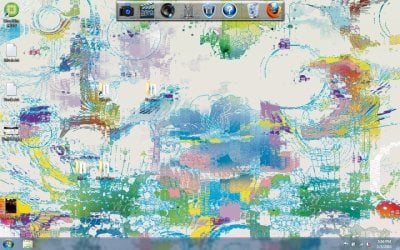
Ever since I updated to Windows 7, I've had graphics issues. The screen basically distorts itself. If it's extremely bad and takes up the whole screen, I can fix a window by minimizing and maximizing it, but there is always some residual distorting, usually at the top of the window. I've attached 2 screen shots. I've done Windows Update and it updated my driver, but that did not fix the problem.

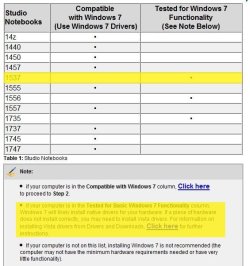
When I initially ran the Windows Upgrade Advisor before the installation, it said everything was fine. When trying to research this problem, I ran across some information on the Dell website. It states that my computer isn't "compatible with Windows 7" but has been "tested for Windows 7 functionality." It gives an explanation as to what this means but I don't quite understand it. I've attached a screen shot of the information from the Dell website with my computer highlighted.

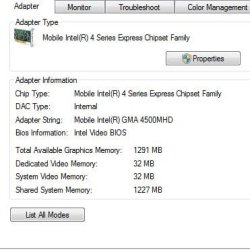
I've also attached screen shots of information about my graphics card and drivers. I don't really understand what it means or where to put it in my system specs, so I've attached what I could find.

Everything else has been working well - this has been my only problem.

One thing I did notice on the system requirements for Windows 7 was a "DirectX 9 graphics device with WDDM 1.0 or higher." Of course, I also don't understand what this means and I couldn't find anything about it on my computer.

Also, I found out today I have the option to upgrade to Windows 7 Professional for free through a class that I'm taking. Would doing this potentially fix the problem? Is there anything else I should be concerned about before I upgrade?

Thanks so much for all the help.
 

Attachments
  • Untitled2.jpg
    Untitled2.jpg
    260.9 KB · Views: 56
  • Untitled3.jpg
    Untitled3.jpg
    172.7 KB · Views: 47
  • dell1.JPG
    dell1.JPG
    54.3 KB · Views: 27
  • Capture.JPG
    Capture.JPG
    27 KB · Views: 24
  • Capture2.JPG
    Capture2.JPG
    14.7 KB · Views: 17

My Computer

Computer Manufacturer/Model Number
Dell Studio 1537
OS
Windows 7 Home Premium 32-bit (6.1, Build 7600)
CPU
Intel Core 2 Duo T5800 @ 2.00 GHz (2 CPUs)
Memory
3072MB RAM
Graphics Card(s)
Mobile Intel 4 Series Express Chipset Family
Hello,

I believe you are struggling with a drivers issue. Upgrading to Professional, while always a good idea, will not solve your problem. Download Speccy and post your video card. Then we can help you find drivers for it. Keep in mind, though, that it is possible there are no compatible drivers for your card.
 

My Computer

Computer Manufacturer/Model Number
Custom
OS
Windows 7 Professional x64
CPU
Intel i7 2600K OC'd @ 4620 MHz
Motherboard
Asus P8Z68-V Pro
Memory
16GB GSkill Sniper 2133 Mhz (4x4GB)
Graphics Card(s)
EVGA GeForce GTX 480 SuperClocked+
Sound Card
Realtek High Definition Audio
Monitor(s) Displays
2x Acer S273HLbmii 27"
Screen Resolution
2 x 1920x1080
Hard Drives
64GB Crucial M4 SSD

Storage: Hitachi 1TB 5400RPM, Samsung 1.5TB 5400RPM
PSU
Corsair HW Series 750w (modular)
Case
Cooler Master HAF 932 Advanced Blue Edition
Cooling
CM Hyper 212+ CPU cooler, 3x 230mm + 1x 140mm case fans
Keyboard
Logitech MK320 (wireless)
Mouse
Logitech MK320 (wireless)
Internet Speed
30 Mb/s : 2 Mb/s
This is all the information for my video card that it gives me:

1291 Mobile Intel 4 Series Express Chipset Family
Driver Version: 8.15.10.1872

What do you suggest if in fact there are no compatible drivers for my card?
 

My Computer

Computer Manufacturer/Model Number
Dell Studio 1537
OS
Windows 7 Home Premium 32-bit (6.1, Build 7600)
CPU
Intel Core 2 Duo T5800 @ 2.00 GHz (2 CPUs)
Memory
3072MB RAM
Graphics Card(s)
Mobile Intel 4 Series Express Chipset Family
I don't think that you need to worry.

The latest drivers Dell lists for your model are for Vista. Those would probably work.

Or, you could try the generic Intel drivers:

Intel® Graphics Driver for Windows 7* and Windows Vista* (exe)

(I'm not completely certain that these are the right ones, as Dell offers two sorts of drivers for onboard Intel graphics.)

There are also supposed to be drivers at Windows Update, but I assume that you'd already have them if they would install automatically.
 

My Computer

Computer Manufacturer/Model Number
homegrown
OS
Windows 7 Pro X64 SP1
CPU
Intel Core I7-3930k
Motherboard
Asus P9X79 Pro
Memory
16 GB Gskill DDR3-2133
Graphics Card(s)
eVGA GTX680
Sound Card
Creative X-Fi Titanium
Monitor(s) Displays
As PA246Q
Screen Resolution
1920 X 1200
Hard Drives
Corsair Force GT, 120 GB
WDC 1.5TB Caviar Black
PSU
PCP&C Silencer 750 Crossfire
Case
Silverstone FT02
Cooling
Noctua NH-D14
Keyboard
cheap Logitech USB
Mouse
Microsoft Intellimouse Explorer (old optical) USB
Internet Speed
6Mb cable
Other Info
Pioneer BDR-205
Samsung SH-203B
Monsoon 5.1 speakers
You mentioned you updated to Windows 7. Was that with a clean install or upgrade install?
 

My Computer

OS
Windows 7 64-bit
CPU
AMD Athlon II X4 620 Propus @ 2.6ghz
Motherboard
GIGABYTE GA-MA785GM-US2H
Memory
OCZ Platinum 4GB (2 x 2GB) 240-Pin DDR2 SDRAM DDR2 1066 (PC2
Graphics Card(s)
ATI Radeon HD 4200 [on board]
Sound Card
Realtek ALC889A [on board]
Case
APEVIA X-QPACK-NW-BK/420 Black Aluminum
I'm having exactly the same problem. I tried every available driver (directly from Intel or from the Dell support website) but none of them solved the problem - it just caused other issues and graphic errors.

@raf051888: I did a clean install.
 

My Computer

OS
Windows 7
Does nobody have a solution? Do you still have this problem jdixon or did you solve it in any way?
 

My Computer

OS
Windows 7
I still have the problem but I think I've gotten it figured out. I've been scouring the Dell support forums. This problem has been affecting most, if not all, of the Dell Studio 1537s that have upgraded to Windows 7. I don't exactly understand everything, but it seems to be that the drivers don't work well with the RAM. I have 3 GB, divided between a 1GB stick and a 2 GB stick. For some reason the mismatched RAM sticks and the drivers don't get along (I'm sure I'm not using the correct terminology but I'm trying to summarize what I've learned). For now, the problem can be fixed by upgrading to 4 GB of RAM (using 2 "matched" 2 GB sticks) or downgrading to 2 GB RAM (using only 1 stick). One person on the forums was able to get Dell to send him a 2 GB stick to upgrade at no charge but I am no longer under warranty so they wouldn't do that for me.

The problem will also seemingly be fixed with an updated BIOS for the computer - which Dell has not released yet. They were supposed to release it December 4 but did not. I was on the phone with Dell for a while today and they finally told me the updated BIOS will be released within the next month. They had also promised a December 4 release, so I don't know how much I can count on that new date. But since I'm no longer under warranty and I don't want to pay for a memory upgrade out of pocket, waiting seems to be my only option. The graphics distortion is annoying but I can live with it in the meantime.

This is why, as shown in one of my previous posts, the Dell website shows that the Studio 1537 is "tested for Windows 7 Functionality" rather than "Compatible with Windows 7." Once the updated BIOS is released, it should be "Compatible." Hopefully.

I hope this helps anyone else who has been having issues with this.

This is where I got my information from:
Studio 1537 graphics corruption with various Intel GMA 4500MHD drivers - DELL COMMUNITY
 

My Computer

Computer Manufacturer/Model Number
Dell Studio 1537
OS
Windows 7 Home Premium 32-bit (6.1, Build 7600)
CPU
Intel Core 2 Duo T5800 @ 2.00 GHz (2 CPUs)
Memory
3072MB RAM
Graphics Card(s)
Mobile Intel 4 Series Express Chipset Family
I still have the problem but I think I've gotten it figured out. I've been scouring the Dell support forums. This problem has been affecting most, if not all, of the Dell Studio 1537s that have upgraded to Windows 7.

That's great news, thanks a lot for your efforts!
I have a Dell Studio 1555 and I don't know if there are huge differences to the 1537, but I guess I'll give it a try it with 2GB RAM or wait for the BIOS update :)
 

My Computer

OS
Windows 7
Little status update: I have finally removed 1GB RAM and now it seems to work pretty well :)

Thanks again for your help everybody!
 

My Computer

OS
Windows 7
I am having this same problem with an HP Elitebook 6930p, which also used the Mobile intel 4 series express chipset. I have installed all the latest and past drivers and I still am having this exact problem with the display becoming distorted. I have read that disabling virtualization within your BIOS can fix this problem. I am trying it now and will see how it works after a few days.

Switching the display to 16bit to disable Aero also fix's this issue, but I would prefer to use the features Windows 7 provides.

if anyone has any other suggestions to try, please let us know.

Thank you.
Rob
 

My Computer

OS
Windows 7
Back
Top