Graphics, or IE, or Windows Mail problem

melissajkelly

New member
Local time
9:25 AM
Messages
10
I'm stumped as to what my problem is--starting by posting in the Graphic Card area.

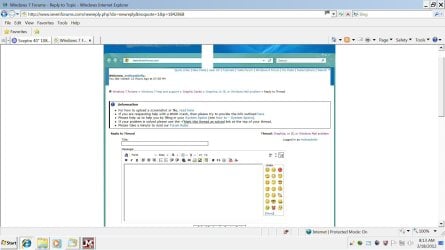
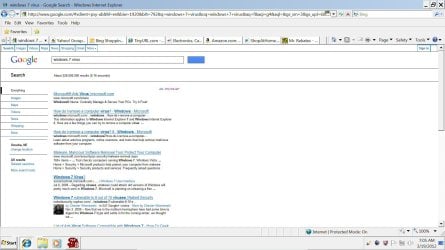
Two weeks ago my computer freaked out. I'm running W7 64 Bit. I had IE9 at the time but have since gone back to IE8; problem didn't correct itself. The problem is, everything I see on my screen in IE (and some in Sarari and Netscape) --- well, it's not appearing as it should. I see "outlines" around everything...text that should be displayed isn't displayed...pictures don't show up. The Facebook hme page is missing the Facebook logo...that kind of thing. (I have screen shots but am not sure how to share them--I'll try to attach a sample of a page in IE.)

I know ZIP about computers so I'm stumped on how to know what is wrong. I thought maybe I could reinstall IE and Windows Mail and see if that would fix it...but can't find how to do that either. All my auto-updates show that everything is updated?

Also---I have a lot of folders in Explorer with padlocks next to them, and they didn't use to have padlocks next to them! My "desktop" folder in Explorer is gone---thank goodness I had backed up the contents to another folder before that but it's not convenient to have the folder gone. My recycle bin vanished from the desktop, too, and has a padlock on it. Stumped.

Please--can anyone help???
 

My Computer

OS
Windows 7 64 Bit
Welcome to Windows Seven Forums.

The padlocks on the folders concerned is telling you that you cannot view the contents without first having permission.

Do not attempt to change these folders as they are not real folders, they are just junction points that Windows 7 uses to ensure compatibility with legacy applications.

For you to see them your folder options must have been changed so that you can see hidden folders and protected system files.

I'm just wondering if you have a virus infection and because of that I'd suggest running a scan with Malwarebytes, which is very good.

http://www.malwarebytes.org/products/malwarebytes_free
 

My Computer

Computer Manufacturer/Model Number
HP Pavilion Elite 495UK
OS
Windows 7 Ultimate SP1 64-Bit
CPU
Intel Core i7 870 @ 2.93GHz
Motherboard
MSI 2A9C (CPU1)
Memory
8Gb Dual-Channel DDR3 @ 664MHz
Graphics Card(s)
nVidia GeForce GTX 460 1024MB dedicated RAM
Sound Card
Realtek HD Audio
Monitor(s) Displays
HP2310i
Screen Resolution
1920 x 1080
Hard Drives
1x1954GB Hitachi HDS22020ALA 330 (RAID), 1x1954GB Hitachi External for backup and storage
PSU
460W
Case
HP Elite
Cooling
Air cooled
Keyboard
Logitech K750 solar-powered keyboard
Mouse
Logitech Wireless M180 mouse
Internet Speed
2Mb
Other Info
Pure Avanti Flow Internet Radio with iPod Dock, 64Gb iPod, HP USB Speakers, Sony MDR-V500 Headphones, Sony Vaio F-Series Laptop
Running Malwarebytes and photo

I'm trying to upload a photo again...this is an image of THIS message posting page in IE8---if it works, you can see all the "outlines" and can compare it with what you see when you go to reply.

Also---I forgot to say that when my PC turns on, I used to get a sold black screen (it's a Dell) where I would choose the user. Now it's a weird white color.

Anyway, I wanted to reply and say I'm running the Malwarebytes quick scan but it's halfway through and I have to leave for the day. So I'm going to shut it down and run the full scan instead, while I'm out, and see what it says when I return tonight. I will post the results. It should be mentioned, though, that I have "McAfee Internet Security" running at all times--does that stop malware?

I agree that now that you said that, it sure seems like a virus might be the culprit here. I'll report the results later. THANK YOU SO MUCH for your help.

Melissa
 

Attachments

  • forum.jpg
    forum.jpg
    145.8 KB · Views: 23

My Computer

OS
Windows 7 64 Bit
You're very welcome Melissa.

McAfee should stop malware getting through, but as with all anti-virus software, nothing is guaranteed.

Many of us have given up on utilities such as McAfee and Norton and use Microsoft's Security Essentials along Malwarebytes, both of which are free.

http://www.microsoft.com/en-us/default.aspx

If you do decide to use Microsoft Security Essentials, you will of course need to uninstall McAfee, as running two anti-virus programs side-by-side can lead to problems.

Anyway, post back with your results later and we can decide what to do then.
 

My Computer

Computer Manufacturer/Model Number
HP Pavilion Elite 495UK
OS
Windows 7 Ultimate SP1 64-Bit
CPU
Intel Core i7 870 @ 2.93GHz
Motherboard
MSI 2A9C (CPU1)
Memory
8Gb Dual-Channel DDR3 @ 664MHz
Graphics Card(s)
nVidia GeForce GTX 460 1024MB dedicated RAM
Sound Card
Realtek HD Audio
Monitor(s) Displays
HP2310i
Screen Resolution
1920 x 1080
Hard Drives
1x1954GB Hitachi HDS22020ALA 330 (RAID), 1x1954GB Hitachi External for backup and storage
PSU
460W
Case
HP Elite
Cooling
Air cooled
Keyboard
Logitech K750 solar-powered keyboard
Mouse
Logitech Wireless M180 mouse
Internet Speed
2Mb
Other Info
Pure Avanti Flow Internet Radio with iPod Dock, 64Gb iPod, HP USB Speakers, Sony MDR-V500 Headphones, Sony Vaio F-Series Laptop
Still running Malwarebytes...1 found

After 11 hours, Malwarebytes is still running. It's current checking the Windows folder, though, so maybe it's almost done. It says "1 found" but I can't tell you what it is (apparently) until it's done--but something was found. Fingers crossed we're on the road to fixing this thing, as it's been driving me nuts for 2 weeks!!!

I'll check it again in 2 hours...but may have to update you in the morning if it's still not done then. Thanks! ~Melissa
 

My Computer

OS
Windows 7 64 Bit
OK Melissa. If I'm not around I've no doubt someone else will help out on the thread, but I'll make a point of checking on your progress when I log on in the morning.
 

My Computer

Computer Manufacturer/Model Number
HP Pavilion Elite 495UK
OS
Windows 7 Ultimate SP1 64-Bit
CPU
Intel Core i7 870 @ 2.93GHz
Motherboard
MSI 2A9C (CPU1)
Memory
8Gb Dual-Channel DDR3 @ 664MHz
Graphics Card(s)
nVidia GeForce GTX 460 1024MB dedicated RAM
Sound Card
Realtek HD Audio
Monitor(s) Displays
HP2310i
Screen Resolution
1920 x 1080
Hard Drives
1x1954GB Hitachi HDS22020ALA 330 (RAID), 1x1954GB Hitachi External for backup and storage
PSU
460W
Case
HP Elite
Cooling
Air cooled
Keyboard
Logitech K750 solar-powered keyboard
Mouse
Logitech Wireless M180 mouse
Internet Speed
2Mb
Other Info
Pure Avanti Flow Internet Radio with iPod Dock, 64Gb iPod, HP USB Speakers, Sony MDR-V500 Headphones, Sony Vaio F-Series Laptop
3 found---here's the log

It ended up finding 3...below is the log. I'll also try to attach the screen capture. Now what?? Click on "remove" to try to remove them?

Malwarebytes Anti-Malware 1.60.1.1000
www.malwarebytes.org
Database version: v2012.03.18.02
Windows 7 Service Pack 1 x64 NTFS
Internet Explorer 8.0.7601.17514
Melissa :: OFFICE [administrator]
3/18/2012 8:23:34 AM
mbam-log-2012-03-18 (20-51-36).txt
Scan type: Full scan
Scan options enabled: Memory | Startup | Registry | File System | Heuristics/Extra | Heuristics/Shuriken | PUP | PUM
Scan options disabled: P2P
Objects scanned: 1457658
Time elapsed: 12 hour(s), 11 minute(s), 18 second(s)
Memory Processes Detected: 0
(No malicious items detected)
Memory Modules Detected: 0
(No malicious items detected)
Registry Keys Detected: 0
(No malicious items detected)
Registry Values Detected: 0
(No malicious items detected)
Registry Data Items Detected: 2
HKCR\scrfile\shell\open\command| (Broken.OpenCommand) -> Bad: (NOTEPAD.EXE %1) Good: ("%1" /S) -> No action taken.
HKCR\regfile\shell\open\command| (Broken.OpenCommand) -> Bad: (NOTEPAD.EXE %1) Good: (regedit.exe "%1") -> No action taken.
Folders Detected: 0
(No malicious items detected)
Files Detected: 1
C:\Melissa\mondaysucks.exe (JokeApp.NotFunny) -> No action taken.
(end)

Thanks! ~Melissa
 

Attachments

  • malwarefound1.jpg
    malwarefound1.jpg
    77.7 KB · Views: 20

My Computer

OS
Windows 7 64 Bit
I would go ahead a let Malwarebytes remove the three it found. Then reboot and see if you are still having the same problem.
 

My Computer

Computer Manufacturer/Model Number
Custom build
OS
Windows 7 Ultimate x64 SP1
CPU
i7 960 3.20Ghz
Motherboard
Gigabyte X58A UD3R
Memory
16GB Crucial Ballistix DDR3 Triple Channel
Graphics Card(s)
Nvidia GeForce GTX 670 ftw
Sound Card
On-Broad
Monitor(s) Displays
27" Samsung HD
Screen Resolution
1920x1080
Hard Drives
Crucial m4 128GB SSD
WD 1TB Caviar Black HD
Seagate 2TB External drive
PSU
850W Thermaltake
Case
CoolerMaster HAF 932 Advanced
Cooling
Corsair H80,
Internet Speed
DSL
Rebooted, problem still exists

Okay...I quarantined those 3 problems succesfully (see below) and rebooted. Windows glitched on the reboot 3 times but finally sucessfully loaded (my heart was in my throat each time). The gray/white part during the boot (Dell) is back to being the normal black.

Good news: the little padlocks went away.

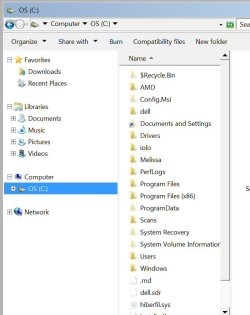
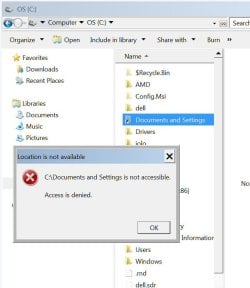
Bad news: I still have a "?" before my Recycle Bin in Explorer. And when I click on "Documents and Settings" it says "access is denied." Certain other folders are grayed out in Explorer and when I click it says I don't have permissions...so something is still wrong with permissions settings??

Log and screens below.

Thanks! ~Melissa

Malwarebytes Anti-Malware 1.60.1.1000
www.malwarebytes.org
Database version: v2012.03.18.02
Windows 7 Service Pack 1 x64 NTFS
Internet Explorer 8.0.7601.17514
Melissa :: OFFICE [administrator]
3/18/2012 8:23:34 AM
mbam-log-2012-03-18 (08-23-34).txt
Scan type: Full scan
Scan options enabled: Memory | Startup | Registry | File System | Heuristics/Extra | Heuristics/Shuriken | PUP | PUM
Scan options disabled: P2P
Objects scanned: 1457658
Time elapsed: 12 hour(s), 11 minute(s), 18 second(s)
Memory Processes Detected: 0
(No malicious items detected)
Memory Modules Detected: 0
(No malicious items detected)
Registry Keys Detected: 0
(No malicious items detected)
Registry Values Detected: 0
(No malicious items detected)
Registry Data Items Detected: 2
HKCR\scrfile\shell\open\command| (Broken.OpenCommand) -> Bad: (NOTEPAD.EXE %1) Good: ("%1" /S) -> Quarantined and repaired successfully.
HKCR\regfile\shell\open\command| (Broken.OpenCommand) -> Bad: (NOTEPAD.EXE %1) Good: (regedit.exe "%1") -> Quarantined and repaired successfully.
Folders Detected: 0
(No malicious items detected)
Files Detected: 1
C:\Melissa\mondaysucks.exe (JokeApp.NotFunny) -> Quarantined and deleted successfully.
(end)
 

Attachments

  • afterrepair.jpg
    afterrepair.jpg
    190.3 KB · Views: 11
  • recyclebin.jpg
    recyclebin.jpg
    53.1 KB · Views: 9
  • docsettings.jpg
    docsettings.jpg
    48.5 KB · Views: 7

My Computer

OS
Windows 7 64 Bit
Still graphics problems, too

I'm sorry...and I also meant to say (in my reply above) that I still have the same graphics problems in IE and Windows Mail. Windows Mail has thick black lines dividing my mailboxes. IE8 has "boxes" around everything--like I'm seeing the webpage sections--and links and graphcis are missing. :cry:
 

My Computer

OS
Windows 7 64 Bit
I'm sorry...and I also meant to say (in my reply above) that I still have the same graphics problems in IE and Windows Mail. Windows Mail has thick black lines dividing my mailboxes. IE8 has "boxes" around everything--like I'm seeing the webpage sections--and links and graphcis are missing. :cry:
sounds like whatever has been accessing your system (virus or otherwise) has restricted access to your temporary internet files, seeing as your temporary internet files are located in documents folder and restricted access is there, it would make sense, firstly i would (just as a test) create a new user account on windows and log in and access the relevant websites and see if the issue is still there.

info on how to create a user acount can be found here : http://www.sevenforums.com/tutorials/181024-user-account-create.html
 

My Computer

Computer type
PC/Desktop
Computer Manufacturer/Model Number
Custom Build
OS
Windows 7 Ultimate x64 SP1
CPU
Intel Q6600 @ 2.6Ghz
Motherboard
Evga NF78-CK-132-A 3-Way SLI
Memory
4Gb DDR2 Corsair Dominator @ 800Mhz 5-5-5-15
Graphics Card(s)
EVGA 560 GTX SC FTW 1GB
Sound Card
Realtek HD 7.1 Audio, Plantronics GameCom780 7.1 Headset
Monitor(s) Displays
Dell S2409W
Screen Resolution
1920 x 1080
Hard Drives
SanDisk SDSSDHII-120G-G25 120GB SSD
Samsung 7200RPM 750Gb SATA
Samsung 850 EVO 120GB SSD
Western Digital Green 1TB 7200RPM
PSU
Xigmatek 750W Quad sli quad core 80% eff
Case
Antec 900 Gaming Case
Cooling
Zalman CNPS9700-NT NVIDIA Tritium
Keyboard
Logitech generic keyboard, MS wireless keyboard
Mouse
Razor Lachesis Banshee V2 Blue, 4000DPI, MS wireless mouse
Internet Speed
152Mb Virgin Media Fibre Optic
Antivirus
Microsoft Security Essentials
Browser
Google Chrome
Other Info
Wireless Gaming Receiver for Windows, Wireless Xbox 360 Pad
Temporary internet files?

At the risk of asking a dumb question...do all of my installed browsers use the SAME temporary internet files? Because if they don't...I don't think this will help, as the problem is occuring IE, Safari, and Netscape.

Also--it's occuring in Windows Mail which I use with Outlook. When I open Outlook I get all the black borders, etc.

Thanks in advance for clarifying for me. ~Melissa
 

My Computer

OS
Windows 7 64 Bit
I'm inclined to think your computer is still infected.

In the event we can't get rid of it how do you feel about a re-install of Windows?
 

My Computer

Computer Manufacturer/Model Number
HP Pavilion Elite 495UK
OS
Windows 7 Ultimate SP1 64-Bit
CPU
Intel Core i7 870 @ 2.93GHz
Motherboard
MSI 2A9C (CPU1)
Memory
8Gb Dual-Channel DDR3 @ 664MHz
Graphics Card(s)
nVidia GeForce GTX 460 1024MB dedicated RAM
Sound Card
Realtek HD Audio
Monitor(s) Displays
HP2310i
Screen Resolution
1920 x 1080
Hard Drives
1x1954GB Hitachi HDS22020ALA 330 (RAID), 1x1954GB Hitachi External for backup and storage
PSU
460W
Case
HP Elite
Cooling
Air cooled
Keyboard
Logitech K750 solar-powered keyboard
Mouse
Logitech Wireless M180 mouse
Internet Speed
2Mb
Other Info
Pure Avanti Flow Internet Radio with iPod Dock, 64Gb iPod, HP USB Speakers, Sony MDR-V500 Headphones, Sony Vaio F-Series Laptop
Running virus check again

I did start another virus check at home before I left for work today. I'll try that again.

I tend to agree..."something" isn't right!

As for reinstalling Windows...I bought the PC 2-3 years ago and don't recall whether or not I have disks from Dell. I would need to back up the files on my current PC and then try that if I have the disks...still afraid it would remain infected, though... ?

Melissa
 

My Computer

OS
Windows 7 64 Bit
A clean install that involves wiping the hard drive and recreating a new partition would get rid of any remaining viruses.

Even if you can't find Dell's recovery discs you can carry out a clean install using the product key on your COA sticker to activate Windows.

You would probably need to download any missing drivers from Dell Support.

Have a look at this excellent tutorial.

http://www.sevenforums.com/tutorials/219487-clean-reinstall-factory-oem-windows-7-a.html#post1839164

If you decide to wipe your hard drive and start afresh we can give you any assistance you might need.
 

My Computer

Computer Manufacturer/Model Number
HP Pavilion Elite 495UK
OS
Windows 7 Ultimate SP1 64-Bit
CPU
Intel Core i7 870 @ 2.93GHz
Motherboard
MSI 2A9C (CPU1)
Memory
8Gb Dual-Channel DDR3 @ 664MHz
Graphics Card(s)
nVidia GeForce GTX 460 1024MB dedicated RAM
Sound Card
Realtek HD Audio
Monitor(s) Displays
HP2310i
Screen Resolution
1920 x 1080
Hard Drives
1x1954GB Hitachi HDS22020ALA 330 (RAID), 1x1954GB Hitachi External for backup and storage
PSU
460W
Case
HP Elite
Cooling
Air cooled
Keyboard
Logitech K750 solar-powered keyboard
Mouse
Logitech Wireless M180 mouse
Internet Speed
2Mb
Other Info
Pure Avanti Flow Internet Radio with iPod Dock, 64Gb iPod, HP USB Speakers, Sony MDR-V500 Headphones, Sony Vaio F-Series Laptop
No virus

The re-scan ran yesterday while I was at work, and no virus was found.

I'll watch the tutorial at work today...but I'm not clear on how on earth I would reinstall Windows if I don't have disks with Windows on them? If my drive is formatted, I doubt my cable modem would work to give me a "live" connection...and I wouldn't be able to get help from you on the boards, either. :cry:
 

My Computer

OS
Windows 7 64 Bit
Just read through the tutorial carefully Melissa.

Your computer came with it's own Windows product key, which is your license to use the software.

The first link explains how to download an official Windows 7 ISO, which you'll burn to a blank DVD before installing it on your computer, and then using your COA product key to activate it.

We'll help you each step of the way if there's anything you're not sure of.

Providing you download any drivers you need for an internet connection before your format your hard drive you'll manage just fine.

Just make sure you have something like a USB flash drive to save the drivers to, the most important being those for your cable modem and your network adapter.
 

My Computer

Computer Manufacturer/Model Number
HP Pavilion Elite 495UK
OS
Windows 7 Ultimate SP1 64-Bit
CPU
Intel Core i7 870 @ 2.93GHz
Motherboard
MSI 2A9C (CPU1)
Memory
8Gb Dual-Channel DDR3 @ 664MHz
Graphics Card(s)
nVidia GeForce GTX 460 1024MB dedicated RAM
Sound Card
Realtek HD Audio
Monitor(s) Displays
HP2310i
Screen Resolution
1920 x 1080
Hard Drives
1x1954GB Hitachi HDS22020ALA 330 (RAID), 1x1954GB Hitachi External for backup and storage
PSU
460W
Case
HP Elite
Cooling
Air cooled
Keyboard
Logitech K750 solar-powered keyboard
Mouse
Logitech Wireless M180 mouse
Internet Speed
2Mb
Other Info
Pure Avanti Flow Internet Radio with iPod Dock, 64Gb iPod, HP USB Speakers, Sony MDR-V500 Headphones, Sony Vaio F-Series Laptop
To be honest Melissa, it's foolproof, I can understand if it was windows XP, but the install is more streamlined for everybody, even a child could install windows :-)

The modem will be functional because most modems use ethernet which is plug and play, and all relevant drivers get installed automatically nowadays, should be a simple and smooth transition.
 

My Computer

Computer type
PC/Desktop
Computer Manufacturer/Model Number
Custom Build
OS
Windows 7 Ultimate x64 SP1
CPU
Intel Q6600 @ 2.6Ghz
Motherboard
Evga NF78-CK-132-A 3-Way SLI
Memory
4Gb DDR2 Corsair Dominator @ 800Mhz 5-5-5-15
Graphics Card(s)
EVGA 560 GTX SC FTW 1GB
Sound Card
Realtek HD 7.1 Audio, Plantronics GameCom780 7.1 Headset
Monitor(s) Displays
Dell S2409W
Screen Resolution
1920 x 1080
Hard Drives
SanDisk SDSSDHII-120G-G25 120GB SSD
Samsung 7200RPM 750Gb SATA
Samsung 850 EVO 120GB SSD
Western Digital Green 1TB 7200RPM
PSU
Xigmatek 750W Quad sli quad core 80% eff
Case
Antec 900 Gaming Case
Cooling
Zalman CNPS9700-NT NVIDIA Tritium
Keyboard
Logitech generic keyboard, MS wireless keyboard
Mouse
Razor Lachesis Banshee V2 Blue, 4000DPI, MS wireless mouse
Internet Speed
152Mb Virgin Media Fibre Optic
Antivirus
Microsoft Security Essentials
Browser
Google Chrome
Other Info
Wireless Gaming Receiver for Windows, Wireless Xbox 360 Pad
Hesitate to reinstall Windows 7

I should start by saying it got busy at work so I wasn't able to watch the tutorial today. Keep in mind I can't watch it on the home PC because my browser is messed up. I will try to watch it tomorrow at work.

The reason I hesitate to reinstall Windows 7 is because every other time I've ever had to reinstall Windows, I've been without my PC for several weeks and ended up paying someone to fix everything. It has never gone smoothly. :( And I always end up losing something important!

I'm not at all familiar with "where stuff is saved" in Windows 7---so that I can back that stuff up and put it back after the reinstall. Like my IE favorites, and my e-mail (which I get to by clicking into Outlook, but then it says I'm using Windows Live Mail).

And if I do the ISO, will it keep the virus and put it right back on my system?

What about updates? I had a contract with Dell so it automatically updated everything from the day when I purchased the PC...will everything be out of date?

I use a crappy cable modem service that never connects after doing a reinstall. So I know I won't have Internet until I can get ahold of someone there to walk me through fixing it after the resintall...and if that requires drivers, I'll be trying to find a library or Kinko's that will let me download and save files to disk or flash drive (assuming my flash drive works after reinstall) to be able to bring things home---only to find out I'm missing "one more file" that I have to drive back and get. Ugh---it's been a hassle every time I've had to do this in the past.

I am so upset. I have no idea WHERE this would have/could have come from! With McAfee running. And System Mechanic. :cry:

Thanks for the help. I will let you know what I think after I'm able to read the instructions/watch the tutorials. ~Melissa
 

My Computer

OS
Windows 7 64 Bit
Back
Top