graphics, video, and aero problems after installing 7

stephynee

New member
Local time
9:14 AM
Messages
8
Ever since I upgraded to windows 7 from vista I've been having a lot of graphical problems, most of which were never an issue before installation.

One issue has been with aero. Moving windows about looks really choppy and slow. I was using Aero with windows vista so I don't see why there would suddenly be a problem? I've also lost all ability to play videos from any media player in fullscreen. The videos lag so much that it's pretty much unbearable to watch.
I haven't tried much in terms of gaming, but I'm pretty sure running a game at this point would be enough to make my computer explode. Even simple games like solitaire don't run smoothly.

One thing I've noticed is that if I lower my computer's resolution I can watch videos again, but I've never had to do this before, what gives?

I've tried a tons of suggestions from around the internet and nothing works. All of my drivers have been updated, and I've even done a clean install of windows 7, which I think actually made the problems worse (I wasn't have video problems until I re-installed)

Some computer specs: I'm using a new HP Pavillion (p6130y) (purchased in August) with 8GB RAM, Nvidia Geforce 9100 graphics card, amd phenom x49750 processor, and a 24 inch monitor if that means anything.

This computer is practically new and ran so amazingly before I upgraded. Any help would be sooo greatly appreciated.
 

My Computer My Computer

OS
windows 7

My Computer My Computer

Computer type
PC/Desktop
Computer Manufacturer/Model Number
Self Built
OS
Win 10 Pro x64
CPU
Intel I5-2500K @3.3GHz
Motherboard
Asrock P67 Extreme4
Memory
16GB G.Skill Ripjaws X (4x4GB)
Graphics Card(s)
EVGA GeForce 750 Ti SC 2GB
Sound Card
ASUS Xonar DG 5.1 Channels 24-bit 96KHz PCI Interface Sound
Monitor(s) Displays
auria eq2367
Screen Resolution
1920 x 1080
Hard Drives
250GB Samsung 850 EVO SSD
1TB WD Blue
1TB Hitachi
PSU
SeaSonic X 650W 80 Plus Gold
Case
Corsair Obsidian 750D
Cooling
Corsair H60, Three 140mm case fans
Keyboard
Logitech Wireless Keyboard K520
Mouse
Logitech Wireless Mouse M310
Internet Speed
Wave Broadband ~ 100 dn 5 up
Antivirus
Windows Defender, Malwarebytes Premium
Browser
Edge, IE11, Chrome
Other Info
Laptop specs: HP g7-1365dx /
CPU: AMD A6-3420M APU with Radeon(tm) HD Graphics /
RAM: Crucial 8Gb (2x4Gb) /
SSD: Crucial M4-CT128M4SSD2 ATA Device/ FW 000F /
GFX: AMD Radeon HD 6520G /
OS: Windows 10 Pro x64
Yup, multiple times in different ways. (through the computer, through the website, uninstall and reinstalled, etc) I feel like I've tried all the basic stuff posted around the internet like updating drivers, but none of it's actually working for me.
 

My Computer My Computer

OS
windows 7
Hi stephynee

Noticed that you performed an upgrade from Vista.
Lots of people have had issues with an upgrade installation and have found that the issues are usually resolved by a new installation of 7 (format of existing OS, then new installation of 7).

If you feel you may need to go on this route, the following tutorial may help:

Clean Install Windows 7 (credits to Brink)

Be sure to back up all your essential data (photos, documents etc) before you proceed with the clean installation.

Hope this helps in resolving your issues


Edit : Re-read your post and saw that you have performed a clean install.:doh:
Have you tried a different driver for your card? How about trying the original media that came with the card?

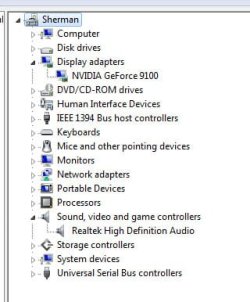
BTW, could you post a pic of your device manager with the display adapters and sound, video and game controllers bars expanded?
 
Last edited:

My Computer My Computer

Computer Manufacturer/Model Number
Custom
OS
Win7 HP (x64)/Win7 Ultimate (x64)
CPU
Core i7 920
Motherboard
Intel X58
Memory
6 x 2GB Corsair XMS3
Graphics Card(s)
CF HD4890
Sound Card
Asus Xonar
Monitor(s) Displays
Dell 2408WFP
Screen Resolution
1920 x 1200
Hard Drives
2 x 150GB WDC Velociraptors (Raid 0)
1 x 1TB Seagate
1 x 1.5TB Seagate
PSU
Corsair HX1000W
Case
Antec 1200
Keyboard
Razer Lycosa/N52te
Mouse
Razer Lachesis
I've tried so many different drivers for my card that I have lost track by now, haha. So far the drivers I am using now (the latest nvidia drivers) are giving me the best windows experience index for graphical stuff--- but it's still pretty crappy considering everything worked perfectly before 7.

I've attached a picture of my device manager like you asked---I think. I haven't posted on a message board in so long that I've forgotten how to do all of this. Try not to laugh at what I named my computer.

I've also noticed that my computer is running smoothly today. I played a video and it was fine, and Aero doesn't seem to be lagging on me. This has happened before though, where I've been tricked into thinking all is well until everything goes to crap again.

Thanks for all the help so far! =)
 

Attachments

  • devicemanager.jpg
    devicemanager.jpg
    42.8 KB · Views: 30

My Computer My Computer

OS
windows 7

My Computer My Computer

OS
Windows 7 Home Premium (64-bit) SP1 RTM
CPU
Intel Core2Duo [email protected]
Motherboard
ASUS P5Q (BIOS 2208)
Memory
2x2Gb GEIL DDR2 800 4-4-4-12 @ 1.8v
Graphics Card(s)
ASUS HD4850 512Mb @700/1100
Sound Card
Realtek ALC1200 @ Intel 82801JB ICH10
Monitor(s) Displays
Samsung Syncmaster T220
Screen Resolution
1680x1050x32@60Hz
Hard Drives
Seagate ST3500410AS SATA300 500Gb
Hitachi HDS721032CLA362 SATA300 320Gb
PSU
Antec NeoPower 650W 3.3v@24A/5v@24A/12v@19A/12v@19A/12v@19A
Internet Speed
3Mbps
Did that already too, LOL. Apparently I'm a hopeless case.

I guess I should mention that I've been trying to fix my computer since December, so I've already tried a variety of different things in an effort solve everything. I finally decided to just make a post myself because I've run out of ideas at this point.
 
Last edited:

My Computer My Computer

OS
windows 7
Did that already too, LOL. Apparently I'm a hopeless case.

Never a hopeless case here stephynee,
I'm certain someone here can help you get this all straightened out, They just haven't seen your thread yet.

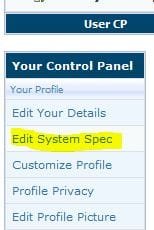
It will help also if you can fill out your system specs in User CP.
 

Attachments

  • Capture.JPG
    Capture.JPG
    14.9 KB · Views: 371

My Computer My Computer

Computer type
PC/Desktop
Computer Manufacturer/Model Number
Self Built
OS
Win 10 Pro x64
CPU
Intel I5-2500K @3.3GHz
Motherboard
Asrock P67 Extreme4
Memory
16GB G.Skill Ripjaws X (4x4GB)
Graphics Card(s)
EVGA GeForce 750 Ti SC 2GB
Sound Card
ASUS Xonar DG 5.1 Channels 24-bit 96KHz PCI Interface Sound
Monitor(s) Displays
auria eq2367
Screen Resolution
1920 x 1080
Hard Drives
250GB Samsung 850 EVO SSD
1TB WD Blue
1TB Hitachi
PSU
SeaSonic X 650W 80 Plus Gold
Case
Corsair Obsidian 750D
Cooling
Corsair H60, Three 140mm case fans
Keyboard
Logitech Wireless Keyboard K520
Mouse
Logitech Wireless Mouse M310
Internet Speed
Wave Broadband ~ 100 dn 5 up
Antivirus
Windows Defender, Malwarebytes Premium
Browser
Edge, IE11, Chrome
Other Info
Laptop specs: HP g7-1365dx /
CPU: AMD A6-3420M APU with Radeon(tm) HD Graphics /
RAM: Crucial 8Gb (2x4Gb) /
SSD: Crucial M4-CT128M4SSD2 ATA Device/ FW 000F /
GFX: AMD Radeon HD 6520G /
OS: Windows 10 Pro x64
Nvidia Geforce 9100 graphics card eh??

when u check ur adapter through device manager what is listed? does the card show up as being recognized.

u may have to uninstall the driver then reinstall them
 

My Computer My Computer

OS
Windows 7 Ultimate 64bit
CPU
AMD Phenom II X4 945 @3.0ghz
Motherboard
Asrock
Memory
4gb kingston hyperX
Graphics Card(s)
1gb Radeon HD 5670
Welcome stephynee :D

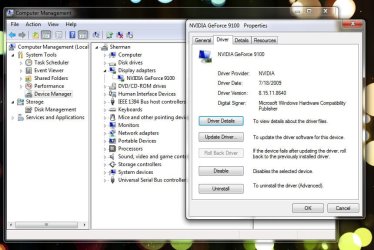
Can you give us a screen snip of your video driver properties ?

Start :ar: Device Manager :ar: Display adapter :ar: nVidia GeForce :ar: Driver (tab)
 

Attachments

  • GeForce_7300_properties.JPG
    GeForce_7300_properties.JPG
    82.4 KB · Views: 16

My Computer My Computer

Computer type
PC/Desktop
Computer Manufacturer/Model Number
Built them myself, Science Experiments !
OS
Win7 Enterprise, Win7 x86 (Ult 7600), Win7 x64 Ult 7600, TechNet RTM on AMD x64 (2.8Ghz)
CPU
AMD fx8350 4ghz, AMD-32 2400mhz, AMD-64 3200mhz, AMDx64 2.8G
Motherboard
SIS 755, ECS-K8M890M-M (Ult 7600), GigaByte & others
Memory
2gb, 4gb on the Ult 7600, 4gb on Technet RTM, 32gb on FX8350
Graphics Card(s)
Draw my own Graphics, several nVidia cards
Sound Card
on motherboard
Monitor(s) Displays
19" flat scr, 28" I-Inc widescr,22" Emprex Widescr, 23" Acer
Screen Resolution
1280 x 1024, 1440 x 900, 1920 x 1080
Hard Drives
6 pata Ide HD's & 2 Sata HD's
added 80gb external on Ult 7600 computer,
numerous extra 1tb, 2TB, 3Tb SATA HD's
A collection of ext HD Docks w/ HDs
PSU
430w, 550w, 600w, 700, 800, etc
Case
All Generic Full Towers
Cooling
Open Air & a few fans, some w/ colored LEDs
Keyboard
Compaq & Dell recycled from GoodWill
Mouse
Made in China Optical Wired Mouse
Internet Speed
Fast Cable InterNet
Antivirus
AVG Free on 24 different Desktops, NO Problems!
Browser
IE 8 is preferred, but use FireFox sometimes
Other Info
Linksys Routers, switches, & Hubs
Too Many USB Flash Drives to count, Biggest is 64GB !
Eight computers in my home network.
Sixteen computers at my business network.
Linked via TeamViewer !
Lots of old used spare computer parts everywhere!
Krispy, I have uninstalled and reinstalled my driver... a lot. Unless I am doing it wrong, it hasn't really made much difference.

Right so, attached driver info... which has changed a lot yesterday alone because I tried out like 3 different drivers haha.

Also, unrelated to drivers, the resolution I use is 1920x1080 because I have a fairly large monitor. When I lower the resolution, I've noticed my performance increases and all of my problems are fixed (videos play without choppiness, yada yada...). But obviously everything looks like crap and gets stretched.

I searched around to see if anyone else was having problems with large monitors and windows 7 performance, and couldn't find anything, so I suppose that isn't the problem, but I thought it was worth mentioning. So basically if I want to watch a movie on my computer I have to lower the resolution beforehand, which is annoying.

Anyway, I talk too much...type too much? I don't know. Thanks for being so patient everyone, and not really mean like people in other forums.
 

Attachments

  • driverstuff.jpg
    driverstuff.jpg
    95.8 KB · Views: 7

My Computer My Computer

OS
windows 7
"Also, unrelated to drivers, the resolution I use is 1920 x 1080 because I have a fairly large monitor"


So which 24" monitor have you got?
Did you install the Digital Monitor Driver?
How are you connecting to it - DVi? HDMi lead?

Some (UK) HP 24" monitors @ native settings!

Lp2475w = 1920 x 1200 @ 85hz
KD911A4 = 1920 x 1200 @ 60 Hz
W2408H = 1920 x 1200 @ 60hz
 

My Computer My Computer

Computer type
PC/Desktop
Computer Manufacturer/Model Number
D.I.Y.
OS
WIN7 Ultimate 64bit
CPU
AMD FX8150/Trinity A10-5700
Motherboard
Asus Sabertooth v.1 /Asus F2A85-M Pro
Memory
G-Skill 2400 x2 @ 1866 (both pc's)
Graphics Card(s)
Sapphire (factory OC version) AMD 7770
Sound Card
onboard
Monitor(s) Displays
T260 Samsung
Screen Resolution
1920x1080
Hard Drives
Western Digital Sata 2TB/1TB Caviar Blacks
Buffalo 1TB usb (excellent drive)
PSU
Be-Quiet 700W E-9/Be-Quiet 550W E-9(E-9 = built by FSP)
Case
Antec P183/Antec P180mini
Cooling
x2 Xigmatek SXHH7-U01 + C-Master R4-EXBB-20PK-R0 120mm Fans
Keyboard
Cherry
Mouse
MS Explorer 3.0
Other Info
LG Blu ray combo
Pioneer 207D/208 Blu ray burners
Just checked monitor. I have the HP w2338h 23" (sorry, I thought it was 24"). And yes I have installed the drivers. I'm connecting it through..err...the plug it came with?
 
Last edited:

My Computer My Computer

OS
windows 7
"Also, unrelated to drivers, the resolution I use is 1920 x 1080 because I have a fairly large monitor"


So which 24" monitor have you got?
Did you install the Digital Monitor Driver?
How are you connecting to it - DVi? HDMi lead?

Some (UK) HP 24" monitors @ native settings!

Lp2475w = 1920 x 1200 @ 85hz
KD911A4 = 1920 x 1200 @ 60 Hz
W2408H = 1920 x 1200 @ 60hz

Just checked monitor. I have the HP w2338h 23" (sorry, I thought it was 24"). And yes I have installed the drivers. I'm connecting it through..err...the plug it came with?

Here's the specs on that monitor,
Product Specifications HP w2338h 23 inch LCD Monitor - HP Customer Care (United States - English)
You've got the right resolution set.

Looking at your driver properties you posted above, Those aren't the most recent drivers. That may or may not be your problem.

I know you're being asked alot of questions but in order to try and give you the best solution for your problem, it helps to know what you have and have not tried, what sort of hardware you have and even what version of 7 you are using, and 32 or 64 bit, that info will help alot.

That being said, If you go to this page and try to update your drivers can you post back your results. You can manually search or have it auto search for updated drivers.
Drivers - Download NVIDIA Drivers

Let us know the results,
Derek
 

My Computer My Computer

Computer type
PC/Desktop
Computer Manufacturer/Model Number
Self Built
OS
Win 10 Pro x64
CPU
Intel I5-2500K @3.3GHz
Motherboard
Asrock P67 Extreme4
Memory
16GB G.Skill Ripjaws X (4x4GB)
Graphics Card(s)
EVGA GeForce 750 Ti SC 2GB
Sound Card
ASUS Xonar DG 5.1 Channels 24-bit 96KHz PCI Interface Sound
Monitor(s) Displays
auria eq2367
Screen Resolution
1920 x 1080
Hard Drives
250GB Samsung 850 EVO SSD
1TB WD Blue
1TB Hitachi
PSU
SeaSonic X 650W 80 Plus Gold
Case
Corsair Obsidian 750D
Cooling
Corsair H60, Three 140mm case fans
Keyboard
Logitech Wireless Keyboard K520
Mouse
Logitech Wireless Mouse M310
Internet Speed
Wave Broadband ~ 100 dn 5 up
Antivirus
Windows Defender, Malwarebytes Premium
Browser
Edge, IE11, Chrome
Other Info
Laptop specs: HP g7-1365dx /
CPU: AMD A6-3420M APU with Radeon(tm) HD Graphics /
RAM: Crucial 8Gb (2x4Gb) /
SSD: Crucial M4-CT128M4SSD2 ATA Device/ FW 000F /
GFX: AMD Radeon HD 6520G /
OS: Windows 10 Pro x64
Just checked monitor. I have the HP w2338h 23" (sorry, I thought it was 24"). And yes I have installed the drivers. I'm connecting it through..err...the plug it came with?

Is this the type of lead/connector you use with your graphic card outlet/plug into the back of your monitor?

You have HDMI (photos on link) OR VGA

Look at the photos on the page!
Google
 

My Computer My Computer

Computer type
PC/Desktop
Computer Manufacturer/Model Number
D.I.Y.
OS
WIN7 Ultimate 64bit
CPU
AMD FX8150/Trinity A10-5700
Motherboard
Asus Sabertooth v.1 /Asus F2A85-M Pro
Memory
G-Skill 2400 x2 @ 1866 (both pc's)
Graphics Card(s)
Sapphire (factory OC version) AMD 7770
Sound Card
onboard
Monitor(s) Displays
T260 Samsung
Screen Resolution
1920x1080
Hard Drives
Western Digital Sata 2TB/1TB Caviar Blacks
Buffalo 1TB usb (excellent drive)
PSU
Be-Quiet 700W E-9/Be-Quiet 550W E-9(E-9 = built by FSP)
Case
Antec P183/Antec P180mini
Cooling
x2 Xigmatek SXHH7-U01 + C-Master R4-EXBB-20PK-R0 120mm Fans
Keyboard
Cherry
Mouse
MS Explorer 3.0
Other Info
LG Blu ray combo
Pioneer 207D/208 Blu ray burners
I don't mind answering a lot of questions (if you're referring to my frustration in the edit reason, that was me being annoyed that I needed to provide a reason for editing haha). Whatever it takes to get my computer back to its normal state.

I know I'm not using the most recent drivers. I've tried the newest ones from the Nvidia website and it didn't change anything. The drivers I am using now are the ones recommended on the HP website for my computer with Windows 7.

I have Windows 7 Home Premium installed (64bit)

Neo, just checked my plugs. It looks like VGA to me.
 

My Computer My Computer

OS
windows 7
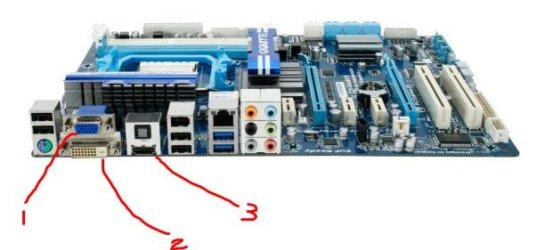
Here are typical video connections: Can be on motherboard or on video card !

1. Standard VGA
2. DVI
3. HDMI port


What connection do you have on the computer or video card ?

and what connections available on the monitor ?
 

Attachments

  • Video connectors.JPG
    Video connectors.JPG
    31.4 KB · Views: 3

My Computer My Computer

Computer type
PC/Desktop
Computer Manufacturer/Model Number
Built them myself, Science Experiments !
OS
Win7 Enterprise, Win7 x86 (Ult 7600), Win7 x64 Ult 7600, TechNet RTM on AMD x64 (2.8Ghz)
CPU
AMD fx8350 4ghz, AMD-32 2400mhz, AMD-64 3200mhz, AMDx64 2.8G
Motherboard
SIS 755, ECS-K8M890M-M (Ult 7600), GigaByte & others
Memory
2gb, 4gb on the Ult 7600, 4gb on Technet RTM, 32gb on FX8350
Graphics Card(s)
Draw my own Graphics, several nVidia cards
Sound Card
on motherboard
Monitor(s) Displays
19" flat scr, 28" I-Inc widescr,22" Emprex Widescr, 23" Acer
Screen Resolution
1280 x 1024, 1440 x 900, 1920 x 1080
Hard Drives
6 pata Ide HD's & 2 Sata HD's
added 80gb external on Ult 7600 computer,
numerous extra 1tb, 2TB, 3Tb SATA HD's
A collection of ext HD Docks w/ HDs
PSU
430w, 550w, 600w, 700, 800, etc
Case
All Generic Full Towers
Cooling
Open Air & a few fans, some w/ colored LEDs
Keyboard
Compaq & Dell recycled from GoodWill
Mouse
Made in China Optical Wired Mouse
Internet Speed
Fast Cable InterNet
Antivirus
AVG Free on 24 different Desktops, NO Problems!
Browser
IE 8 is preferred, but use FireFox sometimes
Other Info
Linksys Routers, switches, & Hubs
Too Many USB Flash Drives to count, Biggest is 64GB !
Eight computers in my home network.
Sixteen computers at my business network.
Linked via TeamViewer !
Lots of old used spare computer parts everywhere!
I don't mind answering a lot of questions (if you're referring to my frustration in the edit reason, that was me being annoyed that I needed to provide a reason for editing haha). Whatever it takes to get my computer back to its normal state.

I know I'm not using the most recent drivers. I've tried the newest ones from the Nvidia website and it didn't change anything. The drivers I am using now are the ones recommended on the HP website for my computer with Windows 7.

I have Windows 7 Home Premium installed (64bit)

Neo, just checked my plugs. It looks like VGA to me.

Had an inkling it might be vga lead knowing HPackard.
You realise there are two different monitor drivers VGA = use Analogue driver
DVi/HDmi = use "digital" monitor driver

Nip down a computer store and buy a 10ft HDMi lead. Get a medium price one or order online.

This is the sort of thing available in UK - when you buy make sure your HDMI cable is version 1.3c /1.4 to keep up with media download speeds!
http://www.amazon.co.uk/PRO-GOLD-Version-15-2Gbps-HD/dp/B002U3I1EW/ref=pd_cp_ce_3


Then research/reload your latest date monitor driver - you will need the digital driver.

Digital signals either work or don't work (ie On or Off) buying massively thick, shielded, expensive cable is a marketing fallacy and a bareface lie.

Unless you live in an electric sub-station :D
 
Last edited:

My Computer My Computer

Computer type
PC/Desktop
Computer Manufacturer/Model Number
D.I.Y.
OS
WIN7 Ultimate 64bit
CPU
AMD FX8150/Trinity A10-5700
Motherboard
Asus Sabertooth v.1 /Asus F2A85-M Pro
Memory
G-Skill 2400 x2 @ 1866 (both pc's)
Graphics Card(s)
Sapphire (factory OC version) AMD 7770
Sound Card
onboard
Monitor(s) Displays
T260 Samsung
Screen Resolution
1920x1080
Hard Drives
Western Digital Sata 2TB/1TB Caviar Blacks
Buffalo 1TB usb (excellent drive)
PSU
Be-Quiet 700W E-9/Be-Quiet 550W E-9(E-9 = built by FSP)
Case
Antec P183/Antec P180mini
Cooling
x2 Xigmatek SXHH7-U01 + C-Master R4-EXBB-20PK-R0 120mm Fans
Keyboard
Cherry
Mouse
MS Explorer 3.0
Other Info
LG Blu ray combo
Pioneer 207D/208 Blu ray burners
I'm so confused. Why do I need to purchase anything? I never had issues with my monitor connection before, what has this got to do with my upgrade to Windows 7?

I think I'm just going to go back to Vista. I never had any issues with that.
 

My Computer My Computer

OS
windows 7
I'm so confused. Why do I need to purchase anything? I never had issues with my monitor connection before, what has this got to do with my upgrade to Windows 7?

I think I'm just going to go back to Vista. I never had any issues with that.
Windows 7 in a new, updated operating system that takes advantage of newer technologies. It allows you to do more; but you have to have the updated equipment to utilize the potential. Updated equipment may include drivers, HDMi cable, etc. It is like buying an HD TV. You have to subscribe to HD service through your cable/satellite provider which usually requires a new cable box and/or a firmware upgrade as well as a new cable from your TV to the box to get the most from HD TV viewing. And here in the US, the cable does not come with the TV.
 

My Computer My Computer

Computer Manufacturer/Model Number
Home built
OS
Windows 7 Ultimate 32 bit
CPU
Intel(R) Pentium(R) 4 CPU 3.00GHz
Motherboard
ASUS P4P800-VM Motherboard Chipset: Intel 865G + ICH5
Memory
2.50 GB RAM
Graphics Card(s)
NVIDIA GeForce 7600 GS
Sound Card
SoundMax Integrated Digital Audio (Chip)
Monitor(s) Displays
ViewSonic VX 1962 wm
Screen Resolution
1680 X 1050
Hard Drives
Seagate Barracuda 7200.10 80 GB
ST380215A ATA Device 18.6 GB
Western Digital "My Book" external hard drive 750 GB
Cooling
Fan based
Keyboard
Microsoft Comfort Curve Keyboard 2000 v10 USB
Mouse
Logitec optic USB
Internet Speed
3.01 Mb/s download 0.64 Mb/s upload
Back
Top