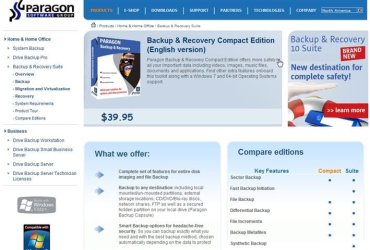
Great Freebie - be quick

SIW2

YTS GEEK
Guru
VIP
SF Team
Local time
5:23 PM
Messages
16,784

My Computers

System One System Two

  • Computer type
    PC/Desktop
    OS
    7 X64
    CPU
    i5 8400
    Motherboard
    gigabyte b365m ds3h
    Memory
    2x8gb 3200mhz
    Hard Drives
    various
    PSU
    pure power 11 400w cm
    Case
    Coolermaster
    Cooling
    cryorig m9i
  • Computer type
    PC/Desktop
    OS
    7x64
    CPU
    g5400
    Motherboard
    ga b365m ds3h
    Memory
    8gb ddr4 2400
    PSU
    xfx pro 450w
Thanks, I just saw this and got it in time. Good Find.
 

My Computer

Computer type
PC/Desktop
Computer Manufacturer/Model Number
Self Built
OS
Win 10 Pro x64
CPU
Intel I5-2500K @3.3GHz
Motherboard
Asrock P67 Extreme4
Memory
16GB G.Skill Ripjaws X (4x4GB)
Graphics Card(s)
EVGA GeForce 750 Ti SC 2GB
Sound Card
ASUS Xonar DG 5.1 Channels 24-bit 96KHz PCI Interface Sound
Monitor(s) Displays
auria eq2367
Screen Resolution
1920 x 1080
Hard Drives
250GB Samsung 850 EVO SSD
1TB WD Blue
1TB Hitachi
PSU
SeaSonic X 650W 80 Plus Gold
Case
Corsair Obsidian 750D
Cooling
Corsair H60, Three 140mm case fans
Keyboard
Logitech Wireless Keyboard K520
Mouse
Logitech Wireless Mouse M310
Internet Speed
Wave Broadband ~ 100 dn 5 up
Antivirus
Windows Defender, Malwarebytes Premium
Browser
Edge, IE11, Chrome
Other Info
Laptop specs: HP g7-1365dx /
CPU: AMD A6-3420M APU with Radeon(tm) HD Graphics /
RAM: Crucial 8Gb (2x4Gb) /
SSD: Crucial M4-CT128M4SSD2 ATA Device/ FW 000F /
GFX: AMD Radeon HD 6520G /
OS: Windows 10 Pro x64
I just finished installation and free registration, although I missed the deadline for a few hours.
 

My Computer

OS
Windows 7 32-bit
CPU
Intel Core 2 Duo T7500 @ 2.2 GHz
Memory
2 GB
Installed it, made an image, made a recovery disk, and booted from it to investigate restoration process.

The image I made of C, first track, and MBR results in 4 files in an arc folder. 3 PBF files and 1 PFM file.

In restore process, I was asked which file I wanted to restore and was shown 3 files, not 4. Didn't make a note, but those 3 may have been the 3 PBFs? I had hoped to see exactly one choice because I had made exactly one image. Not intuitive.

Next screen concerned destination to restore, which showed a "before" and "after" graphic of my C drive.

I thought that graphic was confusing and non-intuitive. Why not be explicit and ask me to choose among my drives: C, D, E, without the graphic or before/after stuff?

These issues may all be explained in the documentation--I have not yet looked. Just wanted to run through it as a greenhorn might and evaluate.

The imaging GUI is reminiscent of Macrium--good marks for that.
 

My Computer

Computer type
PC/Desktop
Computer Manufacturer/Model Number
Ignatz Special; 4 speed manual gearbox; factory air conditioning; one of one
OS
Windows 7 Home Premium SP1, 64-bit
CPU
Intel Skylake i5-6600K, not overclocked
Motherboard
AsRock Z170M Extreme 4, micro ATX
Memory
8 GB HyperX DDR4-2666 (2 x 4 GB)
Graphics Card(s)
none; graphics are integrated on CPU
Sound Card
onboard: Realtek ALC1150; external: USB Behringer UF0-202
Monitor(s) Displays
Dell S2340M 23 inch IPS
Screen Resolution
1600 x 900
Hard Drives
System: Crucial MX100 series SSD, 128 GB;
Data: Samsung Spinpoint 103SJ, 1 TB;
Backup: WD Caviar Green WD30EZRX-00D8PB0, 3 TB
PSU
Rosewill SilentNight 500 watt fanless, semi-modular
Case
Antec Solo II
Cooling
Noctua NH-U12S; Noctua F12 intake, Noctua S12A exhaust
Keyboard
Microsoft 200 6JH-00001 USB
Mouse
Dell or Microsoft optical wired; USB
Antivirus
Microsoft Security Essentials and Malwarebytes Premium
Browser
Pale Moon
Other Info
All fans PWM; speeds at idle: CPU circa 500 rpm; intake circa 600 rpm; exhaust circa 600 rpm; CPU temps 27 idle and 47 C load in a warm room (27 C/81 F) when running Intel Extreme Tuning Utility stress test.
Just got it still free.
 

My Computer

Computer type
Laptop
Computer Manufacturer/Model Number
Sager NP9170
OS
Win 7 Pro x64 / Win 10 Pro
CPU
Intel(R) Core(TM) i7-3630QM CPU @ 2.40GHz
Motherboard
CLEVO P170EM
Memory
12 GB
Graphics Card(s)
(1) Intel(R) HD Graphics 4000 (2) NVIDIA GeForce GTX 675M
Sound Card
(1) Realtek High Definition Audio (2) Intel(R) Display Aud
Monitor(s) Displays
17.3
Screen Resolution
1920x1080
Hard Drives
(1) Samsung 860 EVO 500GB(OS) (1) Samsung 860 EVO 500GB(Data)
Keyboard
Backlite
Antivirus
MSE, Malwarebytes Pro
Browser
Firefox
Other Info
DESKTOP: Custom-built.
OS: Win 10 Pro x64.
CASE: Rosewill R5.
CPU: Intel I5 4670K CPU @ 3.40GHz.
CPU COOLER: Cool Master Hyper 212 EVO.
MOTHERBOARD: Asus Z87-A.
MEMORY: Kingston HyperX 2x4 GB.
GPU: Nvidia Geforce 650 TI.
PSU: Corsair TX750.
DRIVES: (1) Samsung 840 120 GB SSD (2) Western Digital blue 500 GB 7200 RPM.
Hi Ig,

It seems pretty straightforward to me. I guess all the manufacturers do things a little differently.

The arc contains some info Paragon uses to determine the contents and partition info - it also contains .pbf , each partition is listed in there separately - allowing individual or multiple restore - very likely you only want to restore one partition.

If you don't untick "image splitting", then it will split the image into chunks so it can be burned to dvd , or flash.


It is not intended the user attempts to dig around the arc in windows explorer - just like Windows sys img doesn't expect you to go digging in it's folders.

There are multiple ways within Paragon to restore the image, individual partitions, or individual files/folders from within the image.:)

Hi Bongo - glad to hear it is still up:) - it did give a 404 not found message a while ago.
 

My Computers

System One System Two

  • Computer type
    PC/Desktop
    OS
    7 X64
    CPU
    i5 8400
    Motherboard
    gigabyte b365m ds3h
    Memory
    2x8gb 3200mhz
    Hard Drives
    various
    PSU
    pure power 11 400w cm
    Case
    Coolermaster
    Cooling
    cryorig m9i
  • Computer type
    PC/Desktop
    OS
    7x64
    CPU
    g5400
    Motherboard
    ga b365m ds3h
    Memory
    8gb ddr4 2400
    PSU
    xfx pro 450w
I use Backupify to back-up things that are in the "cloud" and Mozy to back-up stuff on my PC.
 

My Computer

Computer Manufacturer/Model Number
HP G50 Laptop
OS
Windows 7 Home Premium 64-bit
CPU
2.0ghz Intel Pentium Duel-Core (Merom)
Motherboard
Winston 360Bf
Memory
2x 4.0GB Centon Duel-Channel DDR2 @ 333MHz
Sound Card
High Definition Audio Device
Monitor(s) Displays
16" lcd monitor
Screen Resolution
1280x800
Hard Drives
160GB Toshiba MK1652GSX
Internet Speed
Satalite Internet. Where I live it's uber slow.
Hi Ig,


The arc contains some info Paragon uses to determine the contents and partition info - it also contains .pbf , each partition is listed in there separately - allowing individual or multiple restore - very likely you only want to restore one partition.

If you don't untick "image splitting", then it will split the image into chunks so it can be burned to dvd , or flash.

There are multiple ways within Paragon to restore the image, individual partitions, or individual files/folders from within the image.:)

SIW:

I did untick image splitting and nonetheless ended up with the 4 files previously mentioned. I assume that is normal.

My intent was to image one partition: C.

I chose 3 items in the "whaddya wanna image" screen: C, MBR, and first track.

Maybe choosing those 3 items (C, MBR, first track) results in 3 files and/or 3 separate images, not 1? Maybe each PBF represents 1 of the 3 items I chose? If so, which is which? If so, which do I choose in the restore process?

At any rate, in the restore process I was shown 3 files to choose from and had no idea at all what each represented and consequently did not know what to choose.

As far as restore destination goes, as I recall there was a dropdown. I assume I could have chosen any of my existing partitions at that point (C, D, or E). I chose C and was then presented with the before/after graphic.

The graphic contributed absolutely nothing to my understanding, particularly the "before/after" bit.

If fact, it detracted from my understanding in this way: since Paragon deliberately chose that graphic and the associated "before/after" comment, I am just dumb enough to assume it must have a literal meaning. Exactly what, I didn't know. And I don't see why a GUI documentation/quality control staff (if any) would willfully leave any doubt whatsoever on such a critical issue.

But I am the guy who has been rolling his eyes for at least 15 years on clarity in applications and support documents---to no avail at all.

Having said all of that--my questions are based purely on what I saw on first pass as a total novice might use the program. All of my issues may be explained in the help file (if there is one).

I will review the help file. If my questions are answered, I may well use the program. If the answers are not in the help file, I will likely not have enough confidence to use the program--precisely because of the lack of documentation, not because of whether or not it "works".

If my attempts had been a real-life emergency rather than an exploration, I would not have felt comfortable and would have had doubt when I pushed the restore button.

Nice talking to you as usual.

 

My Computer

Computer type
PC/Desktop
Computer Manufacturer/Model Number
Ignatz Special; 4 speed manual gearbox; factory air conditioning; one of one
OS
Windows 7 Home Premium SP1, 64-bit
CPU
Intel Skylake i5-6600K, not overclocked
Motherboard
AsRock Z170M Extreme 4, micro ATX
Memory
8 GB HyperX DDR4-2666 (2 x 4 GB)
Graphics Card(s)
none; graphics are integrated on CPU
Sound Card
onboard: Realtek ALC1150; external: USB Behringer UF0-202
Monitor(s) Displays
Dell S2340M 23 inch IPS
Screen Resolution
1600 x 900
Hard Drives
System: Crucial MX100 series SSD, 128 GB;
Data: Samsung Spinpoint 103SJ, 1 TB;
Backup: WD Caviar Green WD30EZRX-00D8PB0, 3 TB
PSU
Rosewill SilentNight 500 watt fanless, semi-modular
Case
Antec Solo II
Cooling
Noctua NH-U12S; Noctua F12 intake, Noctua S12A exhaust
Keyboard
Microsoft 200 6JH-00001 USB
Mouse
Dell or Microsoft optical wired; USB
Antivirus
Microsoft Security Essentials and Malwarebytes Premium
Browser
Pale Moon
Other Info
All fans PWM; speeds at idle: CPU circa 500 rpm; intake circa 600 rpm; exhaust circa 600 rpm; CPU temps 27 idle and 47 C load in a warm room (27 C/81 F) when running Intel Extreme Tuning Utility stress test.
Hi Ig,

I understand for those who are accustomed to apps with very few controls and features it may look a little different.

Paragon is big on features - particularly safety features - making the user confirm and double confirm sometimes. They also like to show what will happen if you go ahead and confirm/apply the operation.

Seems sensible to me.

You get a choice of boxes to tick in the "what to backup ". Each of those is stored separately in the archive folder. That makes it easier to find and restore just the partition you want ( I use the term loosely as the first track isn't actually a partition ). Or to explore and restore individual; files - assuming you know which partition they were on.

Normally , you use Volume Explorer, or File transfer Wizard to expand the .pbf of the partition you want , then explore/copy back any files you want.

The only time you won't be able to see anything is with the first track, and the mbr - there are no folders there to look at.

The before and after you refer to is to prevent the user making an error.

Clearly "Before" - means this is what your drive looks like now - before you do the restore.

Equally clearly - "After" means -this is what your drive will look like after the restore.

In your case - you were restoring an image you just made - back to the exact same place.

Obviously the before and after look the same.

If the after looks different - then obviously, you have pointed the restore somewhere different - if that's what you intended - you can double check you pointed at the right restore location.

If it's not what you intended - that should alert you.

It's not hard to understand.
 

My Computers

System One System Two

  • Computer type
    PC/Desktop
    OS
    7 X64
    CPU
    i5 8400
    Motherboard
    gigabyte b365m ds3h
    Memory
    2x8gb 3200mhz
    Hard Drives
    various
    PSU
    pure power 11 400w cm
    Case
    Coolermaster
    Cooling
    cryorig m9i
  • Computer type
    PC/Desktop
    OS
    7x64
    CPU
    g5400
    Motherboard
    ga b365m ds3h
    Memory
    8gb ddr4 2400
    PSU
    xfx pro 450w
I know what you mean about support documents - what I am looking for is never mentioned in the Help file - no matter what app. I am using.

Not surprising, I suppose. Most people can't be bothered reading the Help file anyway.

If the developer included every possible scenario - the Help file would be enormous - hundreds of pages - guaranteeing nobody would ever look at it.

For the developer, it's damned if you do, and damned if you don't.
 

My Computers

System One System Two

  • Computer type
    PC/Desktop
    OS
    7 X64
    CPU
    i5 8400
    Motherboard
    gigabyte b365m ds3h
    Memory
    2x8gb 3200mhz
    Hard Drives
    various
    PSU
    pure power 11 400w cm
    Case
    Coolermaster
    Cooling
    cryorig m9i
  • Computer type
    PC/Desktop
    OS
    7x64
    CPU
    g5400
    Motherboard
    ga b365m ds3h
    Memory
    8gb ddr4 2400
    PSU
    xfx pro 450w
Yeah, if I had continued to progress to the next screen and the next screen, things might have become more obvious and clarified. But you never know exactly where "the point of no return" is, so I was reluctant to continue to poke "next", fearing I might kick off a restore process.

So I stopped at the before/after graphic.

Thanks for the comments.
 

My Computer

Computer type
PC/Desktop
Computer Manufacturer/Model Number
Ignatz Special; 4 speed manual gearbox; factory air conditioning; one of one
OS
Windows 7 Home Premium SP1, 64-bit
CPU
Intel Skylake i5-6600K, not overclocked
Motherboard
AsRock Z170M Extreme 4, micro ATX
Memory
8 GB HyperX DDR4-2666 (2 x 4 GB)
Graphics Card(s)
none; graphics are integrated on CPU
Sound Card
onboard: Realtek ALC1150; external: USB Behringer UF0-202
Monitor(s) Displays
Dell S2340M 23 inch IPS
Screen Resolution
1600 x 900
Hard Drives
System: Crucial MX100 series SSD, 128 GB;
Data: Samsung Spinpoint 103SJ, 1 TB;
Backup: WD Caviar Green WD30EZRX-00D8PB0, 3 TB
PSU
Rosewill SilentNight 500 watt fanless, semi-modular
Case
Antec Solo II
Cooling
Noctua NH-U12S; Noctua F12 intake, Noctua S12A exhaust
Keyboard
Microsoft 200 6JH-00001 USB
Mouse
Dell or Microsoft optical wired; USB
Antivirus
Microsoft Security Essentials and Malwarebytes Premium
Browser
Pale Moon
Other Info
All fans PWM; speeds at idle: CPU circa 500 rpm; intake circa 600 rpm; exhaust circa 600 rpm; CPU temps 27 idle and 47 C load in a warm room (27 C/81 F) when running Intel Extreme Tuning Utility stress test.
You always have to hit the yes button , then the Apply button - it makes you overconfirm everything. Bit annoying sometimes - but better safe than sorry.

Check this out:

backup_system.swf

selective_restore.swf

I think if you use any of the "express options" - there is less confirming - more like other manufacturers apps.
 

My Computers

System One System Two

  • Computer type
    PC/Desktop
    OS
    7 X64
    CPU
    i5 8400
    Motherboard
    gigabyte b365m ds3h
    Memory
    2x8gb 3200mhz
    Hard Drives
    various
    PSU
    pure power 11 400w cm
    Case
    Coolermaster
    Cooling
    cryorig m9i
  • Computer type
    PC/Desktop
    OS
    7x64
    CPU
    g5400
    Motherboard
    ga b365m ds3h
    Memory
    8gb ddr4 2400
    PSU
    xfx pro 450w
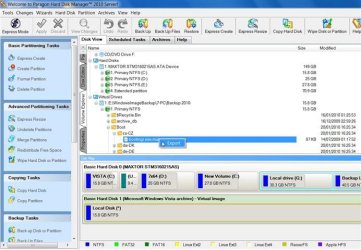
I am having a look at the HDM 2010 right now - it's awesome:


HDM2010-2010-01-20_215054 (Small).jpg
 

My Computers

System One System Two

  • Computer type
    PC/Desktop
    OS
    7 X64
    CPU
    i5 8400
    Motherboard
    gigabyte b365m ds3h
    Memory
    2x8gb 3200mhz
    Hard Drives
    various
    PSU
    pure power 11 400w cm
    Case
    Coolermaster
    Cooling
    cryorig m9i
  • Computer type
    PC/Desktop
    OS
    7x64
    CPU
    g5400
    Motherboard
    ga b365m ds3h
    Memory
    8gb ddr4 2400
    PSU
    xfx pro 450w
Looks good.

I don't see a freebie on it. Send up a flare if you ever see one.
 

My Computer

Computer type
PC/Desktop
Computer Manufacturer/Model Number
Ignatz Special; 4 speed manual gearbox; factory air conditioning; one of one
OS
Windows 7 Home Premium SP1, 64-bit
CPU
Intel Skylake i5-6600K, not overclocked
Motherboard
AsRock Z170M Extreme 4, micro ATX
Memory
8 GB HyperX DDR4-2666 (2 x 4 GB)
Graphics Card(s)
none; graphics are integrated on CPU
Sound Card
onboard: Realtek ALC1150; external: USB Behringer UF0-202
Monitor(s) Displays
Dell S2340M 23 inch IPS
Screen Resolution
1600 x 900
Hard Drives
System: Crucial MX100 series SSD, 128 GB;
Data: Samsung Spinpoint 103SJ, 1 TB;
Backup: WD Caviar Green WD30EZRX-00D8PB0, 3 TB
PSU
Rosewill SilentNight 500 watt fanless, semi-modular
Case
Antec Solo II
Cooling
Noctua NH-U12S; Noctua F12 intake, Noctua S12A exhaust
Keyboard
Microsoft 200 6JH-00001 USB
Mouse
Dell or Microsoft optical wired; USB
Antivirus
Microsoft Security Essentials and Malwarebytes Premium
Browser
Pale Moon
Other Info
All fans PWM; speeds at idle: CPU circa 500 rpm; intake circa 600 rpm; exhaust circa 600 rpm; CPU temps 27 idle and 47 C load in a warm room (27 C/81 F) when running Intel Extreme Tuning Utility stress test.
No , it won't be free - not sure of the pricing - the current one HDM 2009 Server is $600.

Paragon HDM 2009 Server

There might be a cut down free special edition at some stage - you never know.
 

My Computers

System One System Two

  • Computer type
    PC/Desktop
    OS
    7 X64
    CPU
    i5 8400
    Motherboard
    gigabyte b365m ds3h
    Memory
    2x8gb 3200mhz
    Hard Drives
    various
    PSU
    pure power 11 400w cm
    Case
    Coolermaster
    Cooling
    cryorig m9i
  • Computer type
    PC/Desktop
    OS
    7x64
    CPU
    g5400
    Motherboard
    ga b365m ds3h
    Memory
    8gb ddr4 2400
    PSU
    xfx pro 450w
My current date and time is 01-21-10 at 12:45AM and it's still free :D
 

My Computer

OS
Home Premium x64
CPU
Intel e7400 2.8GHz Dual Core, OC @ 3.36GHz
Motherboard
Gigabyte GA-EP43-DS3L/S3L
Memory
4GB DDR2 1066
Graphics Card(s)
Nvidia GeForce 9800 GT
Sound Card
Realtek Surround Onboard.
Monitor(s) Displays
ASUS VW224, 22 Inch and Samsung SyncMaster 713v
Screen Resolution
Main Screen @1680x1050, Secondary @ 1280x1024
Hard Drives
Western Digital WD3200AAKS 320GB 7200 RPM SATA 3.0Gb/s
PSU
Thermaltake Purepower W0100RU 500W
Case
Rosewill R5601-BK Screw-less
Cooling
Two 120mm fans and Stock CPU fans
Keyboard
Old Dell Keyboard my neighbor gave me.
Mouse
Logitech MX518
Internet Speed
6Kbps
Other Info
Logitech X-540 70 watts 5.1 Speakers
Back
Top