Great Program for Recording Sounds

ZeshanA

New member
Local time
4:15 AM
Messages
334
Hey guys, just thought I'd share this with ya!

I found a great program called MP3myMP3 (CNET Review here: MP3 My MP3 Recorder - Free software downloads and software reviews - CNET Download.com) that records sounds that your PC makes.
In other words, the sound that YOU hear from it.
E.G. If you wanted to record an error sound that Windows Makes (I know that they're in C: Somewhere this is just an example) you'd just press record and then play the sound and press stop. Simple.

Just thought I'd share as it came in handy for me.

ZeshanA
(P.S. If this is breaking Forum Rules 5,7 or 11, feel free to remove it ;) Got to keep a good rep :D)
 
Thanks for the heads up! ;)
 

My Computer

Computer type
PC/Desktop
Computer Manufacturer/Model Number
LENOVO K450 @3.0GHZ
OS
64-bit Windows 8.1 Pro
CPU
Core(TM) i5 CPU 4330 Haswell @ 3.20GHz
Motherboard
LENOVO
Memory
12.00 GB
Graphics Card(s)
Intel(R) HD Graphics
Sound Card
Intel HD integtrated
Monitor(s) Displays
HP 25' ISP Monitor
Screen Resolution
1900/1020
Hard Drives
(1) ST1000DM003-1CH162 (2) Generic STORAGE DEVICE USB Device (3) Generic STORAGE DEVICE USB Device
Internet Speed
100mb down/10mb up
Ditto

Ken J+
 

My Computer

Computer Manufacturer/Model Number
HP Pavillion dv-7 1005 Tx
OS
Win 8 Release candidate 8400
CPU
[email protected]
Memory
4 gigs
Graphics Card(s)
Nvidia 9600M
Sound Card
HD built-in
Monitor(s) Displays
17" Wxga
Screen Resolution
1440x900
Cooling
none
Internet Speed
45Mb down 5Mb up
Thanks. :)
 

My Computer

Computer Manufacturer/Model Number
Dell XPS420
OS
Vista Ult 64 bit Seven Ult RTM x64
CPU
Intel Core2 Quad Q6600 2.40 gigahertz
Memory
Crucial Ballistix 4x2GB PC2 6400
Graphics Card(s)
NVIDIA GeForce 8600 GTS 256 MB
Sound Card
Creative SB X-Fi audio
Monitor(s) Displays
HP w2207 + HPvs15
Screen Resolution
1680x1050 + 1024x768
Hard Drives
2-WD5000AAKS-500 GB
WD5000AAV-500 GB external
Keyboard
Microsoft Comfort Curve
Mouse
MX Revolution
Other Info
Wacom Intuos 2 Graphics Tablet
Experience Index=5.5
Audacity has this function as well, you just select, "what you hear" and it records what you hear :P.
Btw, on most computers this can also be achieved by right clicking on your volume icon in the taskbar, selected recording devices and set 'Stereo Mixer' as your default device. In this way you can record with any program, windows sound recorder. A screen capture program, for games will in this way also record only the game sounds, so there's no need to edit it and paste the audio under the video later.
 

My Computer

Computer Manufacturer/Model Number
HP Compaq 8510w
OS
Windows 7
Monitor(s) Displays
Crimson1989
Crimson:

Can you point me to the Audacity menu where I can select "what you hear"??

I can't seem to find it.
 

My Computer

Computer type
PC/Desktop
Computer Manufacturer/Model Number
Ignatz Special; 4 speed manual gearbox; factory air conditioning; one of one
OS
Windows 7 Home Premium SP1, 64-bit
CPU
Intel Skylake i5-6600K, not overclocked
Motherboard
AsRock Z170M Extreme 4, micro ATX
Memory
8 GB HyperX DDR4-2666 (2 x 4 GB)
Graphics Card(s)
none; graphics are integrated on CPU
Sound Card
onboard: Realtek ALC1150; external: USB Behringer UF0-202
Monitor(s) Displays
Dell S2340M 23 inch IPS
Screen Resolution
1600 x 900
Hard Drives
System: Crucial MX100 series SSD, 128 GB;
Data: Samsung Spinpoint 103SJ, 1 TB;
Backup: WD Caviar Green WD30EZRX-00D8PB0, 3 TB
PSU
Rosewill SilentNight 500 watt fanless, semi-modular
Case
Antec Solo II
Cooling
Noctua NH-U12S; Noctua F12 intake, Noctua S12A exhaust
Keyboard
Microsoft 200 6JH-00001 USB
Mouse
Dell or Microsoft optical wired; USB
Antivirus
Microsoft Security Essentials and Malwarebytes Premium
Browser
Pale Moon
Other Info
All fans PWM; speeds at idle: CPU circa 500 rpm; intake circa 600 rpm; exhaust circa 600 rpm; CPU temps 27 idle and 47 C load in a warm room (27 C/81 F) when running Intel Extreme Tuning Utility stress test.
Hmm, it depends on your video card. Some video card manufacturers have called it "what you hear" others "mix out" or what ever. So you should go to tools and record options and there you can choose what to record from.
I'm sorry but I don't have audacity installed atm, so I can't really check for you. But the other solution, going into control panel and changing your play and record devices as mentioned above, works for everything.
 

My Computer

Computer Manufacturer/Model Number
HP Compaq 8510w
OS
Windows 7
Monitor(s) Displays
Crimson1989
Crimson:

I am aware of the choices in control panel and how to enable them if found, but I see no choices whatsoever in Audacity for "stereo mix", "what you hear", or anything close to that. I know that in some cases you can in fact record "what you hear" with Audacity, but I don't see any choices in the application that refer to that capability.
 

My Computer

Computer type
PC/Desktop
Computer Manufacturer/Model Number
Ignatz Special; 4 speed manual gearbox; factory air conditioning; one of one
OS
Windows 7 Home Premium SP1, 64-bit
CPU
Intel Skylake i5-6600K, not overclocked
Motherboard
AsRock Z170M Extreme 4, micro ATX
Memory
8 GB HyperX DDR4-2666 (2 x 4 GB)
Graphics Card(s)
none; graphics are integrated on CPU
Sound Card
onboard: Realtek ALC1150; external: USB Behringer UF0-202
Monitor(s) Displays
Dell S2340M 23 inch IPS
Screen Resolution
1600 x 900
Hard Drives
System: Crucial MX100 series SSD, 128 GB;
Data: Samsung Spinpoint 103SJ, 1 TB;
Backup: WD Caviar Green WD30EZRX-00D8PB0, 3 TB
PSU
Rosewill SilentNight 500 watt fanless, semi-modular
Case
Antec Solo II
Cooling
Noctua NH-U12S; Noctua F12 intake, Noctua S12A exhaust
Keyboard
Microsoft 200 6JH-00001 USB
Mouse
Dell or Microsoft optical wired; USB
Antivirus
Microsoft Security Essentials and Malwarebytes Premium
Browser
Pale Moon
Other Info
All fans PWM; speeds at idle: CPU circa 500 rpm; intake circa 600 rpm; exhaust circa 600 rpm; CPU temps 27 idle and 47 C load in a warm room (27 C/81 F) when running Intel Extreme Tuning Utility stress test.
This is what I'm talking about
audacity_windows.jpg

Next to the Mic, there's a 'Line in', you can also choose microphone, stereo mix or whatever input sources are detected by windows on your machine.
Now I did a quick little google search, and it seems like there are many people out there who have an empty box instead of 'Line in'. If this is the case, there are many solution provided online.
On my system it always worked fine.
 

My Computer

Computer Manufacturer/Model Number
HP Compaq 8510w
OS
Windows 7
Monitor(s) Displays
Crimson1989
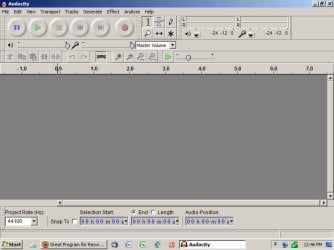
Here is my Audacity screen.

Master Volume is the only choice in the dropdown. This is on a recent version (1.3.9) and I don't recall seeing anything else in earlier versions. I can't explain why yours and mine don't match.
 

Attachments

  • Untitled-1.jpg
    Untitled-1.jpg
    44.6 KB · Views: 7

My Computer

Computer type
PC/Desktop
Computer Manufacturer/Model Number
Ignatz Special; 4 speed manual gearbox; factory air conditioning; one of one
OS
Windows 7 Home Premium SP1, 64-bit
CPU
Intel Skylake i5-6600K, not overclocked
Motherboard
AsRock Z170M Extreme 4, micro ATX
Memory
8 GB HyperX DDR4-2666 (2 x 4 GB)
Graphics Card(s)
none; graphics are integrated on CPU
Sound Card
onboard: Realtek ALC1150; external: USB Behringer UF0-202
Monitor(s) Displays
Dell S2340M 23 inch IPS
Screen Resolution
1600 x 900
Hard Drives
System: Crucial MX100 series SSD, 128 GB;
Data: Samsung Spinpoint 103SJ, 1 TB;
Backup: WD Caviar Green WD30EZRX-00D8PB0, 3 TB
PSU
Rosewill SilentNight 500 watt fanless, semi-modular
Case
Antec Solo II
Cooling
Noctua NH-U12S; Noctua F12 intake, Noctua S12A exhaust
Keyboard
Microsoft 200 6JH-00001 USB
Mouse
Dell or Microsoft optical wired; USB
Antivirus
Microsoft Security Essentials and Malwarebytes Premium
Browser
Pale Moon
Other Info
All fans PWM; speeds at idle: CPU circa 500 rpm; intake circa 600 rpm; exhaust circa 600 rpm; CPU temps 27 idle and 47 C load in a warm room (27 C/81 F) when running Intel Extreme Tuning Utility stress test.
Here is my Audacity screen.

Master Volume is the only choice in the dropdown. This is on a recent version (1.3.9) and I don't recall seeing anything else in earlier versions. I can't explain why yours and mine don't match.

Your driver probably has Wave In disabled. Mine does too :( Heard the RIAA has something to do with it. Nowadays recording sounds from your PC is PIRACY :mad::mad::mad:

ZeshanA
 
Back
Top