Green Pixels, Screen Freezes, Random Turn Offs?

:mad: :mad: :mad: :mad: :mad:

Error Message again!!!

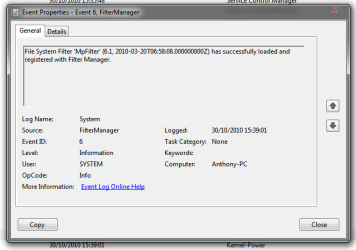
I have attached the new error message it is "MPFilter" this time??
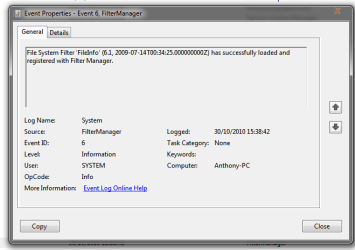
Also there is another error that always comes before this. that is also attached at the bottom.
 

Attachments

  • log3.png
    log3.png
    12.8 KB · Views: 29
  • Log4.png
    Log4.png
    11.5 KB · Views: 19

My Computer My Computer

At a glance

Windows 7 Eternity 64bitIntel(R) Quad Core(TM) i5 750 @2.67GHzDDR3 4096MBytesRadeon HD 4650
Computer Manufacturer/Model Number
HomeMade PC
OS
Windows 7 Eternity 64bit
CPU
Intel(R) Quad Core(TM) i5 750 @2.67GHz
Motherboard
BIOSTAR TP55
Memory
DDR3 4096MBytes
Graphics Card(s)
Radeon HD 4650
Monitor(s) Displays
Acer V233H
Screen Resolution
1920 x 1080
Hard Drives
1TB
Cooling
AIR!
Internet Speed
50 mb/s
what you are describing sounds like a graphics card problem, have you tried going back to an older driver?
 

My Computer My Computer

At a glance

Windows 7 Ultimate x641.80 GHz Intel Core 2 Duo processor T71003 gig ddr2NVIDIA GeForce 8400M GS
Computer Manufacturer/Model Number
HP dv6519tx
OS
Windows 7 Ultimate x64
CPU
1.80 GHz Intel Core 2 Duo processor T7100
Memory
3 gig ddr2
Graphics Card(s)
NVIDIA GeForce 8400M GS
Sound Card
Realtek High Definition Audio
Monitor(s) Displays
15.4” WXGA High Definition BrightView Widescreen
Screen Resolution
1280 x 800
Hard Drives
Hitachi 320 GB (5400 rpm)
PSU
90 W AC Power Adapter
Cooling
Kitchen plate under the lappy
Keyboard
101 key compatible
Mouse
Touch Pad with On/Off button and dedicated vertical Scroll
Internet Speed
Three Wireless internet prepaid using E160G USB dongle
Yes problem still there :(
 

My Computer My Computer

At a glance

Windows 7 Eternity 64bitIntel(R) Quad Core(TM) i5 750 @2.67GHzDDR3 4096MBytesRadeon HD 4650
Computer Manufacturer/Model Number
HomeMade PC
OS
Windows 7 Eternity 64bit
CPU
Intel(R) Quad Core(TM) i5 750 @2.67GHz
Motherboard
BIOSTAR TP55
Memory
DDR3 4096MBytes
Graphics Card(s)
Radeon HD 4650
Monitor(s) Displays
Acer V233H
Screen Resolution
1920 x 1080
Hard Drives
1TB
Cooling
AIR!
Internet Speed
50 mb/s
Do you have onboard graphics or another card that you use to see if it is a card issue?
 

My Computer My Computer

At a glance

W7 Professional x64AMD Athlon II X3 445 Rana 3.10 GHzPNY XLR DDR3 1600 4x2GBNVIDIA GeForce GTS 450 (fermi) 1GB GDDR5
Computer Manufacturer/Model Number
Pugh Technologies
OS
W7 Professional x64
CPU
AMD Athlon II X3 445 Rana 3.10 GHz
Motherboard
MSI 870A-G54
Memory
PNY XLR DDR3 1600 4x2GB
Graphics Card(s)
NVIDIA GeForce GTS 450 (fermi) 1GB GDDR5
Sound Card
Realtek ALC892 onboard
Monitor(s) Displays
ASUS VE205t, Viewsonic VX2035WM
Screen Resolution
1600x900, 1600x1050
Hard Drives
977GB Hitachi Hitachi HDS721010CLA332
244GB Western Digital WDC WD2500AAJS-65B4A0
488GB Western Digital WDC WD5000AAJS-00A8B0
488GB Western Digital WDC WD5000AAKS-00UU3A0
PSU
Antec EarthWatts EA650 650W
Case
ThermalTake Armor A90 Mid Tower
Cooling
3x 120mm in, 1x 120mm & 200mm out, self built hydro-cooler
Keyboard
Logitec 55
Mouse
Razer Deathadder
Internet Speed
20 Mbps D/L, 9 Mbps U/L
three pages and no one has told him his graphics card is screwed :p

those are artifacts they are caused by overheating or faulty ram on the GPU , half of the screen freezing another gpu issue.

on very very rare occations this has turned out to a driver issue first thing try other drivers

you could try clocking back (underclocking your gpu memory) you could try making sure your gpu is seated properly on yuor mobo , you could try reseating your gpu cooler paying particular attention to ram heatsinks (or the part of the HS that contacts the ram) you should monitor the gpu core voltage when under load (with an app such as msi afterburner) although core temp maybe fine your memory temp could still be too hot there is no way of monitoring it

If i were you id stop worrying about unrelated errors and concentrate on your graphics card its that thats failing

 

My Computer My Computer

At a glance

Win 10 Home Premium 64 BitI7 5930K @ 4.516GB Kingston Hyper X Fury DDR4EVGA 980ti SC + ACX 2.0
Computer type
PC/Desktop
Computer Manufacturer/Model Number
Custom
OS
Win 10 Home Premium 64 Bit
CPU
I7 5930K @ 4.5
Motherboard
Asus X99 s
Memory
16GB Kingston Hyper X Fury DDR4
Graphics Card(s)
EVGA 980ti SC + ACX 2.0
Sound Card
Onboard
Monitor(s) Displays
ROG Swift PG278Q
Screen Resolution
2560x1440
Hard Drives
Kingston Hyper X 250gb SSD
Samsung 2TB mechanical
PSU
Corsair RM 850
Case
NZXT H440 Red
Cooling
Corsair H100i GTX
Keyboard
Razer Reclusa
Mouse
Logitech G5 Gamer
Internet Speed
34mb
Antivirus
Eset Smart Security
Browser
Firefox
three pages and no one has told him his graphics card is screwed :p

those are artifacts they are caused by overheating or faulty ram on the GPU , half of the screen freezing another gpu issue.

on very very rare occations this has turned out to a driver issue first thing try other drivers

you could try clocking back (underclocking your gpu memory) you could try making sure your gpu is seated properly on yuor mobo , you could try reseating your gpu cooler paying particular attention to ram heatsinks (or the part of the HS that contacts the ram) you should monitor the gpu core voltage when under load (with an app such as msi afterburner) although core temp maybe fine your memory temp could still be too hot there is no way of monitoring it

If i were you id stop worrying about unrelated errors and concentrate on your graphics card its that thats failing

So how can something hardware related show up in a screen shot??? im not sure how that happens?
 

My Computer My Computer

At a glance

Windows 7 x86/x64, Server 2008r2, Web Server ...i7 v2 3930K Steping stone 2G.SKILL Ripjaws Z Series 32GBAMD HD 5770
Computer Manufacturer/Model Number
SMN-Productions
OS
Windows 7 x86/x64, Server 2008r2, Web Server 2008
CPU
i7 v2 3930K Steping stone 2
Motherboard
ASUS Rampage IV Extreme
Memory
G.SKILL Ripjaws Z Series 32GB
Graphics Card(s)
AMD HD 5770
Monitor(s) Displays
Acer 21" and Samsung 20"
Hard Drives
Patriot Pyro 80GB
PSU
1000 Watt
Case
HAF-X
Cooling
4 Fans
Keyboard
Black Widow Ultimate
because your graphics card is what renders the screen shot ;)
 

My Computer My Computer

At a glance

W7 Professional x64AMD Athlon II X3 445 Rana 3.10 GHzPNY XLR DDR3 1600 4x2GBNVIDIA GeForce GTS 450 (fermi) 1GB GDDR5
Computer Manufacturer/Model Number
Pugh Technologies
OS
W7 Professional x64
CPU
AMD Athlon II X3 445 Rana 3.10 GHz
Motherboard
MSI 870A-G54
Memory
PNY XLR DDR3 1600 4x2GB
Graphics Card(s)
NVIDIA GeForce GTS 450 (fermi) 1GB GDDR5
Sound Card
Realtek ALC892 onboard
Monitor(s) Displays
ASUS VE205t, Viewsonic VX2035WM
Screen Resolution
1600x900, 1600x1050
Hard Drives
977GB Hitachi Hitachi HDS721010CLA332
244GB Western Digital WDC WD2500AAJS-65B4A0
488GB Western Digital WDC WD5000AAJS-00A8B0
488GB Western Digital WDC WD5000AAKS-00UU3A0
PSU
Antec EarthWatts EA650 650W
Case
ThermalTake Armor A90 Mid Tower
Cooling
3x 120mm in, 1x 120mm & 200mm out, self built hydro-cooler
Keyboard
Logitec 55
Mouse
Razer Deathadder
Internet Speed
20 Mbps D/L, 9 Mbps U/L
Ahh good point :P
 

My Computer My Computer

At a glance

Windows 7 x86/x64, Server 2008r2, Web Server ...i7 v2 3930K Steping stone 2G.SKILL Ripjaws Z Series 32GBAMD HD 5770
Computer Manufacturer/Model Number
SMN-Productions
OS
Windows 7 x86/x64, Server 2008r2, Web Server 2008
CPU
i7 v2 3930K Steping stone 2
Motherboard
ASUS Rampage IV Extreme
Memory
G.SKILL Ripjaws Z Series 32GB
Graphics Card(s)
AMD HD 5770
Monitor(s) Displays
Acer 21" and Samsung 20"
Hard Drives
Patriot Pyro 80GB
PSU
1000 Watt
Case
HAF-X
Cooling
4 Fans
Keyboard
Black Widow Ultimate
I have similar issues before. The green and pink artifacts only appear when playing movies or games. I immediately concluded it was gfx. Replaced the nvidia with Ati and the problem is gone. However, once a while and very rarely now, the PC freezes. I begin to suspect it's not my nvidia but it is due to the pci-e slot or my mobo, slowly killing my card. It doesn't bother me much as the freezes is very rare.
 

My Computer My Computer

At a glance

Windows 7 Ultimate x64
OS
Windows 7 Ultimate x64
Yeah it might be because the computer gets hot inside as well. sometimes after it freezes and i restart the computer it says the temp is about 50-60 degrees.
 

My Computer My Computer

At a glance

Windows 7 Eternity 64bitIntel(R) Quad Core(TM) i5 750 @2.67GHzDDR3 4096MBytesRadeon HD 4650
Computer Manufacturer/Model Number
HomeMade PC
OS
Windows 7 Eternity 64bit
CPU
Intel(R) Quad Core(TM) i5 750 @2.67GHz
Motherboard
BIOSTAR TP55
Memory
DDR3 4096MBytes
Graphics Card(s)
Radeon HD 4650
Monitor(s) Displays
Acer V233H
Screen Resolution
1920 x 1080
Hard Drives
1TB
Cooling
AIR!
Internet Speed
50 mb/s
Back
Top