
Grid view for start menu

abhayalmighty

New member
Local time
6:59 PM
Messages
5
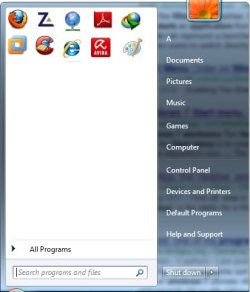
i want to get grid view for start menu pinned apps...
somewhat like the pic shown.
can anybody help
 

Attachments
  • Untitled.jpg
    Untitled.jpg
    22 KB · Views: 7
Last edited by a moderator:

My Computer

OS
Windows 7 Ultimate x64
Hmm, have seen that in Windows Mobile. But in normal Win7 you do not have the reg key that would have to be changed.

Where did you find that example?
 

My Computer

Computer Manufacturer/Model Number
HP, Dell, Gateway, Toshiba - 4 laptops and 2 desktops
OS
Vista, Windows7, Mint Mate, Zorin, Windows 8
CPU
from 1.6GHz Duo to i7
Monitor(s) Displays
2x HP w2207
Hard Drives
5x HDD, 7x SSD, 12x Externals
Keyboard
with trackball - no mices
Mouse
Trackball mice
Internet Speed
DSL 6000
Hmm, have seen that in Windows Mobile. But in normal Win7 you do not have the reg key that would have to be changed.

Where did you find that example?


i created that pic in paint just for better understanding of my question....
any 3rd party apps that would let me achieve that?
 

My Computer

OS
Windows 7 Ultimate x64
Not that I know of any. I think the key that is missing is
HKEY_LOCAL_MACHINE\Software\Microsoft\Shell\Rai\
 

My Computer

Computer Manufacturer/Model Number
HP, Dell, Gateway, Toshiba - 4 laptops and 2 desktops
OS
Vista, Windows7, Mint Mate, Zorin, Windows 8
CPU
from 1.6GHz Duo to i7
Monitor(s) Displays
2x HP w2207
Hard Drives
5x HDD, 7x SSD, 12x Externals
Keyboard
with trackball - no mices
Mouse
Trackball mice
Internet Speed
DSL 6000
If you care mostly about the look of the menu, and not the ease of adding/removing "pinned" items, try Classic Shell. See the screenshot.

To manage your grid items you will have to go through the start menu settings and create custom item for each.
 

Attachments

  • startmenu.png
    startmenu.png
    24.3 KB · Views: 3

My Computer

Computer Manufacturer/Model Number
Me :) I build all my PCs
OS
Windows 7 Home 64, Vista Ultimate 64
If you care mostly about the look of the menu, and not the ease of adding/removing "pinned" items, try Classic Shell. See the screenshot.

To manage your grid items you will have to go through the start menu settings and create custom item for each.

I tried Classic shell it changed complete look of start menu. But i only want to change the pinned items view. BTW your avatar is awesome
 

My Computer

OS
Windows 7 Ultimate x64
Hmm, have seen that in Windows Mobile. But in normal Win7 you do not have the reg key that would have to be changed.

Where did you find that example?

Will adding that reg key get it to work?
Can u elaborate exactly what changes need to be made to registry.
Sorry i don't understand much about win registry:(
 

My Computer

OS
Windows 7 Ultimate x64
Not that I know of any. I think the key that is missing is HKEY_LOCAL_MACHINE\Software\Microsoft\Shell\Rai\

Will adding that reg key get it to work?
Can u elaborate exactly what changes need to be made to registry.
Sorry i don't understand much about win registry:(
 

My Computer

OS
Windows 7 Ultimate x64
If you are not a registry expert, you better keep off it. I have not tried adding that key, so I cannot say.
 

My Computer

Computer Manufacturer/Model Number
HP, Dell, Gateway, Toshiba - 4 laptops and 2 desktops
OS
Vista, Windows7, Mint Mate, Zorin, Windows 8
CPU
from 1.6GHz Duo to i7
Monitor(s) Displays
2x HP w2207
Hard Drives
5x HDD, 7x SSD, 12x Externals
Keyboard
with trackball - no mices
Mouse
Trackball mice
Internet Speed
DSL 6000
Back
Top