Group challenge - how to get Classic theme Windows Explorer only

Lexus45

New member
Member
Local time
7:51 AM
Messages
29
I am impressed with eveyone associated with this board, so here is my challenge:

If you select the Windows Classic theme, you get among other things the older more Classic view of Windows Explorer with the "+" and the dashed vertical tree lines.

I would love to have that, but still retain the other Aero desktop and features. Is it possible to hack or extract just the Windows Explorer view from the Classic theme that is already on Windows 7?

PS: I know there are third party progams/utilities to return Windows 7 to Windows XP, but that is not what I am asking for.
 

My Computer My Computer

At a glance

Windows 7 Professional x64Intel
Computer Manufacturer/Model Number
Maingear
OS
Windows 7 Professional x64
CPU
Intel
That whole Windows Explorer window can be customized if you are up to it, the "+" can be done with aero if you edit the images for default aero they are #s 928,929,930, normal, 931,932,933, hot open/closed depending on DPI settings in the image folder in C:\Windows\Resources\Themes\Aero\aero.msstyles
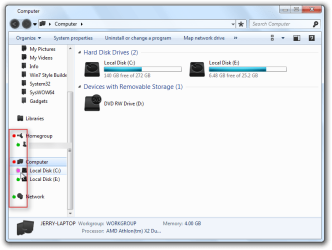
Here is a screenshot of just some round spots I did to test, you could draw the + and - for the images.
Computer.png

Here is the custom theme I use
Computer2.png

Let me know if I can help more.
Jerry
 

My Computer My Computer

At a glance

Win 7 Pro x64 / Win 10 ProIntel(R) Core(TM) i7-3630QM CPU @ 2.40GHz12 GB(1) Intel(R) HD Graphics 4000 (2) NVIDIA GeFo...
Computer type
Laptop
Computer Manufacturer/Model Number
Sager NP9170
OS
Win 7 Pro x64 / Win 10 Pro
CPU
Intel(R) Core(TM) i7-3630QM CPU @ 2.40GHz
Motherboard
CLEVO P170EM
Memory
12 GB
Graphics Card(s)
(1) Intel(R) HD Graphics 4000 (2) NVIDIA GeForce GTX 675M
Sound Card
(1) Realtek High Definition Audio (2) Intel(R) Display Aud
Monitor(s) Displays
17.3
Screen Resolution
1920x1080
Hard Drives
(1) Samsung 860 EVO 500GB(OS) (1) Samsung 860 EVO 500GB(Data)
Keyboard
Backlite
Antivirus
MSE, Malwarebytes Pro
Browser
Firefox
Other Info
DESKTOP: Custom-built.
OS: Win 10 Pro x64.
CASE: Rosewill R5.
CPU: Intel I5 4670K CPU @ 3.40GHz.
CPU COOLER: Cool Master Hyper 212 EVO.
MOTHERBOARD: Asus Z87-A.
MEMORY: Kingston HyperX 2x4 GB.
GPU: Nvidia Geforce 650 TI.
PSU: Corsair TX750.
DRIVES: (1) Samsung 840 120 GB SSD (2) Western Digital blue 500 GB 7200 RPM.
Bongo,
Thanks for the reply and sample.

But this is way beyond me :cry: , but does this just add an image in front of the drive or whatever is modified or does it do more after the modifications?

What I like and liked about the older Windows Explorer style was the clearer delineation of what folders and subfolders were open and the vertical directory tree lines. I could do without the tree lines if the clearer deliniation of open folders and subfolders could be accomplished. If the open ones in Windows 7 had more indentation from the others, that would also help a lot.

I was hoping it could be done by locating and selecting the folder, file, dll, or whatever it is that Windows uses to create the Explorer view in Classic mode.

Oh well.
 

My Computer My Computer

At a glance

Windows 7 Professional x64Intel
Computer Manufacturer/Model Number
Maingear
OS
Windows 7 Professional x64
CPU
Intel
Back
Top