Windows Explorer only processes images on screen not all in file?

LindaPradetto

New member
Local time
3:55 AM
Messages
16
This problem isn't that big just time consuming and annoying.

I am a wedding photographer and process hundreds of images at a time. Most of the time I use Photoshop bridge to view images but when I burn to disc and want to verify that they were transferred correctly I use Windows Explorer. I select "Large Icons" to view the image's thumbnails. Windows will only process the images showing on the screen which is usually 180 images. With the size files of each image I use, a DVD will hold around 400 images so I have to scroll down, wait until the images load (which is extremely slow), then scroll down, wait again until all images are loaded and viewable. If Windows would process all the images on the disc at once and all I would need to do was scroll down to view instantaneously, I would not be tied up at the computer.

As I said, this isn't a major problem, just a time consumer and upsets my work flow. I verify the discs on three different computers, one with Vista, one with Windows 7 and one with 8.1 and all of them do the same. I use Windows Explorer because that is what most of my clients will use to view them. Is there any way to re-set how windows handles opening and displaying the thumbnails to speed up this process? Since all three computers behave the same I understand it is possible there is nothing I can do, but every time I go through this process, I wonder about it and thought I would ask.

Thank you,

Lidna
 

My Computer My Computer

At a glance

Windows 7 Ultimate x64Intel Core i716GBDon't know
Computer type
PC/Desktop
Computer Manufacturer/Model Number
Custom Build
OS
Windows 7 Ultimate x64
CPU
Intel Core i7
Motherboard
Intel DQ77MK
Memory
16GB
Graphics Card(s)
Don't know
Hard Drives
SSD drive + 2 TB storage drive
Antivirus
Windows Security Essentials
Browser
Internet Explorer
I don't use that view - so, I might not be of much help here.

I was just wondering if you see a thumbnail cache file on the DVD?
Windows thumbnail cache - Wikipedia, the free encyclopedia

Hopefully, someone more knowledgeable about this cache can tell you how to get it to work on the DVD files.
 

My Computer My Computer

At a glance

W7 Pro SP1 64biti78GBIntel HD Graphics
Computer type
Laptop
Computer Manufacturer/Model Number
Employer provided Dell Latitude
OS
W7 Pro SP1 64bit
CPU
i7
Memory
8GB
Graphics Card(s)
Intel HD Graphics
Hard Drives
crappy SSD
Antivirus
Employer mandated Symantec Endpoint Protection
Browser
Pale Moon 64bit, IE11 64bit & Chrome 64bit
I think it all depends on CPU speed, total RAM Memory & speed, and access (read speed) of hard drives & CD/DVD drives.

I see the same problem viewing all the photos, wallpapers, snips, etc that I have collected & stored.
 

My Computer My Computer

At a glance

Win7 Enterprise, Win7 x86 (Ult 7600), Win7 x6...AMD fx8350 4ghz, AMD-32 2400mhz, AMD-64 3200m...2gb, 4gb on the Ult 7600, 4gb on Technet RTM,...Draw my own Graphics, several nVidia cards
Computer type
PC/Desktop
Computer Manufacturer/Model Number
Built them myself, Science Experiments !
OS
Win7 Enterprise, Win7 x86 (Ult 7600), Win7 x64 Ult 7600, TechNet RTM on AMD x64 (2.8Ghz)
CPU
AMD fx8350 4ghz, AMD-32 2400mhz, AMD-64 3200mhz, AMDx64 2.8G
Motherboard
SIS 755, ECS-K8M890M-M (Ult 7600), GigaByte & others
Memory
2gb, 4gb on the Ult 7600, 4gb on Technet RTM, 32gb on FX8350
Graphics Card(s)
Draw my own Graphics, several nVidia cards
Sound Card
on motherboard
Monitor(s) Displays
19" flat scr, 28" I-Inc widescr,22" Emprex Widescr, 23" Acer
Screen Resolution
1280 x 1024, 1440 x 900, 1920 x 1080
Hard Drives
6 pata Ide HD's & 2 Sata HD's
added 80gb external on Ult 7600 computer,
numerous extra 1tb, 2TB, 3Tb SATA HD's
A collection of ext HD Docks w/ HDs
PSU
430w, 550w, 600w, 700, 800, etc
Case
All Generic Full Towers
Cooling
Open Air & a few fans, some w/ colored LEDs
Keyboard
Compaq & Dell recycled from GoodWill
Mouse
Made in China Optical Wired Mouse
Internet Speed
Fast Cable InterNet
Antivirus
AVG Free on 24 different Desktops, NO Problems!
Browser
IE 8 is preferred, but use FireFox sometimes
Other Info
Linksys Routers, switches, & Hubs
Too Many USB Flash Drives to count, Biggest is 64GB !
Eight computers in my home network.
Sixteen computers at my business network.
Linked via TeamViewer !
Lots of old used spare computer parts everywhere!
Thanks for your reply UsernameIssues,

As I understand it, Windows does produce a thumbnail cache when it opens the images on the disc, but I'm pretty sure it won't transfer the cache when they are burnt onto the disc. It may if I were to transfer the whole folder, but I prefer that the images show up instead of a folder that the client has to click on when they open the disc. No stored thumbnail cache is why it takes so long to open them when I check the discs. I've also learnt to delete the thumbnail cache from Windows when I check more than one copy of the same disc. If there is a problem with the burn and some of the images don't load correctly on the first disc, if I don't dump the cache for that particle disc, every additional copy will show the same corrupt image, even if it isn't corrupt on subsequent discs.

I just don't understand why Windows will not open all the files on the disc without them being displayed on the screen. If I go into Adobe Bridge and open a file folder with numerous images, it will process every image in that file at once and when I scroll down to look at the images they are all on display. Not so in Windows, no matter how long I wait, when I scroll down to display the next 180 images they appear as jpeg icons and will then proceed to process to a thumbnail of the images. Also, Windows will not use Bridge's thumbnails, they are completely different and can only be seen by certain Adobe programs.

Anyway thanks for your help, and sorry for rambling on about this,

Linda
 

My Computer My Computer

At a glance

Windows 7 Ultimate x64Intel Core i716GBDon't know
Computer type
PC/Desktop
Computer Manufacturer/Model Number
Custom Build
OS
Windows 7 Ultimate x64
CPU
Intel Core i7
Motherboard
Intel DQ77MK
Memory
16GB
Graphics Card(s)
Don't know
Hard Drives
SSD drive + 2 TB storage drive
Antivirus
Windows Security Essentials
Browser
Internet Explorer
Your ramblings are good/informative :-)
Thanks for the info.

I don't know of a setting that would tell Windows Explorer to process all of the image files when a folder is opened.

I was wondering: If you...
...created a temp folder with the images to be burned to DVD
...let Windows create the thumbnail cache by viewing each photo
...moved the images and the thumbnail cache file(s?) to the DVD
Does that speedup viewing the DVD's photos as icons?
 

My Computer My Computer

At a glance

W7 Pro SP1 64biti78GBIntel HD Graphics
Computer type
Laptop
Computer Manufacturer/Model Number
Employer provided Dell Latitude
OS
W7 Pro SP1 64bit
CPU
i7
Memory
8GB
Graphics Card(s)
Intel HD Graphics
Hard Drives
crappy SSD
Antivirus
Employer mandated Symantec Endpoint Protection
Browser
Pale Moon 64bit, IE11 64bit & Chrome 64bit
UsernameIssues,

I just tried that and it didn't help, still only opening the images seen on screen. As soon as they were opened the drive stopped turning (the drive is very loud and I can tell when it is reading data). As soon as I scrolled down the images started opening up again. I think I'm stuck with this with no way to change the way the disc is read. Whether it is a windows or the drive set up, I'm not sure.

I wonder why the files on the disc are treated differently than the ones on regular hard drives. Maybe I'll ask Microsoft and see if I can get an answer.

Thanks all who answered, I appreciate the time spent trying to figure out a fix for me.

Linda
 

My Computer My Computer

At a glance

Windows 7 Ultimate x64Intel Core i716GBDon't know
Computer type
PC/Desktop
Computer Manufacturer/Model Number
Custom Build
OS
Windows 7 Ultimate x64
CPU
Intel Core i7
Motherboard
Intel DQ77MK
Memory
16GB
Graphics Card(s)
Don't know
Hard Drives
SSD drive + 2 TB storage drive
Antivirus
Windows Security Essentials
Browser
Internet Explorer
Bummer.

But thanks for documenting the issue so well. Maybe it will be corrected someday.
 

My Computer My Computer

At a glance

W7 Pro SP1 64biti78GBIntel HD Graphics
Computer type
Laptop
Computer Manufacturer/Model Number
Employer provided Dell Latitude
OS
W7 Pro SP1 64bit
CPU
i7
Memory
8GB
Graphics Card(s)
Intel HD Graphics
Hard Drives
crappy SSD
Antivirus
Employer mandated Symantec Endpoint Protection
Browser
Pale Moon 64bit, IE11 64bit & Chrome 64bit
Suggestion

Well on my machine images are slow to load if the folder contains a huge number of images. I've speeded things up a little using a RAMDisk (not recommended for most users). Even using other photo viewers doesn't improve things too much. There are faster ones available like Nexus and the like.

The reason that I'm posting in this thread is just to let you know about an image viewer that you might want to try. It won't solve the problem for your clients though if they're using default windows photo viewing methods.

Suggest:

Take a look at WildBit Image Viewer

Personally I downloaded the portable version (no help) and no installation required.

In order to apply settings the program must be run with admin rights. Right click the executable and choose "run as administrator"

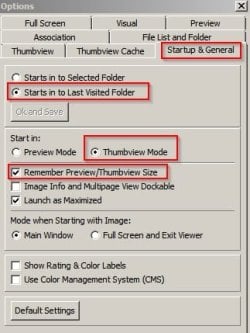
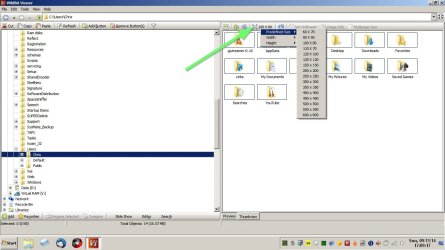
What's interesting is that you can set it to load thumbnails and pre-define thumbnail size and also store the thumbnail cache in your chosen location so that it loads thumbnails very quickly.

Here's some screenshots of settings:

Start in thumbnail mode
WildBit1.jpg

Save thumbnail cache to disk and load it
WildBit2.jpg

Define a small size for thumbnails for faster loading
WildBit3.jpg

Files in cache
Wildbit Cache.jpg
 

My Computer My Computer

At a glance

Microsoft Windows 7 Home Premium 64-bit 7601 ...AMD C-60 APU with Radeon(tm) HD Graphics4.00 GBAMD Radeon HD 6290 Graphics
Computer type
Laptop
Computer Manufacturer/Model Number
ASUS
OS
Microsoft Windows 7 Home Premium 64-bit 7601 Multiprocessor Free Service Pack 1
CPU
AMD C-60 APU with Radeon(tm) HD Graphics
Motherboard
ASUSTeK COMPUTER INC. X501U
Memory
4.00 GB
Graphics Card(s)
AMD Radeon HD 6290 Graphics
Sound Card
(1) AMD High Definition Audio Device (2) Realtek High Defi
Screen Resolution
1366 x 768 x 32 bits (4294967296 colors) @ 60 Hz
Hard Drives
Hitachi HTS545050A7E380 SATA Disk Device
Antivirus
Comodo CIS & FW, SecureAplus App Whitelisting, Threatfire
Browser
Cyberfox 64bit, Opera 64bit, Airfox
Other Info
Spy-The-Spy, HitmanPro.Alert, Norton Connect Safe, MJRegWatcher, BitDefender TrafficLight, Voodoo Shield, Zemana AntiMalware
Back
Top