
You are using an out of date browser. It may not display this or other websites correctly.
You should upgrade or use an alternative browser.
You should upgrade or use an alternative browser.
GT 220 Problems!!!!
- Thread starter martto14
- Start date

Welcome to Seven Forums. Are you using th latest driver from Nvidia 258.96? NVIDIA DRIVERS 258.96 WHQL
If so where you experiencing this before you installed it?
If not you might want to un-install it and go back to a previous driver, if the problem persists you may want to check your card and make sure the fan is clean and your not experiencing any heat issues.
Sometimes the new driver will cause issues with different cards.
I don't know if this is due to the fact that maybe they're focusing more on the newer GTX Fremi cards or what.
You can also try using driver sweeper, once you have un-installed the old driver you can run this program to remove any residual files that maybe left over form the previous driver. Guru3D - Driver Sweeper download from Guru3D.com driver sweeper
I also like to suggest to members before you install a new driver / application I always create a restore point.
This way once you have un-installed the driver/app you can easily restore your system back to is previous state. Fabe
If so where you experiencing this before you installed it?
If not you might want to un-install it and go back to a previous driver, if the problem persists you may want to check your card and make sure the fan is clean and your not experiencing any heat issues.
Sometimes the new driver will cause issues with different cards.
I don't know if this is due to the fact that maybe they're focusing more on the newer GTX Fremi cards or what.
You can also try using driver sweeper, once you have un-installed the old driver you can run this program to remove any residual files that maybe left over form the previous driver. Guru3D - Driver Sweeper download from Guru3D.com driver sweeper
I also like to suggest to members before you install a new driver / application I always create a restore point.
This way once you have un-installed the driver/app you can easily restore your system back to is previous state. Fabe
My Computer
- Computer Manufacturer/Model Number
- Self Built
- OS
- Windows 7 ultimate 64 bit / XP Home sp3
- CPU
- intel Core 2 Duo E8400 3.0ghz
- Motherboard
- Asus P5ND bios 1401
- Memory
- 8 gigs 1066 OCZ Fata1ty
- Graphics Card(s)
- EVGA GTX 580 Call of Duty Black Ops Edition
- Sound Card
- Creative Soundblaster Audigy 2zs
- Monitor(s) Displays
- Asus 24in LCD's 2MS X2
- Screen Resolution
- 1920x1080p @60Hz
- Hard Drives
- WD Caviar 500 Black/ WD Caviar 200 Blue
- PSU
- OCZ 700W GameXtreme
- Case
- NZXT Apollo
- Cooling
- Corsair H50 CPU/120mm x3 /60mm x2 /Corsair Dominator Ram
- Keyboard
- Logitech Bluetooth Wireless MX5000
- Mouse
- Logitech Bluetooth Wireless MX1000
- Internet Speed
- Download 19.83 Upload 0.97
- Other Info
- Logitech Z2300 Speakers/ Bose Noise Cancelling Headphones/Avermedia PCI-e Hybrid TV Bravo/Epson NX415 all in one/ 4 Port Powered USB Hub/ LG 10x Bluray Burner /TSST Corp DVDRW External
GT 220 Problems!!!!
Found a fix w00t
This is always nice to hear but it's even better when you share your fix so it could possibly help another member with a simular issue. Fabe
My Computer
- Computer Manufacturer/Model Number
- Self Built
- OS
- Windows 7 ultimate 64 bit / XP Home sp3
- CPU
- intel Core 2 Duo E8400 3.0ghz
- Motherboard
- Asus P5ND bios 1401
- Memory
- 8 gigs 1066 OCZ Fata1ty
- Graphics Card(s)
- EVGA GTX 580 Call of Duty Black Ops Edition
- Sound Card
- Creative Soundblaster Audigy 2zs
- Monitor(s) Displays
- Asus 24in LCD's 2MS X2
- Screen Resolution
- 1920x1080p @60Hz
- Hard Drives
- WD Caviar 500 Black/ WD Caviar 200 Blue
- PSU
- OCZ 700W GameXtreme
- Case
- NZXT Apollo
- Cooling
- Corsair H50 CPU/120mm x3 /60mm x2 /Corsair Dominator Ram
- Keyboard
- Logitech Bluetooth Wireless MX5000
- Mouse
- Logitech Bluetooth Wireless MX1000
- Internet Speed
- Download 19.83 Upload 0.97
- Other Info
- Logitech Z2300 Speakers/ Bose Noise Cancelling Headphones/Avermedia PCI-e Hybrid TV Bravo/Epson NX415 all in one/ 4 Port Powered USB Hub/ LG 10x Bluray Burner /TSST Corp DVDRW External
Since you changed your first post you'll have to re-explain your problem.
Also please take the time to fill in your system specs. Here's a program to help if you meed it. Speccy - System Information - Free Download
Please go under userCP (top of page) then scroll down to edit system specs. This way they will apear under My System Specs in the lower left hand corner of every post you make.
Thanks. Fabe
Also please take the time to fill in your system specs. Here's a program to help if you meed it. Speccy - System Information - Free Download
Please go under userCP (top of page) then scroll down to edit system specs. This way they will apear under My System Specs in the lower left hand corner of every post you make.
Thanks. Fabe
My Computer
- Computer Manufacturer/Model Number
- Self Built
- OS
- Windows 7 ultimate 64 bit / XP Home sp3
- CPU
- intel Core 2 Duo E8400 3.0ghz
- Motherboard
- Asus P5ND bios 1401
- Memory
- 8 gigs 1066 OCZ Fata1ty
- Graphics Card(s)
- EVGA GTX 580 Call of Duty Black Ops Edition
- Sound Card
- Creative Soundblaster Audigy 2zs
- Monitor(s) Displays
- Asus 24in LCD's 2MS X2
- Screen Resolution
- 1920x1080p @60Hz
- Hard Drives
- WD Caviar 500 Black/ WD Caviar 200 Blue
- PSU
- OCZ 700W GameXtreme
- Case
- NZXT Apollo
- Cooling
- Corsair H50 CPU/120mm x3 /60mm x2 /Corsair Dominator Ram
- Keyboard
- Logitech Bluetooth Wireless MX5000
- Mouse
- Logitech Bluetooth Wireless MX1000
- Internet Speed
- Download 19.83 Upload 0.97
- Other Info
- Logitech Z2300 Speakers/ Bose Noise Cancelling Headphones/Avermedia PCI-e Hybrid TV Bravo/Epson NX415 all in one/ 4 Port Powered USB Hub/ LG 10x Bluray Burner /TSST Corp DVDRW External

Can you please explain what your problem is so that we can help you. As it stands, we have nothing to go on whatsoever. Also, please do not edit your post as you have done as it makes the thread pointless both for you if you have the same or similar problem in the future, and for others who might as well. Remember that posting details of the problem, and having them as a record, is of equal importance as the solution itself because people with a problem will look for posts/threads with the same or similar problem in order to find a solution.
My Computer
- Computer type
- PC/Desktop
- Computer Manufacturer/Model Number
- Dwarf Dwf/11/2012 r09/2013
- OS
- Windows 8.1 Pro RTM x64
- CPU
- Intel Core-i5-3570K 4-core @ 3.4GHz (Ivy Bridge) (OC 4.4GHz)
- Motherboard
- ASRock Z77 Extreme4-M
- Memory
- 4 x 4GB DDR3-1600 Corsair Vengeance CMZ8GX3M2A1600C9B (16GB)
- Graphics Card(s)
- MSI GeForce GTX770 Gaming OC 2GB
- Sound Card
- Realtek High Definition on board solution (ALC 898)
- Monitor(s) Displays
- ViewSonic VA1912w Widescreen (VGA)
- Screen Resolution
- 1440x900
- Hard Drives
- OCZ Agility 3 SSD 120GB SATA III x2 (RAID 0)
Samsung HD501LJ 500GB SATA II x2
Hitachi HDS721010CLA332 1TB SATA II
Iomega 1.5TB Ext USB 2.0
WD 2.0TB Ext USB 3.0
- PSU
- XFX Pro Series 850W Semi-Modular
- Case
- Gigabyte IF233
- Cooling
- 1 x 120mm Front Inlet 1 x 120mm Rear Exhaust
- Keyboard
- Microsoft Comfort Curve Keyboard 3000 (USB)
- Mouse
- Microsoft Comfort Mouse 3000 for Business (USB)
- Internet Speed
- NetGear DG834Gv3 ADSL Modem/Router (Ethernet) ~4.0 Mb/s (O2)
- Antivirus
- Avast! 8.0.1497
- Browser
- IE 11
- Other Info
- Optical Drive: HL-DT-ST BD-RE BH10LS30 SATA Bluray
Lexmark S305 Printer/Scanner/Copier (USB)
WEI Score: 8.1/8.1/8.5/8.5/8.25
Asus Eee PC 1011PX Netbook (Windows 7 x86 Starter)
i know my Specs because i bought all things one by one
OK here is the info:
2GB Ram DDR2 1100
1GB Video Card GT 220 DDR2
2.81GHz AMD x2 240
Windows 7 Ultimate x86 (x32)
Mother: n68-s (Asrock)
My problem is that the video card's drivers are ****ed up i think (sorry for the word) and when i install it if i look little more in the words i see moving lines or something like little stars like the TV. Sometimes it dissappears sometimes i see it in many places in the screen and it gets annoying.
OK now help
P.S. If the problem is in the driver show a working dirver for gt 220 NOT Update from Nvidia
I googled for drivers none found :S
OK here is the info:
2GB Ram DDR2 1100
1GB Video Card GT 220 DDR2
2.81GHz AMD x2 240
Windows 7 Ultimate x86 (x32)
Mother: n68-s (Asrock)
My problem is that the video card's drivers are ****ed up i think (sorry for the word) and when i install it if i look little more in the words i see moving lines or something like little stars like the TV. Sometimes it dissappears sometimes i see it in many places in the screen and it gets annoying.
OK now help
P.S. If the problem is in the driver show a working dirver for gt 220 NOT Update from Nvidia
I googled for drivers none found :S
My Computer
- OS
- Windows 7 Ultimate x32

I'm running Windows 7 Home Premium 64 bit with a BFG GT220 PCIe 2.0 Graphics card. I'm using the NVidia Geforce 257.21 drivers. No problems that I know of. Are you running the latest drivers for your motherboard. inside of your PC case nice and clean? Case temperature OK? All the fans working OK? I had one video card do something similar to what you describe and it turned out that it's cooling fan was failing and it was overheating.
My Computer
- Computer type
- PC/Desktop
- Computer Manufacturer/Model Number
- Home Built
- OS
- Windows 10 Education 64 bit
- CPU
- AMD Phenom II X4 980 Black Edition Deneb 3.7GHz
- Motherboard
- Asus M4N68T-M V2 µATX Motherboard
- Memory
- 8GB 4GBx2 Kingston PC10600 DDR3 1333 Memory
- Graphics Card(s)
- Zotac NVIDIA Geforce GT640 2 Gig DDR3 PCIe
- Sound Card
- VIA VT1708s High Definition Audio 8-channel Onboard
- Monitor(s) Displays
- 22" LG E2242 1080p and 2 19" I-INC AG191D
- Screen Resolution
- 1280x1024 - 1920x1080 - 1280x1024
- Hard Drives
- Crucial M100 256 GB SSD and 500 GB WD Blue SATA
- PSU
- Thermaltake TR 620
- Case
- Power Up Black ATX Mid-Tower Case
- Cooling
- Stock heatsink and fan
- Keyboard
- Logitech Wireless K350 Wave
- Mouse
- Logitech Wireless M570 Trackman Wheel
- Internet Speed
- 80 Mbps Down 30 Mbps Up
- Antivirus
- Windows Defender
- Browser
- Internet Explorer 11
- Other Info
- HP DVD1040e Lightscribe - External USB2

Acording to my BIOS my CPU is running at 42c, its an Athlon II x4 2.6 GHz. My case temps are 35c. What Program did you use to get those temps? Let me know and I'll run it and see what temp my gt220 is running at. I'm thinking your temps might be on the hot side. Those little flames next CPU and GPU can't be good.
EDIT: According to CPUID Hardware Monitor My GT220 is running at 44c. Looks like your system is close to 10c hotter than mine acrose the board. You'll have to do some searching and looking up specs to see if thats way to hot or not.
EDIT: According to CPUID Hardware Monitor My GT220 is running at 44c. Looks like your system is close to 10c hotter than mine acrose the board. You'll have to do some searching and looking up specs to see if thats way to hot or not.
My Computer
- Computer type
- PC/Desktop
- Computer Manufacturer/Model Number
- Home Built
- OS
- Windows 10 Education 64 bit
- CPU
- AMD Phenom II X4 980 Black Edition Deneb 3.7GHz
- Motherboard
- Asus M4N68T-M V2 µATX Motherboard
- Memory
- 8GB 4GBx2 Kingston PC10600 DDR3 1333 Memory
- Graphics Card(s)
- Zotac NVIDIA Geforce GT640 2 Gig DDR3 PCIe
- Sound Card
- VIA VT1708s High Definition Audio 8-channel Onboard
- Monitor(s) Displays
- 22" LG E2242 1080p and 2 19" I-INC AG191D
- Screen Resolution
- 1280x1024 - 1920x1080 - 1280x1024
- Hard Drives
- Crucial M100 256 GB SSD and 500 GB WD Blue SATA
- PSU
- Thermaltake TR 620
- Case
- Power Up Black ATX Mid-Tower Case
- Cooling
- Stock heatsink and fan
- Keyboard
- Logitech Wireless K350 Wave
- Mouse
- Logitech Wireless M570 Trackman Wheel
- Internet Speed
- 80 Mbps Down 30 Mbps Up
- Antivirus
- Windows Defender
- Browser
- Internet Explorer 11
- Other Info
- HP DVD1040e Lightscribe - External USB2
Uhh SpeedFan
Edit: Well what to do to open the Left side of the PC to cool more?
P.S. Little hot on my country whole summer like 30-40 C*
Gonna try while open what's the temperature :\
Edit: Well what to do to open the Left side of the PC to cool more?
P.S. Little hot on my country whole summer like 30-40 C*
Gonna try while open what's the temperature :\
Last edited:
My Computer
- OS
- Windows 7 Ultimate x32
OK here is my screen shoot: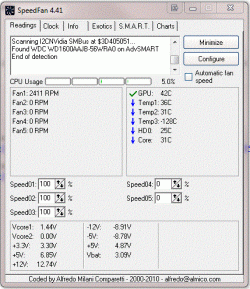
I think your temps are on the high side myself. I'm running a quad versus your dual core and my case has no cooling fans in it. It's just my power supply exhausting the hot air. You might want to add some fans to your case or double check they are moving air in the right direction. Front mounted fans should be blowing in, rear mounted fans blowing out.
I think your temps are on the high side myself. I'm running a quad versus your dual core and my case has no cooling fans in it. It's just my power supply exhausting the hot air. You might want to add some fans to your case or double check they are moving air in the right direction. Front mounted fans should be blowing in, rear mounted fans blowing out.
My Computer
- Computer type
- PC/Desktop
- Computer Manufacturer/Model Number
- Home Built
- OS
- Windows 10 Education 64 bit
- CPU
- AMD Phenom II X4 980 Black Edition Deneb 3.7GHz
- Motherboard
- Asus M4N68T-M V2 µATX Motherboard
- Memory
- 8GB 4GBx2 Kingston PC10600 DDR3 1333 Memory
- Graphics Card(s)
- Zotac NVIDIA Geforce GT640 2 Gig DDR3 PCIe
- Sound Card
- VIA VT1708s High Definition Audio 8-channel Onboard
- Monitor(s) Displays
- 22" LG E2242 1080p and 2 19" I-INC AG191D
- Screen Resolution
- 1280x1024 - 1920x1080 - 1280x1024
- Hard Drives
- Crucial M100 256 GB SSD and 500 GB WD Blue SATA
- PSU
- Thermaltake TR 620
- Case
- Power Up Black ATX Mid-Tower Case
- Cooling
- Stock heatsink and fan
- Keyboard
- Logitech Wireless K350 Wave
- Mouse
- Logitech Wireless M570 Trackman Wheel
- Internet Speed
- 80 Mbps Down 30 Mbps Up
- Antivirus
- Windows Defender
- Browser
- Internet Explorer 11
- Other Info
- HP DVD1040e Lightscribe - External USB2


It might already be damaged from overheating. You'll notice it more in video intensive programs like games. Anything that puts a load on the card and makes it run hot. The only way to tell is to try that video card in another PC, or try a different card in your PC. If you can get a screen shot of what you see when it's acting up it may help. If you think it's a driver problem you may have to start over with a clean install. if you go that route I'd download the latest driver again just to rule out a corrupted download.
My Computer
- Computer type
- PC/Desktop
- Computer Manufacturer/Model Number
- Home Built
- OS
- Windows 10 Education 64 bit
- CPU
- AMD Phenom II X4 980 Black Edition Deneb 3.7GHz
- Motherboard
- Asus M4N68T-M V2 µATX Motherboard
- Memory
- 8GB 4GBx2 Kingston PC10600 DDR3 1333 Memory
- Graphics Card(s)
- Zotac NVIDIA Geforce GT640 2 Gig DDR3 PCIe
- Sound Card
- VIA VT1708s High Definition Audio 8-channel Onboard
- Monitor(s) Displays
- 22" LG E2242 1080p and 2 19" I-INC AG191D
- Screen Resolution
- 1280x1024 - 1920x1080 - 1280x1024
- Hard Drives
- Crucial M100 256 GB SSD and 500 GB WD Blue SATA
- PSU
- Thermaltake TR 620
- Case
- Power Up Black ATX Mid-Tower Case
- Cooling
- Stock heatsink and fan
- Keyboard
- Logitech Wireless K350 Wave
- Mouse
- Logitech Wireless M570 Trackman Wheel
- Internet Speed
- 80 Mbps Down 30 Mbps Up
- Antivirus
- Windows Defender
- Browser
- Internet Explorer 11
- Other Info
- HP DVD1040e Lightscribe - External USB2
I'm on my third GT220. The first one was DOA right out of the box. The replacement for that one had a defective fan that buzzed. I started getting artifacts on screen during game play and ended up returning it too. The third one bought on sale at a different store has worked fine for months now. New parts can be defective, damaged in shipping etc.
As far as the drivers causing the problems, thats plausible but unlikely. That does happen but usually you get a lot of people complaining and new drivers are issued or the defective ones are pulled from being available. Also depending on the card, initially it may be shown as standard VGA and be running at a low resolution. There would be little stress on the card and you may not notice anything until you install the drivers and up the resolution. If you really think it's the drivers, un-install them, download a fresh copy and re-install them. Might want use system restore to go back to a point before you installed them if possible.
As far as the drivers causing the problems, thats plausible but unlikely. That does happen but usually you get a lot of people complaining and new drivers are issued or the defective ones are pulled from being available. Also depending on the card, initially it may be shown as standard VGA and be running at a low resolution. There would be little stress on the card and you may not notice anything until you install the drivers and up the resolution. If you really think it's the drivers, un-install them, download a fresh copy and re-install them. Might want use system restore to go back to a point before you installed them if possible.
My Computer
- Computer type
- PC/Desktop
- Computer Manufacturer/Model Number
- Home Built
- OS
- Windows 10 Education 64 bit
- CPU
- AMD Phenom II X4 980 Black Edition Deneb 3.7GHz
- Motherboard
- Asus M4N68T-M V2 µATX Motherboard
- Memory
- 8GB 4GBx2 Kingston PC10600 DDR3 1333 Memory
- Graphics Card(s)
- Zotac NVIDIA Geforce GT640 2 Gig DDR3 PCIe
- Sound Card
- VIA VT1708s High Definition Audio 8-channel Onboard
- Monitor(s) Displays
- 22" LG E2242 1080p and 2 19" I-INC AG191D
- Screen Resolution
- 1280x1024 - 1920x1080 - 1280x1024
- Hard Drives
- Crucial M100 256 GB SSD and 500 GB WD Blue SATA
- PSU
- Thermaltake TR 620
- Case
- Power Up Black ATX Mid-Tower Case
- Cooling
- Stock heatsink and fan
- Keyboard
- Logitech Wireless K350 Wave
- Mouse
- Logitech Wireless M570 Trackman Wheel
- Internet Speed
- 80 Mbps Down 30 Mbps Up
- Antivirus
- Windows Defender
- Browser
- Internet Explorer 11
- Other Info
- HP DVD1040e Lightscribe - External USB2
And there goes another problem i can't stop the Auto search for drivers from the windows... at least help me there...
Edit: Found another thing... my video card's temperature is too high (ima going to get flamed because you did 3 posts about the problems that maybe the heat is causing the problem...) and uhhh when i open the panel to get fresh air to the PC it doesn't go so lul...
Sooo how to make it more Cool (Low temperature) without opening the panel?
Edit: Found another thing... my video card's temperature is too high (ima going to get flamed because you did 3 posts about the problems that maybe the heat is causing the problem...) and uhhh when i open the panel to get fresh air to the PC it doesn't go so lul...
Sooo how to make it more Cool (Low temperature) without opening the panel?
My Computer
- OS
- Windows 7 Ultimate x32
If hit the windows key and the pause/break that should open your System windows. In there click advanced system settings. Go to the hardware tab and click the device installation settings button. In the next window that opens select No, let me choose what to do. That will stop windows from automatically downloading drivers and installing them.
As far as keeping you PC cool there are a couple of basic things you can do. One is to make sure to keep the inside of your case clean. Dust build up on heatsinks will act as an insulator and trap heat in. Dirty fans will reduce thier eficancy. The general rull of thumb is to have any front mounted cooling fans drawing air in and rear mounted fans blowing it out. You also want to try and ballence things out so you have the same number of fans drawing air in as out. It dowsn't always work out that way. Its not a big deal unless its lopsided one way or the other. Taking the side panel off will sometimes do in a pinch.
As far as keeping you PC cool there are a couple of basic things you can do. One is to make sure to keep the inside of your case clean. Dust build up on heatsinks will act as an insulator and trap heat in. Dirty fans will reduce thier eficancy. The general rull of thumb is to have any front mounted cooling fans drawing air in and rear mounted fans blowing it out. You also want to try and ballence things out so you have the same number of fans drawing air in as out. It dowsn't always work out that way. Its not a big deal unless its lopsided one way or the other. Taking the side panel off will sometimes do in a pinch.
My Computer
- Computer type
- PC/Desktop
- Computer Manufacturer/Model Number
- Home Built
- OS
- Windows 10 Education 64 bit
- CPU
- AMD Phenom II X4 980 Black Edition Deneb 3.7GHz
- Motherboard
- Asus M4N68T-M V2 µATX Motherboard
- Memory
- 8GB 4GBx2 Kingston PC10600 DDR3 1333 Memory
- Graphics Card(s)
- Zotac NVIDIA Geforce GT640 2 Gig DDR3 PCIe
- Sound Card
- VIA VT1708s High Definition Audio 8-channel Onboard
- Monitor(s) Displays
- 22" LG E2242 1080p and 2 19" I-INC AG191D
- Screen Resolution
- 1280x1024 - 1920x1080 - 1280x1024
- Hard Drives
- Crucial M100 256 GB SSD and 500 GB WD Blue SATA
- PSU
- Thermaltake TR 620
- Case
- Power Up Black ATX Mid-Tower Case
- Cooling
- Stock heatsink and fan
- Keyboard
- Logitech Wireless K350 Wave
- Mouse
- Logitech Wireless M570 Trackman Wheel
- Internet Speed
- 80 Mbps Down 30 Mbps Up
- Antivirus
- Windows Defender
- Browser
- Internet Explorer 11
- Other Info
- HP DVD1040e Lightscribe - External USB2