

TheShadbusher
Mjolnir Mk IV
- Local time
- 9:33 AM
- Messages
- 43
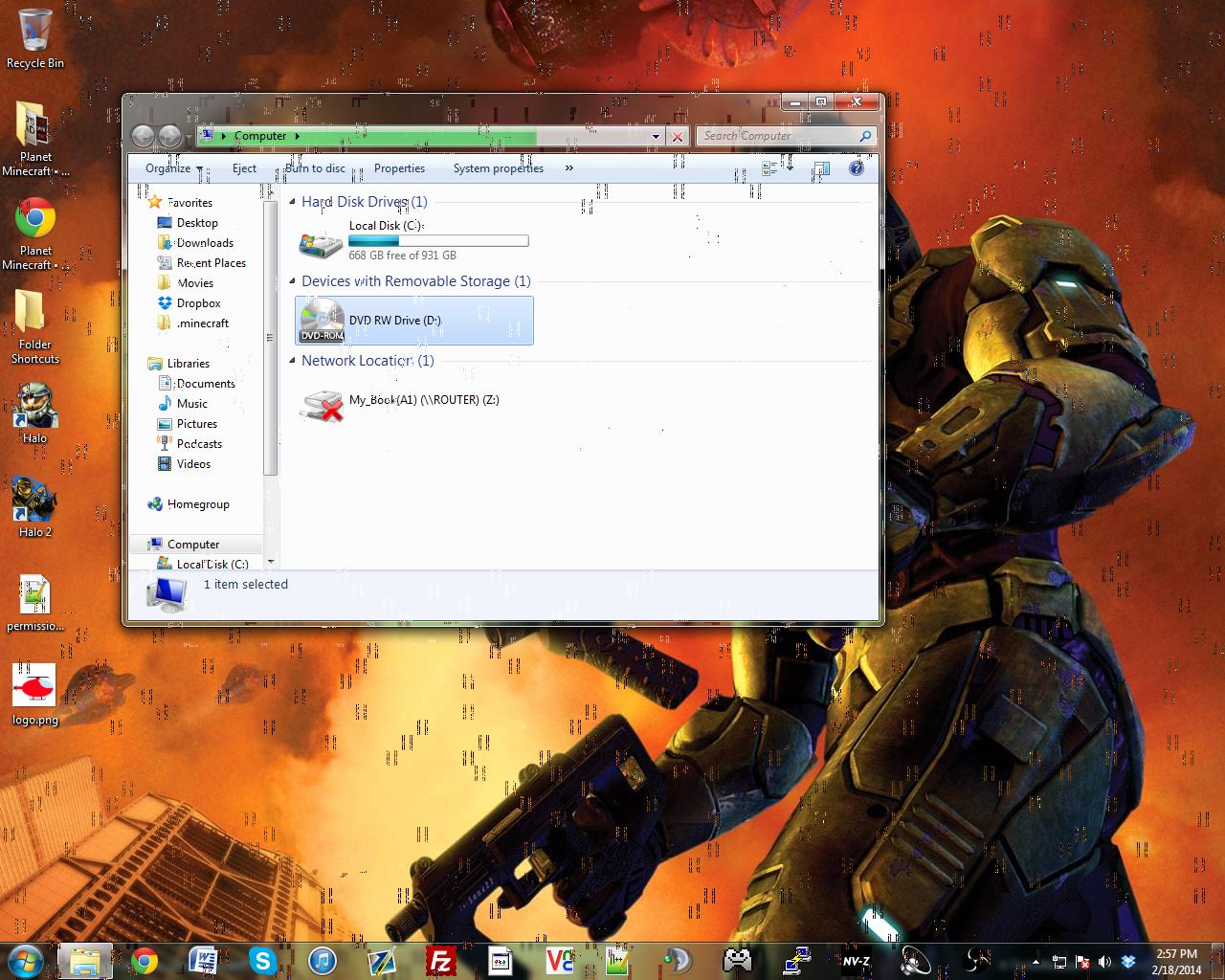
Yesterday, I was Skyping with a friend. I wanted to show him the shaders mod for Minecraft, so I screen-shared with him. Unfortunately, while I was screen-sharing, the picture on the screen started developing odd glitchy boxes. I thought it was an issue with Skype, so I stopped screen-sharing, and they went away. Later on, I was using VNC, and the boxes started showing up again. I then figured that it was probably either the monitor (which is pushing 10 years of age), the VGA cable, or the DVI-to-VGA adapter that was causing the problem. All of those were working fine. I checked to make sure that my NVIDIA drivers were up to date, and they were. I unplugged the graphics card and booted using the integrated graphics on the 4770k, and everything was fine. I plugged the GTX 660 back in, and uninstalled the device and its drivers. Windows immediately recognized it as a new display device, and used it as a standard VGA controller, which displayed things fine, albeit at 800 x 600. Windows installed the graphics drivers, and, sure enough, once the Windows device installer thing said it had installed the proper drivers, the glitchy boxes showed up again.
Not only are the boxes annoying, but they're also slowing down my computer's performance drastically.
I'm not sure if it's the card itself with the problems, or driver issues, but I'm now installing the drivers from the CD, in hopes of the problem being fixed. Has anyone else had this problem, or does anyone know how to fix it? Also please note that the boxes are only there when I'm logged on.
TL;DR: I'm getting glitchy box things covering my screen, slowing my computer's performance by a lot, and I think it may be a driver issue.
Here's a picture of the problem:
Not only are the boxes annoying, but they're also slowing down my computer's performance drastically.
I'm not sure if it's the card itself with the problems, or driver issues, but I'm now installing the drivers from the CD, in hopes of the problem being fixed. Has anyone else had this problem, or does anyone know how to fix it? Also please note that the boxes are only there when I'm logged on.
TL;DR: I'm getting glitchy box things covering my screen, slowing my computer's performance by a lot, and I think it may be a driver issue.
Here's a picture of the problem:
My Computer
At a glance
Windows 8.1 Pro x64Intel Core i7-4790K @4.0 GHz2 x 8 GB Crucial Ballistix Sport XT @1866 MHzNVIDIA GTX 660 EVGA Superclocked Edition
- Computer type
- PC/Desktop
- Computer Manufacturer/Model Number
- Custom
- OS
- Windows 8.1 Pro x64
- CPU
- Intel Core i7-4790K @4.0 GHz
- Motherboard
- ASUS Z97I-PLUS
- Memory
- 2 x 8 GB Crucial Ballistix Sport XT @1866 MHz
- Graphics Card(s)
- NVIDIA GTX 660 EVGA Superclocked Edition
- Sound Card
- Integrated
- Monitor(s) Displays
- ASUS VG248QE and Dell 1280x1024 display
- Screen Resolution
- 1920x1080 (main screen)
- Hard Drives
- WD Blue 1 TB 7200 RPM
Dying Seagate Barracuda 300 GB 7200 RPM (for ShadowPlay)
- PSU
- EVGA 500W 80+ Gold
- Case
- EVGA Hadron Air
- Cooling
- Noctua NH-U9B
- Keyboard
- Some Dell multimedia keyboard
- Mouse
- Dell wired mouse
- Internet Speed
- 28/6
- Antivirus
- Malwarebytes
- Browser
- Google Chrome


 <--- Dang, that's a creepy smile.
