Guest account access problem

Flybywyre

New member
Local time
5:01 PM
Messages
7
Location
Winchester
I have just set up a guest account and want to stop that account from accessing the C drive, which it is able to do at the moment by clicking on “Computer” / “Cdrive” then right click “open”
I have gone into the C drive properties / permissions area on my own account and want to change the permissions for the “users” from “full access” to “deny” which I hope will then stop anyone using the guest account from accessing the C drive.
Two questions, the first one being will that work ?
And secondly I am concerned that although I am the administrator and still have full access, I came across a little snippet while trying to sort this out that said if I was registered as having full access in two areas e.g. Administrator and User, if access was denied to one of those (User) then that would take priority over the other one (Administrator).
I am concerned that I may lock myself out of my computer.
Can anyone give me any help or advice on this ?
Thanks in anticipation,
FBW
 

My Computer

OS
Windows 7 Home Premium (build 7600)
CPU
2.93 gigahertz Intel Core2 Duo
Motherboard
ASUS P5KP
Memory
4GB
Graphics Card(s)
NVIDIA GeForce 9500 GT
Monitor(s) Displays
HKC 19"
Screen Resolution
1280 x 768
Hard Drives
1 x WDC WD1500HLFS-01G6U0
1 x Maxtor 6Y080M0
IMPORTANT

Users is a group that contains all users on the system (including the administrator accounts)
Deny rights do override all others so you are likely to lock yourself out if you follow the path you describe.

By default the guest user can see the c: drive but can only access the public areas, a guest user cannot change anything that will effect the operating system - if a guest attempts to run any system level commands they will be prompted to enter administrator credentials and the request will be looged in the security log (event Viewer)

If you wish to prevent the guest from "seeing" the c:drive the only way to do this safely is to remove the everyone group from the areas concerned whilst retaining the administrators group's access and manually adding your actual user to the permissions (assuming UAC is correctly set-up).

Due to the complex permissions schema used for win7 system drives I would actually advise against trying this on the C: drive

It is however quite simple to do on data drives but even here I suggest that you experiment with a test folder tree to ensure you get things correct

one more thing if you are going to work with this sort of permissions changes image your system before you start and enable the hidden administrator as a backup user
 

My Computers

System One System Two

  • Computer type
    PC/Desktop
    Computer Manufacturer/Model Number
    ChillBlast - Custom to my design
    OS
    Windows 11 Pro x64 [Latest Release and Release Preview]
    CPU
    Ryzen 9 5950X, 3.8 - 5.2 MHz
    Motherboard
    Asus Prime X570-Pro
    Memory
    64GB [2 x 32GB] DDR4 3200MHz
    Graphics Card(s)
    4GB NVIDIA GEFORCE GTX 1650 Ti
    Sound Card
    On-board SPDIF to 5.1 System + HDMI [5.1 system]
    Monitor(s) Displays
    32" UHD 32 Bit HDR Monitor + 43" UHD 4K 32Bit HDR TV
    Screen Resolution
    2 x 3840 x 2160 @60Hz
    Hard Drives
    1TB M2 SSD OS, 500GB Fast Access SSD, 2 x 8TB Data + Various Externals from 1TB to 4TB, 10TB NAS
    PSU
    NZXT C750 80 PLUS Gold 750W Modular PSU
    Case
    Workstation Case [Matt Black]
    Cooling
    NZXT Kraken X63 280mm CPU Cooler +2x Quiet Case fans
    Keyboard
    Logitech Wireless MX Keys & K400 + others
    Mouse
    Logitech Wireless MX Master 3S
    Internet Speed
    920 MB Down 50 MB Up
    Antivirus
    BitDefender Total Security Pro
    Browser
    Chrome (always run latest Non-Beta)
    Other Info
    Also run ...
    Laptop - Quad 8GB - Windows 10 Pro x64
    Nexus 7 Android tablet x2
    Samsung 10.2" tablet
    Blackview TAB 8 4G Android Tablet c/w Keyboard
    Wacom Intuos Pro Medium Pen Pad
    Wacom Intuos Pro Small Pen Pad
    Wacom Expresskeys Remote
    Loopdeck+ Graphics Controller
    Shuttle Pro v2 Control
  • Computer type
    Laptop
    System Manufacturer/Model Number
    Dell XPS 17 10750H
    OS
    Windows 11 Pro x64 Latest RP
    CPU
    Intel I7 10750H 5.0GHz
    Motherboard
    Dell XPS
    Memory
    32GB [2x16GB] DDR4 2933 MHz
    Graphics Card(s)
    nVidia GTX1650Ti 4 GB GDDR6
    Sound Card
    Stock [Realtek] 4 Speaker
    Monitor(s) Displays
    17" IPS UHD+ Infinity Edge Touchscreen
    Screen Resolution
    3840 x 2400
    Hard Drives
    2TB M2 NVMe, 4TB External + various 500GB & 1TB External NVMe (also have access to spinner HDD from
    PSU
    Stock
    Case
    Stock XPS Aluminium & Carbon Fibre
    Cooling
    Stock - Active Fan Control
    Keyboard
    Backlit + Various Logitech
    Mouse
    Stock Track Pad + Logitech MX Trackball
    Internet Speed
    72 MB Down 18MB Up
    Browser
    Chrome
    Other Info
    Also run ...
    Laptop - Quad 8GB - Windows 10 Pro x64
    Nexus 7 Android tablet x2
    10.2" tablet
    Sony Z3 Android Smartphone
    Wacom Intuos Pro Medium Pen Pad
    Wacom Intuos Pro Small Pen Pad
    Wacom Expresskeys Remote
    Loopdeck+ Graphics Controller
    Shuttle Pro v2 Control Pad
    10TB NAS
Good advice Barman. Another thing to consider is. Is this a domain account or just your home computer. Do you have Windows 7 Home Premium or Professional? Not sure if they have changed this in 7 Pro, but Gpedit.msc is how you get to group policy settings in previous version of windows.

There you can set many different policies. One of them is denying access to the C-Drive. Easiest thing to do is log into the account you want to restrict, launch Gpedit.msc as the admin, click on the User Configuration Tree, and start searching for it. I'm really tired, so I just don't have the energy to search for it, but we've done this numerous times at my job. You can restrict the C-Drive, You can remove the icon, but leave access, you can just remove my computer and anything else you want.

If your a domain admin setting AD policy, well, hell, Sky's the limit.
 

My Computer

OS
Windows 7
CPU
Quad Core
Memory
8GB
Hard Drives
1TB
Thank you both for your advice

I will have a little dabble tomorrow and see what happens

Cheers
FBW
 

My Computer

OS
Windows 7 Home Premium (build 7600)
CPU
2.93 gigahertz Intel Core2 Duo
Motherboard
ASUS P5KP
Memory
4GB
Graphics Card(s)
NVIDIA GeForce 9500 GT
Monitor(s) Displays
HKC 19"
Screen Resolution
1280 x 768
Hard Drives
1 x WDC WD1500HLFS-01G6U0
1 x Maxtor 6Y080M0
Had a little dabble tonight instead.
Wish that I had not because all it has done is wind me up! :mad:
Why do Windows make something that should be very simple to do so very difficult ??
At the moment if you are using the guest account and you go into "Computer" and right click on either of the two hard drives I have, then click "open" you can then access "documents and settings" and then almost anything that you want.
What I want to happen is when you right click on said hard drives you get the Administrators box pop up saying access denied and asking you to enter a password.
Why should it be so difficult to set this up ??
Regards,
FBW
 

My Computer

OS
Windows 7 Home Premium (build 7600)
CPU
2.93 gigahertz Intel Core2 Duo
Motherboard
ASUS P5KP
Memory
4GB
Graphics Card(s)
NVIDIA GeForce 9500 GT
Monitor(s) Displays
HKC 19"
Screen Resolution
1280 x 768
Hard Drives
1 x WDC WD1500HLFS-01G6U0
1 x Maxtor 6Y080M0
I assume you mean My documents, as documents and settings is only a link in win7 so will work from that assumption.

right click on the documents folder or the user Folder, ( one level up), if you wish to control other personal folders such as pictures Etc., and select security,

select advanced,
select the users entry
select change permissions ,
uncheck the inherit from parent checkbox,
remove the users entry.
Select the replace all child ... checkbox
ok the dialog to close

This should prevent any user not specifically given permissions from accessing the area

It is not good practice to do this for the drive as the system folders require special permissions that this methods would corrupt
 

My Computers

System One System Two

  • Computer type
    PC/Desktop
    Computer Manufacturer/Model Number
    ChillBlast - Custom to my design
    OS
    Windows 11 Pro x64 [Latest Release and Release Preview]
    CPU
    Ryzen 9 5950X, 3.8 - 5.2 MHz
    Motherboard
    Asus Prime X570-Pro
    Memory
    64GB [2 x 32GB] DDR4 3200MHz
    Graphics Card(s)
    4GB NVIDIA GEFORCE GTX 1650 Ti
    Sound Card
    On-board SPDIF to 5.1 System + HDMI [5.1 system]
    Monitor(s) Displays
    32" UHD 32 Bit HDR Monitor + 43" UHD 4K 32Bit HDR TV
    Screen Resolution
    2 x 3840 x 2160 @60Hz
    Hard Drives
    1TB M2 SSD OS, 500GB Fast Access SSD, 2 x 8TB Data + Various Externals from 1TB to 4TB, 10TB NAS
    PSU
    NZXT C750 80 PLUS Gold 750W Modular PSU
    Case
    Workstation Case [Matt Black]
    Cooling
    NZXT Kraken X63 280mm CPU Cooler +2x Quiet Case fans
    Keyboard
    Logitech Wireless MX Keys & K400 + others
    Mouse
    Logitech Wireless MX Master 3S
    Internet Speed
    920 MB Down 50 MB Up
    Antivirus
    BitDefender Total Security Pro
    Browser
    Chrome (always run latest Non-Beta)
    Other Info
    Also run ...
    Laptop - Quad 8GB - Windows 10 Pro x64
    Nexus 7 Android tablet x2
    Samsung 10.2" tablet
    Blackview TAB 8 4G Android Tablet c/w Keyboard
    Wacom Intuos Pro Medium Pen Pad
    Wacom Intuos Pro Small Pen Pad
    Wacom Expresskeys Remote
    Loopdeck+ Graphics Controller
    Shuttle Pro v2 Control
  • Computer type
    Laptop
    System Manufacturer/Model Number
    Dell XPS 17 10750H
    OS
    Windows 11 Pro x64 Latest RP
    CPU
    Intel I7 10750H 5.0GHz
    Motherboard
    Dell XPS
    Memory
    32GB [2x16GB] DDR4 2933 MHz
    Graphics Card(s)
    nVidia GTX1650Ti 4 GB GDDR6
    Sound Card
    Stock [Realtek] 4 Speaker
    Monitor(s) Displays
    17" IPS UHD+ Infinity Edge Touchscreen
    Screen Resolution
    3840 x 2400
    Hard Drives
    2TB M2 NVMe, 4TB External + various 500GB & 1TB External NVMe (also have access to spinner HDD from
    PSU
    Stock
    Case
    Stock XPS Aluminium & Carbon Fibre
    Cooling
    Stock - Active Fan Control
    Keyboard
    Backlit + Various Logitech
    Mouse
    Stock Track Pad + Logitech MX Trackball
    Internet Speed
    72 MB Down 18MB Up
    Browser
    Chrome
    Other Info
    Also run ...
    Laptop - Quad 8GB - Windows 10 Pro x64
    Nexus 7 Android tablet x2
    10.2" tablet
    Sony Z3 Android Smartphone
    Wacom Intuos Pro Medium Pen Pad
    Wacom Intuos Pro Small Pen Pad
    Wacom Expresskeys Remote
    Loopdeck+ Graphics Controller
    Shuttle Pro v2 Control Pad
    10TB NAS
What Barman is saying is good advice, especially if you are new to setting up permissions. Give me a few minutes and I'll post some screen-shots which I think will make things clearer for you, and how to achieve what you want.
 

My Computer

OS
Windows 7
CPU
Quad Core
Memory
8GB
Hard Drives
1TB
The following is an example of how to prevent guests (or any group or user) from accessing whatever resource you decide to restrict. Also, you don't have to mess with the built in USERS group, which can lead to further frustrations.

It's important to note that there is a difference between a group and user. However, MSFT doesn't make this necessarily easy to realize, as they name accounts so similarly. For example: The Administrator Account is not the same as the Administrators Group.

Also, I'm on XP at the moment, but everything should pretty much be the same in W7. I may post some W7 screen-shots later, but I just migrated over, so bear with me.

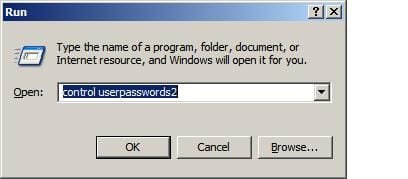
1. You want to create a new group, call it something like MyGroup. Go To Start and in search box type Control UserPasswords2. You can also launch that same command from the Command Line.

CUP2.JPG

2. Once in the User Accounts Dialog, select the Advanced tab, and click the Advanced button under the "Advanced User Management" section (see how MSFT uses the same names over and over) ;)

ADVUSERMGT.JPG

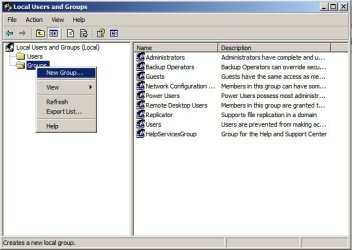
3. You should now be in the Local Users & Groups tool. Right Click on the Groups folder and click New Group

NEWGRP.JPG

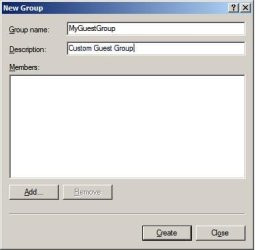
4. In the New Group dialog, enter a name for your new group, I'll use MyGuestGroup, as an example here. You can add a description if you like.

MYGSTGRP.JPG

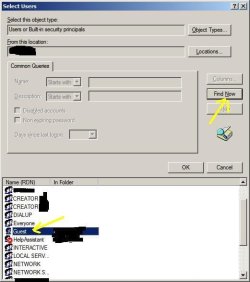
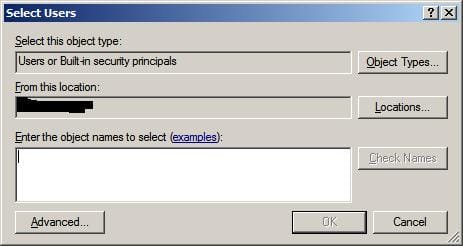
5. Next, click the Add button, then click the Advanced button at the bottom of the Select User's Windows. Click Find Now and select the Guest account. It will be the icon with a single face, not the double face.

Finally, add the Guest account as a member of that group. Click Ok until you have confirmed that the Guest Account is now a member of the MyGuestGroup Group.

FNDNOW.JPG

6. You can now close all those open dialogs. Next, go back to run, or the command line, and run Control UserPasswords2 again. This time click the Users tab, select the Guest account, and click properties.

CUSRPW222.JPG

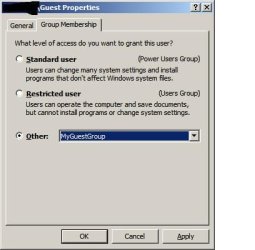
7. Under the Guest Properties dialog, select Group Membership. Under the "What level of access" section select Other and then select "MyGuestsGroup," click Apply and then Ok.

Other LVL of access.JPG

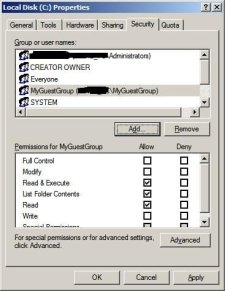
8. Now, go to your folder, or C-Drive, in this case. Right click and select Sharing & Security. Select the Security tab. Click Add to add the MyGuestGroup to the Access Control List. Under the Permissions for MyGuestGroup, under the Deny column, select List Folder Contents. This should be enough to prevent them from viewing what is inside of the C-Drive.

You may have to play around with the deny permissions to get it to do exactly what you want.

DNYMGSTGRP.JPG


And that's it. Now, if anyone logs in under the Guest account, they are subject to the permissions of your MyGuestGroup, and since you have stated that MyGuestGroup cannot list folder contents of the C-Drive, they should be denied when they try to access C:\.

Now for a disclaimer, I'm new to W7, and IDK if there is a new feature which will prompt for a password when you try to access a restricted drive ( you don't mean UAC do you?) , but in XP, I'm pretty sure there is no way to make windows prompt for a password just by clicking on a restricted folder. You do have things such as Secondary Login, but that is used for launching executables under a different permission.

If you want run W7 as a guest, and still be able to access certain privileged files or applications, you can either access them through the command line, or if they are applications (executable) then you should be prompted by UAC. However, I don't think UAC works the same way on directories. But again, you'll have to ask one of the W7 Gurus on this forum.

Hope that helps.
 

Attachments

  • SLCTUSERS.JPG
    SLCTUSERS.JPG
    14.6 KB · Views: 6

My Computer

OS
Windows 7
CPU
Quad Core
Memory
8GB
Hard Drives
1TB
Hello again Dranfu.........
Thanks for taking the time and trouble to post such a detailed and informative reply.
I am at work at the moment and will play around later this evening after refreshing myself first in the pub :D
It is a pity that so much has to be done to put in place such a simple function. When I first migrated from XP to 7 I had the opposite problem. I kept getting "Access denied" boxes popping up all over the place while I was trying to set the system up how I wanted it, which wound me up even more than this problem has :mad:.
There is one thing that I am slightly unclear about. The guest user will still need access to things like Adobe and various other general programmes that are all installed on the Cdrive. Presumably the actions you have listed above will not block the guest account from running all the usual passive programmes stored on the main drive.
Once again thanks to you and Barman for your help.
Cheers
FBW
 

My Computer

OS
Windows 7 Home Premium (build 7600)
CPU
2.93 gigahertz Intel Core2 Duo
Motherboard
ASUS P5KP
Memory
4GB
Graphics Card(s)
NVIDIA GeForce 9500 GT
Monitor(s) Displays
HKC 19"
Screen Resolution
1280 x 768
Hard Drives
1 x WDC WD1500HLFS-01G6U0
1 x Maxtor 6Y080M0
What I actually do is to re-locate all data from the c: drive to a data drive using the location feature built into win7 and rely on the built-in controls to protect C:

If you want to then further control a guest user's access to this data you can more easily adjust the permissions on the data drive, without the possibility of locking the user from Programs that they need to run
 

My Computers

System One System Two

  • Computer type
    PC/Desktop
    Computer Manufacturer/Model Number
    ChillBlast - Custom to my design
    OS
    Windows 11 Pro x64 [Latest Release and Release Preview]
    CPU
    Ryzen 9 5950X, 3.8 - 5.2 MHz
    Motherboard
    Asus Prime X570-Pro
    Memory
    64GB [2 x 32GB] DDR4 3200MHz
    Graphics Card(s)
    4GB NVIDIA GEFORCE GTX 1650 Ti
    Sound Card
    On-board SPDIF to 5.1 System + HDMI [5.1 system]
    Monitor(s) Displays
    32" UHD 32 Bit HDR Monitor + 43" UHD 4K 32Bit HDR TV
    Screen Resolution
    2 x 3840 x 2160 @60Hz
    Hard Drives
    1TB M2 SSD OS, 500GB Fast Access SSD, 2 x 8TB Data + Various Externals from 1TB to 4TB, 10TB NAS
    PSU
    NZXT C750 80 PLUS Gold 750W Modular PSU
    Case
    Workstation Case [Matt Black]
    Cooling
    NZXT Kraken X63 280mm CPU Cooler +2x Quiet Case fans
    Keyboard
    Logitech Wireless MX Keys & K400 + others
    Mouse
    Logitech Wireless MX Master 3S
    Internet Speed
    920 MB Down 50 MB Up
    Antivirus
    BitDefender Total Security Pro
    Browser
    Chrome (always run latest Non-Beta)
    Other Info
    Also run ...
    Laptop - Quad 8GB - Windows 10 Pro x64
    Nexus 7 Android tablet x2
    Samsung 10.2" tablet
    Blackview TAB 8 4G Android Tablet c/w Keyboard
    Wacom Intuos Pro Medium Pen Pad
    Wacom Intuos Pro Small Pen Pad
    Wacom Expresskeys Remote
    Loopdeck+ Graphics Controller
    Shuttle Pro v2 Control
  • Computer type
    Laptop
    System Manufacturer/Model Number
    Dell XPS 17 10750H
    OS
    Windows 11 Pro x64 Latest RP
    CPU
    Intel I7 10750H 5.0GHz
    Motherboard
    Dell XPS
    Memory
    32GB [2x16GB] DDR4 2933 MHz
    Graphics Card(s)
    nVidia GTX1650Ti 4 GB GDDR6
    Sound Card
    Stock [Realtek] 4 Speaker
    Monitor(s) Displays
    17" IPS UHD+ Infinity Edge Touchscreen
    Screen Resolution
    3840 x 2400
    Hard Drives
    2TB M2 NVMe, 4TB External + various 500GB & 1TB External NVMe (also have access to spinner HDD from
    PSU
    Stock
    Case
    Stock XPS Aluminium & Carbon Fibre
    Cooling
    Stock - Active Fan Control
    Keyboard
    Backlit + Various Logitech
    Mouse
    Stock Track Pad + Logitech MX Trackball
    Internet Speed
    72 MB Down 18MB Up
    Browser
    Chrome
    Other Info
    Also run ...
    Laptop - Quad 8GB - Windows 10 Pro x64
    Nexus 7 Android tablet x2
    10.2" tablet
    Sony Z3 Android Smartphone
    Wacom Intuos Pro Medium Pen Pad
    Wacom Intuos Pro Small Pen Pad
    Wacom Expresskeys Remote
    Loopdeck+ Graphics Controller
    Shuttle Pro v2 Control Pad
    10TB NAS
Flybywyre,

Did you get a chance to test this out yet?
 

My Computer

OS
Windows 7
CPU
Quad Core
Memory
8GB
Hard Drives
1TB
Hello Danfu

Yes I did manage to finally get it sorted last night :D
However I am not sure how I did it but the end result is exactly what I wanted. You click on the drive while in the guest account and immediately a box comes up saying "access denied" :geek:
It took hours and I did mange to lock myself out, fortunately I was able to get back in as you can see.
It does seem absurd that W7 makes what should be a very basic function so very difficult.
Anyway once again thanks to yourself and Barman for your help :)
Cheers
FBW
 

My Computer

OS
Windows 7 Home Premium (build 7600)
CPU
2.93 gigahertz Intel Core2 Duo
Motherboard
ASUS P5KP
Memory
4GB
Graphics Card(s)
NVIDIA GeForce 9500 GT
Monitor(s) Displays
HKC 19"
Screen Resolution
1280 x 768
Hard Drives
1 x WDC WD1500HLFS-01G6U0
1 x Maxtor 6Y080M0
Good to see you have things how you want them :D

and though the system that Microsoft uses for permissions may seem overly complex - as it has to be scalable from a single machine with two users, as in your case, to thousands of machines with hundreds of users, it's not too bad a system. - it does get easier after the first few times you have to use it :)
 

My Computers

System One System Two

  • Computer type
    PC/Desktop
    Computer Manufacturer/Model Number
    ChillBlast - Custom to my design
    OS
    Windows 11 Pro x64 [Latest Release and Release Preview]
    CPU
    Ryzen 9 5950X, 3.8 - 5.2 MHz
    Motherboard
    Asus Prime X570-Pro
    Memory
    64GB [2 x 32GB] DDR4 3200MHz
    Graphics Card(s)
    4GB NVIDIA GEFORCE GTX 1650 Ti
    Sound Card
    On-board SPDIF to 5.1 System + HDMI [5.1 system]
    Monitor(s) Displays
    32" UHD 32 Bit HDR Monitor + 43" UHD 4K 32Bit HDR TV
    Screen Resolution
    2 x 3840 x 2160 @60Hz
    Hard Drives
    1TB M2 SSD OS, 500GB Fast Access SSD, 2 x 8TB Data + Various Externals from 1TB to 4TB, 10TB NAS
    PSU
    NZXT C750 80 PLUS Gold 750W Modular PSU
    Case
    Workstation Case [Matt Black]
    Cooling
    NZXT Kraken X63 280mm CPU Cooler +2x Quiet Case fans
    Keyboard
    Logitech Wireless MX Keys & K400 + others
    Mouse
    Logitech Wireless MX Master 3S
    Internet Speed
    920 MB Down 50 MB Up
    Antivirus
    BitDefender Total Security Pro
    Browser
    Chrome (always run latest Non-Beta)
    Other Info
    Also run ...
    Laptop - Quad 8GB - Windows 10 Pro x64
    Nexus 7 Android tablet x2
    Samsung 10.2" tablet
    Blackview TAB 8 4G Android Tablet c/w Keyboard
    Wacom Intuos Pro Medium Pen Pad
    Wacom Intuos Pro Small Pen Pad
    Wacom Expresskeys Remote
    Loopdeck+ Graphics Controller
    Shuttle Pro v2 Control
  • Computer type
    Laptop
    System Manufacturer/Model Number
    Dell XPS 17 10750H
    OS
    Windows 11 Pro x64 Latest RP
    CPU
    Intel I7 10750H 5.0GHz
    Motherboard
    Dell XPS
    Memory
    32GB [2x16GB] DDR4 2933 MHz
    Graphics Card(s)
    nVidia GTX1650Ti 4 GB GDDR6
    Sound Card
    Stock [Realtek] 4 Speaker
    Monitor(s) Displays
    17" IPS UHD+ Infinity Edge Touchscreen
    Screen Resolution
    3840 x 2400
    Hard Drives
    2TB M2 NVMe, 4TB External + various 500GB & 1TB External NVMe (also have access to spinner HDD from
    PSU
    Stock
    Case
    Stock XPS Aluminium & Carbon Fibre
    Cooling
    Stock - Active Fan Control
    Keyboard
    Backlit + Various Logitech
    Mouse
    Stock Track Pad + Logitech MX Trackball
    Internet Speed
    72 MB Down 18MB Up
    Browser
    Chrome
    Other Info
    Also run ...
    Laptop - Quad 8GB - Windows 10 Pro x64
    Nexus 7 Android tablet x2
    10.2" tablet
    Sony Z3 Android Smartphone
    Wacom Intuos Pro Medium Pen Pad
    Wacom Intuos Pro Small Pen Pad
    Wacom Expresskeys Remote
    Loopdeck+ Graphics Controller
    Shuttle Pro v2 Control Pad
    10TB NAS
Back
Top