Guest Account has Admin folders as shortcuts

If I may butt in and add a little :)

Are you seeing those "S-1-5..." when hovering your mouse over your user account names in the Belarc screen? If so, those aren't passwords. They're the Windows' security identifier numbers (SID); it's how Windows handles user accounts. You know your account by the username that you assign, Windows knows them by the SID, but Windows also knows the names you've assigned and shows them to you rather than the "internal" SID.

You ought to be able to see the SID for the Ali account also, by hovering your mouse over the Ali username.

You should not see any user account passwords in the Belarc report, as it doesn't access user account passwords.
 

My Computer My Computer

At a glance

Windows 7 Ultimate x64
OS
Windows 7 Ultimate x64
Thank you for making it so clear. I knew the SID identified the account and used the wrong word- password. I am learning so much with this forum. I am still using the crippled system but all the shortcuts are gone. Just seems as if I have 2 accounts running. I remove yahoo mail and it reappears again. Had not had time to do anything further on my system. Great to have your input.
 

My Computer My Computer

At a glance

Microsoft Windows 7 Home Premium 64-bit 7601 ...AMD Athlon(tm) 64 X2 Dual Core Processor 4400+4.00 GBNVIDIA GeForce 6150SE nForce 430 (Microsoft C...
Computer Manufacturer/Model Number
HP Pavillon
OS
Microsoft Windows 7 Home Premium 64-bit 7601 Multiprocessor Free Service Pack 1
CPU
AMD Athlon(tm) 64 X2 Dual Core Processor 4400+
Motherboard
ASUSTek Computer INC. NARRA2
Memory
4.00 GB
Graphics Card(s)
NVIDIA GeForce 6150SE nForce 430 (Microsoft Corporation - WD
Sound Card
Realtek High Definition Audio
Monitor(s) Displays
Samsung
Screen Resolution
1280 x 1024 x 32 bits (4294967296 colors) @ 60 Hz
Hard Drives
(1) ST332082 0AS SCSI Disk Device (2) Generic- Compact Flash USB Device (3) Generic- MS/MS-Pro USB Device (4) Generic- SD/MMC USB Device (5) Generic- SM/xD-Picture USB Device
Browser
Firfefox 25
Short cuts still. Network taking over.

I am still loosing date. Shorts cuts and now network is taking over.
Please advise better security settings.
Avie


Hello Avie, I am afraid I am not sure what you mean in your above post ^?

I got a little confused. Do you mean that you are sharing folders and/or sharing public folders and the guest account has access to files stored in them? I do not know of any other way in which the guest account can access Admin account folders. If so, type "Change advanced sharing options" without quotes into the start menu search bar, and select options to NOT share public folders and NOT share folders and printers. In addition, make sure you DO select password protected sharing to force a password requirement for all network connected computers in the event you decide later on to start sharing (added security).

If I missed the mark, please explain further. Hope this helps
 

My Computer My Computer

At a glance

Microsoft Windows 7 Home Premium 64-bit 7601 ...AMD Athlon(tm) 64 X2 Dual Core Processor 4400+4.00 GBNVIDIA GeForce 6150SE nForce 430 (Microsoft C...
Computer Manufacturer/Model Number
HP Pavillon
OS
Microsoft Windows 7 Home Premium 64-bit 7601 Multiprocessor Free Service Pack 1
CPU
AMD Athlon(tm) 64 X2 Dual Core Processor 4400+
Motherboard
ASUSTek Computer INC. NARRA2
Memory
4.00 GB
Graphics Card(s)
NVIDIA GeForce 6150SE nForce 430 (Microsoft Corporation - WD
Sound Card
Realtek High Definition Audio
Monitor(s) Displays
Samsung
Screen Resolution
1280 x 1024 x 32 bits (4294967296 colors) @ 60 Hz
Hard Drives
(1) ST332082 0AS SCSI Disk Device (2) Generic- Compact Flash USB Device (3) Generic- MS/MS-Pro USB Device (4) Generic- SD/MMC USB Device (5) Generic- SM/xD-Picture USB Device
Browser
Firfefox 25
I am still loosing date. Shorts cuts and now network is taking over.
Please advise better security settings.
Avie

I'm sorry, but I'm afraid you're going to have to more fully explain what is going on. When you say "loosing date" do you mean losing data? Further to that, does that mean losing shortcuts (ie, data)? And I have no idea what "network is taking over" really means...

Have you done any restores, reinstalls, or malware scans to correct your issue? Can you fill in your system specs and let us know what firewall and antivirus apps you're using? It would also be nice to know how you're connecting to the internet and whether that connection has other computers (that work properly) that use it.

Also, did you try any of DustSailor's previous recommendations?
 

My Computer My Computer

At a glance

Windows 7 Ultimate x64
OS
Windows 7 Ultimate x64
Hello again Avie. Well shucks, lets see if we can fix this for real this time.

PLEASE, in the post right above this one, answer EVERY question, otherwise your problem is not going to get resolved. In addition, how you are connecting to the internet:


Answer all of these questions as well:
  • Are you able to connect to the internet? Are you connecting wirelessly or wired? Do you have a router and modem that your computer plugs into (both) or just directly into the modem?
  • Like F5ing said, are other computers able to connect to the internet?
  • Try this tutorial from Dinesh: http://www.sevenforums.com/tutorials/18203-internet-troubleshooting-guide.html <- you might try to disable add-ons to see if things get better. One of them could be a culprit right there.
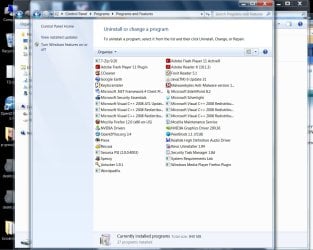
  • I still don't quite know what is being created and how the network is taking over. Perhaps there is a program installed on your computer that is doing this? You might post a screenshot of all installed programs. I saw in your previous screenshots some shortcuts to random things. Are they gone now? And your antivirus is coming up clean, and you've done this tutorial?: http://www.sevenforums.com/tutorials/1538-sfc-scannow-command-system-file-checker.html
  • Update all add-ons and programs and windows. This closes security holes
We'll get this thing working sooner or later ;)
 

My Computer My Computer

At a glance

Microsoft Windows 8.1 Pro 64-bitIntel(R) Core(TM) i3-4130 CPU @ 3.40GHz8.00 GBNone
Computer type
PC/Desktop
Computer Manufacturer/Model Number
Custom Asus Build
OS
Microsoft Windows 8.1 Pro 64-bit
CPU
Intel(R) Core(TM) i3-4130 CPU @ 3.40GHz
Motherboard
B85M-E
Memory
8.00 GB
Graphics Card(s)
None
Sound Card
Realtek High Definition Audio
Monitor(s) Displays
Asus 23.6" Monitor
Screen Resolution
1920 x 1080 x 32 bits (4294967296 colors) @ 60 Hz
Hard Drives
INTEL SSDSC2BW180A4
Samsung SSD 840 PRO Series
PSU
Seasonic S12II-380Bronze
Case
Lian Li
Cooling
Fan, Passive
Keyboard
Logitech K120
Mouse
Microsoft Touch Mouse
Internet Speed
4ms Ping, 19.0 Mbps Download, 19.0 Mbps Upload
Antivirus
Eset Endpoint
Browser
Internet Explorer, Chrome
Short cuts ,etc.

Hey:)

Cox Internet connection is cable directly into modem. No wireless, nor router.
I am a single computer in my home. Sometimes I have to reset to default PUBLIC profile through advanced Firewall setting.

I have found Firefox in 3 locations and with usb and network. All my settings are gone. . (ie #1 Users>Ali>All Data>roaming>Profile. 2. Users>Ali>All Data>local 3. Users>Ali>All Data> local low.) Some are locked and some have several profiles and one was part of XP which said Application Data instead of App Data, and then there is a Network icon. I just keep restoring to get going again. I think it is 2 footed 10 finger virus.
I spent 2 hours with my yahoo mail trying to find why my emails are being "hacked" by an address change. i.e. @WTKR.com is returned as undeliverble showing @WWTKR.com address. Did it again this am. I need my computer safe because I am faced with all the legal stuff I am working on. Trying to get a case in Criminal /Federal court. Relatives and lawyers, accounts took all my money.
And I am determined to beat this with your help. I am sure my cable was on a splitter. Because the attic hatch was opened and my cable is under the bed. So I don't know it wireless is happening or just another connection. Belarc showed the Dlink Switch (one cable in and up to 5 out.) and now there is just another router
name. So the attic hatch is to screwed close. It could be anywhere with common attic space.
I did uninstall all addons. I have about 3 clean installs for Firefox. The profiles are a bit confusing. Wanted ot ask about the "no network" setting in the Tutorial for Firefox profiles. I found 23 pgs they left on how to programming my H.P. all-in one-printer for networking. I cannot even change the setting to print front toback..
My antivirus is clean. I think my scannow did not work the last time I tried. but I may have not have put in the command in correctly. All is upgraded. I lam really at the point of leaving cox cable it so shared!I am goin to sign off and go to Dinesh.

I can give you my list . I was unable to use program from this forum. I installed IE if it might work automatically.
I am happy. More later.
 

My Computer My Computer

At a glance

Microsoft Windows 7 Home Premium 64-bit 7601 ...AMD Athlon(tm) 64 X2 Dual Core Processor 4400+4.00 GBNVIDIA GeForce 6150SE nForce 430 (Microsoft C...
Computer Manufacturer/Model Number
HP Pavillon
OS
Microsoft Windows 7 Home Premium 64-bit 7601 Multiprocessor Free Service Pack 1
CPU
AMD Athlon(tm) 64 X2 Dual Core Processor 4400+
Motherboard
ASUSTek Computer INC. NARRA2
Memory
4.00 GB
Graphics Card(s)
NVIDIA GeForce 6150SE nForce 430 (Microsoft Corporation - WD
Sound Card
Realtek High Definition Audio
Monitor(s) Displays
Samsung
Screen Resolution
1280 x 1024 x 32 bits (4294967296 colors) @ 60 Hz
Hard Drives
(1) ST332082 0AS SCSI Disk Device (2) Generic- Compact Flash USB Device (3) Generic- MS/MS-Pro USB Device (4) Generic- SD/MMC USB Device (5) Generic- SM/xD-Picture USB Device
Browser
Firfefox 25
Hello Avie. Your Yahoo mail shouldn't have anything to do with your computer as it is a part of Yahoo. I am not sure why the address is changing, nor which address you mean. Your yahoo email address cannot change, ie [email protected]. Is an email contact changing? Which address is changing? When you click on a link in the email, do you mean that the link is taking you to the wrong location? Such as wehn you click Aplace Fashion Store & Magazine | Established 2007 | Stockholm, it turns up SomeWhereElse.com (please don't go to those locations, they were made up just now).

I'd like to see the installed program list, which may help pinpoint programs that may be interfering with your work. You can uninstall add-ons that you don't use, but keep ones such as adobe, shockwave, flash, etc.

I will need to see this router name, because I am not sure what you mean. Give me a screenshot. You just told me before that you didn't have a router connected to your computer, only a modem with a splitter. Even with a splitter, you aren't getting hacked. People might share your bandwidth with a splitter, but not your personal information. You are safe, so long as you do not have a virus installed (which your antivirus says you don't).

The printer problem is specific to your printer and not a computer problem. Does your printer have the ability to print front to back? Is the most current driver installed for it? This is no reason to believe you were hacked.

Again, any pictures you could post here indicting where and how you believe you are unsecure on your computer would help us tremendously. Be careful that you yourself are not modifying system files or important settings which may be causing you this trouble to begin with. You mentioned Black Viper before. Perhaps you disabled something that is preventing normal operation? The more you modify and don't tell us about, the harder it will be to fix your computer. Eventually you may just have to save your work to a usb drive and completely reintall the whole thing. So the more you tell us about the things you've changed on your computer, the more we are able to help.

If IE is working for you better than firefox, thats fine. Consider uninstalling firefox if you no longer use it, or reinstalling it if you plan on using it but want to try and fix it.


Were the shortcuts still being created randomly? Can you post another screenshot?
 

My Computer My Computer

At a glance

Microsoft Windows 8.1 Pro 64-bitIntel(R) Core(TM) i3-4130 CPU @ 3.40GHz8.00 GBNone
Computer type
PC/Desktop
Computer Manufacturer/Model Number
Custom Asus Build
OS
Microsoft Windows 8.1 Pro 64-bit
CPU
Intel(R) Core(TM) i3-4130 CPU @ 3.40GHz
Motherboard
B85M-E
Memory
8.00 GB
Graphics Card(s)
None
Sound Card
Realtek High Definition Audio
Monitor(s) Displays
Asus 23.6" Monitor
Screen Resolution
1920 x 1080 x 32 bits (4294967296 colors) @ 60 Hz
Hard Drives
INTEL SSDSC2BW180A4
Samsung SSD 840 PRO Series
PSU
Seasonic S12II-380Bronze
Case
Lian Li
Cooling
Fan, Passive
Keyboard
Logitech K120
Mouse
Microsoft Touch Mouse
Internet Speed
4ms Ping, 19.0 Mbps Download, 19.0 Mbps Upload
Antivirus
Eset Endpoint
Browser
Internet Explorer, Chrome
shorrt cuts, etc.

Dust Sailer,
Passed all ipconfig. google, yahoo, but <default gateway> said incorrect syntex.
flush dns, release, renew. IPV6 Default, 3tunnel adapters , isatap, DNS, tunnel Pseudo, Tunnel 6T04 adapter. IPv6 & 4. OK Subnet Mask, Default Gatewasy. all good addresses.
FF failed up restart. "the instructions at 0x77412245 referenced memory at 0x77f174e8. The memory could be red. FF has stopped working". Ok after restart.
Scannow done and attached log.
menupop.gif
View attachment sfcdetails.txt

Untitled.png

Untitled.jpg
 
Last edited:

My Computer My Computer

At a glance

Microsoft Windows 7 Home Premium 64-bit 7601 ...AMD Athlon(tm) 64 X2 Dual Core Processor 4400+4.00 GBNVIDIA GeForce 6150SE nForce 430 (Microsoft C...
Computer Manufacturer/Model Number
HP Pavillon
OS
Microsoft Windows 7 Home Premium 64-bit 7601 Multiprocessor Free Service Pack 1
CPU
AMD Athlon(tm) 64 X2 Dual Core Processor 4400+
Motherboard
ASUSTek Computer INC. NARRA2
Memory
4.00 GB
Graphics Card(s)
NVIDIA GeForce 6150SE nForce 430 (Microsoft Corporation - WD
Sound Card
Realtek High Definition Audio
Monitor(s) Displays
Samsung
Screen Resolution
1280 x 1024 x 32 bits (4294967296 colors) @ 60 Hz
Hard Drives
(1) ST332082 0AS SCSI Disk Device (2) Generic- Compact Flash USB Device (3) Generic- MS/MS-Pro USB Device (4) Generic- SD/MMC USB Device (5) Generic- SM/xD-Picture USB Device
Browser
Firfefox 25
You have windows mail installed? Can you uninstall it, and reinstall it? It is called microsoft live essentials in the bundle, and you can select to remove individual programs out of it (the live mail part). (Reading the list you just put up, i didn't see the program. have you had it in the past?)

*Gasp* holy crap. It can't repair windows defender either. But defender shouldn't be running if you have MSE...

Just which services on your computer did you change?

Uninstall MSE using control panel>uninstall programs, and install the newest version here: Spyware Protection | Free Spyware Protection | Microsoft Security Essentials

Run it, update it and let it scan (full scan takes longer but scans more).

Did you reinstall firefox (Only if you are planning on using it)

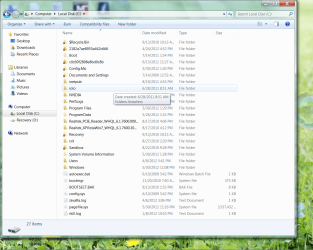
How come you are looking through the C: drive folder contents? Have you been changing files/folders in there? For most users, you shouldn't even BE in there...
I still don't know what settings you've changed on your system, could be anything. From some of the screenshots you've posted, it seems like you've been digging deep into your computer system. BAD IDEA! If you change something that deep, it could mess up normal operation. And it is starting to sound like this is exactly what happened.

I don't mean to put you on the defensive, but it just may be possible that the reason you are having all of this trouble is because you brought it upon yourself :(

I can help you reinstall your whole computer if interested, or we can continue working through these problems and see if we can't find somewhat of a solution. Up to you, bro

I'll talk to you more about the picture you just put up of your programs in the next post I write:
 
Last edited:

My Computer My Computer

At a glance

Microsoft Windows 8.1 Pro 64-bitIntel(R) Core(TM) i3-4130 CPU @ 3.40GHz8.00 GBNone
Computer type
PC/Desktop
Computer Manufacturer/Model Number
Custom Asus Build
OS
Microsoft Windows 8.1 Pro 64-bit
CPU
Intel(R) Core(TM) i3-4130 CPU @ 3.40GHz
Motherboard
B85M-E
Memory
8.00 GB
Graphics Card(s)
None
Sound Card
Realtek High Definition Audio
Monitor(s) Displays
Asus 23.6" Monitor
Screen Resolution
1920 x 1080 x 32 bits (4294967296 colors) @ 60 Hz
Hard Drives
INTEL SSDSC2BW180A4
Samsung SSD 840 PRO Series
PSU
Seasonic S12II-380Bronze
Case
Lian Li
Cooling
Fan, Passive
Keyboard
Logitech K120
Mouse
Microsoft Touch Mouse
Internet Speed
4ms Ping, 19.0 Mbps Download, 19.0 Mbps Upload
Antivirus
Eset Endpoint
Browser
Internet Explorer, Chrome
  • Your Java is old and needs to be updated. This is important as it is a big tool in an attacker's ability to compromise your system. Some people don't even need java and uninstall it to keep more secure. Some rarely used aspects of Openoffice require java to run: http://www.openoffice.org/download/common/java.html
  • Be VERY careful with CCleaner. Most of the time i recommend not using it because most of the time, people don't know exactly what they are deleting when they use the registry cleaner. And it isn't an important thing to do by any means, either. It can potentially delete a key required by the system (unusual) or program (more often). This could cause you problems on all kinds of levels. It isn't worth it unless you know for certain what you are doing
  • This is purely a suggestion (Highly recommended), but I'd remove Prevx completely. If you are using MSE and malewarebytes, the only thing it will do is get in the way. There is some controversy surrounding that program too, something I would stay away from. To remove it, I would suggest using Revo Uninstaller Free (you already have it installed, but you may need to update it) to remove every last bit of it. Just in case, here is how to use Revo: How to use Revo Uninstaller - YouTube - Use the advanced method to uninstall
  • Do you use wordpadfix? Is it important to have when you use openoffice (I don't know about wordpadfix)
  • Do you need both adobe reader X and Foxit reader, which do the same thing?
  • Peerblock, does it work as a block list, firewall, or both? If it is a firewall, I would recommend the windows firewall over peerblock. But that is up to you. I do not know that program
  • I would remove system requirements lab unless you use it.
  • Some of the programs you have that keep your computer more secure (Keyscrambler, security task manager, prevx, etc) may also be what is causing you problems (Though I am not sure of this, it is only possible). The more secure you are, the less functionality you have. Completely secure would mean disconnected from all input ports and disconnected from the internet. Obviously not a realistic situation. I would think the only security programs you would need are malwarebytes and MSE, but if you feel that you would rather have more, that is entirely your choice. Many people prefer to be kept safer on their computers. I'm just saying that it is possible the problem could be with one of these extra programs and some conflict or other, but I can't be sure of this.
The problem could very well have nothing to do with these extra security programs I've mentioned and be something else entirely. This could be a start though in finding the problem. Start small and slow to clean this up. If you do not want to be rid of something or some program, please don't feel that I am forcing it on you. But let me know so I can keep on the same page as you
 

My Computer My Computer

At a glance

Microsoft Windows 8.1 Pro 64-bitIntel(R) Core(TM) i3-4130 CPU @ 3.40GHz8.00 GBNone
Computer type
PC/Desktop
Computer Manufacturer/Model Number
Custom Asus Build
OS
Microsoft Windows 8.1 Pro 64-bit
CPU
Intel(R) Core(TM) i3-4130 CPU @ 3.40GHz
Motherboard
B85M-E
Memory
8.00 GB
Graphics Card(s)
None
Sound Card
Realtek High Definition Audio
Monitor(s) Displays
Asus 23.6" Monitor
Screen Resolution
1920 x 1080 x 32 bits (4294967296 colors) @ 60 Hz
Hard Drives
INTEL SSDSC2BW180A4
Samsung SSD 840 PRO Series
PSU
Seasonic S12II-380Bronze
Case
Lian Li
Cooling
Fan, Passive
Keyboard
Logitech K120
Mouse
Microsoft Touch Mouse
Internet Speed
4ms Ping, 19.0 Mbps Download, 19.0 Mbps Upload
Antivirus
Eset Endpoint
Browser
Internet Explorer, Chrome
:DOK! all done except peer block. Some progams I did not know about at all how they got there. You are big, big help. Very appreciated!
I use Yahoo mail. Do not want W mail or Live stuff.
Firefox is my primary. Only installed IE yesterday to use your system specxs program on your site if needed.
As for in Windows folder I did not even recognize the C drive I pictured for you.
Someone comes in and switches stuff. I am missing all the scans for May billing I had done. Just empty. (I sent a copy of the scannow log. FUll of errors. On Brink's Tutorial page. CBS logs.)
The Dlink switch was noted on Belarc and was installed next door or in attic. I now have 2 more routers with address appearing to be IPV6 types. I will have to copy with mouse over to show the addresses.
As for wrong addresses not going as I addressed and being retuned not delivered.... I sent to [email protected] and they are aborted and retuned to me as [email protected]. Just totally stopping all communication with the important person.
I can take it out of my address book and put in manually and it fails. It is as if there are parallell account. Because when my Yahoo address book sends the mail it show a duplicate with wrong address. I cannot find out where it is coming from. since it is not in my address book. It is like there is network and a local. You keep the copy of my C drive (computer) and you will see it changes. All my bookmarks disappeared also.
The wordfix was to fix an error for double spaces (lines) when typing.
 

My Computer My Computer

At a glance

Microsoft Windows 7 Home Premium 64-bit 7601 ...AMD Athlon(tm) 64 X2 Dual Core Processor 4400+4.00 GBNVIDIA GeForce 6150SE nForce 430 (Microsoft C...
Computer Manufacturer/Model Number
HP Pavillon
OS
Microsoft Windows 7 Home Premium 64-bit 7601 Multiprocessor Free Service Pack 1
CPU
AMD Athlon(tm) 64 X2 Dual Core Processor 4400+
Motherboard
ASUSTek Computer INC. NARRA2
Memory
4.00 GB
Graphics Card(s)
NVIDIA GeForce 6150SE nForce 430 (Microsoft Corporation - WD
Sound Card
Realtek High Definition Audio
Monitor(s) Displays
Samsung
Screen Resolution
1280 x 1024 x 32 bits (4294967296 colors) @ 60 Hz
Hard Drives
(1) ST332082 0AS SCSI Disk Device (2) Generic- Compact Flash USB Device (3) Generic- MS/MS-Pro USB Device (4) Generic- SD/MMC USB Device (5) Generic- SM/xD-Picture USB Device
Browser
Firfefox 25
Avie, you mention this:

Hey:) Cox Internet connection is cable directly into modem. No wireless, nor router. I am a single computer in my home.

This is your "own" modem? Meaning one you bought or one you rent from Cox Cable? And you connect your PC to it with an ethernet cable?

If so, you can pretty much consider the Cox cable side of that modem as controlled by Cox and yourself, and no one else. On the cable side of it there can be splitters, amplifiers, and all sorts of stuff on that line but you should not have to be worried about any of that. Cox should be managing that side of the modem.

What you need to worry about is the other side of the modem; the ethernet side. If no one else has access to the modem box itself and the ethernet connection to your computer then you should be in good shape as far as an internet connection is concerned.

I would however recommend a router to put in between the modem and your PC for a greater level of security.
 

My Computer My Computer

At a glance

Windows 7 Ultimate x64
OS
Windows 7 Ultimate x64
Guest accont ,short cuts

Thanks for suggestion. I have the cox modem at my desktop. No router. However, the cable goes to attic and through common attic. My cable was undone and attic hatch has been opened.
I set programs and then find the next day I have bookmarks missing. Cannot find Explorer, O folder with police scanner type thing inside. I deleted. Security Task Manager is write protected today.
I have installed programs and cannot find where they are installed. ie Imternet Eplorer, 3 times today and still do not see it. Cannot get to real estate records in Fla that I need. My open office was showing a check mark to export my bookmarks. And they did. I am going backwards each day. Lost data and hours lost. I think they are physically in the house when I leave. There are 8 empty brown folders in my file cabinet drawer.
Mozilla maintenance was removed yesterday and it is back.
How about a finger print sign on? I will try anything. I even see programs in double. So i think there is another user. Printer settings change and they can stop while I am printing. I am ion a network somehow.
I am taking anything to help. What would be the very safest set up? Would I be able to keep reouter programed correctly? I dont' even have the cable from the box in the back to my unit. It was removed. there are many connection to my building. it seeems Cox shares lines more than anyone else. I could go to DSL and save money also.
Avie
 

My Computer My Computer

At a glance

Microsoft Windows 7 Home Premium 64-bit 7601 ...AMD Athlon(tm) 64 X2 Dual Core Processor 4400+4.00 GBNVIDIA GeForce 6150SE nForce 430 (Microsoft C...
Computer Manufacturer/Model Number
HP Pavillon
OS
Microsoft Windows 7 Home Premium 64-bit 7601 Multiprocessor Free Service Pack 1
CPU
AMD Athlon(tm) 64 X2 Dual Core Processor 4400+
Motherboard
ASUSTek Computer INC. NARRA2
Memory
4.00 GB
Graphics Card(s)
NVIDIA GeForce 6150SE nForce 430 (Microsoft Corporation - WD
Sound Card
Realtek High Definition Audio
Monitor(s) Displays
Samsung
Screen Resolution
1280 x 1024 x 32 bits (4294967296 colors) @ 60 Hz
Hard Drives
(1) ST332082 0AS SCSI Disk Device (2) Generic- Compact Flash USB Device (3) Generic- MS/MS-Pro USB Device (4) Generic- SD/MMC USB Device (5) Generic- SM/xD-Picture USB Device
Browser
Firfefox 25
At a minimum, the equipment you have (your PC and modem) needs to be physically secured. There's not much you can do to protect it if people have access to your equipment while you're not home.

User account passwords and fingerprint scanners for logon are good for protection, but if someone has unrestricted access to your machine it can all be easily compromised.

If you're really suspecting someone is physically entering your home and accessing your equipment without your approval then I think you need to get in touch with local authorities. You're not going to be able to truly secure your equipment if someone has unrestricted access to it.
 

My Computer My Computer

At a glance

Windows 7 Ultimate x64
OS
Windows 7 Ultimate x64
Security

F5ing

Thanks for what I feared. I still think I can do better if I move it to locked room and get off the cable. What are my options to equipment. There is not much help if they are involved. A computer person was here last year and he said my neighbor to the right was wide open on her wireless account. Router's are to take care of that. I am just not familiar with all this stuff.

You might be able to tell me how to turn on mailto: for Open office. FF takes care of sending through Yahoo. But I can not send from Open Office. It tries to use Windows Mail and I do not have that installed. Can that be done?
Any ideas?or tricks?/any Help?:o
 

My Computer My Computer

At a glance

Microsoft Windows 7 Home Premium 64-bit 7601 ...AMD Athlon(tm) 64 X2 Dual Core Processor 4400+4.00 GBNVIDIA GeForce 6150SE nForce 430 (Microsoft C...
Computer Manufacturer/Model Number
HP Pavillon
OS
Microsoft Windows 7 Home Premium 64-bit 7601 Multiprocessor Free Service Pack 1
CPU
AMD Athlon(tm) 64 X2 Dual Core Processor 4400+
Motherboard
ASUSTek Computer INC. NARRA2
Memory
4.00 GB
Graphics Card(s)
NVIDIA GeForce 6150SE nForce 430 (Microsoft Corporation - WD
Sound Card
Realtek High Definition Audio
Monitor(s) Displays
Samsung
Screen Resolution
1280 x 1024 x 32 bits (4294967296 colors) @ 60 Hz
Hard Drives
(1) ST332082 0AS SCSI Disk Device (2) Generic- Compact Flash USB Device (3) Generic- MS/MS-Pro USB Device (4) Generic- SD/MMC USB Device (5) Generic- SM/xD-Picture USB Device
Browser
Firfefox 25
I still think I can do better if I move it to locked room and get off the cable. What are my options to equipment.
That's the point. Any way that you can secure the modem/computer from unauthorized physical access will work. Doesn't much matter whether you use cable or DSL. If no one except you can access your locked room then you're physically secured and can then focus on making sure software/hardware configuration is properly set.

And by the way, without going through all the previous posts, it would be good for you to reconfirm whether or not you're using the Windows Firewall and what antivirus app you're using.

If you want to verify that your cable really is properly connected to Cox you can call Cox's 24/7 line at 504-304-8444. You might have to go through a few voice prompts to get through to a tech person you can talk to. Tell them that you seem to be having connection issues and ask them what the signal strengths of your modem are. They should respond by saying the signal are good, marginal, bad or whatever. Unplug or turn off your modem and ask how the signals are now. They should say that it dropped off and they can no longer see it. Say something like "oops, it hasn't finished rebooting" and return power to the modem. They should not be able to tell you signal strengths until the modem finishes rebooting and fully reconnects (at least about 20 seconds). During that time you may get some confirmation from them that they can see the modem attempting to establish a valid connection (you can ask if they do not offer: "do you see it yet?").

If you call Cox and the conversation goes somewhat like I described you can be pretty sure you are validly connected to Cox.

And whether you use DSL or cable it is always better to have a router between your modem and PC's for security. It's a relatively cheap and efficient way to help maximize security. It should be kept physically secured along with the rest of your equipment.
There is not much help if they are involved.
Who is "they"?
A computer person was here last year and he said my neighbor to the right was wide open on her wireless account. Router's are to take care of that. I am just not familiar with all this stuff.
The computer person mentioning your neighbor was likely referring to a way in which she set up her own network, by connecting a wireless router or access point to her modem, and didn't change its default settings. This would mean that she did not set up the security options on her router/access point and that anyone within range could access her internet account and her computers. And she may never even realize if she was ever compromised.
You might be able to tell me how to turn on mailto: for Open office. FF takes care of sending through Yahoo. But I can not send from Open Office. It tries to use Windows Mail and I do not have that installed. Can that be done?
That's likely just an Open Office default. You would have to go into Open Office's options to select another e-mail client that you've installed. I doubt that you can change it to use a free web-based email account like Yahoo. It used to be that you could pay for the Yahoo+ e-mail service (I think that's what it was called) to be used with an installed client. Could be wrong about that though.
 

My Computer My Computer

At a glance

Windows 7 Ultimate x64
OS
Windows 7 Ultimate x64
Best connection./SFC Win Defender.

Some good advice and thoughts. I one uses wireless then the cable would be in locked room. Could I have computer at a distance? there are so many wireless choices that I have seen. I saw a wireless setup that plugs into electical outlet for the whole house. Small and powerful. BUT our condo have a common meter box at end of the building. Most impossible to restrict your own services. And I an in the middle. If I understand correctly the router would protect the "space" between the incoming service , air or cable, and the computer.

I did the restore as far back as I could go. It almost caught the Win Defender service whcih I was trying to replace. And then aborted and I had redo again. My action center will not turn on WSE. Win Defender is back in Services but broken. <filed to read description. Error code: 2>

I did get yahoo Classic that I could not get before and things are more peppy. But not so secure. Many remote desktop etc.

Guess I should ask for instruction as to backing up and reinstalling. I bought an exteranl a while back (hope I still have it. ) Does it work like a zip? then how do you get the programs back into your computer?

All the help and ideas are wonderful.
 

My Computer My Computer

At a glance

Microsoft Windows 7 Home Premium 64-bit 7601 ...AMD Athlon(tm) 64 X2 Dual Core Processor 4400+4.00 GBNVIDIA GeForce 6150SE nForce 430 (Microsoft C...
Computer Manufacturer/Model Number
HP Pavillon
OS
Microsoft Windows 7 Home Premium 64-bit 7601 Multiprocessor Free Service Pack 1
CPU
AMD Athlon(tm) 64 X2 Dual Core Processor 4400+
Motherboard
ASUSTek Computer INC. NARRA2
Memory
4.00 GB
Graphics Card(s)
NVIDIA GeForce 6150SE nForce 430 (Microsoft Corporation - WD
Sound Card
Realtek High Definition Audio
Monitor(s) Displays
Samsung
Screen Resolution
1280 x 1024 x 32 bits (4294967296 colors) @ 60 Hz
Hard Drives
(1) ST332082 0AS SCSI Disk Device (2) Generic- Compact Flash USB Device (3) Generic- MS/MS-Pro USB Device (4) Generic- SD/MMC USB Device (5) Generic- SM/xD-Picture USB Device
Browser
Firfefox 25
Some good advice and thoughts. I one uses wireless then the cable would be in locked room. Could I have computer at a distance? there are so many wireless choices that I have seen. I saw a wireless setup that plugs into electical outlet for the whole house. Small and powerful. BUT our condo have a common meter box at end of the building. Most impossible to restrict your own services. And I an in the middle. If I understand correctly the router would protect the "space" between the incoming service , air or cable, and the computer.

I think I would just get a standard wireless router (if you PC has wireless) and not worry about checking out those device that communicate over power lines (I've read they've gotten a lot better over the years but don't yet measure up to standard dedicated wired devices).

A router protects all the PC's connected to it from internet hazards (if by wireless you've also got to configure the router's wireless security options). Your machines would be "invisible" when connected. Even Cox cannot see them; they can see the modem and the router connected to it, but not your machines.

You could keep your modem and wireless router in the locked room and roam around the house using your laptop. When you're done you would physically secure your laptop too (maybe put it in the same locked room).

I did the restore as far back as I could go. It almost caught the Win Defender service whcih I was trying to replace. And then aborted and I had redo again. My action center will not turn on WSE. Win Defender is back in Services but broken. <filed to read description. Error code: 2>

I did get yahoo Classic that I could not get before and things are more peppy. But not so secure. Many remote desktop etc.

Guess I should ask for instruction as to backing up and reinstalling. I bought an exteranl a while back (hope I still have it. ) Does it work like a zip? then how do you get the programs back into your computer?

All the help and ideas are wonderful.

An external hard disk (HD) will work the same as your internal HD, with the exception of disconnecting. Make sure you use Windows to "eject" the external HD before physically disconnecting it.

For reinstalling I would follow one of these tutorials:

http://www.sevenforums.com/tutorials/1649-clean-install-windows-7-a.html

http://www.sevenforums.com/tutorials/219487-clean-reinstall-factory-oem-windows-7-a.html

Your programs and personal data would have to be installed/copied.
 

My Computer My Computer

At a glance

Windows 7 Ultimate x64
OS
Windows 7 Ultimate x64
New plan

Thank you for the direction I think I will take. No laptop. Just use router - wireless. What goes in my computer to be wireless? a card: I do have a wireless usb mouse. the cable hook up in that room is really in the middle of a wrong wall. I have a sign in the window, "Nother is safe here"! And I havea knight's beast plate plate on the the front door knocker. A plastic Halloween one. But it gets the thought across. :dinesh:
 

My Computer My Computer

At a glance

Microsoft Windows 7 Home Premium 64-bit 7601 ...AMD Athlon(tm) 64 X2 Dual Core Processor 4400+4.00 GBNVIDIA GeForce 6150SE nForce 430 (Microsoft C...
Computer Manufacturer/Model Number
HP Pavillon
OS
Microsoft Windows 7 Home Premium 64-bit 7601 Multiprocessor Free Service Pack 1
CPU
AMD Athlon(tm) 64 X2 Dual Core Processor 4400+
Motherboard
ASUSTek Computer INC. NARRA2
Memory
4.00 GB
Graphics Card(s)
NVIDIA GeForce 6150SE nForce 430 (Microsoft Corporation - WD
Sound Card
Realtek High Definition Audio
Monitor(s) Displays
Samsung
Screen Resolution
1280 x 1024 x 32 bits (4294967296 colors) @ 60 Hz
Hard Drives
(1) ST332082 0AS SCSI Disk Device (2) Generic- Compact Flash USB Device (3) Generic- MS/MS-Pro USB Device (4) Generic- SD/MMC USB Device (5) Generic- SM/xD-Picture USB Device
Browser
Firfefox 25
Your specs indicate an HP Pavillion. Some of the higher end desktops from them already have a wireless card installed, so you might check that to see.

I would need to know the model number to recommend an internal card that fits. Or you can go with a USB dongle:

Amazon.com: usb wireless nic USB Network Adapters

What will be the distance between the wireless router and your desktop?
 

My Computer My Computer

At a glance

Windows 7 Ultimate x64
OS
Windows 7 Ultimate x64
Back
Top