
Jamal NUMAN
New member
“Guest” and “administrator” users,
“Guest” and “administrator” users,
I’m not sure why the “Guest” and “administrator” users are not displayed at start, switch users, log off modes?
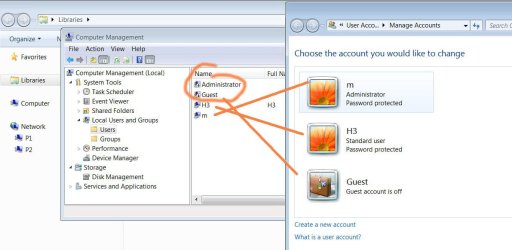
· What might be the particularity of these two users (attached)?
· Why they have different icons notation? What does the little down arrow indicate for?
· How they can be displayed at start, switch users, log off modes (attached)?
Best
Jamal
“Guest” and “administrator” users,
I’m not sure why the “Guest” and “administrator” users are not displayed at start, switch users, log off modes?
· What might be the particularity of these two users (attached)?
· Why they have different icons notation? What does the little down arrow indicate for?
· How they can be displayed at start, switch users, log off modes (attached)?
Best
Jamal
Attachments

My Computer
- OS
- Windows 7 Ultimate x64
