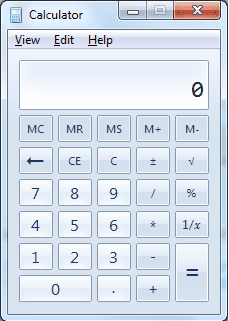
Half Digits Problem in Calculator

bary69

New member
Local time
11:15 PM
Messages
4
hello all, I have Windows 7 Ultimate x64 for almost 2 weeks, and today I ahve noticed one thing, my calculator is showing half digits in the window look at the screenshot, how can I solve this kind of a problem?

Thank You

11228803.jpg
 
Last edited by a moderator:

My Computer

OS
Windows 7 Ultimate x64
Wow, it's truncated! I've never seen that before; but I am happy to help you fix it.
BTW - Your screen is much shorter than mine.
Try selecting your calculator and pressing ALT+2, then ALT+1, does this fix it?
 

Attachments

  • calc.png
    calc.png
    8.6 KB · Views: 1,104

My Computer

Computer Manufacturer/Model Number
Custom Hack job
OS
Windows 7 Ultimate 64 bit
CPU
Intel(R) Core(TM)2 Quad CPU Q8200 @ 2.33GHz
Motherboard
GigaByte EP45-UD3
Memory
8 GB Kingston
Graphics Card(s)
Nvidia GeForce 9600GT
Sound Card
Soundblaster Audigy
Monitor(s) Displays
AOC x2 22"
Hard Drives
2 x Samsung 500GB (RAID)
2 x Samsung 2TB
1 x WD Green 2TB
1 x Seagate 1TB
1 x Samsung 500GB
PSU
Thermaltake QFan 750W
Case
CM Scout Gaming
Cooling
Coolermaster V10
Keyboard
Microsoft Wireless Keyboard 1000
Mouse
Microsoft Wireless Optical 2000
Internet Speed
320
Other Info
Winfast PVR2000CP
LG DVD-RAM DVD/RW/DL Super Multi
Linksys WMP300Nx2 Wireless Adapter
hmm..
try pressing alt+4
It will change view to statistic calculator. (it has larger screen :p )

EDIT: TimStitt was faster
 

My Computer

OS
Windows 7 Ultimate x86 SP1

My Computer

Computer Manufacturer/Model Number
Custom Hack job
OS
Windows 7 Ultimate 64 bit
CPU
Intel(R) Core(TM)2 Quad CPU Q8200 @ 2.33GHz
Motherboard
GigaByte EP45-UD3
Memory
8 GB Kingston
Graphics Card(s)
Nvidia GeForce 9600GT
Sound Card
Soundblaster Audigy
Monitor(s) Displays
AOC x2 22"
Hard Drives
2 x Samsung 500GB (RAID)
2 x Samsung 2TB
1 x WD Green 2TB
1 x Seagate 1TB
1 x Samsung 500GB
PSU
Thermaltake QFan 750W
Case
CM Scout Gaming
Cooling
Coolermaster V10
Keyboard
Microsoft Wireless Keyboard 1000
Mouse
Microsoft Wireless Optical 2000
Internet Speed
320
Other Info
Winfast PVR2000CP
LG DVD-RAM DVD/RW/DL Super Multi
Linksys WMP300Nx2 Wireless Adapter
Wow, it's truncated! I've never seen that before; but I am happy to help you fix it.
BTW - Your screen is much shorter than mine.
Try selecting your calculator and pressing ALT+2, then ALT+1, does this fix it?

Doesn't work

38210041.jpg


maybe there is a way to reinstall calculator? can you teach how to do it?
 
Last edited by a moderator:

My Computer

OS
Windows 7 Ultimate x64
The problem is solved, I have reinstalled calculator and it is working like a charm
 

My Computer

OS
Windows 7 Ultimate x64
I'm glad you got it working Bary. It's the strangest problem I've seen all week. :)
 

My Computer

Computer Manufacturer/Model Number
Custom Hack job
OS
Windows 7 Ultimate 64 bit
CPU
Intel(R) Core(TM)2 Quad CPU Q8200 @ 2.33GHz
Motherboard
GigaByte EP45-UD3
Memory
8 GB Kingston
Graphics Card(s)
Nvidia GeForce 9600GT
Sound Card
Soundblaster Audigy
Monitor(s) Displays
AOC x2 22"
Hard Drives
2 x Samsung 500GB (RAID)
2 x Samsung 2TB
1 x WD Green 2TB
1 x Seagate 1TB
1 x Samsung 500GB
PSU
Thermaltake QFan 750W
Case
CM Scout Gaming
Cooling
Coolermaster V10
Keyboard
Microsoft Wireless Keyboard 1000
Mouse
Microsoft Wireless Optical 2000
Internet Speed
320
Other Info
Winfast PVR2000CP
LG DVD-RAM DVD/RW/DL Super Multi
Linksys WMP300Nx2 Wireless Adapter
hi,

can you let me know how you reinstalled calculator? i have the exact same problem.

thanks
 

My Computer

OS
windows 7
Hi Wookietv,

Welcome to the forums.

I'm travelling and don't have my Win7 box with me. So this is from memory only (hope it's right! :) 0. Look for the 'Turn windows features on or off" section (via 'COntrol Panel' and 'Programs and features'). Just look for the calculator (it maybe in accessories) and untick it. Apply and Ok your way out. Then go back in and re-tick it to install calcualtor once more. Good Luck!

Tim
 

My Computer

Computer Manufacturer/Model Number
Custom Hack job
OS
Windows 7 Ultimate 64 bit
CPU
Intel(R) Core(TM)2 Quad CPU Q8200 @ 2.33GHz
Motherboard
GigaByte EP45-UD3
Memory
8 GB Kingston
Graphics Card(s)
Nvidia GeForce 9600GT
Sound Card
Soundblaster Audigy
Monitor(s) Displays
AOC x2 22"
Hard Drives
2 x Samsung 500GB (RAID)
2 x Samsung 2TB
1 x WD Green 2TB
1 x Seagate 1TB
1 x Samsung 500GB
PSU
Thermaltake QFan 750W
Case
CM Scout Gaming
Cooling
Coolermaster V10
Keyboard
Microsoft Wireless Keyboard 1000
Mouse
Microsoft Wireless Optical 2000
Internet Speed
320
Other Info
Winfast PVR2000CP
LG DVD-RAM DVD/RW/DL Super Multi
Linksys WMP300Nx2 Wireless Adapter
@bary69
I like your wallpaper do you have a link I can go to to download it? Thanks.
 

My Computer

Computer type
PC/Desktop
Computer Manufacturer/Model Number
Dell OP7010
OS
Windows 7 Enterprise (x64); Windows Server 2008 R2 (x64)
Memory
16GB
Monitor(s) Displays
4 Dell 24" LCD
Screen Resolution
1280x1024
Keyboard
Dell
Mouse
Dell Optical
Internet Speed
40meg
hi,

can you let me know how you reinstalled calculator? i have the exact same problem.

thanks

sure wookietv, here is my little tutorial :)

1. Download this archive RapidShare: 1-CLICK Web hosting - Easy Filehosting ( Win 7 Calculator )

2. Then you should disable TrustedInstaller ( Here is how to do it ) :
Press the start button then in the search field type cmd then paste this

takeown /f C:\Windows\System32\en-US\calc.exe.mui

then

cacls C:\Windows\System32\en-US\calc.exe.mui /G ALEX:F ( ALEX IS MY NAME, YOU SHOULD PASTE YOURS ) you will see the padlock on the file , now you can delete it and paste my one

Then Do the same:

takeown /f C:\Windows\System32\calc.exe

then

cacls C:\Windows\System32\calc.exe /G ALEX:F ( DO this operation in safe mod ) you will see the padlock delete the file and paste my one than reboot your computer and the problem will be gone :)
 

My Computer

OS
Windows 7 Ultimate x64
Back
Top