Halo 2 Installation issue

Wikne

New member
Local time
9:29 PM
Messages
9
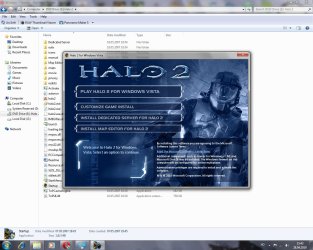
Hi. I recently bought a retail copy of Halo 2, but it won't install on my computer. I'm running Windows 7 Professional (build 7600 i think..). I can install Map Editor, and The dedicated Server app. but when i try to install the game I get some sort of error: "redists/vcredits.msi: The installation is forbidden by system policy. Contact your system administrator." I have googled and found people with similar problems, both in connection with Halo 2 and other programs, but have not found a solution that works for me. I am the only user of this computer and I am the admin. I have tried to right-click and use run as admin but it makes no difference. I have also copied the disc to a folder on my machine but i get the same error wen trying to install from the folder. I also tried this and similar actions within the the Local Security Policy settings:
"Click Start -> Control Panel
Open Administrative Tools
Open Local Security Settings
Click Software Restriction Policies
If no software restrictions are defined, right click the Software Restriction Policies node and select New Software Restriction Policy
Double click Enforcement
Select "All users except local administrators"
Click OK
Reboot the machine "

I have tested all the Compability modes, and that did not work either. Does anyone know whats wrong? I know people have trouble playing online, due to an issue with the Windows Live service but the game usually installs just fine.

Some links I have visited, regarding the problem:
Forbidden by system policy

Halo 2 wont install on Vista.

halo 2 windows 7 - Google-søk
 

Attachments
  • Untitled1.jpg
    Untitled1.jpg
    148 KB · Views: 11,269
  • Untitled2.jpg
    Untitled2.jpg
    113.7 KB · Views: 604

My Computer

OS
Windows 7 Professional
CPU
E8500
Motherboard
GA-X38-DS5
Memory
Crucial DDR2 BallistiX PC8500 4x1GB CL5
Graphics Card(s)
Radeon 3870
Monitor(s) Displays
19"Syncmaster, Philips 40PFL8664H
Hard Drives
Hitachi Deskstar 160GB + 500Gb.
PSU
Mist 1000W
Case
Alienware
Cooling
Zalman CNPS9500LED
Hi. I recently bought a retail copy of Halo 2, but it won't install on my computer. I'm running Windows 7 Professional (build 7600 i think..). I can install Map Editor, and The dedicated Server app. but when i try to install the game I get some sort of error: "redists/vcredits.msi: The installation is forbidden by system policy. Contact your system administrator." I have googled and found people with similar problems, both in connection with Halo 2 and other programs, but have not found a solution that works for me. I am the only user of this computer and I am the admin. I have tried to right-click and use run as admin but it makes no difference. I have also copied the disc to a folder on my machine but i get the same error wen trying to install from the folder. I also tried this and similar actions within the the Local Security Policy settings:
"Click Start -> Control Panel
Open Administrative Tools
Open Local Security Settings
Click Software Restriction Policies
If no software restrictions are defined, right click the Software Restriction Policies node and select New Software Restriction Policy
Double click Enforcement
Select "All users except local administrators"
Click OK
Reboot the machine "

I have tested all the Compability modes, and that did not work either. Does anyone know whats wrong? I know people have trouble playing online, due to an issue with the Windows Live service but the game usually installs just fine.

Some links I have visited, regarding the problem:
Forbidden by system policy

Halo 2 wont install on Vista.

halo 2 windows 7 - Google-søk

Be welcome To Seven Forums.

Install those packages before the game:

For Windows x86
Download details: Visual C++ 2008 SP1 Redistributable Package (x86)
For Windows x64 Download details: Visual C++ 2008 SP1 Redistributable Package (x64)
Games For Windows Download details: Games for Windows - LIVE Setup 3.2

After those two installations, try to install the game one more time and let us know the results!

"PLEASE REP ANYONE WHO HELPS YOU"
 

My Computer

Computer Manufacturer/Model Number
WALLONN7 / LIN BLACK SERIES II
OS
Windows 7 Ultimate x64 SP1
CPU
AMD PHENOM II X6 1090T 3.2GHz
Motherboard
GIGABYTE GA-890FXA-UD7
Memory
8GB G.SKILL RIPJAWS - F3-10666CL7D
Graphics Card(s)
SAPPHIRE ATI RADEON HD 5870 VAPOR X OC
Sound Card
REALTEK DOLBY HOME THEATER
Monitor(s) Displays
LED LG W2486L
Screen Resolution
1080p
Hard Drives
SEAGATE 1TB -ST31000528AS - AHCI MODE - AS SATA
PSU
ZALMAN ZM1000-HP 1000W
Case
THERMALTAKE XASER VI VG4000SWA
Cooling
140MM x3 / 120MM x1 AIR COOLING - THERMALTAKE
Keyboard
MICROSOFT DIGITAL MEDIA KEYBOARD 3000 - USB
Mouse
MICROSOFT BASIC OPTICAL MOUSE 2.0 - USB
Internet Speed
600KBPS
Other Info
MICROSOFT XBOX 360 CONTROLLER
Hi and thanks for the help. I've tried to install the game after installing the packages you linked to, but I still get the same result as before "redists/vcredist.msi"... Do you have any other suggestions?
 

My Computer

OS
Windows 7 Professional
CPU
E8500
Motherboard
GA-X38-DS5
Memory
Crucial DDR2 BallistiX PC8500 4x1GB CL5
Graphics Card(s)
Radeon 3870
Monitor(s) Displays
19"Syncmaster, Philips 40PFL8664H
Hard Drives
Hitachi Deskstar 160GB + 500Gb.
PSU
Mist 1000W
Case
Alienware
Cooling
Zalman CNPS9500LED
"redists/vcredits.msi: The installation is forbidden by system policy. Contact your system administrator."

Hi Wikne,

Take a look at my Tips on Troubleshooting Game Issues and check out tip #14. May or may not apply but it's something to think about. You might want to go over the entire guide as well, see if you missed something.

Good luck
 

My Computer

Computer type
PC/Desktop
Computer Manufacturer/Model Number
Custom built by me.
OS
Windows 10 Pro
CPU
Intel Core i7-4770K (3.5Ghz)
Motherboard
Gigabyte G1 Sniper 5 (F10 Bios)
Memory
32 gig Corsair Dominator Platinum (4x8Gig)
Graphics Card(s)
Sapphire Tri-X R9 Fury
Sound Card
Soundblaster ZXR
Monitor(s) Displays
NEC PA242W 24" LCD Monitor
Screen Resolution
1920 x 1200
Hard Drives
Primary - Samsung 850 Pro (512gig), Samsung 840 Pro (256gig), 2TB WD Caviar Black.
PSU
EVGA Supernova 1000 G2
Case
Cooler Master HAF X
Cooling
Corsair H100i with Corsair Air Series SP120 Quiet Fans
Keyboard
Logitech Wireless Wave
Mouse
Logitech Performance MX
Internet Speed
High Speed Cable
Antivirus
Norton Security
Browser
IE11
Other Info
Memory Timings - 1866MHz @ 9-9-9-27-1T @ 1.5 volts
Hi and thanks for the help. I've tried to install the game after installing the packages you linked to, but I still get the same result as before "redists/vcredist.msi"... Do you have any other suggestions?

Strange... corrupt dvd?! I've an idea. You'll need to:

1º: a blank dvd - dvd-rw is better; Halo 2 DVD;

2º: UltraISO installed - take it here >
ISO CD DVD image creator, editor and ISZ DMG DAA UIF to ISO converter - UltraISO can extract/create/edit/convert CD and DVD image files directly, make bootable CDs and convert ISZ DMG DAA UIF to ISO.
please remember to DO NOT INSTALL VIRTUAL DRIVE;
Winrar too
WinRAR archiver, a powerful tool to process RAR and ZIP files

3º: Dvd burner - Nero, Power2Go, etc - but UltraISO do the work;

4º: "redists" folder - I've upload it from my Halo 2 dvd - >
redists.rar

Install UltraISO - 30 day trial. Download "redists". Install WinRAR to extract "redists.rar"
I'll continue this tuto in the next post...
 

My Computer

Computer Manufacturer/Model Number
WALLONN7 / LIN BLACK SERIES II
OS
Windows 7 Ultimate x64 SP1
CPU
AMD PHENOM II X6 1090T 3.2GHz
Motherboard
GIGABYTE GA-890FXA-UD7
Memory
8GB G.SKILL RIPJAWS - F3-10666CL7D
Graphics Card(s)
SAPPHIRE ATI RADEON HD 5870 VAPOR X OC
Sound Card
REALTEK DOLBY HOME THEATER
Monitor(s) Displays
LED LG W2486L
Screen Resolution
1080p
Hard Drives
SEAGATE 1TB -ST31000528AS - AHCI MODE - AS SATA
PSU
ZALMAN ZM1000-HP 1000W
Case
THERMALTAKE XASER VI VG4000SWA
Cooling
140MM x3 / 120MM x1 AIR COOLING - THERMALTAKE
Keyboard
MICROSOFT DIGITAL MEDIA KEYBOARD 3000 - USB
Mouse
MICROSOFT BASIC OPTICAL MOUSE 2.0 - USB
Internet Speed
600KBPS
Other Info
MICROSOFT XBOX 360 CONTROLLER
Follow attached thumbnails:

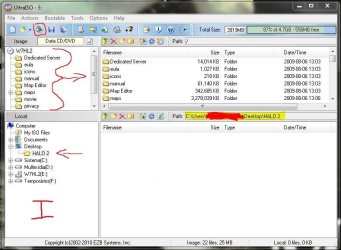
I - Open UltraISO and put Halo dvd into drive and press "UltraISO's open cd/dvd"; Find "Halo 2" folder you've created and select it as show.

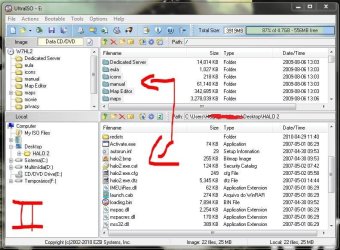
II - Right mouse click inside UltraISO superior right side window and "select all". Now, drag all selected items to UltraISO's inferior right side window. Wait 'till it ends. Close UltraISO.

# - Open Halo 2 folder and exclude "redists" folder. Right mouse click at "redists.rar" and "extract to"... find Halo 2 folder you've created and press OK. "redists" folder is in there?! That' fine!

III - Open UltraISO again. Find Halo 2 folder you've created at UltraISO's inferior left window. Right mouse click and select all itens at inferior right window and drag them all to superior right window. Ready?!...

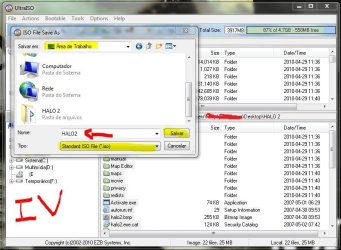
IV - Now press "save as" as thumb shows. Wait 'till it ends.

Now, open your dvd burner, select "Halo2.iso" and burn it at 4x - DVD-RW RECOMMENDED
Install the game using this dvd.Let us know the results!!!

"PLEASE REP ANYONE WHO HELPS YOU"


Attachments

  • h1.JPG
    h1.JPG
    71 KB · Views: 125
  • h2.JPG
    h2.JPG
    98.2 KB · Views: 11,063
  • h3.JPG
    h3.JPG
    95 KB · Views: 72
  • h4.JPG
    h4.JPG
    85.6 KB · Views: 71

My Computer

Computer Manufacturer/Model Number
WALLONN7 / LIN BLACK SERIES II
OS
Windows 7 Ultimate x64 SP1
CPU
AMD PHENOM II X6 1090T 3.2GHz
Motherboard
GIGABYTE GA-890FXA-UD7
Memory
8GB G.SKILL RIPJAWS - F3-10666CL7D
Graphics Card(s)
SAPPHIRE ATI RADEON HD 5870 VAPOR X OC
Sound Card
REALTEK DOLBY HOME THEATER
Monitor(s) Displays
LED LG W2486L
Screen Resolution
1080p
Hard Drives
SEAGATE 1TB -ST31000528AS - AHCI MODE - AS SATA
PSU
ZALMAN ZM1000-HP 1000W
Case
THERMALTAKE XASER VI VG4000SWA
Cooling
140MM x3 / 120MM x1 AIR COOLING - THERMALTAKE
Keyboard
MICROSOFT DIGITAL MEDIA KEYBOARD 3000 - USB
Mouse
MICROSOFT BASIC OPTICAL MOUSE 2.0 - USB
Internet Speed
600KBPS
Other Info
MICROSOFT XBOX 360 CONTROLLER
I had problems with this game as well. Turned out I had to uninstall the game
and Games for Windows Live. Then reinstall both from the disk. After everything was
running I then updated Games for Windows and all was well.
 

My Computer

Computer type
PC/Desktop
Computer Manufacturer/Model Number
Acer M5641
OS
Windows 7 Home Premium 64bit
CPU
Q6600
Motherboard
Nvidia MCP73PV
Memory
4GB.
Graphics Card(s)
Sapphire Vapor-X 5750
Sound Card
XFI Extreem music
Monitor(s) Displays
Acer X223W
Screen Resolution
1680x1050
Hard Drives
WD10 02FAEX
WD64 00AAKS
PSU
stock 450w
Case
acer
Cooling
stock
Keyboard
Microsoft Digital Media Pro.
Mouse
Logitech MX620
Internet Speed
49.51Mbs down 4.98Mbs up 17.6ms ping
Antivirus
MSE
Browser
Waterfox
Other Info
Shaw Cable
Netgear R6200
I actually found the post on another site that got Halo2 working for me,
[FONT=Verdana, Arial, Helvetica]For those having problems with Windows 7 and halo 2 getting the above see my post at
Halo 2 on Windows 7 will not start due to Windows live 3.0 not compatible

Basically on vista with SP2 it doesn't install windows live version 1.0 so
you have to install it manually. I have copied a paragraph from my other post
which works for vista as I got the same error message in vista as well as
Windows 7.

So where does it leave Windows 7 users and Halo 2 for now. Well install Halo
2 as your FIRST windows Live game and then install windows live manually from
the dvd it's under the redists folder and named XLiveRedist1.0.6027.msi BTW
this will work for vista as well. Whatever you do don't install the windows
live 3.0 redist like I did. After running Halo for the first time and it
updating to version 3.0 of live you can install your other live games and
they will work fine.
[/FONT]
Here's the link http://www.microsoft.com/communities/newsgroups/en-us/default.aspx?dg=microsoft.public.xbox.halo&tid=45207f5c-8ced-4c8b-9320-04df1f8b81f6&cat=en_US_d61cd8ee-3cb1-4ad8-8ed2-69e4b6d3b885〈=en&cr=US&sloc=&p=1
 

My Computer

Computer type
PC/Desktop
Computer Manufacturer/Model Number
Acer M5641
OS
Windows 7 Home Premium 64bit
CPU
Q6600
Motherboard
Nvidia MCP73PV
Memory
4GB.
Graphics Card(s)
Sapphire Vapor-X 5750
Sound Card
XFI Extreem music
Monitor(s) Displays
Acer X223W
Screen Resolution
1680x1050
Hard Drives
WD10 02FAEX
WD64 00AAKS
PSU
stock 450w
Case
acer
Cooling
stock
Keyboard
Microsoft Digital Media Pro.
Mouse
Logitech MX620
Internet Speed
49.51Mbs down 4.98Mbs up 17.6ms ping
Antivirus
MSE
Browser
Waterfox
Other Info
Shaw Cable
Netgear R6200
"redists/vcredits.msi: The installation is forbidden by system policy. Contact your system administrator."

Hi Wikne,

Take a look at my Tips on Troubleshooting Game Issues and check out tip #14. May or may not apply but it's something to think about. You might want to go over the entire guide as well, see if you missed something.

Good luck

Thank for the tip, but I have tried that already. You've done a God job on that thread though;) I also updated most drivers and DirectX before trying to install, so I doubt that is the issue.
 

My Computer

OS
Windows 7 Professional
CPU
E8500
Motherboard
GA-X38-DS5
Memory
Crucial DDR2 BallistiX PC8500 4x1GB CL5
Graphics Card(s)
Radeon 3870
Monitor(s) Displays
19"Syncmaster, Philips 40PFL8664H
Hard Drives
Hitachi Deskstar 160GB + 500Gb.
PSU
Mist 1000W
Case
Alienware
Cooling
Zalman CNPS9500LED
I had problems with this game as well. Turned out I had to uninstall the game
and Games for Windows Live. Then reinstall both from the disk. After everything was
running I then updated Games for Windows and all was well.

I'm aware of that problem as I read many threads concerning the issue with Halo 2 and Games For Windows Live, but that is just if you can't play live is it not? I can't get it to install at all. I have tried to both install the 3.0 version first and also to remove GFWL overall before installing, but I have not gotten any further..
 

My Computer

OS
Windows 7 Professional
CPU
E8500
Motherboard
GA-X38-DS5
Memory
Crucial DDR2 BallistiX PC8500 4x1GB CL5
Graphics Card(s)
Radeon 3870
Monitor(s) Displays
19"Syncmaster, Philips 40PFL8664H
Hard Drives
Hitachi Deskstar 160GB + 500Gb.
PSU
Mist 1000W
Case
Alienware
Cooling
Zalman CNPS9500LED
I actually found the post on another site that got Halo2 working for me,
[FONT=Verdana, Arial, Helvetica]For those having problems with Windows 7 and halo 2 getting the above see my post at
Halo 2 on Windows 7 will not start due to Windows live 3.0 not compatible

Basically on vista with SP2 it doesn't install windows live version 1.0 so
you have to install it manually. I have copied a paragraph from my other post
which works for vista as I got the same error message in vista as well as
Windows 7.

So where does it leave Windows 7 users and Halo 2 for now. Well install Halo
2 as your FIRST windows Live game and then install windows live manually from
the dvd it's under the redists folder and named XLiveRedist1.0.6027.msi BTW
this will work for vista as well. Whatever you do don't install the windows
live 3.0 redist like I did. After running Halo for the first time and it
updating to version 3.0 of live you can install your other live games and
they will work fine.
[/FONT]
Here's the link http://www.microsoft.com/communities/newsgroups/en-us/default.aspx?dg=microsoft.public.xbox.halo&tid=45207f5c-8ced-4c8b-9320-04df1f8b81f6&cat=en_US_d61cd8ee-3cb1-4ad8-8ed2-69e4b6d3b885〈=en&cr=US&sloc=&p=1

I have seen that thread but I don't recall having any games that is for windows live installed. That is of course if there is a difference between games marked with Games for Windows and Games marked with Games for Windows Live?
 

My Computer

OS
Windows 7 Professional
CPU
E8500
Motherboard
GA-X38-DS5
Memory
Crucial DDR2 BallistiX PC8500 4x1GB CL5
Graphics Card(s)
Radeon 3870
Monitor(s) Displays
19"Syncmaster, Philips 40PFL8664H
Hard Drives
Hitachi Deskstar 160GB + 500Gb.
PSU
Mist 1000W
Case
Alienware
Cooling
Zalman CNPS9500LED
I actually found the post on another site that got Halo2 working for me,
[FONT=Verdana, Arial, Helvetica]For those having problems with Windows 7 and halo 2 getting the above see my post at
Halo 2 on Windows 7 will not start due to Windows live 3.0 not compatible

Basically on vista with SP2 it doesn't install windows live version 1.0 so
you have to install it manually. I have copied a paragraph from my other post
which works for vista as I got the same error message in vista as well as
Windows 7.

So where does it leave Windows 7 users and Halo 2 for now. Well install Halo
2 as your FIRST windows Live game and then install windows live manually from
the dvd it's under the redists folder and named XLiveRedist1.0.6027.msi BTW
this will work for vista as well. Whatever you do don't install the windows
live 3.0 redist like I did. After running Halo for the first time and it
updating to version 3.0 of live you can install your other live games and
they will work fine.
[/FONT]
Here's the link http://www.microsoft.com/communities/newsgroups/en-us/default.aspx?dg=microsoft.public.xbox.halo&tid=45207f5c-8ced-4c8b-9320-04df1f8b81f6&cat=en_US_d61cd8ee-3cb1-4ad8-8ed2-69e4b6d3b885〈=en&cr=US&sloc=&p=1

I've the latest Windows Live installed here and no problem to play the game...
 

My Computer

Computer Manufacturer/Model Number
WALLONN7 / LIN BLACK SERIES II
OS
Windows 7 Ultimate x64 SP1
CPU
AMD PHENOM II X6 1090T 3.2GHz
Motherboard
GIGABYTE GA-890FXA-UD7
Memory
8GB G.SKILL RIPJAWS - F3-10666CL7D
Graphics Card(s)
SAPPHIRE ATI RADEON HD 5870 VAPOR X OC
Sound Card
REALTEK DOLBY HOME THEATER
Monitor(s) Displays
LED LG W2486L
Screen Resolution
1080p
Hard Drives
SEAGATE 1TB -ST31000528AS - AHCI MODE - AS SATA
PSU
ZALMAN ZM1000-HP 1000W
Case
THERMALTAKE XASER VI VG4000SWA
Cooling
140MM x3 / 120MM x1 AIR COOLING - THERMALTAKE
Keyboard
MICROSOFT DIGITAL MEDIA KEYBOARD 3000 - USB
Mouse
MICROSOFT BASIC OPTICAL MOUSE 2.0 - USB
Internet Speed
600KBPS
Other Info
MICROSOFT XBOX 360 CONTROLLER
Follow attached thumbnails:

I - Open UltraISO and put Halo dvd into drive and press "UltraISO's open cd/dvd"; Find "Halo 2" folder you've created and select it as show.

II - Right mouse click inside UltraISO superior right side window and "select all". Now, drag all selected items to UltraISO's inferior right side window. Wait 'till it ends. Close UltraISO.

# - Open Halo 2 folder and exclude "redists" folder. Right mouse click at "redists.rar" and "extract to"... find Halo 2 folder you've created and press OK. "redists" folder is in there?! That' fine!

III - Open UltraISO again. Find Halo 2 folder you've created at UltraISO's inferior left window. Right mouse click and select all itens at inferior right window and drag them all to superior right window. Ready?!...

IV - Now press "save as" as thumb shows. Wait 'till it ends.

Now, open your dvd burner, select "Halo2.iso" and burn it at 4x - DVD-RW RECOMMENDED
Install the game using this dvd.Let us know the results!!!

"PLEASE REP ANYONE WHO HELPS YOU"


I've tried both with UltraIso and PowerIso but they won't let me save files over 300mb. but I have checked that the disc is fine on another win7 computer, so it is something wrong with the security policies and permissions on my pc. I think I'll try a repair install on win 7 to see if that can help. found a similar case on this page where that seemed to do the trick: http://www.sevenforums.com/software/57366-adobe-not-installing-5.html
 

My Computer

OS
Windows 7 Professional
CPU
E8500
Motherboard
GA-X38-DS5
Memory
Crucial DDR2 BallistiX PC8500 4x1GB CL5
Graphics Card(s)
Radeon 3870
Monitor(s) Displays
19"Syncmaster, Philips 40PFL8664H
Hard Drives
Hitachi Deskstar 160GB + 500Gb.
PSU
Mist 1000W
Case
Alienware
Cooling
Zalman CNPS9500LED
Follow attached thumbnails:

I - Open UltraISO and put Halo dvd into drive and press "UltraISO's open cd/dvd"; Find "Halo 2" folder you've created and select it as show.

II - Right mouse click inside UltraISO superior right side window and "select all". Now, drag all selected items to UltraISO's inferior right side window. Wait 'till it ends. Close UltraISO.

# - Open Halo 2 folder and exclude "redists" folder. Right mouse click at "redists.rar" and "extract to"... find Halo 2 folder you've created and press OK. "redists" folder is in there?! That' fine!

III - Open UltraISO again. Find Halo 2 folder you've created at UltraISO's inferior left window. Right mouse click and select all itens at inferior right window and drag them all to superior right window. Ready?!...

IV - Now press "save as" as thumb shows. Wait 'till it ends.

Now, open your dvd burner, select "Halo2.iso" and burn it at 4x - DVD-RW RECOMMENDED
Install the game using this dvd.Let us know the results!!!

"PLEASE REP ANYONE WHO HELPS YOU"


I've tried both with UltraIso and PowerIso but they won't let me save files over 300mb. but I have checked that the disc is fine on another win7 computer, so it is something wrong with the security policies and permissions on my pc. I think I'll try a repair install on win 7 to see if that can help. found a similar case on this page where that seemed to do the trick: http://www.sevenforums.com/software/57366-adobe-not-installing-5.html

Sorry about UltraISO...:o I'm an old registered user and forgot such limitations... Ignore UltraISO "III" and "IV" steps... use this one to do them: Folder2Iso Main Page (Official Page).

Let us know the results.

"PLEASE REP ANYONE WHO HELPS YOU"
 

My Computer

Computer Manufacturer/Model Number
WALLONN7 / LIN BLACK SERIES II
OS
Windows 7 Ultimate x64 SP1
CPU
AMD PHENOM II X6 1090T 3.2GHz
Motherboard
GIGABYTE GA-890FXA-UD7
Memory
8GB G.SKILL RIPJAWS - F3-10666CL7D
Graphics Card(s)
SAPPHIRE ATI RADEON HD 5870 VAPOR X OC
Sound Card
REALTEK DOLBY HOME THEATER
Monitor(s) Displays
LED LG W2486L
Screen Resolution
1080p
Hard Drives
SEAGATE 1TB -ST31000528AS - AHCI MODE - AS SATA
PSU
ZALMAN ZM1000-HP 1000W
Case
THERMALTAKE XASER VI VG4000SWA
Cooling
140MM x3 / 120MM x1 AIR COOLING - THERMALTAKE
Keyboard
MICROSOFT DIGITAL MEDIA KEYBOARD 3000 - USB
Mouse
MICROSOFT BASIC OPTICAL MOUSE 2.0 - USB
Internet Speed
600KBPS
Other Info
MICROSOFT XBOX 360 CONTROLLER
I actually found the post on another site that got Halo2 working for me,
[FONT=Verdana, Arial, Helvetica]For those having problems with Windows 7 and halo 2 getting the above see my post at
Halo 2 on Windows 7 will not start due to Windows live 3.0 not compatible

Basically on vista with SP2 it doesn't install windows live version 1.0 so
you have to install it manually. I have copied a paragraph from my other post
which works for vista as I got the same error message in vista as well as
Windows 7.

So where does it leave Windows 7 users and Halo 2 for now. Well install Halo
2 as your FIRST windows Live game and then install windows live manually from
the dvd it's under the redists folder and named XLiveRedist1.0.6027.msi BTW
this will work for vista as well. Whatever you do don't install the windows
live 3.0 redist like I did. After running Halo for the first time and it
updating to version 3.0 of live you can install your other live games and
they will work fine.
[/FONT]
Here's the link http://www.microsoft.com/communities/newsgroups/en-us/default.aspx?dg=microsoft.public.xbox.halo&tid=45207f5c-8ced-4c8b-9320-04df1f8b81f6&cat=en_US_d61cd8ee-3cb1-4ad8-8ed2-69e4b6d3b885〈=en&cr=US&sloc=&p=1

I have seen that thread but I don't recall having any games that is for windows live installed. That is of course if there is a difference between games marked with Games for Windows and Games marked with Games for Windows Live?
I didn't at that time either, but for some reason, if you don't install
Games for Windows Live off of the disk,it borks the install.
 

My Computer

Computer type
PC/Desktop
Computer Manufacturer/Model Number
Acer M5641
OS
Windows 7 Home Premium 64bit
CPU
Q6600
Motherboard
Nvidia MCP73PV
Memory
4GB.
Graphics Card(s)
Sapphire Vapor-X 5750
Sound Card
XFI Extreem music
Monitor(s) Displays
Acer X223W
Screen Resolution
1680x1050
Hard Drives
WD10 02FAEX
WD64 00AAKS
PSU
stock 450w
Case
acer
Cooling
stock
Keyboard
Microsoft Digital Media Pro.
Mouse
Logitech MX620
Internet Speed
49.51Mbs down 4.98Mbs up 17.6ms ping
Antivirus
MSE
Browser
Waterfox
Other Info
Shaw Cable
Netgear R6200
Follow attached thumbnails:

I - Open UltraISO and put Halo dvd into drive and press "UltraISO's open cd/dvd"; Find "Halo 2" folder you've created and select it as show.

II - Right mouse click inside UltraISO superior right side window and "select all". Now, drag all selected items to UltraISO's inferior right side window. Wait 'till it ends. Close UltraISO.

# - Open Halo 2 folder and exclude "redists" folder. Right mouse click at "redists.rar" and "extract to"... find Halo 2 folder you've created and press OK. "redists" folder is in there?! That' fine!

III - Open UltraISO again. Find Halo 2 folder you've created at UltraISO's inferior left window. Right mouse click and select all itens at inferior right window and drag them all to superior right window. Ready?!...

IV - Now press "save as" as thumb shows. Wait 'till it ends.

Now, open your dvd burner, select "Halo2.iso" and burn it at 4x - DVD-RW RECOMMENDED
Install the game using this dvd.Let us know the results!!!

"PLEASE REP ANYONE WHO HELPS YOU"


I've tried both with UltraIso and PowerIso but they won't let me save files over 300mb. but I have checked that the disc is fine on another win7 computer, so it is something wrong with the security policies and permissions on my pc. I think I'll try a repair install on win 7 to see if that can help. found a similar case on this page where that seemed to do the trick: http://www.sevenforums.com/software/57366-adobe-not-installing-5.html

Sorry about UltraISO...:o I'm an old registered user and forgot such limitations... Ignore UltraISO "III" and "IV" steps... use this one to do them: Folder2Iso Main Page (Official Page).

Let us know the results.

"PLEASE REP ANYONE WHO HELPS YOU"

Is there a point in doing that now that I know my retail halo 2 disc works fine? Like I said before, I have tested it a laptop running win 7 home premium and it installed just fine. Maybe I was a bit unclear in my last post, but I meant the retail disc, not the one I tried to create. I should think it has something to do with the computer I'm trying to install it on rather than the disc when it works on another machine? :confused: Of course, it might work with another disc, but I don't see why not the retail one should work on this computer when it works perfectly on another. Unless there is something different in the redist files you gave me than the original files on the gamedisc I'll save the dvd for something else;) or do you disagree?:p
 

My Computer

OS
Windows 7 Professional
CPU
E8500
Motherboard
GA-X38-DS5
Memory
Crucial DDR2 BallistiX PC8500 4x1GB CL5
Graphics Card(s)
Radeon 3870
Monitor(s) Displays
19"Syncmaster, Philips 40PFL8664H
Hard Drives
Hitachi Deskstar 160GB + 500Gb.
PSU
Mist 1000W
Case
Alienware
Cooling
Zalman CNPS9500LED
I've tried both with UltraIso and PowerIso but they won't let me save files over 300mb. but I have checked that the disc is fine on another win7 computer, so it is something wrong with the security policies and permissions on my pc. I think I'll try a repair install on win 7 to see if that can help. found a similar case on this page where that seemed to do the trick: http://www.sevenforums.com/software/57366-adobe-not-installing-5.html

Sorry about UltraISO...:o I'm an old registered user and forgot such limitations... Ignore UltraISO "III" and "IV" steps... use this one to do them: Folder2Iso Main Page (Official Page).

Let us know the results.

"PLEASE REP ANYONE WHO HELPS YOU"

Is there a point in doing that now that I know my retail halo 2 disc works fine? Like I said before, I have tested it a laptop running win 7 home premium and it installed just fine. Maybe I was a bit unclear in my last post, but I meant the retail disc, not the one I tried to create. I should think it has something to do with the computer I'm trying to install it on rather than the disc when it works on another machine? :confused: Of course, it might work with another disc, but I don't see why not the retail one should work on this computer when it works perfectly on another. Unless there is something different in the redist files you gave me than the original files on the gamedisc I'll save the dvd for something else;) or do you disagree?:p

Sorry again...:o:D I've just "ignored" some o' your words... Forgot my last post!!!:)

But let us know the results when it installs as well!!

"PLEASE REP ANYONE WHO HELPS YOU"

P.S. how about drive disk?!... incompatibility on reading happens... rarely, but does...


My Computer

Computer Manufacturer/Model Number
WALLONN7 / LIN BLACK SERIES II
OS
Windows 7 Ultimate x64 SP1
CPU
AMD PHENOM II X6 1090T 3.2GHz
Motherboard
GIGABYTE GA-890FXA-UD7
Memory
8GB G.SKILL RIPJAWS - F3-10666CL7D
Graphics Card(s)
SAPPHIRE ATI RADEON HD 5870 VAPOR X OC
Sound Card
REALTEK DOLBY HOME THEATER
Monitor(s) Displays
LED LG W2486L
Screen Resolution
1080p
Hard Drives
SEAGATE 1TB -ST31000528AS - AHCI MODE - AS SATA
PSU
ZALMAN ZM1000-HP 1000W
Case
THERMALTAKE XASER VI VG4000SWA
Cooling
140MM x3 / 120MM x1 AIR COOLING - THERMALTAKE
Keyboard
MICROSOFT DIGITAL MEDIA KEYBOARD 3000 - USB
Mouse
MICROSOFT BASIC OPTICAL MOUSE 2.0 - USB
Internet Speed
600KBPS
Other Info
MICROSOFT XBOX 360 CONTROLLER
Sorry about UltraISO...:o I'm an old registered user and forgot such limitations... Ignore UltraISO "III" and "IV" steps... use this one to do them: Folder2Iso Main Page (Official Page).

Let us know the results.

"PLEASE REP ANYONE WHO HELPS YOU"

Is there a point in doing that now that I know my retail halo 2 disc works fine? Like I said before, I have tested it a laptop running win 7 home premium and it installed just fine. Maybe I was a bit unclear in my last post, but I meant the retail disc, not the one I tried to create. I should think it has something to do with the computer I'm trying to install it on rather than the disc when it works on another machine? :confused: Of course, it might work with another disc, but I don't see why not the retail one should work on this computer when it works perfectly on another. Unless there is something different in the redist files you gave me than the original files on the gamedisc I'll save the dvd for something else;) or do you disagree?:p

Sorry again...:o:D I've just "ignored" some o' your words... Forgot my last post!!!:)

But let us know the results when it installs as well!!

"PLEASE REP ANYONE WHO HELPS YOU"

P.S. how about drive disk?!... incompatibility on reading happens... rarely, but does...


No problem hehe:p But I've learned that there is no such thing as a repair mode:o at least not one that can help me hehe:P I thought there was one that just checked the windows intallation for errors but apparently there isn't.:P Were there something like that on Xp maybe? I'm not sure where I got that idea from, but anyways, I don't know where to go next..:confused: But I will let you know it I get it going somehow, sometime;) Thanks for all the help so far:)
 

My Computer

OS
Windows 7 Professional
CPU
E8500
Motherboard
GA-X38-DS5
Memory
Crucial DDR2 BallistiX PC8500 4x1GB CL5
Graphics Card(s)
Radeon 3870
Monitor(s) Displays
19"Syncmaster, Philips 40PFL8664H
Hard Drives
Hitachi Deskstar 160GB + 500Gb.
PSU
Mist 1000W
Case
Alienware
Cooling
Zalman CNPS9500LED
I have got it working at last:) I updated my Local Group Policies, running gpupdate.exe Using Software Restriction Policies to Protect Against Unauthorized Software . Then I ran the vcredist file from the halo 2 disc to install Microsoft Visual C++ 2005 redistributable which was the root to all the problems as it was blocked by some security policy and therefore not allowed to install. Ran it first in safe mode without success, worked my way to the policies for Windows Installer (local computer policies-> user configuration->Aministrative Templates-> Windows components->Windows Installer)
where I discovered this policy; "Always install with elevated privileges" and enabled it. Then I right-clicked the vcredist file and selected repair, tried to run it again, and then it installed like a charm. So I guess it was enabling the "Always install with elevated privileges" policy that did the trick in the end, or maybe in a combination with the gpupdate, I'm not sure. Just glad I got it working;)
 

My Computer

OS
Windows 7 Professional
CPU
E8500
Motherboard
GA-X38-DS5
Memory
Crucial DDR2 BallistiX PC8500 4x1GB CL5
Graphics Card(s)
Radeon 3870
Monitor(s) Displays
19"Syncmaster, Philips 40PFL8664H
Hard Drives
Hitachi Deskstar 160GB + 500Gb.
PSU
Mist 1000W
Case
Alienware
Cooling
Zalman CNPS9500LED
I have got it working at last:) I updated my Local Group Policies, running gpupdate.exe Using Software Restriction Policies to Protect Against Unauthorized Software . Then I ran the vcredist file from the halo 2 disc to install Microsoft Visual C++ 2005 redistributable which was the root to all the problems as it was blocked by some security policy and therefore not allowed to install. Ran it first in safe mode without success, worked my way to the policies for Windows Installer (local computer policies-> user configuration->Aministrative Templates-> Windows components->Windows Installer)
where I discovered this policy; "Always install with elevated privileges" and enabled it. Then I right-clicked the vcredist file and selected repair, tried to run it again, and then it installed like a charm. So I guess it was enabling the "Always install with elevated privileges" policy that did the trick in the end, or maybe in a combination with the gpupdate, I'm not sure. Just glad I got it working;)

It's good to hear you got it working!:)
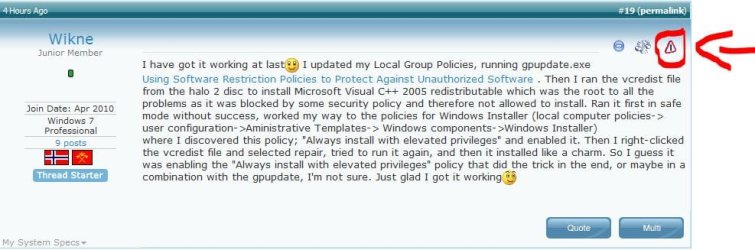
Once your problem is solved, you need to report it. Just follow the arrow to do it!
Come back as soon as you need!;)

"PLEASE REP ANYONE WHO HELPS YOU"


Attachments

  • Capturar.JPG
    Capturar.JPG
    67.7 KB · Views: 70

My Computer

Computer Manufacturer/Model Number
WALLONN7 / LIN BLACK SERIES II
OS
Windows 7 Ultimate x64 SP1
CPU
AMD PHENOM II X6 1090T 3.2GHz
Motherboard
GIGABYTE GA-890FXA-UD7
Memory
8GB G.SKILL RIPJAWS - F3-10666CL7D
Graphics Card(s)
SAPPHIRE ATI RADEON HD 5870 VAPOR X OC
Sound Card
REALTEK DOLBY HOME THEATER
Monitor(s) Displays
LED LG W2486L
Screen Resolution
1080p
Hard Drives
SEAGATE 1TB -ST31000528AS - AHCI MODE - AS SATA
PSU
ZALMAN ZM1000-HP 1000W
Case
THERMALTAKE XASER VI VG4000SWA
Cooling
140MM x3 / 120MM x1 AIR COOLING - THERMALTAKE
Keyboard
MICROSOFT DIGITAL MEDIA KEYBOARD 3000 - USB
Mouse
MICROSOFT BASIC OPTICAL MOUSE 2.0 - USB
Internet Speed
600KBPS
Other Info
MICROSOFT XBOX 360 CONTROLLER
Back
Top