

If anyone has any handy hints or tips, be them helpful or just plain stupid. Post them up they are always good for a laugh, and some might save you a few bob.
Allot of people might of heard of this one but it can come in handy.
Basically it's for testing most standard remote controls to make sure that all the buttons are working and to check if the batteries are ok.
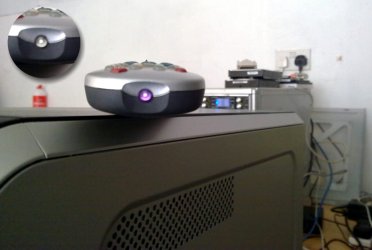
When you look at the sensor of the remote and press any of the buttons you can't see anything happen as it's invisible to the naked eye (top left in pic), but try doing whilst looking through the camera on your mobile phone. If all the buttons are working and the batteries are fine you will be able to see the remote sensor flickering. Try it
Allot of people might of heard of this one but it can come in handy.
Basically it's for testing most standard remote controls to make sure that all the buttons are working and to check if the batteries are ok.
When you look at the sensor of the remote and press any of the buttons you can't see anything happen as it's invisible to the naked eye (top left in pic), but try doing whilst looking through the camera on your mobile phone. If all the buttons are working and the batteries are fine you will be able to see the remote sensor flickering. Try it
Attachments
My Computer
At a glance
Windows 7 Ultimate 64bitAMD Phenom Quad core 9950 black edition16Gb2x XFX Radeon 5850
- Computer type
- PC/Desktop
- Computer Manufacturer/Model Number
- Self Built
- OS
- Windows 7 Ultimate 64bit
- CPU
- AMD Phenom Quad core 9950 black edition
- Motherboard
- Gigabyte
- Memory
- 16Gb
- Graphics Card(s)
- 2x XFX Radeon 5850
- Sound Card
- PCI Express X-Fi Titanium / Logitech G35
- Monitor(s) Displays
- 2x HP 2410i
- Screen Resolution
- 1920x1080
- Hard Drives
- 2x 500Gb Seagate
1x 300Gb Seagate
1x 1Tb Seagate
2x 1Tb Hitatchi
- PSU
- Jean Tech Storm 700W
- Case
- Cooler Master COSMOS S
- Cooling
- Akasa Evo Blue Pro
- Keyboard
- Logitech G15
- Mouse
- Mad Catz M.M.O. 7
- Internet Speed
- 12mb


