Hangs head in shame whilst pleading 4 help

AaLF

New member
Member
VIP
Local time
12:18 PM
Messages
488
Windows 7 & my current PC have been so good for so long I've forgotten how to fix simple things due to lack of practice.

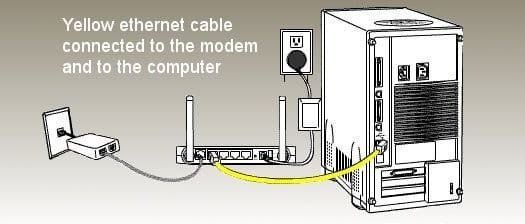
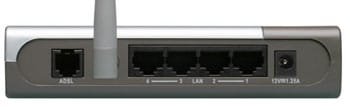
Got a new modem Netcom NB 604

So far so good -

  • Power cable is plugged
  • internet cable plugged in
  • ethernet cable plugged in


Ethernet light not on -


  • PWR light on & solid
  • DSL light on & solid
  • WWW light on & flickering
  • ethernet light NOT RESPONDING


http://192.168.1.1 is not accessing the modem. Its as if the ethernet cable's not working


**So I cannot get into the modem to set a password to connect to the net.


Attachments

  • NETC-NB604Nspb.jpg
    NETC-NB604Nspb.jpg
    39.4 KB · Views: 50
  • 122i3BEAD442192FE2C6.jpg
    122i3BEAD442192FE2C6.jpg
    17.2 KB · Views: 51

My Computer My Computer

At a glance

Microsoft Windows 7 HomePremium 64-bit 7601 M...Intel(R) Core(TM)2 Duo CPU E4500 @ 2.20GHz8GbNVIDIA GeForce GT 710
Computer type
PC/Desktop
Computer Manufacturer/Model Number
Generic - custom build
OS
Microsoft Windows 7 HomePremium 64-bit 7601 Multiprocessor Free Service Pack 1
CPU
Intel(R) Core(TM)2 Duo CPU E4500 @ 2.20GHz
Motherboard
Gigabyte Technology Co., Ltd. EP35-DS3P
Memory
8Gb
Graphics Card(s)
NVIDIA GeForce GT 710
Sound Card
(1) USB Audio Device (2) USB Audio Device (3) NVIDIA Hig
Monitor(s) Displays
older 21" thinkvision brand?
Screen Resolution
1680 x 1050
Hard Drives
WDC WD5000AAKS-22A7B0 ATA Device
ST3500418AS ATA Device
ST3320813AS ATA Device
PSU
ANTEC NEO ECO 520W
Case
generic tower
Cooling
couple of 4" fans
Keyboard
logitech k220
Mouse
logitech 305
Antivirus
malwarebytes premium
Browser
FireFox + opera
Have you tried their troubleshoot webpage ?

you do know that link with your IP is a porn page
 

My Computer My Computer

At a glance

Windows 10 Home Premium 64bit sp1Intel I7-6700K @ 4.6 Ghz 1.344 volts everyday OC32GB G-Skill TridentZ 3200mhz 16-18-18-38 DDR4Sli Gigabyte Windforce GTX 980 G1
Computer type
PC/Desktop
Computer Manufacturer/Model Number
CoreI7-6700K MrFingerIII Special Builds
OS
Windows 10 Home Premium 64bit sp1
CPU
Intel I7-6700K @ 4.6 Ghz 1.344 volts everyday OC
Motherboard
Asrock Fatality K6 Z170 Socket 1151
Memory
32GB G-Skill TridentZ 3200mhz 16-18-18-38 DDR4
Graphics Card(s)
Sli Gigabyte Windforce GTX 980 G1
Sound Card
AC97 Creative Rage Tactic 3D Headphones Bluetooth
Monitor(s) Displays
27" Asus ROG Swift PG278Q G-Sync 48" Vizio Smart HD TV
Screen Resolution
2560x1440p 27"- 48" Currently Gaming at 2560x1440p Res 2K
Hard Drives
250GB Samsung Evo840SSD Seagate baracuda 500 GB WD Mybook 500Gb 1TB Seagate Barracuda
PSU
HX1050w Corsair Silver 80plus certified crosfire/sli
Case
Enthod Pro Full Tower
Cooling
Corsair H110i GT 280 mm High Performance WaterBlock
Keyboard
Logitech wireless keyboard
Mouse
Logitech wireless mouse
Internet Speed
Cox Cable 100+ mb
Antivirus
WebRoot Spysweeper with Antivirus
Browser
IE-10, Chrome, Opera
Other Info
My Other Rig is a AMD FX8320E @4.6Ghz 16GB Ballistic Sport Ram
Mobo Asrock Fatality 990FX 120GB OCZ SSD 1TB Seagate Barracuda Corsair H75 Cooling PSU Corsair CX750
GPU GTX Gigabyte 970G1
Is the light on the NIC on?
I assume you tried resetting the router.

Not sure about that particular model, but usually a light should come on when an Ethernet cable is plugged. Could be a bad router. Did you try switching to other ports?
 

My Computer My Computer

At a glance

Windows 7 Pro
Computer type
PC/Desktop
OS
Windows 7 Pro
you do know that link with your IP is a porn page

What link? I supplied no link. 192.168.1.1 is all i published.

.....................................

As for this ethernet hassle. Plugged in old modem (still works) it doesn't see the ethernet cable either.


  1. A light called LAN should light up on modem display, yes?
  2. Can it be the PC doesn't see the ethernet cable? how do i check?
 

My Computer My Computer

At a glance

Microsoft Windows 7 HomePremium 64-bit 7601 M...Intel(R) Core(TM)2 Duo CPU E4500 @ 2.20GHz8GbNVIDIA GeForce GT 710
Computer type
PC/Desktop
Computer Manufacturer/Model Number
Generic - custom build
OS
Microsoft Windows 7 HomePremium 64-bit 7601 Multiprocessor Free Service Pack 1
CPU
Intel(R) Core(TM)2 Duo CPU E4500 @ 2.20GHz
Motherboard
Gigabyte Technology Co., Ltd. EP35-DS3P
Memory
8Gb
Graphics Card(s)
NVIDIA GeForce GT 710
Sound Card
(1) USB Audio Device (2) USB Audio Device (3) NVIDIA Hig
Monitor(s) Displays
older 21" thinkvision brand?
Screen Resolution
1680 x 1050
Hard Drives
WDC WD5000AAKS-22A7B0 ATA Device
ST3500418AS ATA Device
ST3320813AS ATA Device
PSU
ANTEC NEO ECO 520W
Case
generic tower
Cooling
couple of 4" fans
Keyboard
logitech k220
Mouse
logitech 305
Antivirus
malwarebytes premium
Browser
FireFox + opera
I would try a different Ethernet cable. You might have a bad one.

If the cable was working, one of the Ethernet lights should light and flicker on the front of the modem.
 

My Computer My Computer

At a glance

Win 7 Pro x64/Win 10 Pro x64 dual bootAMD FX 8350 Vishera @ 420016 GB Mushkin Blackline DDR3-2400 @ 1866 (9-1...XFX Radeon R9 280 Double D Black Edition
Computer type
PC/Desktop
Computer Manufacturer/Model Number
Mellon Labs (custom build)
OS
Win 7 Pro x64/Win 10 Pro x64 dual boot
CPU
AMD FX 8350 Vishera @ 4200
Motherboard
ASUS M5A97 R2.0
Memory
16 GB Mushkin Blackline DDR3-2400 @ 1866 (9-10-10-10-31)
Graphics Card(s)
XFX Radeon R9 280 Double D Black Edition
Sound Card
Realtek HD Audio on MB. Sounds great.
Monitor(s) Displays
Acer 24", Acer 22"
Screen Resolution
3840 x 1080
Hard Drives
1 x Mushkin Chronos 120 GB SSD (Win 10)
1 x Samsung 850 EVO 250 GB SSD (Win 7)
1 x WD 1TB SATA Blue
1 x WD 1TB SATA Green
PSU
Corsair TX-750
Case
CoolerMaster HAF 912+
Cooling
Coolermaster Seidon 240M Liquid AIO. 6 case fans
Keyboard
Logitech G710+
Mouse
Logitech G500s
Internet Speed
Much better since I got fiber, but still way overpriced.
Antivirus
MSE, Malware Bytes for scanning
Browser
Firefox
Other Info
Corsair VOID USB headphones.

A Mellon Labs X-1 - LCD Smartie driven system status display.

Brought to you by the letter E
Does the cable work when directly plugged into the modem.
 

My Computer My Computer

At a glance

Vista, Windows7, Mint Mate, Zorin, Windows 8from 1.6GHz Duo to i7
Computer Manufacturer/Model Number
HP, Dell, Gateway, Toshiba - 4 laptops and 2 desktops
OS
Vista, Windows7, Mint Mate, Zorin, Windows 8
CPU
from 1.6GHz Duo to i7
Monitor(s) Displays
2x HP w2207
Hard Drives
5x HDD, 7x SSD, 12x Externals
Keyboard
with trackball - no mices
Mouse
Trackball mice
Internet Speed
DSL 6000
you do know that link with your IP is a porn page

What link? I supplied no link. 192.168.1.1 is all i published.

.....................................

As for this ethernet hassle. Plugged in old modem (still works) it doesn't see the ethernet cable either.


  1. A light called LAN should light up on modem display, yes?
  2. Can it be the PC doesn't see the ethernet cable? how do i check?
yes your IP turned into a link
 

My Computer My Computer

At a glance

Windows 10 Home Premium 64bit sp1Intel I7-6700K @ 4.6 Ghz 1.344 volts everyday OC32GB G-Skill TridentZ 3200mhz 16-18-18-38 DDR4Sli Gigabyte Windforce GTX 980 G1
Computer type
PC/Desktop
Computer Manufacturer/Model Number
CoreI7-6700K MrFingerIII Special Builds
OS
Windows 10 Home Premium 64bit sp1
CPU
Intel I7-6700K @ 4.6 Ghz 1.344 volts everyday OC
Motherboard
Asrock Fatality K6 Z170 Socket 1151
Memory
32GB G-Skill TridentZ 3200mhz 16-18-18-38 DDR4
Graphics Card(s)
Sli Gigabyte Windforce GTX 980 G1
Sound Card
AC97 Creative Rage Tactic 3D Headphones Bluetooth
Monitor(s) Displays
27" Asus ROG Swift PG278Q G-Sync 48" Vizio Smart HD TV
Screen Resolution
2560x1440p 27"- 48" Currently Gaming at 2560x1440p Res 2K
Hard Drives
250GB Samsung Evo840SSD Seagate baracuda 500 GB WD Mybook 500Gb 1TB Seagate Barracuda
PSU
HX1050w Corsair Silver 80plus certified crosfire/sli
Case
Enthod Pro Full Tower
Cooling
Corsair H110i GT 280 mm High Performance WaterBlock
Keyboard
Logitech wireless keyboard
Mouse
Logitech wireless mouse
Internet Speed
Cox Cable 100+ mb
Antivirus
WebRoot Spysweeper with Antivirus
Browser
IE-10, Chrome, Opera
Other Info
My Other Rig is a AMD FX8320E @4.6Ghz 16GB Ballistic Sport Ram
Mobo Asrock Fatality 990FX 120GB OCZ SSD 1TB Seagate Barracuda Corsair H75 Cooling PSU Corsair CX750
GPU GTX Gigabyte 970G1
Have you tried their troubleshoot webpage ?

you do know that link with your IP is a porn page

I don't know where it takes you, but it takes me to the sign-in page of my router. I'm sure that's what OP intended and that's how it should work. Not sure where the issue lies but, I think I'd check things out a bit on your end.
 

My Computer My Computer

At a glance

Microsoft Windows 10 Home Build 15036Intel(R) Core(TM) i7-860 @ 2.80GHz4.00 GBNVIDIA GeForce GTX 750
Computer type
PC/Desktop
Computer Manufacturer/Model Number
iBuyPower NZXT
OS
Microsoft Windows 10 Home Build 15036
CPU
Intel(R) Core(TM) i7-860 @ 2.80GHz
Motherboard
Gigabyte Technology Co., Ltd. P55-UD3L
Memory
4.00 GB
Graphics Card(s)
NVIDIA GeForce GTX 750
Sound Card
(1) Line 6 UX2 (2) Realtek High Definition Audio
Monitor(s) Displays
23" acer
Screen Resolution
1920 x 1080 x 32 bits (4294967296 colors) @ 60 Hz
Hard Drives
(1) WDC WD5000AAKS-00D2B0 ATA Device (2) Seagate FreeAgent Go 250G USB Device
Cooling
Corsair H75 liquid cooler (Very easy to install, actually)
Internet Speed
60M cable modem-->Linksys E1200-->1Gbps net card
Browser
Chrome
Other Info
This is probably the longest I've ever had a Windows machine run without having to restore it to scratch. I'm used to restoring to "factory" about every 2 yrs. I've run with Win7 since new in 2009 and only recently (Nov, '14) restored to clean up the machine from all my 'xperimenting. LOL!! I may never need another machine.

Upgraded to 10 when it was still free, then installed 2017 update.
you do know that link with your IP is a porn page

What link? I supplied no link. 192.168.1.1 is all i published.

.....................................

As for this ethernet hassle. Plugged in old modem (still works) it doesn't see the ethernet cable either.


  1. A light called LAN should light up on modem display, yes?
  2. Can it be the PC doesn't see the ethernet cable? how do i check?
yes your IP turned into a link

192.168..1.1 is used to "get into" the config page of a modem/router. Or at least some of 'em.

192.168.1.1


192.168.1.1 IP address is used by various router models as a default address for router itself. Router binds this address to itself when it creates a network.
To connect to the router you usually need to type http://192.168.1.1/. If your router is bound to 192.168.1.1 IP address you should see router connection page immediately. Usually this page will require you to enter router password.
If you don’t see a router connection page and get empty page or browser redirects you to a search results then there is something wrong. Possible problem reasons are following:
• Router is registered to a different IP (some router models use 192.168.1.2 and other IP addresses). Try reading your router user guide to get default IP address which router uses.
• Your computer is not connected to the router (check if cables are connected and functioning)
• Router is not turned off
• Router is malfunctioning (restarting your router may help)
192.168.1.1 IP address is most frequently used by Linksys routers. So you can start your search for solution from Linksys website.

192.168.1.1
 

My Computer My Computer

At a glance

Microsoft Windows 7 HomePremium 64-bit 7601 M...Intel(R) Core(TM)2 Duo CPU E4500 @ 2.20GHz8GbNVIDIA GeForce GT 710
Computer type
PC/Desktop
Computer Manufacturer/Model Number
Generic - custom build
OS
Microsoft Windows 7 HomePremium 64-bit 7601 Multiprocessor Free Service Pack 1
CPU
Intel(R) Core(TM)2 Duo CPU E4500 @ 2.20GHz
Motherboard
Gigabyte Technology Co., Ltd. EP35-DS3P
Memory
8Gb
Graphics Card(s)
NVIDIA GeForce GT 710
Sound Card
(1) USB Audio Device (2) USB Audio Device (3) NVIDIA Hig
Monitor(s) Displays
older 21" thinkvision brand?
Screen Resolution
1680 x 1050
Hard Drives
WDC WD5000AAKS-22A7B0 ATA Device
ST3500418AS ATA Device
ST3320813AS ATA Device
PSU
ANTEC NEO ECO 520W
Case
generic tower
Cooling
couple of 4" fans
Keyboard
logitech k220
Mouse
logitech 305
Antivirus
malwarebytes premium
Browser
FireFox + opera
192.168.1.1 is a private IP and should either take you to a networked device or nowhere. Solar - you may have some browser malware.

OP - are you sure you are not using an RJ-11 connector? Just checking :) Did you try a different cable?
 

My Computer My Computer

At a glance

Windows 7 Pro
Computer type
PC/Desktop
OS
Windows 7 Pro
OK. Forget the new router. Old Dlink is also arguing.

This all started when my download speed tumbled to slooow. ISP says looks OK to them. Demand I drag Desktop PC over to socket & connect via ethernet cable to be sure about ADSL problem.

So even the current dlink doesn't see either of my two cables. Wireless adapters run fine.


Once I plug in an ethernet cable...........

windows cannot find a properly installed network adapter

I'm not a PC hobbyist. I'm a user not builder. what's this missing adapter?
 

Attachments

  • dsl604t-02.jpg
    dsl604t-02.jpg
    4.4 KB · Views: 22

My Computer My Computer

At a glance

Microsoft Windows 7 HomePremium 64-bit 7601 M...Intel(R) Core(TM)2 Duo CPU E4500 @ 2.20GHz8GbNVIDIA GeForce GT 710
Computer type
PC/Desktop
Computer Manufacturer/Model Number
Generic - custom build
OS
Microsoft Windows 7 HomePremium 64-bit 7601 Multiprocessor Free Service Pack 1
CPU
Intel(R) Core(TM)2 Duo CPU E4500 @ 2.20GHz
Motherboard
Gigabyte Technology Co., Ltd. EP35-DS3P
Memory
8Gb
Graphics Card(s)
NVIDIA GeForce GT 710
Sound Card
(1) USB Audio Device (2) USB Audio Device (3) NVIDIA Hig
Monitor(s) Displays
older 21" thinkvision brand?
Screen Resolution
1680 x 1050
Hard Drives
WDC WD5000AAKS-22A7B0 ATA Device
ST3500418AS ATA Device
ST3320813AS ATA Device
PSU
ANTEC NEO ECO 520W
Case
generic tower
Cooling
couple of 4" fans
Keyboard
logitech k220
Mouse
logitech 305
Antivirus
malwarebytes premium
Browser
FireFox + opera
192.168.1.1 is a private IP and should either take you to a networked device or nowhere. Solar - you may have some browser malware.

OP - are you sure you are not using an RJ-11 connector? Just checking :) Did you try a different cable?


Actually i just rechecked it went to the right page but when i clicked the first page he wrote and link it tiped off my ativirus add blocker
 

My Computer My Computer

At a glance

Windows 10 Home Premium 64bit sp1Intel I7-6700K @ 4.6 Ghz 1.344 volts everyday OC32GB G-Skill TridentZ 3200mhz 16-18-18-38 DDR4Sli Gigabyte Windforce GTX 980 G1
Computer type
PC/Desktop
Computer Manufacturer/Model Number
CoreI7-6700K MrFingerIII Special Builds
OS
Windows 10 Home Premium 64bit sp1
CPU
Intel I7-6700K @ 4.6 Ghz 1.344 volts everyday OC
Motherboard
Asrock Fatality K6 Z170 Socket 1151
Memory
32GB G-Skill TridentZ 3200mhz 16-18-18-38 DDR4
Graphics Card(s)
Sli Gigabyte Windforce GTX 980 G1
Sound Card
AC97 Creative Rage Tactic 3D Headphones Bluetooth
Monitor(s) Displays
27" Asus ROG Swift PG278Q G-Sync 48" Vizio Smart HD TV
Screen Resolution
2560x1440p 27"- 48" Currently Gaming at 2560x1440p Res 2K
Hard Drives
250GB Samsung Evo840SSD Seagate baracuda 500 GB WD Mybook 500Gb 1TB Seagate Barracuda
PSU
HX1050w Corsair Silver 80plus certified crosfire/sli
Case
Enthod Pro Full Tower
Cooling
Corsair H110i GT 280 mm High Performance WaterBlock
Keyboard
Logitech wireless keyboard
Mouse
Logitech wireless mouse
Internet Speed
Cox Cable 100+ mb
Antivirus
WebRoot Spysweeper with Antivirus
Browser
IE-10, Chrome, Opera
Other Info
My Other Rig is a AMD FX8320E @4.6Ghz 16GB Ballistic Sport Ram
Mobo Asrock Fatality 990FX 120GB OCZ SSD 1TB Seagate Barracuda Corsair H75 Cooling PSU Corsair CX750
GPU GTX Gigabyte 970G1
Agree with others. Ethernet link not blinking means bad cable or bad port on either side. You tried all Ethernet ports on the router?

I think the message means you need to install Ethernet drivers. Those should have come on a CD with your system. But you can get them from here: (RAlink LAN driver):

GIGABYTE - Motherboard - Socket 775 - GA-EP35-DS3P (rev. 2.1)

But first, can you right click on my computer, select manage, then select device manager and capture what you see iwith snipping tool and post here? Then open up the network Adaptors and post what you see there?
 

My Computer My Computer

At a glance

Windows 10 Pro. EFI boot partition, full EFI ...i7 4770k 4.4GHz (44-44-43-43 turbo) @ 1.248V16GB (8GBx2) @2200 MHz G.skill Sniper 10-11-1...MSI GTX 970 Gaming 4G
Computer type
PC/Desktop
Computer Manufacturer/Model Number
Home built (GeneO industries)/Model 4
OS
Windows 10 Pro. EFI boot partition, full EFI boot
CPU
i7 4770k 4.4GHz (44-44-43-43 turbo) @ 1.248V
Motherboard
ASUS Maximus VI Hero
Memory
16GB (8GBx2) @2200 MHz G.skill Sniper 10-11-10-30-1, 1.6V
Graphics Card(s)
MSI GTX 970 Gaming 4G
Sound Card
Onboard SupremeFX Audio
Monitor(s) Displays
NEC Spectraview 2490WUXi-SV
Screen Resolution
1920 x 1200
Hard Drives
Samsung 850 Pro 256GB (OS), Samsung 2x 128GB 840 Pro SSD in RAID0, 3x WD Blue 6Gb/s 1TB RAID0, WD 2TB Black external USB 3.0, 2TB WD20EARS Green external USB 3.0, 2x 500GB Seagate and 1 750 GB external USB, 1x 350GB external USB3
PSU
Seasonic X-850 (2012 KM3 model)
Case
Fractal Design Define R4
Cooling
NH-D14, NF-F12, NF-A15; NF-P14, NF-P12,NF-A14, S12A PWM
Keyboard
Cooler Master Storm Quickfire Rapid - Brown
Mouse
Logitech G602
Internet Speed
126.4 Mb/s down, 24.3 Mb/s up
Other Info
USB 3.0 x8 , SATA III x8, eSATA, USB 2.0 x6. Samsung DVD R/W drive.

WEI: CPU 7.8, Memory 7.9, Graphics 7.9, Disk 7.9
Back
Top