Hard disc causing crashes?

annapolitan

New member
Local time
12:42 AM
Messages
4
Location
Annapolis, MD, USA
I have had multiple instances of browsers not responding - white screen - both IE and Firefox. I check my event log and found two consistent errors: bonjour service and disk issues. First, should I uninstall bonjour? Second, is this suggesting that my hard drive is dying and needs replacing? the error messages are:
1) The driver detected a controller error on \Device\Harddisk2\DR3.
2) The device, \Device\Harddisk0\DR0, has a bad block.
Thanks in advance for your assistance.
 

My Computer

Computer Manufacturer/Model Number
custom
OS
Windows 7
CPU
AMD quad core
Motherboard
gigabyte
Memory
4GB
Graphics Card(s)
Radeon HD5450
Sound Card
on board
Monitor(s) Displays
dell 1910
Hard Drives
WD 500GB
PSU
500 watt
Yes, you can uninstall Bonjour, but you won't be able to discover other itunes libraries on other systems broadcasted around you. Can also reinstall iTunes if you want to keep it

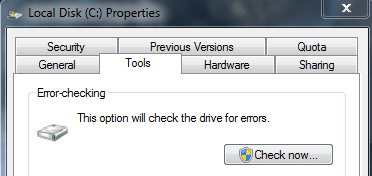
Defragment your harddrive see if it can make it. Then check your disk for errors and automatically fix them and recovery of bad sectors:
Capture.PNG
 

My Computer

Computer type
PC/Desktop
Computer Manufacturer/Model Number
Custom Asus Build
OS
Microsoft Windows 8.1 Pro 64-bit
CPU
Intel(R) Core(TM) i3-4130 CPU @ 3.40GHz
Motherboard
B85M-E
Memory
8.00 GB
Graphics Card(s)
None
Sound Card
Realtek High Definition Audio
Monitor(s) Displays
Asus 23.6" Monitor
Screen Resolution
1920 x 1080 x 32 bits (4294967296 colors) @ 60 Hz
Hard Drives
INTEL SSDSC2BW180A4
Samsung SSD 840 PRO Series
PSU
Seasonic S12II-380Bronze
Case
Lian Li
Cooling
Fan, Passive
Keyboard
Logitech K120
Mouse
Microsoft Touch Mouse
Internet Speed
4ms Ping, 19.0 Mbps Download, 19.0 Mbps Upload
Antivirus
Eset Endpoint
Browser
Internet Explorer, Chrome
Thanks Dusty - I uninstalled Bonjour, I defragged my hard drive, and I checked the disk for errors. It indeed found several and attempted to automatically fix them and recover bad sectors. I think the crashes are happening LESS, but are still occurring. Is it possible a second round of disk-checking is warranted? Or could there be a potential additional issue that I need to address?
 

My Computer

Computer Manufacturer/Model Number
custom
OS
Windows 7
CPU
AMD quad core
Motherboard
gigabyte
Memory
4GB
Graphics Card(s)
Radeon HD5450
Sound Card
on board
Monitor(s) Displays
dell 1910
Hard Drives
WD 500GB
PSU
500 watt
DO these tutorials: fix system file errors & startup repair

after that, my guess would the the HDD is going bad. Someone else may have to confirm that. You might try the disk check again, and before it starts, I think there are options for more advanced checking.

This is the wrong section for this post, as it should have been created in the crashes section, but read this and post what it tells you here anyway, and we'll see what we can find: http://www.sevenforums.com/crashes-debugging/96879-blue-screen-death-bsod-posting-instructions.html
 

My Computer

Computer type
PC/Desktop
Computer Manufacturer/Model Number
Custom Asus Build
OS
Microsoft Windows 8.1 Pro 64-bit
CPU
Intel(R) Core(TM) i3-4130 CPU @ 3.40GHz
Motherboard
B85M-E
Memory
8.00 GB
Graphics Card(s)
None
Sound Card
Realtek High Definition Audio
Monitor(s) Displays
Asus 23.6" Monitor
Screen Resolution
1920 x 1080 x 32 bits (4294967296 colors) @ 60 Hz
Hard Drives
INTEL SSDSC2BW180A4
Samsung SSD 840 PRO Series
PSU
Seasonic S12II-380Bronze
Case
Lian Li
Cooling
Fan, Passive
Keyboard
Logitech K120
Mouse
Microsoft Touch Mouse
Internet Speed
4ms Ping, 19.0 Mbps Download, 19.0 Mbps Upload
Antivirus
Eset Endpoint
Browser
Internet Explorer, Chrome
Download Speedfan and use it's built-in smart monitoring to check your hard drive's health.

Download SpeedFan - Access temperature sensor in your computer

Run the online analysis:
smart.bmp


It will bring up a web page about your drive's overall health including specific breakdowns of what areas your drive is doing poorly in:
web.bmp
 

My Computer

Computer Manufacturer/Model Number
Alienware m15x (my main PC)
OS
Windows 7 Ultimate x64
CPU
Intel Core i7 740QM
Memory
G. Skill 8GB (2x4GB) DDR3 @ 1333MHz
Graphics Card(s)
nVidia GeForce GTX 460M
Sound Card
IDT Integrated HD Audio
Monitor(s) Displays
15.6HDF+ WLED
Screen Resolution
1600 x 900
Hard Drives
240GB OCZ Agility 3 SSD
Mouse
Razer Orochi
Internet Speed
50Mb/s
Other Info
Intel Ultimate N Wi-Fi Link 5300, Bluetooth 2.0
Browser crashes

DO these tutorials: fix system file errors & startup repair

after that, my guess would the the HDD is going bad. Someone else may have to confirm that. You might try the disk check again, and before it starts, I think there are options for more advanced checking.

This is the wrong section for this post, as it should have been created in the crashes section, but read this and post what it tells you here anyway, and we'll see what we can find: http://www.sevenforums.com/crashes-debugging/96879-blue-screen-death-bsod-posting-instructions.html

Dusty,
Thanks for the further tips - we'll see what happens. Sorry for posting in the wrong section. I started this as a BROWSER issue, since crashes are mainly happening while surfing the internet, and it has morphed into a possible hard drive issue.
 

My Computer

Computer Manufacturer/Model Number
custom
OS
Windows 7
CPU
AMD quad core
Motherboard
gigabyte
Memory
4GB
Graphics Card(s)
Radeon HD5450
Sound Card
on board
Monitor(s) Displays
dell 1910
Hard Drives
WD 500GB
PSU
500 watt
Back
Top