Hard Disk dropping

Nippe

New member
Member
Local time
1:59 AM
Messages
84
Like a month ago I found my second hard disk was gone (Windows or BIOS couldn't see it) and suddenly it came back like 2 days after (this time I could see it under my computer, but couldn't access it). After a week it just suddenly started working again.

Now it worked just perfect until today. I still see it, but can't access some folders or run programs.

What should I do with this?
 

My Computer

Computer Manufacturer/Model Number
Me
OS
Windows 7 Ultimate x64
CPU
Intel Core i7-3960X 3.3GHz LGA2011
Motherboard
Asus P9X79 PRO Intel X79 LGA2011 ATX
Memory
Kingston HyperX 16 GB (2 x 8 GB) DDR3 2133MHz
Graphics Card(s)
NVIDIA GeForce GTX 690
Sound Card
Creative Sound Blaster X-Fi Titanium
Monitor(s) Displays
Asus VE276Q 27" LCD
Screen Resolution
1920x1080
Hard Drives
2x Intel 520 120 GB SATA3 SSD 2.5" (25nm)
Western Digital Caviar Black 2 TB SATA
PSU
Corsair AX1200W AX
Case
Cooler Master Cosmos II
Cooling
Corsair Cooling Hydro H100
Keyboard
Razer BlackWidow Ultimate
Mouse
Razer Naga Hex
Humh.. what of those Western Digital tools should I download ?
 

My Computer

Computer Manufacturer/Model Number
Me
OS
Windows 7 Ultimate x64
CPU
Intel Core i7-3960X 3.3GHz LGA2011
Motherboard
Asus P9X79 PRO Intel X79 LGA2011 ATX
Memory
Kingston HyperX 16 GB (2 x 8 GB) DDR3 2133MHz
Graphics Card(s)
NVIDIA GeForce GTX 690
Sound Card
Creative Sound Blaster X-Fi Titanium
Monitor(s) Displays
Asus VE276Q 27" LCD
Screen Resolution
1920x1080
Hard Drives
2x Intel 520 120 GB SATA3 SSD 2.5" (25nm)
Western Digital Caviar Black 2 TB SATA
PSU
Corsair AX1200W AX
Case
Cooler Master Cosmos II
Cooling
Corsair Cooling Hydro H100
Keyboard
Razer BlackWidow Ultimate
Mouse
Razer Naga Hex
what of those Western Digital tools should I download ?


The first link should do. Gives you both the windows and DOS version.

You'll also want to start copying data from the drive:

Copy & Paste - in Windows Recovery Console

Or, failing the above method, a Linux Live CD may allow you to see and copy files from the drive.

James
 

My Computer

OS
Win7U 64 RTM
CPU
Q9550
Motherboard
GA-EP45-UD3R
Memory
8GB Gskill
Graphics Card(s)
ASUS|EAH4850/HTDI/1GD3/A
Sound Card
xfi Plat
Monitor(s) Displays
Dell 2405fpw
Screen Resolution
1920x1200
Hard Drives
Seagate & WD sata Drives
PSU
Antec
Case
Antec
Keyboard
MS Natural Ergonomic 4000
Mouse
Logitech MX610 USB Cordless
I downloaded some app from here
WD Support / Downloads / SATA & SAS / WD VelociRaptor
And all it told was "There were errors that we can't repair, contact support. (error 08)"

Now Windows threw a message "Want to check for bad sectors?"
I did press "yes" and it asked to force dismount drive.. So it did and scanned it (I think) but now the drive is dismounted..
 

My Computer

Computer Manufacturer/Model Number
Me
OS
Windows 7 Ultimate x64
CPU
Intel Core i7-3960X 3.3GHz LGA2011
Motherboard
Asus P9X79 PRO Intel X79 LGA2011 ATX
Memory
Kingston HyperX 16 GB (2 x 8 GB) DDR3 2133MHz
Graphics Card(s)
NVIDIA GeForce GTX 690
Sound Card
Creative Sound Blaster X-Fi Titanium
Monitor(s) Displays
Asus VE276Q 27" LCD
Screen Resolution
1920x1080
Hard Drives
2x Intel 520 120 GB SATA3 SSD 2.5" (25nm)
Western Digital Caviar Black 2 TB SATA
PSU
Corsair AX1200W AX
Case
Cooler Master Cosmos II
Cooling
Corsair Cooling Hydro H100
Keyboard
Razer BlackWidow Ultimate
Mouse
Razer Naga Hex
So now I even can't see my second Hard Drive.. Any tips how to get it back? Last time it just became normal after a week.
 

My Computer

Computer Manufacturer/Model Number
Me
OS
Windows 7 Ultimate x64
CPU
Intel Core i7-3960X 3.3GHz LGA2011
Motherboard
Asus P9X79 PRO Intel X79 LGA2011 ATX
Memory
Kingston HyperX 16 GB (2 x 8 GB) DDR3 2133MHz
Graphics Card(s)
NVIDIA GeForce GTX 690
Sound Card
Creative Sound Blaster X-Fi Titanium
Monitor(s) Displays
Asus VE276Q 27" LCD
Screen Resolution
1920x1080
Hard Drives
2x Intel 520 120 GB SATA3 SSD 2.5" (25nm)
Western Digital Caviar Black 2 TB SATA
PSU
Corsair AX1200W AX
Case
Cooler Master Cosmos II
Cooling
Corsair Cooling Hydro H100
Keyboard
Razer BlackWidow Ultimate
Mouse
Razer Naga Hex
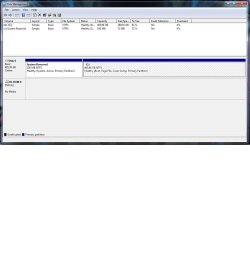
Click Start orb :orb: type Disk Management, click on Create and format hard disc partitions. A new window will open, can you expand this window and then copy and paste it here using the snipping tool.
 

My Computer

Computer Manufacturer/Model Number
Something I threw together
OS
Windows 7 Ultimate x64
CPU
Intel Core i7-2600K
Motherboard
Asus P8P67
Memory
16 GB G Skill F3-10666 CL9D-4GBRL
Graphics Card(s)
ATI Radeon HD 6870
Sound Card
ATI Radeon HDMI / Realtek ALC892
Monitor(s) Displays
2 x 22" standard monitors / LG32LC56v TV to watch films
Screen Resolution
1920 x1080
Hard Drives
2 x OCZ Vertex2 111.79GB
3 x Samsung103SJ
1 x Samsung103UJ
1 x WD3200BEVT
1 x Hitachi5K320-160
PSU
Thermaltake Toughpower Cable Management 750W
Case
Antec 300
Cooling
Noctua NH-U12P SE2 and 5 120mm Case fans
Keyboard
Microsoft Comfort Curve Keyboard 2000
Mouse
Hama M3110 / Logitech M305
Internet Speed
16000
Other Info
I have also used Fedora, Suse, Ubuntu Linux
And all other Windows from 95 to date except ME
Here..
 

Attachments

  • Untitled.jpg
    Untitled.jpg
    72.1 KB · Views: 34

My Computer

Computer Manufacturer/Model Number
Me
OS
Windows 7 Ultimate x64
CPU
Intel Core i7-3960X 3.3GHz LGA2011
Motherboard
Asus P9X79 PRO Intel X79 LGA2011 ATX
Memory
Kingston HyperX 16 GB (2 x 8 GB) DDR3 2133MHz
Graphics Card(s)
NVIDIA GeForce GTX 690
Sound Card
Creative Sound Blaster X-Fi Titanium
Monitor(s) Displays
Asus VE276Q 27" LCD
Screen Resolution
1920x1080
Hard Drives
2x Intel 520 120 GB SATA3 SSD 2.5" (25nm)
Western Digital Caviar Black 2 TB SATA
PSU
Corsair AX1200W AX
Case
Cooler Master Cosmos II
Cooling
Corsair Cooling Hydro H100
Keyboard
Razer BlackWidow Ultimate
Mouse
Razer Naga Hex
Not looking good :( you could try the connections to the device to ensure they are still sitting properly. If it is also not showing in the BIOS and Device manager I would say that it is an ex HDD.
 

My Computer

Computer Manufacturer/Model Number
Something I threw together
OS
Windows 7 Ultimate x64
CPU
Intel Core i7-2600K
Motherboard
Asus P8P67
Memory
16 GB G Skill F3-10666 CL9D-4GBRL
Graphics Card(s)
ATI Radeon HD 6870
Sound Card
ATI Radeon HDMI / Realtek ALC892
Monitor(s) Displays
2 x 22" standard monitors / LG32LC56v TV to watch films
Screen Resolution
1920 x1080
Hard Drives
2 x OCZ Vertex2 111.79GB
3 x Samsung103SJ
1 x Samsung103UJ
1 x WD3200BEVT
1 x Hitachi5K320-160
PSU
Thermaltake Toughpower Cable Management 750W
Case
Antec 300
Cooling
Noctua NH-U12P SE2 and 5 120mm Case fans
Keyboard
Microsoft Comfort Curve Keyboard 2000
Mouse
Hama M3110 / Logitech M305
Internet Speed
16000
Other Info
I have also used Fedora, Suse, Ubuntu Linux
And all other Windows from 95 to date except ME
Well it doesn't show in BIOS (like it didnt last time) but last time it just suddenly reappeared? And cables are fine.
 

My Computer

Computer Manufacturer/Model Number
Me
OS
Windows 7 Ultimate x64
CPU
Intel Core i7-3960X 3.3GHz LGA2011
Motherboard
Asus P9X79 PRO Intel X79 LGA2011 ATX
Memory
Kingston HyperX 16 GB (2 x 8 GB) DDR3 2133MHz
Graphics Card(s)
NVIDIA GeForce GTX 690
Sound Card
Creative Sound Blaster X-Fi Titanium
Monitor(s) Displays
Asus VE276Q 27" LCD
Screen Resolution
1920x1080
Hard Drives
2x Intel 520 120 GB SATA3 SSD 2.5" (25nm)
Western Digital Caviar Black 2 TB SATA
PSU
Corsair AX1200W AX
Case
Cooler Master Cosmos II
Cooling
Corsair Cooling Hydro H100
Keyboard
Razer BlackWidow Ultimate
Mouse
Razer Naga Hex
you could wait for it to appear again it may happen, but I still say it is at best, on its way out :(
If you want to be certain try it in another PC.
 

My Computer

Computer Manufacturer/Model Number
Something I threw together
OS
Windows 7 Ultimate x64
CPU
Intel Core i7-2600K
Motherboard
Asus P8P67
Memory
16 GB G Skill F3-10666 CL9D-4GBRL
Graphics Card(s)
ATI Radeon HD 6870
Sound Card
ATI Radeon HDMI / Realtek ALC892
Monitor(s) Displays
2 x 22" standard monitors / LG32LC56v TV to watch films
Screen Resolution
1920 x1080
Hard Drives
2 x OCZ Vertex2 111.79GB
3 x Samsung103SJ
1 x Samsung103UJ
1 x WD3200BEVT
1 x Hitachi5K320-160
PSU
Thermaltake Toughpower Cable Management 750W
Case
Antec 300
Cooling
Noctua NH-U12P SE2 and 5 120mm Case fans
Keyboard
Microsoft Comfort Curve Keyboard 2000
Mouse
Hama M3110 / Logitech M305
Internet Speed
16000
Other Info
I have also used Fedora, Suse, Ubuntu Linux
And all other Windows from 95 to date except ME
I downloaded some app from here
WD Support / Downloads / SATA & SAS / WD VelociRaptor
And all it told was "There were errors that we can't repair, contact support. (error 08)"

Do you have a velociRaptor HD? Your specs show as ATA. Are you sure it's not SATA? The model# could help in determining that. Is the drive in warranty?

So now I even can't see my second Hard Drive.. Any tips how to get it back? Last time it just became normal after a week.

The HD is failing or failed. Your main priority should be saving your data. First, if the drive is in warranty, you should contact WD to see if they can help you save your data before RMAing the drive.

Here are two other ways you can try, but again, if the drive is in warranty, contact wd support before anything else.

http://www.sevenforums.com/hardware-devices/166036-hard-disk-dropping.html#post1421602

Try the Windows Recovery Console method first (link in earlier post). If Windows Recovery Console can't see it, you can try the Linux Live CD, which is a bootable CD.

Here is a link to a Linux Live CD download. Scrolling down will reveal a step by step tutorial in downloading, burning and using the Linux Live CD:

Download | Ubuntu

The Linux method should be tried if the Windows method fails. Here is a link to an indepth tutorial on how to use it to save your data:

Use Ubuntu Live CD to Backup Files from Your Dead Windows Computer - How-To Geek

Again, if your drive is in warranty, contact WD support before anything else.

James
 

My Computer

OS
Win7U 64 RTM
CPU
Q9550
Motherboard
GA-EP45-UD3R
Memory
8GB Gskill
Graphics Card(s)
ASUS|EAH4850/HTDI/1GD3/A
Sound Card
xfi Plat
Monitor(s) Displays
Dell 2405fpw
Screen Resolution
1920x1200
Hard Drives
Seagate & WD sata Drives
PSU
Antec
Case
Antec
Keyboard
MS Natural Ergonomic 4000
Mouse
Logitech MX610 USB Cordless
Device properties shows this: WDC WD5000AAKS-07YGA0 ATA Device

Warranty is gone ages ago (I rebuilt PC and kept old HD:s)

I was thinking about that Ubuntu too.. But if even BIOS can't see it I don't know how Ubuntu would.. :)

And I can't backup disk I can't see.. But maybe I should try in other PC.
 

My Computer

Computer Manufacturer/Model Number
Me
OS
Windows 7 Ultimate x64
CPU
Intel Core i7-3960X 3.3GHz LGA2011
Motherboard
Asus P9X79 PRO Intel X79 LGA2011 ATX
Memory
Kingston HyperX 16 GB (2 x 8 GB) DDR3 2133MHz
Graphics Card(s)
NVIDIA GeForce GTX 690
Sound Card
Creative Sound Blaster X-Fi Titanium
Monitor(s) Displays
Asus VE276Q 27" LCD
Screen Resolution
1920x1080
Hard Drives
2x Intel 520 120 GB SATA3 SSD 2.5" (25nm)
Western Digital Caviar Black 2 TB SATA
PSU
Corsair AX1200W AX
Case
Cooler Master Cosmos II
Cooling
Corsair Cooling Hydro H100
Keyboard
Razer BlackWidow Ultimate
Mouse
Razer Naga Hex
You should follow the steps listed in my previous posts, starting with Windows Recovery Console.

You don't mention the symptoms, but sometimes mechanical issues with a drive can cause it to overheat.

1. Try shutting the system down for an hour.
2. When time is up, restart the system and enter the bios. Is the drive present?
3. Regardless of whether it is or not, make sure that your CD/DVD drive is listed first in the boot priority list so that you can boot from it (this will not prevent booting from your system drive, but will check the DVD drive first for a boot CD)

Try the Windows Recovery method. Does it see the drive? If not, there is an old trick that may help:

1. Try removing the problem drive, wrap it in a cloth, place it in a ziplock, then place it in the freezer for 2 hours.
2. Remove it from the freezer and bag, make sure there is no condensation on the drive (if so, wait a few minutes for evaporataion).
3. Place it back in the system and immediately try WR. If that fails, try the Linux method.

If the drive shows up, You will need to immediately try to save your data while you can see it. Don't boot into windows, don't waste time. Data recovery is the priority.

If none of this works, you may be able to see it in another machine.

James
 

My Computer

OS
Win7U 64 RTM
CPU
Q9550
Motherboard
GA-EP45-UD3R
Memory
8GB Gskill
Graphics Card(s)
ASUS|EAH4850/HTDI/1GD3/A
Sound Card
xfi Plat
Monitor(s) Displays
Dell 2405fpw
Screen Resolution
1920x1200
Hard Drives
Seagate & WD sata Drives
PSU
Antec
Case
Antec
Keyboard
MS Natural Ergonomic 4000
Mouse
Logitech MX610 USB Cordless
Like a month ago I found my second hard disk was gone (Windows or BIOS couldn't see it) and suddenly it came back like 2 days after (this time I could see it under my computer, but couldn't access it). After a week it just suddenly started working again.

Now it worked just perfect until today. I still see it, but can't access some folders or run programs.

What should I do with this?
It's already been discussed, that this drive may really be an ex-HDD.

But if you haven't already tried it you might connecting the SATA cable to a different SATA connector on the motherboard, removing the power and data cables at both ends (i.e. to both board and power supply, as well as to the drive) and re-connecting the cables making sure that both ends are firmly seated, and replacing the SATA cable itself.

But if the drive is gone, it's gone. Time for a replacement, unfortunately.


Incidentally, I had a virtually identical story myself. No great insight here, other than that I actually DID finally decide after trying all of the above suggestions to eliminate the intermittent failure, that it was the drive.

So I replaced it and the problem disappeared! I was convinced it was a defective old drive.

Well everything was perfect for a few weeks, when it started happening again!! I now realized it probably wasn't the old drive (which was probably fine, after all), but just something about the other variables in the story. Again, I changed to yet another SATA connector on the motherboard but still no change. Swapped to a new SATA cable and magically it fixed itself. Once again, stability returned... and hasn't failed since.

So it took one new drive, three different SATA connectors, and two SATA cables, to finally find what (fingers crossed) is stability again.
 

My Computer

Computer type
PC/Desktop
Computer Manufacturer/Model Number
Home-built, two systems (1) and (2)
OS
Windows 7 Pro x64 (1), Win7 Pro X64 (2)
CPU
i5-3350p 3.1Ghz/6MB-cache (1); E8400 3.0Ghz/6MB-cache (2)
Motherboard
ASUS P8Z77-V Pro (1); ASUS P5Q3 (2)
Memory
8GB PC3-12800 DDR3 (1); 4GB PC3-10600 DDR3 (2)
Graphics Card(s)
ATI HD7750 (1), (see TV cards); ATI R7 250 (2)
Sound Card
Realtek ALC892 HD Audio (1); Realtek ALC1200 HD Audio (2)
Monitor(s) Displays
Eizo HD2441W LCD, Eizo S2433W (1); Eizo 24" S2433W (2)
Screen Resolution
1920x1200, 1920x1200 (1); 1920x1200 (2)
Hard Drives
(1) 1TB SATA-II (7200RPM), 2x2TB SATA-III (7200RPM), 250GB SATA-III (10000RPM) for OS; 2x2TB external USB 3.0

(2) 320GB SATA-II (7200RPM), 750GB SATA-II (7200RPM), 150GB SATA-II (10000RPM) for OS; 2TB external USB 3.0
PSU
Nesteq ECS-6001 600W (1); Nesteq ECS-5001 500W (2)
Case
Acousti-Case 360 (1) and (2)
Cooling
Noctua NH-U12P SE2 for CPU, 2x120mm case fans (1) and (2)
Keyboard
IBM PS/2 (1) and (2)
Mouse
Logitech MX Revolution wireless (1); Microsoft wired (2)
Internet Speed
100mbps down / 10mbps up
Antivirus
Microsoft Security Essentials; Malwarebyte Anti-Malware Pro
Browser
Firefox
Other Info
Ceton InfiniTV 4-tuner cablecard-enabled TV card as well as Hauppauge HVR-2250 OTA/ATSC 2-tuner TV card in (1), running under Win7 WMC
This is a Known SATA 1 problem.

There is no difference in maximum transfer speeds between cables labelled as SATA vs. SATA2. The only difference is that SATA2 cables have a locking mechanism to stabilise connection.

SATA 2.PNG
 

My Computer

OS
ME/XP/Vista/Win7
You mean I should replace my cable with SATA 2 or ?
 

My Computer

Computer Manufacturer/Model Number
Me
OS
Windows 7 Ultimate x64
CPU
Intel Core i7-3960X 3.3GHz LGA2011
Motherboard
Asus P9X79 PRO Intel X79 LGA2011 ATX
Memory
Kingston HyperX 16 GB (2 x 8 GB) DDR3 2133MHz
Graphics Card(s)
NVIDIA GeForce GTX 690
Sound Card
Creative Sound Blaster X-Fi Titanium
Monitor(s) Displays
Asus VE276Q 27" LCD
Screen Resolution
1920x1080
Hard Drives
2x Intel 520 120 GB SATA3 SSD 2.5" (25nm)
Western Digital Caviar Black 2 TB SATA
PSU
Corsair AX1200W AX
Case
Cooler Master Cosmos II
Cooling
Corsair Cooling Hydro H100
Keyboard
Razer BlackWidow Ultimate
Mouse
Razer Naga Hex
Ok.. After I today woke up my computer it found my disk again O_o
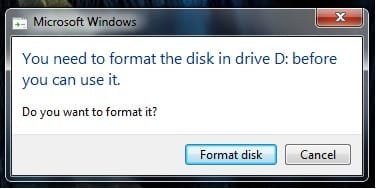
But now it says "You need to format the disk in drive D: before you can use it."

Should I format it or ignore and see if it returns normal soon?
 

My Computer

Computer Manufacturer/Model Number
Me
OS
Windows 7 Ultimate x64
CPU
Intel Core i7-3960X 3.3GHz LGA2011
Motherboard
Asus P9X79 PRO Intel X79 LGA2011 ATX
Memory
Kingston HyperX 16 GB (2 x 8 GB) DDR3 2133MHz
Graphics Card(s)
NVIDIA GeForce GTX 690
Sound Card
Creative Sound Blaster X-Fi Titanium
Monitor(s) Displays
Asus VE276Q 27" LCD
Screen Resolution
1920x1080
Hard Drives
2x Intel 520 120 GB SATA3 SSD 2.5" (25nm)
Western Digital Caviar Black 2 TB SATA
PSU
Corsair AX1200W AX
Case
Cooler Master Cosmos II
Cooling
Corsair Cooling Hydro H100
Keyboard
Razer BlackWidow Ultimate
Mouse
Razer Naga Hex
"format" message looks like this..


I don't know should I pass it and do that format actually work :/
 

Attachments

  • Untitled.jpg
    Untitled.jpg
    11.3 KB · Views: 0

My Computer

Computer Manufacturer/Model Number
Me
OS
Windows 7 Ultimate x64
CPU
Intel Core i7-3960X 3.3GHz LGA2011
Motherboard
Asus P9X79 PRO Intel X79 LGA2011 ATX
Memory
Kingston HyperX 16 GB (2 x 8 GB) DDR3 2133MHz
Graphics Card(s)
NVIDIA GeForce GTX 690
Sound Card
Creative Sound Blaster X-Fi Titanium
Monitor(s) Displays
Asus VE276Q 27" LCD
Screen Resolution
1920x1080
Hard Drives
2x Intel 520 120 GB SATA3 SSD 2.5" (25nm)
Western Digital Caviar Black 2 TB SATA
PSU
Corsair AX1200W AX
Case
Cooler Master Cosmos II
Cooling
Corsair Cooling Hydro H100
Keyboard
Razer BlackWidow Ultimate
Mouse
Razer Naga Hex
You mean I should replace my cable with SATA 2 or ?

I'm using some sata I's on sata II and have not had any issues, but it would be advisable to try it, esp. since it takes minutes to try.

Should I format it or ignore and see if it returns normal soon?

OK, I'm going to go out on a limb here and assume you don't care about the existing data on this drive. If you do, backtrack in this thread to employ the data rescue methods mentioned.

Beyond that, sata drives are so cheap these days:

Newegg.com - Internal Hard Drives

I would pick up another drive ( a 500GB is now less than $50) to put in the system. Given that the WD diag software states the drive has an irreparable error, there's no way I would trust this drive.

James
 

My Computer

OS
Win7U 64 RTM
CPU
Q9550
Motherboard
GA-EP45-UD3R
Memory
8GB Gskill
Graphics Card(s)
ASUS|EAH4850/HTDI/1GD3/A
Sound Card
xfi Plat
Monitor(s) Displays
Dell 2405fpw
Screen Resolution
1920x1200
Hard Drives
Seagate & WD sata Drives
PSU
Antec
Case
Antec
Keyboard
MS Natural Ergonomic 4000
Mouse
Logitech MX610 USB Cordless
Back
Top