Hard Disk not supported

itsMarick

New member
Local time
6:11 AM
Messages
11
Location
The Netherlands
Hello. I received a Western Digital 500 GB external Hard Disk for my birthday. So today I tried to install Windows 7 on it. It's formatted in NTFS, but the installation panel gave 1 error. It saids that the disk is not supported by booting... I already went to a computer shop (MyCom, in The Netherlands), but they said would work. I axially don't know if they checked in the Bios, but I guess they did...

Further the installation gave no errors. Later I booted in the bios, and the Hard Disk displays. (eSata). Anybody idea?

(By the way, sorry for the poop-english, I'm just a 13 year old boy who's trying to get Windows 7 on it's ext hard disk :P)
 

My Computer

Computer Manufacturer/Model Number
Medion Akoya MD 96970
OS
Windows Vista
CPU
Intel(R) Core(TM)2 Duo CPU T5750 @ 2.00GHz
Motherboard
-
Memory
3 GB
Graphics Card(s)
NVIDIA GeForce 9300M G
Sound Card
Realtek High Definition Audio
Monitor(s) Displays
NVIDIA GeForce 9300M G
Screen Resolution
1280x800
Hard Drives
1x 320 GB (boot C)
1x 20 GB (recover files)
Hello. I received a Western Digital 500 GB external Hard Disk for my birthday. So today I tried to install Windows 7 on it. It's formatted in NTFS, but the installation panel gave 1 error. It saids that the disk is not supported by booting... I already went to a computer shop (MyCom, in The Netherlands), but they said would work. I axially don't know if they checked in the Bios, but I guess they did...

Further the installation gave no errors. Later I booted in the bios, and the Hard Disk displays. (eSata). Anybody idea?

(By the way, sorry for the poop-english, I'm just a 13 year old boy who's trying to get Windows 7 on it's ext hard disk :P)

I don't think you will be able to install Win7 on the external HD & Boot from it :(

" Doc "
 

My Computer

Computer type
PC/Desktop
Computer Manufacturer/Model Number
Built them myself, Science Experiments !
OS
Win7 Enterprise, Win7 x86 (Ult 7600), Win7 x64 Ult 7600, TechNet RTM on AMD x64 (2.8Ghz)
CPU
AMD fx8350 4ghz, AMD-32 2400mhz, AMD-64 3200mhz, AMDx64 2.8G
Motherboard
SIS 755, ECS-K8M890M-M (Ult 7600), GigaByte & others
Memory
2gb, 4gb on the Ult 7600, 4gb on Technet RTM, 32gb on FX8350
Graphics Card(s)
Draw my own Graphics, several nVidia cards
Sound Card
on motherboard
Monitor(s) Displays
19" flat scr, 28" I-Inc widescr,22" Emprex Widescr, 23" Acer
Screen Resolution
1280 x 1024, 1440 x 900, 1920 x 1080
Hard Drives
6 pata Ide HD's & 2 Sata HD's
added 80gb external on Ult 7600 computer,
numerous extra 1tb, 2TB, 3Tb SATA HD's
A collection of ext HD Docks w/ HDs
PSU
430w, 550w, 600w, 700, 800, etc
Case
All Generic Full Towers
Cooling
Open Air & a few fans, some w/ colored LEDs
Keyboard
Compaq & Dell recycled from GoodWill
Mouse
Made in China Optical Wired Mouse
Internet Speed
Fast Cable InterNet
Antivirus
AVG Free on 24 different Desktops, NO Problems!
Browser
IE 8 is preferred, but use FireFox sometimes
Other Info
Linksys Routers, switches, & Hubs
Too Many USB Flash Drives to count, Biggest is 64GB !
Eight computers in my home network.
Sixteen computers at my business network.
Linked via TeamViewer !
Lots of old used spare computer parts everywhere!
Is the drive connected by eSATA or USB or firewire? Circle one answer only.
 
edit: ^ eSata

Why not? :eek: And... do you know (or somebody else :P) which external hard disk works to boot? I really want to let this work. :D
 

My Computer

Computer Manufacturer/Model Number
Medion Akoya MD 96970
OS
Windows Vista
CPU
Intel(R) Core(TM)2 Duo CPU T5750 @ 2.00GHz
Motherboard
-
Memory
3 GB
Graphics Card(s)
NVIDIA GeForce 9300M G
Sound Card
Realtek High Definition Audio
Monitor(s) Displays
NVIDIA GeForce 9300M G
Screen Resolution
1280x800
Hard Drives
1x 320 GB (boot C)
1x 20 GB (recover files)
eSATA drive should boot.

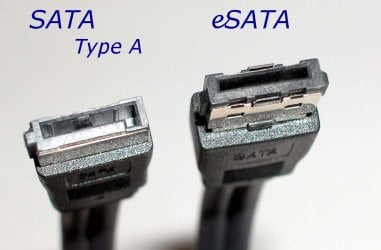
Don't be offended - please provide a picture of your eSATA connector wire and connection.

Please provide your System Specs under User CP. Motherboard model number PLEASE.
 

My Computer

OS
7 RTM 64bit
CPU
AMD Phenom 965 B3
Motherboard
ASUS M3A79-T DELUXE
Memory
Corsair 4GB (2x2GB) DDR2 800MHz/PC2-6400 XMS2 Memory Kit CL5
Graphics Card(s)
PowerColour HD 5770 CF 16x-16x
Monitor(s) Displays
32"
Screen Resolution
1920-1080
Hard Drives
Hitachi

1tb 7200rpm
PSU
Be Quiet Straight Power 650wat
Case
Asus TA-M series
Cooling
CoolIT Eco ALC Water Cooling System
Keyboard
Microsoft wireless Keyboard
Mouse
Microsoft wireless mouse
What is the make and model number of your motherboard?

The e-SATA interface is for connecting external SATA HDDs to your system, and specifically allows them to be hot-pluggable (i.e. you can plug and unplug with the system running).

Just because the interface is the same as the internal connectors it does not mean that an external drive connected this way will be bootable - you will need to check the motherboard manual and/or the support website for that information.
 

My Computer

Computer type
PC/Desktop
Computer Manufacturer/Model Number
Dwarf Dwf/11/2012 r09/2013
OS
Windows 8.1 Pro RTM x64
CPU
Intel Core-i5-3570K 4-core @ 3.4GHz (Ivy Bridge) (OC 4.4GHz)
Motherboard
ASRock Z77 Extreme4-M
Memory
4 x 4GB DDR3-1600 Corsair Vengeance CMZ8GX3M2A1600C9B (16GB)
Graphics Card(s)
MSI GeForce GTX770 Gaming OC 2GB
Sound Card
Realtek High Definition on board solution (ALC 898)
Monitor(s) Displays
ViewSonic VA1912w Widescreen (VGA)
Screen Resolution
1440x900
Hard Drives
OCZ Agility 3 SSD 120GB SATA III x2 (RAID 0)
Samsung HD501LJ 500GB SATA II x2
Hitachi HDS721010CLA332 1TB SATA II
Iomega 1.5TB Ext USB 2.0
WD 2.0TB Ext USB 3.0
PSU
XFX Pro Series 850W Semi-Modular
Case
Gigabyte IF233
Cooling
1 x 120mm Front Inlet 1 x 120mm Rear Exhaust
Keyboard
Microsoft Comfort Curve Keyboard 3000 (USB)
Mouse
Microsoft Comfort Mouse 3000 for Business (USB)
Internet Speed
NetGear DG834Gv3 ADSL Modem/Router (Ethernet) ~4.0 Mb/s (O2)
Antivirus
Avast! 8.0.1497
Browser
IE 11
Other Info
Optical Drive: HL-DT-ST BD-RE BH10LS30 SATA Bluray
Lexmark S305 Printer/Scanner/Copier (USB)
WEI Score: 8.1/8.1/8.5/8.5/8.25
Asus Eee PC 1011PX Netbook (Windows 7 x86 Starter)
A: Desktop

B: LapTop

Which ?
 

My Computer

Computer type
PC/Desktop
Computer Manufacturer/Model Number
Built them myself, Science Experiments !
OS
Win7 Enterprise, Win7 x86 (Ult 7600), Win7 x64 Ult 7600, TechNet RTM on AMD x64 (2.8Ghz)
CPU
AMD fx8350 4ghz, AMD-32 2400mhz, AMD-64 3200mhz, AMDx64 2.8G
Motherboard
SIS 755, ECS-K8M890M-M (Ult 7600), GigaByte & others
Memory
2gb, 4gb on the Ult 7600, 4gb on Technet RTM, 32gb on FX8350
Graphics Card(s)
Draw my own Graphics, several nVidia cards
Sound Card
on motherboard
Monitor(s) Displays
19" flat scr, 28" I-Inc widescr,22" Emprex Widescr, 23" Acer
Screen Resolution
1280 x 1024, 1440 x 900, 1920 x 1080
Hard Drives
6 pata Ide HD's & 2 Sata HD's
added 80gb external on Ult 7600 computer,
numerous extra 1tb, 2TB, 3Tb SATA HD's
A collection of ext HD Docks w/ HDs
PSU
430w, 550w, 600w, 700, 800, etc
Case
All Generic Full Towers
Cooling
Open Air & a few fans, some w/ colored LEDs
Keyboard
Compaq & Dell recycled from GoodWill
Mouse
Made in China Optical Wired Mouse
Internet Speed
Fast Cable InterNet
Antivirus
AVG Free on 24 different Desktops, NO Problems!
Browser
IE 8 is preferred, but use FireFox sometimes
Other Info
Linksys Routers, switches, & Hubs
Too Many USB Flash Drives to count, Biggest is 64GB !
Eight computers in my home network.
Sixteen computers at my business network.
Linked via TeamViewer !
Lots of old used spare computer parts everywhere!
What is the make and model number of your motherboard?

The e-SATA interface is for connecting external SATA HDDs to your system, and specifically allows them to be hot-pluggable (i.e. you can plug and unplug with the system running).

Just because the interface is the same as the internal connectors it does not mean that an external drive connected this way will be bootable - you will need to check the motherboard manual and/or the support website for that information.

The connectors are not the same. SATA is L shaped, eSATA is l shaped. An internal SATA port can be carried to the backplane with a SATA-eSATA converter assembly, bypassing any BIOS setting that disallows booting from an eSATA port.
 
I agree that the connectors are slightly different as this is to allow for the hot-swapping capability of the e-SATA interface. My system only has the internal version of that connector, so I've never seen an actual e-SATA connector.
 

My Computer

Computer type
PC/Desktop
Computer Manufacturer/Model Number
Dwarf Dwf/11/2012 r09/2013
OS
Windows 8.1 Pro RTM x64
CPU
Intel Core-i5-3570K 4-core @ 3.4GHz (Ivy Bridge) (OC 4.4GHz)
Motherboard
ASRock Z77 Extreme4-M
Memory
4 x 4GB DDR3-1600 Corsair Vengeance CMZ8GX3M2A1600C9B (16GB)
Graphics Card(s)
MSI GeForce GTX770 Gaming OC 2GB
Sound Card
Realtek High Definition on board solution (ALC 898)
Monitor(s) Displays
ViewSonic VA1912w Widescreen (VGA)
Screen Resolution
1440x900
Hard Drives
OCZ Agility 3 SSD 120GB SATA III x2 (RAID 0)
Samsung HD501LJ 500GB SATA II x2
Hitachi HDS721010CLA332 1TB SATA II
Iomega 1.5TB Ext USB 2.0
WD 2.0TB Ext USB 3.0
PSU
XFX Pro Series 850W Semi-Modular
Case
Gigabyte IF233
Cooling
1 x 120mm Front Inlet 1 x 120mm Rear Exhaust
Keyboard
Microsoft Comfort Curve Keyboard 3000 (USB)
Mouse
Microsoft Comfort Mouse 3000 for Business (USB)
Internet Speed
NetGear DG834Gv3 ADSL Modem/Router (Ethernet) ~4.0 Mb/s (O2)
Antivirus
Avast! 8.0.1497
Browser
IE 11
Other Info
Optical Drive: HL-DT-ST BD-RE BH10LS30 SATA Bluray
Lexmark S305 Printer/Scanner/Copier (USB)
WEI Score: 8.1/8.1/8.5/8.5/8.25
Asus Eee PC 1011PX Netbook (Windows 7 x86 Starter)
I am refraining from adding a clever comment in this space. The preceding not clever comment is included for the sole purpose of satisfying the forum requirement of "You must post something in addition to a picture".
 

Attachments

  • sata+esata.jpg
    sata+esata.jpg
    12.1 KB · Views: 2,514
  • eSATA_TypA_lrg.jpg
    eSATA_TypA_lrg.jpg
    84.9 KB · Views: 1,457
I think the boy was a bit overwhelmed by the many responses/questions.

He went offline almost an hour ago.
 

My Computer

OS
Win7 Build 7600 x86
CPU
Pentium II 300MHz
Motherboard
Asus
Memory
32mb EDO RAM
Graphics Card(s)
Diamond Viper
Sound Card
Soundblaster 16
Monitor(s) Displays
14" AOC CRT 16K color
Screen Resolution
800x600
Hard Drives
300mb Quantum fireball
PSU
110 Watts
Cooling
Passive
Keyboard
Trust Ergonomic
Mouse
Generic
Internet Speed
256K u 128K d
I am refraining from adding a clever comment in this space. The preceding not clever comment is included for the sole purpose of satisfying the forum requirement of "You must post something in addition to a picture".
Thanks for clarifying the differences between the connectors.
 

My Computer

Computer type
PC/Desktop
Computer Manufacturer/Model Number
Dwarf Dwf/11/2012 r09/2013
OS
Windows 8.1 Pro RTM x64
CPU
Intel Core-i5-3570K 4-core @ 3.4GHz (Ivy Bridge) (OC 4.4GHz)
Motherboard
ASRock Z77 Extreme4-M
Memory
4 x 4GB DDR3-1600 Corsair Vengeance CMZ8GX3M2A1600C9B (16GB)
Graphics Card(s)
MSI GeForce GTX770 Gaming OC 2GB
Sound Card
Realtek High Definition on board solution (ALC 898)
Monitor(s) Displays
ViewSonic VA1912w Widescreen (VGA)
Screen Resolution
1440x900
Hard Drives
OCZ Agility 3 SSD 120GB SATA III x2 (RAID 0)
Samsung HD501LJ 500GB SATA II x2
Hitachi HDS721010CLA332 1TB SATA II
Iomega 1.5TB Ext USB 2.0
WD 2.0TB Ext USB 3.0
PSU
XFX Pro Series 850W Semi-Modular
Case
Gigabyte IF233
Cooling
1 x 120mm Front Inlet 1 x 120mm Rear Exhaust
Keyboard
Microsoft Comfort Curve Keyboard 3000 (USB)
Mouse
Microsoft Comfort Mouse 3000 for Business (USB)
Internet Speed
NetGear DG834Gv3 ADSL Modem/Router (Ethernet) ~4.0 Mb/s (O2)
Antivirus
Avast! 8.0.1497
Browser
IE 11
Other Info
Optical Drive: HL-DT-ST BD-RE BH10LS30 SATA Bluray
Lexmark S305 Printer/Scanner/Copier (USB)
WEI Score: 8.1/8.1/8.5/8.5/8.25
Asus Eee PC 1011PX Netbook (Windows 7 x86 Starter)
I think the boy was a bit overwhelmed by the many responses/questions.

He went offline almost an hour ago.
Thanks for clarifying the differences between the connectors.
I hope the OP comes back to this. I am rather interested in the results. Only laziness/lethargy prevents me from trying it myself - but I am 100% certain this can be done. It is only logical.
 

My Computer

Computer Manufacturer/Model Number
Medion Akoya MD 96970
OS
Windows Vista
CPU
Intel(R) Core(TM)2 Duo CPU T5750 @ 2.00GHz
Motherboard
-
Memory
3 GB
Graphics Card(s)
NVIDIA GeForce 9300M G
Sound Card
Realtek High Definition Audio
Monitor(s) Displays
NVIDIA GeForce 9300M G
Screen Resolution
1280x800
Hard Drives
1x 320 GB (boot C)
1x 20 GB (recover files)
I hope the OP comes back to this. I am rather interested in the results. Only laziness/lethargy prevents me from trying it myself - but I am 100% certain this can be done. It is only logical.

I added an eSATA connection to my desktop via a SATA to eSATA cable directly from the motherboard to the backplate, plugged in my eSATA external HD, loaded Win7 on the external and never had a problem.

How would the motherboard 'know' it's not directly connected to the SATA port?

If there is an eSATA card, then maybe.

Worked for me.

My laptop has an eSATA port and I run the eSATA external HD the same way, but haven't actually ran an OS from the external HD on it. Should work, I do run a couple of programs from it.

Your BIOS must be set to SATA or RAID in order to hot swap.

It worked fine for hot plugging in, but no 'safely remove hardware' for unplugging. I use a program called 'Hot Swap' and now I can 'safely remove hardware'. It clears the cache and let's you know if you forgot to close something.

Win7 is on my internal HD now.

EDIT:
You can get information about your computer (and motherboard) from a couple different programs. I use SIW, it doesn't install on your operating system and you can run it when needed.
SIW can be found here

Hope this helps,
 
Last edited:

My Computer

Computer type
PC/Desktop
Computer Manufacturer/Model Number
76~2.0
OS
Windows 7 Ult x64 - SP1/ Windows 8 Pro x64
CPU
Intel Core i5-3570K 4.6GHz
Motherboard
Gigabyte GA-Z77X UD3H, f18
Memory
8GB (2X4GB) DDR3 1600 Corsair Vengeance CL8 1.5v
Graphics Card(s)
Sapphire HD 7770 Vapor-X OC 1GB DDR5
Sound Card
Onboard VIA VT2021
Monitor(s) Displays
22" LCD Dell
Screen Resolution
1680x1050
Hard Drives
Samsung 840Pro 128GB SSD,
Seagate Barracuda 500GB SATA2 7200rpm 32MB cache, Seagate Barracuda 1TB SATA2 7200rpm 32MB cache,
PSU
Corsair HX650W
Case
Cooler Master Storm Scout
Cooling
Corsair H80 2x12cm Noctua NF P12 , 2x14cm case fans
Keyboard
Logitech Wave
Mouse
CM Sentinel
Internet Speed
Dismal
Antivirus
Avast
Browser
Opera Next
Other Info
Haswell laptop: HP Envy 17t-j, i7-4700MQ, GeForce 740M 2GB DDR3, 17.3" Full HD 1920x1080, 16GB RAM, Samsung 840 Pro 128GB, 1TB Hitachi 7200 HDD,
Desktop: eSATA ports,
External eSATA Seagate 500GB SATA2 7200rpm,
External WD USB 500GB
I tried to find a user manual for your laptop, but I cannot. I have to work from assumptions.

All of the following is pointel

Scenario One, Assumption One:
There is nothing wrong with your new hard drive. The BIOS is restricting boot from eSATA. This may be as simple as changing some BIOS settings.

Solve: Modify the BIOS to allow boot from eSATA. Perhaps this is found under a header/page like Boot Order or Boot Devices.

Also, I do not understand "Further the installation gave no errors."
 

My Computer

Computer type
PC/Desktop
Computer Manufacturer/Model Number
76~2.0
OS
Windows 7 Ult x64 - SP1/ Windows 8 Pro x64
CPU
Intel Core i5-3570K 4.6GHz
Motherboard
Gigabyte GA-Z77X UD3H, f18
Memory
8GB (2X4GB) DDR3 1600 Corsair Vengeance CL8 1.5v
Graphics Card(s)
Sapphire HD 7770 Vapor-X OC 1GB DDR5
Sound Card
Onboard VIA VT2021
Monitor(s) Displays
22" LCD Dell
Screen Resolution
1680x1050
Hard Drives
Samsung 840Pro 128GB SSD,
Seagate Barracuda 500GB SATA2 7200rpm 32MB cache, Seagate Barracuda 1TB SATA2 7200rpm 32MB cache,
PSU
Corsair HX650W
Case
Cooler Master Storm Scout
Cooling
Corsair H80 2x12cm Noctua NF P12 , 2x14cm case fans
Keyboard
Logitech Wave
Mouse
CM Sentinel
Internet Speed
Dismal
Antivirus
Avast
Browser
Opera Next
Other Info
Haswell laptop: HP Envy 17t-j, i7-4700MQ, GeForce 740M 2GB DDR3, 17.3" Full HD 1920x1080, 16GB RAM, Samsung 840 Pro 128GB, 1TB Hitachi 7200 HDD,
Desktop: eSATA ports,
External eSATA Seagate 500GB SATA2 7200rpm,
External WD USB 500GB
Sorry for the laaaaate reaction. :P I'm not gonna install Windows 7 on my external hard disk. Too many problems etc. But my dad gave me my old computer back, and it was still in good state, so i installed Windows 7 without any problems on that computer. And it works really fast! =D

Thanks for all the help people. ;) I don't know what I'm gonna do with that external hard disk, maybe I'll go try again, some day. ^^
 

My Computer

Computer Manufacturer/Model Number
Medion Akoya MD 96970
OS
Windows Vista
CPU
Intel(R) Core(TM)2 Duo CPU T5750 @ 2.00GHz
Motherboard
-
Memory
3 GB
Graphics Card(s)
NVIDIA GeForce 9300M G
Sound Card
Realtek High Definition Audio
Monitor(s) Displays
NVIDIA GeForce 9300M G
Screen Resolution
1280x800
Hard Drives
1x 320 GB (boot C)
1x 20 GB (recover files)
Back
Top