Solved Hard disk Partition

August2012

New member
Local time
10:30 AM
Messages
2
I have recently purchased HP laptop pre loaded with windows home basic 7.HDD 500Gb, It is currently partioned c drive 450 Gb and D drive 50 Gb, i want to make C drive 50 Gb and rest i want to split in other two drives for my movies and personal stuff.
 

My Computer

OS
Windows 7 home basic

My Computer

Computer type
PC/Desktop
Computer Manufacturer/Model Number
Skylake Special #666
OS
Windows 10 Pro x64
CPU
Intel Core i7 6700K
Motherboard
Asus Sabertooth Z170 Mark 1
Memory
GSkill TridentZ RGB 16GB 3600 16-16-16-36
Graphics Card(s)
EVGA GTX 980 Ti SC x2
Sound Card
Realtek High Definition
Monitor(s) Displays
AOC G2460PG
Screen Resolution
1920 x 1080 144Hz
Hard Drives
Samsung 860 Pro 256GB, Seagate Barracuda 4TB x2
PSU
EVGA 1000 P2, EVGA White Custom Braided Cables
Case
Corsair Vengeance C70 Gunmetal Black
Cooling
Corsair H100i v2, Corsair ML120 x2, Thermal Grizzly Kryonaut
Keyboard
Logitech G910 Orion Spectrum
Mouse
Logitech G700s
Internet Speed
Verizon Fios Quantum Gateway 75/75
Antivirus
Windows Defender, Malwarebytes Free 3.8.3
Browser
Chrome
Other Info
Corsair SP120 x4, LG Blu-ray Drive, Durabrand HT-395 100 Watt Dolby Digital Amp, Corsair H2100 Wireless 7.1 Headset
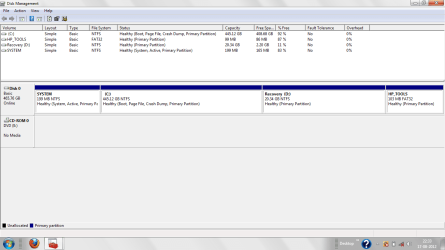
Before going for further partitioning, please post a screenshot of your disk management window.

I guess you already have four primary partitions there say HP Tools and System reserved (hidden). Any further partitioning may convert the disk to dynamic and non-bootable at all.

So , please post the snip of your disk management window at first.
 

My Computer

Computer type
PC/Desktop
Computer Manufacturer/Model Number
Self Assembled
OS
Microsoft Windows 10 Pro Insider Preview 64-bit
CPU
Intel(R) Core(TM) i3-4130 CPU @ 3.40GHz
Motherboard
Gigabyte Technology Co., Ltd. B85M-D3H
Memory
Corsair Vengence 4GB x2 (8.00GB Dual-Channel DDR3 @ 798MHz)
Graphics Card(s)
2047MB GeForce GTS 450 (ZOTAC International)
Sound Card
Onboard (Realtek High Definition Audio)
Monitor(s) Displays
LG Flatron E2040T
Screen Resolution
1600x900
Hard Drives
Western Digital 1 TB
Seagate 500 GB
PSU
Corsair VS550
Case
Cooler Master K380
Cooling
Cooler Master Seidon 120V Plus
Keyboard
Logitech MK260r
Mouse
Logitech MK260r
Internet Speed
PMPL Broadband
Antivirus
Windows Defender + MBAM
Browser
Firefox
Other Info
Dell Studio 15" Laptop
Disk Management.png

Hi

I have attached snapshot of my disk management, please suggest me how to partition my drive.

Steve,

If i do the partition by "Create and Format Hard Disk Partitions" will it effect my already loaded windows7?
 

My Computer

OS
Windows 7 home basic
Hello August 2012.

As I told, you have four primary partitions already. So before going further partitioning , follow what is being instructed.


  1. Download Partition Wizard Bootable CD. burn it in a blank CD.
  2. Boot into the partition wizard bootable cd just burned.
  3. Set "C" as logical :ar:" How to set partition as Logical .
  4. Rebuild the MBR .:ar: How to Rebuild MBR
  5. Shrink C as you want. :ar:How to resize Partition
  6. Create a new partition in the free space . :ar:Create Partition. Format the new partition as logical, must.

Let us now if you need any further information.

I am asking you to Set C as logical, dont worry for that. Windows 7 boots from from the first unlettered partition, System. So a logical C will not be a problem at all. The other two rest partitions are also required to be primary for proper maintenance and running of your computer. So there is the only option to convert C to logical, and to create other partitions in that area.
 

My Computer

Computer type
PC/Desktop
Computer Manufacturer/Model Number
Self Assembled
OS
Microsoft Windows 10 Pro Insider Preview 64-bit
CPU
Intel(R) Core(TM) i3-4130 CPU @ 3.40GHz
Motherboard
Gigabyte Technology Co., Ltd. B85M-D3H
Memory
Corsair Vengence 4GB x2 (8.00GB Dual-Channel DDR3 @ 798MHz)
Graphics Card(s)
2047MB GeForce GTS 450 (ZOTAC International)
Sound Card
Onboard (Realtek High Definition Audio)
Monitor(s) Displays
LG Flatron E2040T
Screen Resolution
1600x900
Hard Drives
Western Digital 1 TB
Seagate 500 GB
PSU
Corsair VS550
Case
Cooler Master K380
Cooling
Cooler Master Seidon 120V Plus
Keyboard
Logitech MK260r
Mouse
Logitech MK260r
Internet Speed
PMPL Broadband
Antivirus
Windows Defender + MBAM
Browser
Firefox
Other Info
Dell Studio 15" Laptop
I would have also deleted the Recovery (D) and HP Tools Partitions. The Recovery Partition shall recover Windows 7 with a lot of bloat-ware and HP Tools are almost never required.

Instead I shall download a Windows 7 Installation ISO Image from Official Windows 7 SP1 ISO from Digital River « My Digital Life and universalize it with eicfg Removal Utility. After that either put it on a bootable pen-drive or burn it on a DVD for re-installing Windows 7 in the future if need be.
 

My Computer

Computer Manufacturer/Model Number
Custom Built
OS
Windows 7 Pro with SP1 32bit
Motherboard
Intel D845GVS1 X86-based PC
Memory
2 gigs of RAM
Graphics Card(s)
Intel(R) 82845G/GL/GE/PE/GV Graphics Controller
Sound Card
Realtek AC'97 Audio
Monitor(s) Displays
Samsung SyncMaster 931BF Black 19" LCD Monitor
Screen Resolution
1280X960
Hard Drives
1. SAMSUNG SP0822N ATA Device ~ 80 GigaBytes

2. Seagate FreeAgent Go USB Device ~ 500 GigaBytes
Keyboard
COMPAQ Standard PS/2 Keyboard
Mouse
iBall Laser Precise Speedster
Internet Speed
4 mb/sec
It depends if the owner wants to keep the Recovery and bootable Diagnostics onboard.

When they try the superior Clean Reinstall - Factory OEM Windows 7 then it's likely they'll never want to go back to the factory bloatware, unless they plan to sell the machine and want it restored as it came from factory.

In that case they can indeed delete all partitions during install, after making their Recovery disks as a precaution or saving a Win7 backup image so they have a path back.

This is discussed further in the tutorial above with special notes for HP owners.
 
Back
Top