
Solved Hard disk partitioning for Windows 7 on Fujitsu AH531. Please help

VanessaG232

New member
Local time
1:12 AM
Messages
2
Hi,

Ordered this laptop yesterday & just setting it up now.

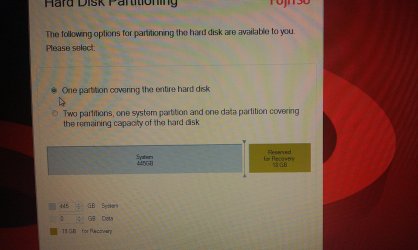
It has come to the part of hard disk partitioning and I am unsure which to choose.

I have attached a picture file to show what it says.

Can anyone help as I want to make sure I choose the correct one. I have researched on the internet and a lot of people are saying to allocate at least 50gb to the system partition and the rest for data. It automatically has 18gb of recovery as shown on the attachment.

Thanks
 

Attachments
  • IMAG0323.jpg
    IMAG0323.jpg
    1 MB · Views: 129

My Computer My Computer

At a glance

Windows 7 Premium 64 bit
OS
Windows 7 Premium 64 bit
If you plan to use an image recovery software, like acronis, and have an external disk to store the backups, then use the one single partition option, else, use the default 18gb for recovery.
 

My Computer My Computer

At a glance

Microsoft Windows 10 Professional / Windows 7...Intel i5-357016GB DDR3AMD Radeon HD 7850 2GB
Computer type
PC/Desktop
OS
Microsoft Windows 10 Professional / Windows 7 Professional
CPU
Intel i5-3570
Motherboard
Lenovo Mahobay
Memory
16GB DDR3
Graphics Card(s)
AMD Radeon HD 7850 2GB
Sound Card
(1) Realtek HD Audio (2) AMD HD Audio
Monitor(s) Displays
LG LS192WS
Screen Resolution
1440 x 900 @ 32bit color
Hard Drives
(1) SUV300S37A/120G (2) ST3500413AS SATA Disk Device AHCI mode enabled.
PSU
Corsair HX620
Case
Thermaltake V4 Black Edition
Cooling
Cooler Master Hyper 212 + Artic Silver 5 on CPU/GPU
Keyboard
Dell SK-8115
Mouse
Razer Copperhead with MAPED mat (awesome!)
Internet Speed
100 Mbps up/down
Browser
Chrome
Hi VanessaG232, welcome to SevenForums.

You can actually choose either option as both will work perfectly well. Also, the partition layout you choose now won't be forever written in stone, it can be changed later should you find that your system (or data) partition is either too large or too small. For this, the bootable CD version of the free Partition Wizard is highly recommended.

But I don't want to jump the gun here - bottom line, choose whichever sounds good to you. Setting aside 50GB for the system and the rest for data is a very good start. (The reserved partition won't be touched so no need to worry about that.)
 

My Computer My Computer

At a glance

Windows 7 Professional SP1 32-bitIntel Core 2 Duo E6600 2.4GHz4GB DDR2-667 (4x1GB in dual-channel config)nVidia GeForce 9800 GT
Computer type
PC/Desktop
Computer Manufacturer/Model Number
Custom-built
OS
Windows 7 Professional SP1 32-bit
CPU
Intel Core 2 Duo E6600 2.4GHz
Motherboard
Asus PL5D2
Memory
4GB DDR2-667 (4x1GB in dual-channel config)
Graphics Card(s)
nVidia GeForce 9800 GT
Sound Card
Creative X-Fi XtremeMusic
Monitor(s) Displays
Acer P236H
Screen Resolution
1920x1200 (DVI)
Hard Drives
OCZ SSD Vertex Plus 60GB SATA (Firmware 3.55), 64MB cache
Hitachi HD321KJ SATA, 320GB, 7200rpm, 16MB cache
PSU
Antec TruePower 2.0
Case
Cooler Master Centurion
Cooling
Too many fans
Keyboard
Standard
Mouse
Microsoft wireless optical mouse
Internet Speed
AT&T U-verse (18mbit/sec)
Antivirus
Microsoft Security Essentials
Browser
Firefox
Other Info
Other devices:
Compaq CQ-60 laptop
Google Nexus 7 (2012) tablet
Nvidia SHIELD tablet (US/LTE)
Hardkernel ODROID-XU single-board computer (Samsung Exynos 5420)
The 18gb which you see there is part of your hard drive for Windows hence why you cannot do anything to it. You can use this recovery partition when booted into windows to make a recovery CD if your laptop did not come with one. If thats what you want to do then use the whole partition rather than partitioning it even more, so use option 1
 

My Computer My Computer

At a glance

Windows 7 Home Premium SP1 x64Intel Core 2 Quad Q83008GB Corsair Vengeance 1600MHzATI Radeon 4670 HD
Computer Manufacturer/Model Number
Asus
OS
Windows 7 Home Premium SP1 x64
CPU
Intel Core 2 Quad Q8300
Motherboard
Asus P5Ql-CM
Memory
8GB Corsair Vengeance 1600MHz
Graphics Card(s)
ATI Radeon 4670 HD
Sound Card
Onboard 7.1
Monitor(s) Displays
LG 32"
Screen Resolution
1390x920
Hard Drives
500GB SATA
1TB Seagate External
320GB Intel External
PSU
350W
Case
Sharkoon T9 Red
Keyboard
Logitech G15
Mouse
Logitech G9
Internet Speed
Virigin Media 10Mb
Thank you for replies everyone. In the end I chose to have one partition but I am sure I could change it if needed. Thanks
 

My Computer My Computer

At a glance

Windows 7 Premium 64 bit
OS
Windows 7 Premium 64 bit
If you decide to alter your hard drive structure in the future, you'll find this tutorial very useful.

http://www.sevenforums.com/tutorials/93322-partition-wizard-use-bootable-cd.html

However, you should bear in mind that if ever you need to recover your system to its factory state, your hard drive would also revert to its original configuration, and you would lose any personal data you hadn't backed up first.
 

My Computer My Computer

At a glance

Windows 7 Ultimate SP1 64-BitIntel Core i7 870 @ 2.93GHz8Gb Dual-Channel DDR3 @ 664MHznVidia GeForce GTX 460 1024MB dedicated RAM
Computer Manufacturer/Model Number
HP Pavilion Elite 495UK
OS
Windows 7 Ultimate SP1 64-Bit
CPU
Intel Core i7 870 @ 2.93GHz
Motherboard
MSI 2A9C (CPU1)
Memory
8Gb Dual-Channel DDR3 @ 664MHz
Graphics Card(s)
nVidia GeForce GTX 460 1024MB dedicated RAM
Sound Card
Realtek HD Audio
Monitor(s) Displays
HP2310i
Screen Resolution
1920 x 1080
Hard Drives
1x1954GB Hitachi HDS22020ALA 330 (RAID), 1x1954GB Hitachi External for backup and storage
PSU
460W
Case
HP Elite
Cooling
Air cooled
Keyboard
Logitech K750 solar-powered keyboard
Mouse
Logitech Wireless M180 mouse
Internet Speed
2Mb
Other Info
Pure Avanti Flow Internet Radio with iPod Dock, 64Gb iPod, HP USB Speakers, Sony MDR-V500 Headphones, Sony Vaio F-Series Laptop
Back
Top