Hard Disk Problem

Darkvyar

New member
Local time
2:19 AM
Messages
3
Hi guys, I've been a lurker here. And I can't find any solution on my problem so I created an account to ask you guys to help me out. Please? :)

okay anyway here's the situation.
I connected my External WD Elements 1048 to a WD cloud, I tried copying files then suddenly it was not visible on the cloud. So I ejected my External, since there are no options to safely remove it and it is not visible on the cloud anymore, I ejected it.

I plugged it on my laptop and the sound of a detected usb can be heard but the external cannot be viewed anymore. Disk Management none, and also in drivers.

I uninstalled the mass storage device driver, restarted my laptop and plugged it again, it is detected and installing however it failed. The error said I should call the manufacturer or take it to where I bought it and have them to take a look with it.

700gb worth of files will be put to waste in an instant :(

anyone can help?
thanks in advance!
 

My Computer

Computer type
Laptop
Computer Manufacturer/Model Number
MSI
OS
Windows 7 64bit
My older brother also connected his External to the WD cloud and it also broke his external. It was his external to be broke first before mine.
 

My Computer

Computer type
Laptop
Computer Manufacturer/Model Number
MSI
OS
Windows 7 64bit
Hello and welcome Darkvyar mate if it is the data you want to retrieve and put onto another drive just in case this drive is bad then try this.

BOOTABLE UBUNTU


Make a bootableUbuntu disk http://www.ubuntu.com/download

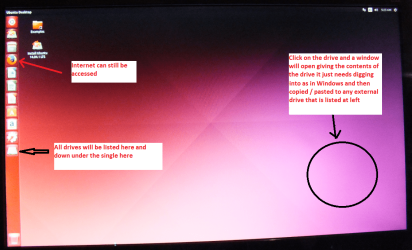
Set the BIOS to boot from the optical when the machine boots it willshow you a screen with TRY or INSTALL >select TRY.You can of course remove the hard driveand anyother drives when doing this as if the optical alone is the only drive left inthe machine then the BIOS will only find the optical to boot from.

When it is finished - it takes very little time you will get a screenlike in the pic .
 

Attachments

  • UBUNTU SCREEN X2.png
    UBUNTU SCREEN X2.png
    272.7 KB · Views: 0

My Computer

Computer type
PC/Desktop
Computer Manufacturer/Model Number
Own build (new) Desk1 / Asus ROG Win 7 / Desk2 1st build
OS
Desk1 7 Home Prem / Desk2 10 Pro / Main lap Asus ROG 10 Pro 2 laptop Toshiba 7 Pro Asus P2520 7 & 10
CPU
Desk1 i5 3750K / Laptop i7 GTX 860M / Desk2 i5 2500
Motherboard
Desk1 Asus P877-V / Desk2 Gigabyte H67 UD3H / Laptop ?
Memory
Desk1 8GB (1866) / Desk2 16GB (1333) / Laptop 8Gb DDR3
Graphics Card(s)
Desk 1& 2NVidia GTX 650 & Laptops on board Intel
Sound Card
Desk 1 & 2 -XONAR DG Realtek High Def audio Laptop
Monitor(s) Displays
Desk 1 Benq HD 2450 / Desk2 Philips 24" / Laptop 17.5"
Screen Resolution
1920x1080 D1 & D2 & Laptop 1
Hard Drives
Desk1 Samsung 120GB 830 SSD
Asus ROG 256GB 850 Pro SSD
Desk2 Samsung 840 256 SSD
Toshiba 120GB EVO
PSU
Desk 1 Corsair HX 1050/ Laptop ? / Desk 2 Corsair HX 650
Case
Desk 1 Cooler HAF XM ? Toshiba laptop / Desk2 Coolermaster
Cooling
Fans on all Desk1 -2 Desk2 - all Coolermasters 5 Laptop ?
Keyboard
Desk 1 MS Sidewinder X6 Desk 2 MS Sidewinder X 4
Mouse
Desk 1&2 - Gigabyte MS 900 gamer - laptop - Logitec wireless
Internet Speed
ADSL2+
Other Info
One other Desktop (tester) and spare Toshba laptop both with SSD's
Running Kaspersky 2016 ISS on all machines config'd identically
Logitec audio stereo systems on each machine (x3)
Canon MG5250MFC
Router/modem TP-Link running WPA2SK
My understanding is that there are specific designated Western Digital drives - WD Support / Downloads / Personal Cloud Storage - that go with the My Cloud application and using the My Cloud application on any non-designated drive may invite problems.

We have another user here http://www.sevenforums.com/hardware-devices/351043-urgent-help-hard-disk-doing-wrong-please.html who has a similar problem and much much later in the progression of the thread conceded that he was using My cloud application. We did try many things - without knowing that he was using My Cloud application on a non-designated drive - but without success.

Please be advised to contact Western Digital Technical Support on your problem. They may know better and tell you how to get back your drive in order, if it is possible. We will also know whether our - rather my :) - inference that using the My Cloud application on a non-designated drive ruins the drive is correct.
 

My Computer

OS
Windows 7 Home Premium 32 bit
Yes I posted in that one too Jumanji and I may as well keep out of them as I am only offering advice because it just seemed to me they just wanted info off the drives:rolleyes:
 

My Computer

Computer type
PC/Desktop
Computer Manufacturer/Model Number
Own build (new) Desk1 / Asus ROG Win 7 / Desk2 1st build
OS
Desk1 7 Home Prem / Desk2 10 Pro / Main lap Asus ROG 10 Pro 2 laptop Toshiba 7 Pro Asus P2520 7 & 10
CPU
Desk1 i5 3750K / Laptop i7 GTX 860M / Desk2 i5 2500
Motherboard
Desk1 Asus P877-V / Desk2 Gigabyte H67 UD3H / Laptop ?
Memory
Desk1 8GB (1866) / Desk2 16GB (1333) / Laptop 8Gb DDR3
Graphics Card(s)
Desk 1& 2NVidia GTX 650 & Laptops on board Intel
Sound Card
Desk 1 & 2 -XONAR DG Realtek High Def audio Laptop
Monitor(s) Displays
Desk 1 Benq HD 2450 / Desk2 Philips 24" / Laptop 17.5"
Screen Resolution
1920x1080 D1 & D2 & Laptop 1
Hard Drives
Desk1 Samsung 120GB 830 SSD
Asus ROG 256GB 850 Pro SSD
Desk2 Samsung 840 256 SSD
Toshiba 120GB EVO
PSU
Desk 1 Corsair HX 1050/ Laptop ? / Desk 2 Corsair HX 650
Case
Desk 1 Cooler HAF XM ? Toshiba laptop / Desk2 Coolermaster
Cooling
Fans on all Desk1 -2 Desk2 - all Coolermasters 5 Laptop ?
Keyboard
Desk 1 MS Sidewinder X6 Desk 2 MS Sidewinder X 4
Mouse
Desk 1&2 - Gigabyte MS 900 gamer - laptop - Logitec wireless
Internet Speed
ADSL2+
Other Info
One other Desktop (tester) and spare Toshba laptop both with SSD's
Running Kaspersky 2016 ISS on all machines config'd identically
Logitec audio stereo systems on each machine (x3)
Canon MG5250MFC
Router/modem TP-Link running WPA2SK
No probs, ICit2, we are also learning many things as we chug along and dealing with unusual problems and trying to understand. Darkvyar himself has told that his brother's drive broke using my Cloud application. So we have three now and the common thing is that My Cloud was used on a non-designated drive.
 

My Computer

OS
Windows 7 Home Premium 32 bit
I will try first to contact WD support team if they can do something about my external.
and my Brother replaced the Cloud with another one
 

My Computer

Computer type
Laptop
Computer Manufacturer/Model Number
MSI
OS
Windows 7 64bit
And keep us posted too for we also want to know what WD Support has to say on this problem.
 

My Computer

OS
Windows 7 Home Premium 32 bit
Back
Top