Solved Hard Disk space seen as occupied... But disk is empty inside

How is the arrangement of info?

  • Thumbs Up

    Votes: 1 100.0%
  • Thumbs Down

    Votes: 0 0.0%

  • Total voters
    1

ArpitRaj

New member
Hi

1. I have Win7 64-bit installed.

2. Earlier I installed MySQL and created database (size: 2 GB) in my D: drive (size: 52.8 GB).

3. Then I formatted my C: drive and installed Win7 again. As a result, MySQL got uninstalled and something happened to the database in D: drive.

4. After the new Win7 installation, My Computer shows D: [50.8 GB free of 52.8 GB] but the disk is empty.

5. How do I recover these 2 GBs?


Regards
Arpit
 

My Computer

OS
Windows 7 Ultimate 64-bit
CPU
Intel Core 2 Quad CPU Q9400 2.66GHz
Motherboard
Intel DG45
Memory
2 GB DDR
Graphics Card(s)
None
Sound Card
Intel HD Audio HDMI
Monitor(s) Displays
Generic Non-PnP Monitor 17'' CRT
Hard Drives
500 GB SATA
Case
ATX
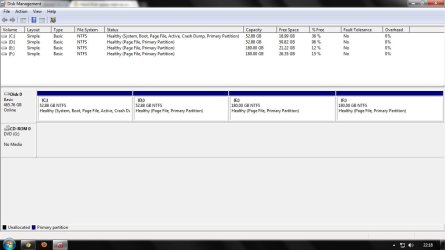
Post a screen shot of Windows Disk Management, showing all the details of the D drive.
 

My Computer

Computer type
PC/Desktop
Computer Manufacturer/Model Number
Ignatz Special; 4 speed manual gearbox; factory air conditioning; one of one
OS
Windows 7 Home Premium SP1, 64-bit
CPU
Intel Skylake i5-6600K, not overclocked
Motherboard
AsRock Z170M Extreme 4, micro ATX
Memory
8 GB HyperX DDR4-2666 (2 x 4 GB)
Graphics Card(s)
none; graphics are integrated on CPU
Sound Card
onboard: Realtek ALC1150; external: USB Behringer UF0-202
Monitor(s) Displays
Dell S2340M 23 inch IPS
Screen Resolution
1600 x 900
Hard Drives
System: Crucial MX100 series SSD, 128 GB;
Data: Samsung Spinpoint 103SJ, 1 TB;
Backup: WD Caviar Green WD30EZRX-00D8PB0, 3 TB
PSU
Rosewill SilentNight 500 watt fanless, semi-modular
Case
Antec Solo II
Cooling
Noctua NH-U12S; Noctua F12 intake, Noctua S12A exhaust
Keyboard
Microsoft 200 6JH-00001 USB
Mouse
Dell or Microsoft optical wired; USB
Antivirus
Microsoft Security Essentials and Malwarebytes Premium
Browser
Pale Moon
Other Info
All fans PWM; speeds at idle: CPU circa 500 rpm; intake circa 600 rpm; exhaust circa 600 rpm; CPU temps 27 idle and 47 C load in a warm room (27 C/81 F) when running Intel Extreme Tuning Utility stress test.
PFA
 

Attachments

  • Disk Mgmt.jpg
    Disk Mgmt.jpg
    157.2 KB · Views: 201

My Computer

OS
Windows 7 Ultimate 64-bit
CPU
Intel Core 2 Quad CPU Q9400 2.66GHz
Motherboard
Intel DG45
Memory
2 GB DDR
Graphics Card(s)
None
Sound Card
Intel HD Audio HDMI
Monitor(s) Displays
Generic Non-PnP Monitor 17'' CRT
Hard Drives
500 GB SATA
Case
ATX
What does "PFA" mean?

Disk Management says there is something on D, but if you don't care about that something, whatever it is, a reformat of D should get all the space back.
 

My Computer

Computer type
PC/Desktop
Computer Manufacturer/Model Number
Ignatz Special; 4 speed manual gearbox; factory air conditioning; one of one
OS
Windows 7 Home Premium SP1, 64-bit
CPU
Intel Skylake i5-6600K, not overclocked
Motherboard
AsRock Z170M Extreme 4, micro ATX
Memory
8 GB HyperX DDR4-2666 (2 x 4 GB)
Graphics Card(s)
none; graphics are integrated on CPU
Sound Card
onboard: Realtek ALC1150; external: USB Behringer UF0-202
Monitor(s) Displays
Dell S2340M 23 inch IPS
Screen Resolution
1600 x 900
Hard Drives
System: Crucial MX100 series SSD, 128 GB;
Data: Samsung Spinpoint 103SJ, 1 TB;
Backup: WD Caviar Green WD30EZRX-00D8PB0, 3 TB
PSU
Rosewill SilentNight 500 watt fanless, semi-modular
Case
Antec Solo II
Cooling
Noctua NH-U12S; Noctua F12 intake, Noctua S12A exhaust
Keyboard
Microsoft 200 6JH-00001 USB
Mouse
Dell or Microsoft optical wired; USB
Antivirus
Microsoft Security Essentials and Malwarebytes Premium
Browser
Pale Moon
Other Info
All fans PWM; speeds at idle: CPU circa 500 rpm; intake circa 600 rpm; exhaust circa 600 rpm; CPU temps 27 idle and 47 C load in a warm room (27 C/81 F) when running Intel Extreme Tuning Utility stress test.
PFA: Please Find Attached

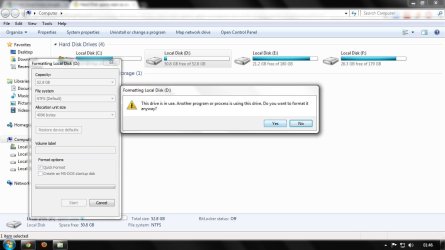
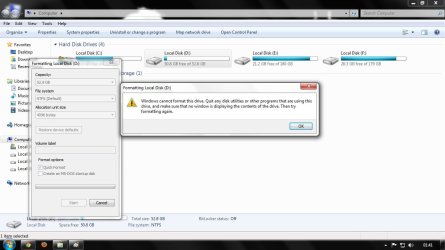
It does not allow to format. I have attached 2 images.
 

Attachments

  • 1.jpg
    1.jpg
    169.4 KB · Views: 94
  • 2.jpg
    2.jpg
    175.9 KB · Views: 67

My Computer

OS
Windows 7 Ultimate 64-bit
CPU
Intel Core 2 Quad CPU Q9400 2.66GHz
Motherboard
Intel DG45
Memory
2 GB DDR
Graphics Card(s)
None
Sound Card
Intel HD Audio HDMI
Monitor(s) Displays
Generic Non-PnP Monitor 17'' CRT
Hard Drives
500 GB SATA
Case
ATX
Post a screenshot of the end step of the following: Start Menu -> Right click Computer -> Properties -> Advanced system settings -> Advanced tab (should already be in this tab after the last step) -> Under the Performance section -> Settings... -> Advanced tab -> Under the Virtual Memory section -> Change...
 

My Computer

Computer Manufacturer/Model Number
HP Pavilion e9110t
OS
Windows 7 Home Premium 64 Bit
CPU
Intel(R) Core(TM)2 Quad CPU Q9550 @ 2.83GHz
Motherboard
Pegatron IPIEL-LA3
Memory
6.00 GB Hundai HMT125U6BFR8C-H9
Graphics Card(s)
ATI Radeon HD 4850
Sound Card
Realtek High Definition Audio/ATI High Definition Audio
Monitor(s) Displays
Acer AL2216W
Screen Resolution
1680x1050
Hard Drives
Hitachi HDP725050GLA360 ATA Device 500 GB
PSU
Unknown/installed by HP
Case
HP generic case
Cooling
Intel Stock Cooling
Keyboard
HP Keyboard
Mouse
HP Mouse
Internet Speed
Download: 19.15 Mbps Upload: 1.67 Mbps
Other Info
Network Adapter Realtek RTL8168D/8111D Family PCI-E Gigabit Ethernet NIC (NDIS 6.20)
Network Adapter 802.11n Wireless PCI Express Card LAN Adapter
Did you ever check whether there were hidden files on the drive.

If you want to reformat, use Partition Wizard - the bootable CD is best.
 

My Computer

Computer Manufacturer/Model Number
HP, Dell, Gateway, Toshiba - 4 laptops and 2 desktops
OS
Vista, Windows7, Mint Mate, Zorin, Windows 8
CPU
from 1.6GHz Duo to i7
Monitor(s) Displays
2x HP w2207
Hard Drives
5x HDD, 7x SSD, 12x Externals
Keyboard
with trackball - no mices
Mouse
Trackball mice
Internet Speed
DSL 6000
Did you ever check whether there were hidden files on the drive.

If you want to reformat, use Partition Wizard - the bootable CD is best.

If the OS is creating a pagefile on the drive (as appears to be the case from Disk Management), formatting the partition will not stop the pagefile from being recreated. I think it is a good idea to check the pagefile settings and turn them off for that partition. I see no reason for a pagefile on each separate partition as there seems to be on the OP's system.
 

My Computer

Computer Manufacturer/Model Number
HP Pavilion e9110t
OS
Windows 7 Home Premium 64 Bit
CPU
Intel(R) Core(TM)2 Quad CPU Q9550 @ 2.83GHz
Motherboard
Pegatron IPIEL-LA3
Memory
6.00 GB Hundai HMT125U6BFR8C-H9
Graphics Card(s)
ATI Radeon HD 4850
Sound Card
Realtek High Definition Audio/ATI High Definition Audio
Monitor(s) Displays
Acer AL2216W
Screen Resolution
1680x1050
Hard Drives
Hitachi HDP725050GLA360 ATA Device 500 GB
PSU
Unknown/installed by HP
Case
HP generic case
Cooling
Intel Stock Cooling
Keyboard
HP Keyboard
Mouse
HP Mouse
Internet Speed
Download: 19.15 Mbps Upload: 1.67 Mbps
Other Info
Network Adapter Realtek RTL8168D/8111D Family PCI-E Gigabit Ethernet NIC (NDIS 6.20)
Network Adapter 802.11n Wireless PCI Express Card LAN Adapter
Go to Folder and Search Options in Windows explorer and View tab. Click the radio button on the Show hidden files, folders, or drives. Remove check mark on Hide protected operating system files. You can also remove the check mark for Hide extensions for known file types.

Now to remove the page file on D:, Right click on Computer and select properties. On the left side of the window, click on Advanced system settings. Here go to Advanced tab and click on the Advanced tab and again click on the Settings button in Performance section. In this section click on Advanced tab. In the Virtual memory section click on Change button.

Select the D: drive and then click on the radio button next to No paging file. Press Set button and close the window. If a message appears that you should restart the system please do so.

Once you get the desktop open D: and check the contents. If you see your old database file there, take a backup of it, and delete any other extra files.

Now you can format the D: and you will have recovered the entire space.
 

My Computer

Computer Manufacturer/Model Number
Toshiba Satellite P775-S7232
OS
MS Windows 7 Ultimate 64-bit SP1
CPU
i5-2410M 2.3GHz (2.9GHz Turbo-Boost) Sandy Bridge 32nm
Motherboard
Toshiba PHRAA ver. PSBY1U-00F003
Memory
4GB+4GB Samsung DDR3 PC3-10700 (1333 MHz)
Graphics Card(s)
Video Intel(R) HD Graphics Family, 1696MB available memory
Sound Card
Realtek High Definition Audio version=6.0.1.6323
Monitor(s) Displays
17.3 " Trubrite TFT LCD, LED Backlit
Screen Resolution
1600x900 32 bit, Native support for 720P content
Hard Drives
TOSHIBA MK6476GSXN
580.614 [GB] partitioned C: 80GB and D: 500GB with hidden recovery partitons.

Spare bay for 2nd HDD but no SATA connector :-(
PSU
Toshiba AC/DC Adapter
Case
Notebook
Cooling
Built-in Fan
Keyboard
Premium Raised Tile keyboard
Mouse
Logitech M215 wireless mouse
Internet Speed
Not fast enough
Other Info
Built-in Harman Kardon speakers with Dolby Advanced Audio, Waves MaxxAudio® 3. HDMI, 1xUSB3+3xUSB2 ports, WebCam, Battery life 4hrs 11mins, 4GB Readyboost SDHC card, WD My Book Essential Ext HDDs 2 TB, 2x1TB, My Passport SE 1TB and WDTV 1st Gen for Multimedia playing on a Sony Wega 32" LCD.
Recent addition to my toys are Asus Transformer Pad TF300T with 32GB onboard sd card + 32GB microsd card.
Were you able to recover the hard disk space using the help provided?
 

My Computer

Computer Manufacturer/Model Number
HP Pavilion e9110t
OS
Windows 7 Home Premium 64 Bit
CPU
Intel(R) Core(TM)2 Quad CPU Q9550 @ 2.83GHz
Motherboard
Pegatron IPIEL-LA3
Memory
6.00 GB Hundai HMT125U6BFR8C-H9
Graphics Card(s)
ATI Radeon HD 4850
Sound Card
Realtek High Definition Audio/ATI High Definition Audio
Monitor(s) Displays
Acer AL2216W
Screen Resolution
1680x1050
Hard Drives
Hitachi HDP725050GLA360 ATA Device 500 GB
PSU
Unknown/installed by HP
Case
HP generic case
Cooling
Intel Stock Cooling
Keyboard
HP Keyboard
Mouse
HP Mouse
Internet Speed
Download: 19.15 Mbps Upload: 1.67 Mbps
Other Info
Network Adapter Realtek RTL8168D/8111D Family PCI-E Gigabit Ethernet NIC (NDIS 6.20)
Network Adapter 802.11n Wireless PCI Express Card LAN Adapter
Back
Top