Solved Hard Disk Stops Responding (Hang)

Dj SharK

New member
Member
Local time
7:21 AM
Messages
93
Location
S.E.A
Hi,

I need some quick help. My hard disk (E Drive) works well and does not have any issues previously. A few hours ago, it just decides to die/hang after a few minutes.

I have 2 HDD.

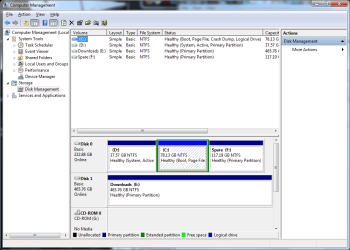
Primary : C, D, F (3 partition) - 250GB
Secondary : E - 500GB

So, it will run fine for about 5 minutes then without any warning, it hangs. After waiting for 2-3 minutes, my E drive will disappear from My Computer and everywhere else. Restart doesn't help. I'll have to open up my CPU, remove the cable and re-attach it again for it to work. And once that is done, it starts well and die off again within a few minutes.

Any idea what is wrong?

Don't know if it matters but a couple minutes before this starts, i did a few windows update.
 
Last edited:

My Computer

Computer Manufacturer/Model Number
DIY
OS
Windows 7 Ultimate x86 7600
CPU
Intel Pentium Dual CPU E2180 @ 2.00 GHz
Motherboard
Gigabyte G41M Combo (rev 1.3)
Memory
1 x 2GB | 1 x 1GB Kingston 667
Graphics Card(s)
512MB Nvidia GeForce EN8500GT Silent Magic
Sound Card
Onboard HD 7.1 Audio
Monitor(s) Displays
22" LG W2242T
Screen Resolution
1680 X 1050
Hard Drives
1 x 500GB SATA Hitachi ( Internal )
1 x 1TB SATA Hitachi ( Internal )
1 x 320GB Western Digital ( External )
PSU
500W
Case
Coolermaster
Cooling
Coolermaster
Keyboard
Logitech Media Wireless Keyboard
Mouse
A4Tech G6 Wireless Mouse
Internet Speed
DL : 12MB/s | UL : 1.2MB/s
Other Info
I'm not a gamer. I don't overclock. I use my PC for web browsing, listening to music and watching HD movies.

My Computer

Computer type
PC/Desktop
Computer Manufacturer/Model Number
Dell XPS 420
OS
Windows 10, Home Clean Install
CPU
Intel Core2 processsor Q8200(2.33Ghz 1333FSB) Quad Core Tech
Motherboard
Dell
Memory
6 gb
Graphics Card(s)
ATI Radeon 256MB HD3650
Sound Card
Intergrated 7.1 Channel Audio
Monitor(s) Displays
Dell SP2009W 20"
Hard Drives
640 GB Serial ATA Hard drive
Cooling
Fan
Keyboard
Dell USB Keyboard
Mouse
Dell Premium Optical USB
Internet Speed
DSL 2.85
I just did. Restored to a couple days back. HDD ( E Drive ) still goes missing after a few minutes if i use it (it's my storage drive where i keep videos, photos, music, etc).

I tried using HDD Regenerator and after a while, it didn't find any bad sectors or errors.

Also, i tried chkdsk e: but it kept on showing "Errors found. CHKDSK cannot continue in read-only mode". :mad:

I'm downloading Hitachi tool to see if the HDD might be at the brink of death. :S
 

Attachments

  • drive.png
    drive.png
    35.5 KB · Views: 236

My Computer

Computer Manufacturer/Model Number
DIY
OS
Windows 7 Ultimate x86 7600
CPU
Intel Pentium Dual CPU E2180 @ 2.00 GHz
Motherboard
Gigabyte G41M Combo (rev 1.3)
Memory
1 x 2GB | 1 x 1GB Kingston 667
Graphics Card(s)
512MB Nvidia GeForce EN8500GT Silent Magic
Sound Card
Onboard HD 7.1 Audio
Monitor(s) Displays
22" LG W2242T
Screen Resolution
1680 X 1050
Hard Drives
1 x 500GB SATA Hitachi ( Internal )
1 x 1TB SATA Hitachi ( Internal )
1 x 320GB Western Digital ( External )
PSU
500W
Case
Coolermaster
Cooling
Coolermaster
Keyboard
Logitech Media Wireless Keyboard
Mouse
A4Tech G6 Wireless Mouse
Internet Speed
DL : 12MB/s | UL : 1.2MB/s
Other Info
I'm not a gamer. I don't overclock. I use my PC for web browsing, listening to music and watching HD movies.
I would suggest copying anything that you feel is important from the E: drive as a precaution against failure. If you have a lot of valuable data, it might be a wise step in case the drive is really failing.
 

My Computer

Computer type
PC/Desktop
Computer Manufacturer/Model Number
Mellon Labs (custom build)
OS
Win 7 Pro x64/Win 10 Pro x64 dual boot
CPU
AMD FX 8350 Vishera @ 4200
Motherboard
ASUS M5A97 R2.0
Memory
16 GB Mushkin Blackline DDR3-2400 @ 1866 (9-10-10-10-31)
Graphics Card(s)
XFX Radeon R9 280 Double D Black Edition
Sound Card
Realtek HD Audio on MB. Sounds great.
Monitor(s) Displays
Acer 24", Acer 22"
Screen Resolution
3840 x 1080
Hard Drives
1 x Mushkin Chronos 120 GB SSD (Win 10)
1 x Samsung 850 EVO 250 GB SSD (Win 7)
1 x WD 1TB SATA Blue
1 x WD 1TB SATA Green
PSU
Corsair TX-750
Case
CoolerMaster HAF 912+
Cooling
Coolermaster Seidon 240M Liquid AIO. 6 case fans
Keyboard
Logitech G710+
Mouse
Logitech G500s
Internet Speed
Much better since I got fiber, but still way overpriced.
Antivirus
MSE, Malware Bytes for scanning
Browser
Firefox
Other Info
Corsair VOID USB headphones.

A Mellon Labs X-1 - LCD Smartie driven system status display.

Brought to you by the letter E
I would suggest copying anything that you feel is important from the E: drive as a precaution against failure. If you have a lot of valuable data, it might be a wise step in case the drive is really failing.
I should add that, maybe this HDD has a faulty data connector, or you are overpassing your PSU capacity (this last could be very rare, but sometimes happens).

If you still have warranty, I?ll sugest replacing your HDD with another one, I guess is not the update, because if so, why the other drives are being shown normally and not hanging? Check also your data cable, maybe is faulty too...

See ya!!! :D
 

My Computer

Computer type
PC/Desktop
Computer Manufacturer/Model Number
Assembled Desktop PC
OS
Microsoft Windows 7 Home Premium SP1 64-bit Build 7600
CPU
AMD Athlon 64 X2 5200+ Dual Core CPU @ 2.7 Ghz (Brisbane)
Motherboard
PCChips A13G+ v3.0
Memory
2x2 GB DDR2 PC-5300 (667 Mhz) Kingston ValueRAM
Graphics Card(s)
XFX ATI Radeon HD 4350 GPU (512 MB + 512 MB HM)
Sound Card
Realtek High Definition Audio Driver ALC660 @ MCP61S
Monitor(s) Displays
HP S2031 20" LED HD Widescreen Display Monitor
Screen Resolution
1600 x 900 px
Hard Drives
Maxtor Diamond Max 10 (160 GB, 7200 RPM, SATA-II Hard Disk)
Western Digital Scorpion Blue (250 GB, 5400 RPM, SATA-II External Hard Disk - Personal Data)
Toshiba MQ01ABD050 (500 GB, 5400 RPM, SATA-II External Hard Disk - Software & ISOs)
PSU
Pixxo Transformer 850W 80+ Certification PSU
Case
Compaq 5BW353 Case
Cooling
Many solutions, see other info...
Keyboard
Green Leaf (Mitzu) Standard Keyboard
Mouse
Microsoft USB Lasser Pointing Device
Internet Speed
10 MB
Antivirus
Avast Antivirus Free
Browser
Firefox, Chrome, Internet Explorer
Other Info
Windows Experience Index Result: 3.8 of 7.9.

Cooling solutions:
- AVC @ 2000/5000 RPM Copper Heatpipes (For Athlon 64 X2 6000+ CPU used in an Athlon 64 X2 5200+)
- Rear Fan 80 mm @ 2700 RPM for heat extraction
- Manhatan Chipset Cooler @ 4700/7200 RPM (For nVidia Chipset in MoBo)
- Foxconn @ 2500 RPM (Old Pentium III heatsink fan) in XFX ATI Radeon HD 4350

IMMEDIATELY BACKUP ALL DATA FROM THAT DRIVE!

Now you can proceed with testing.

The results of the Hitachi drive test program?

If you are lucky, then your problem is heat or power-related, but the odds are that the drive is on its last legs.
 

My Computer

Computer Manufacturer/Model Number
Toshiba Satellite S875D-S7239 laptop
OS
MS Windows 7 Ultimate SP1 64-bit
CPU
AMD A10-4600M
Motherboard
AMD Pumori (Socket FT1)
Memory
6.00 GB Dual-Channel DDR3 @ 798MHz (11-11-12-28)
Graphics Card(s)
AMD Radeon HD 7660G
Sound Card
High Definition Audio Device
Monitor(s) Displays
Generic PnP Monitor (1600x900@60Hz)
Screen Resolution
1600x900@60Hz
Hard Drives
SSD 119GB Corsair CSSD-V128GB2 ATA Device
Keyboard
Standard PS/2 Keyboard
Mouse
HP Wireless Optical Mobile Mouse Model FHA-3410
Internet Speed
What the local pub, local coffee shop offers.
Other Info
Optical Drive:MATSHITA BD-CMB UJ160B ATA Device


Also have an Asus ha1002xp netbook with Win 7 Ultimate installed.

My Computer

Computer Manufacturer/Model Number
Toshiba Satellite S875D-S7239 laptop
OS
MS Windows 7 Ultimate SP1 64-bit
CPU
AMD A10-4600M
Motherboard
AMD Pumori (Socket FT1)
Memory
6.00 GB Dual-Channel DDR3 @ 798MHz (11-11-12-28)
Graphics Card(s)
AMD Radeon HD 7660G
Sound Card
High Definition Audio Device
Monitor(s) Displays
Generic PnP Monitor (1600x900@60Hz)
Screen Resolution
1600x900@60Hz
Hard Drives
SSD 119GB Corsair CSSD-V128GB2 ATA Device
Keyboard
Standard PS/2 Keyboard
Mouse
HP Wireless Optical Mobile Mouse Model FHA-3410
Internet Speed
What the local pub, local coffee shop offers.
Other Info
Optical Drive:MATSHITA BD-CMB UJ160B ATA Device


Also have an Asus ha1002xp netbook with Win 7 Ultimate installed.
I just did the hitachi test thingy.

There are 2 options. Quick test and Advanced.

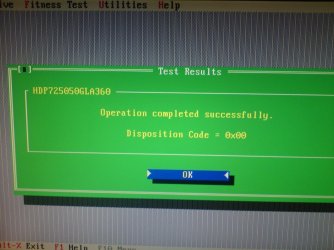
I first did the quick test and the result came back with "Operation Completed Successfully. Disposition Code : 0x00".
I then proceeded to do the advance test and about 10 minutes in, the drive gave 1 clicking sound and died again. I had to remove the drive cable and re-insert them before it works. But i did not continue the test as i thought it could die off again.

No idea if the drive is failing or it could just be the cable. :S
 

Attachments

  • DSC00481.JPG
    DSC00481.JPG
    178.6 KB · Views: 22

My Computer

Computer Manufacturer/Model Number
DIY
OS
Windows 7 Ultimate x86 7600
CPU
Intel Pentium Dual CPU E2180 @ 2.00 GHz
Motherboard
Gigabyte G41M Combo (rev 1.3)
Memory
1 x 2GB | 1 x 1GB Kingston 667
Graphics Card(s)
512MB Nvidia GeForce EN8500GT Silent Magic
Sound Card
Onboard HD 7.1 Audio
Monitor(s) Displays
22" LG W2242T
Screen Resolution
1680 X 1050
Hard Drives
1 x 500GB SATA Hitachi ( Internal )
1 x 1TB SATA Hitachi ( Internal )
1 x 320GB Western Digital ( External )
PSU
500W
Case
Coolermaster
Cooling
Coolermaster
Keyboard
Logitech Media Wireless Keyboard
Mouse
A4Tech G6 Wireless Mouse
Internet Speed
DL : 12MB/s | UL : 1.2MB/s
Other Info
I'm not a gamer. I don't overclock. I use my PC for web browsing, listening to music and watching HD movies.
@Karl

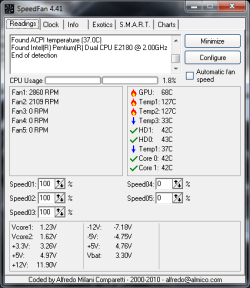
Attached is Speedfan. Is there something i should be worried about looking by the image?
 

Attachments

  • speedfan.png
    speedfan.png
    12.4 KB · Views: 191

My Computer

Computer Manufacturer/Model Number
DIY
OS
Windows 7 Ultimate x86 7600
CPU
Intel Pentium Dual CPU E2180 @ 2.00 GHz
Motherboard
Gigabyte G41M Combo (rev 1.3)
Memory
1 x 2GB | 1 x 1GB Kingston 667
Graphics Card(s)
512MB Nvidia GeForce EN8500GT Silent Magic
Sound Card
Onboard HD 7.1 Audio
Monitor(s) Displays
22" LG W2242T
Screen Resolution
1680 X 1050
Hard Drives
1 x 500GB SATA Hitachi ( Internal )
1 x 1TB SATA Hitachi ( Internal )
1 x 320GB Western Digital ( External )
PSU
500W
Case
Coolermaster
Cooling
Coolermaster
Keyboard
Logitech Media Wireless Keyboard
Mouse
A4Tech G6 Wireless Mouse
Internet Speed
DL : 12MB/s | UL : 1.2MB/s
Other Info
I'm not a gamer. I don't overclock. I use my PC for web browsing, listening to music and watching HD movies.
Replace your power supply unit.

Incidentally, did you know that water boils at 100 degrees C?

100 degrees C = 212 degrees F

Do not attempt to use your computer until the power supply unit is replaced.

Replace with a heftier version than you currently have. While doing further testing, use one and only 1 monitor.

There is also the distinct possibility that your graphics card is in very bad shape.

If you have an old one you can stick in and ONLY run one monitor, then by all means do such. Did you notice that your -12v is at less than -8v? This is due to a bad power supply or a real bad graphics card or both. Not good.
 

My Computer

Computer Manufacturer/Model Number
Toshiba Satellite S875D-S7239 laptop
OS
MS Windows 7 Ultimate SP1 64-bit
CPU
AMD A10-4600M
Motherboard
AMD Pumori (Socket FT1)
Memory
6.00 GB Dual-Channel DDR3 @ 798MHz (11-11-12-28)
Graphics Card(s)
AMD Radeon HD 7660G
Sound Card
High Definition Audio Device
Monitor(s) Displays
Generic PnP Monitor (1600x900@60Hz)
Screen Resolution
1600x900@60Hz
Hard Drives
SSD 119GB Corsair CSSD-V128GB2 ATA Device
Keyboard
Standard PS/2 Keyboard
Mouse
HP Wireless Optical Mobile Mouse Model FHA-3410
Internet Speed
What the local pub, local coffee shop offers.
Other Info
Optical Drive:MATSHITA BD-CMB UJ160B ATA Device


Also have an Asus ha1002xp netbook with Win 7 Ultimate installed.
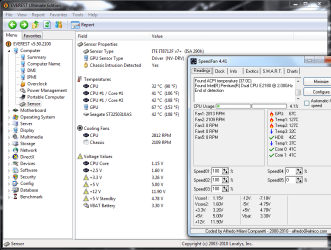
Is Temp1/Temp2 on Speedfan the same as CPU #1/CPU #2 on Everest?

If it is, then something is not right cause they don't show the same temperature.

Edit : Looks like i made a mistake. They both do tally. Though i have no idea what Temp1 and Temp2 is. :S
 

Attachments

  • temp.png
    temp.png
    47.3 KB · Views: 83

My Computer

Computer Manufacturer/Model Number
DIY
OS
Windows 7 Ultimate x86 7600
CPU
Intel Pentium Dual CPU E2180 @ 2.00 GHz
Motherboard
Gigabyte G41M Combo (rev 1.3)
Memory
1 x 2GB | 1 x 1GB Kingston 667
Graphics Card(s)
512MB Nvidia GeForce EN8500GT Silent Magic
Sound Card
Onboard HD 7.1 Audio
Monitor(s) Displays
22" LG W2242T
Screen Resolution
1680 X 1050
Hard Drives
1 x 500GB SATA Hitachi ( Internal )
1 x 1TB SATA Hitachi ( Internal )
1 x 320GB Western Digital ( External )
PSU
500W
Case
Coolermaster
Cooling
Coolermaster
Keyboard
Logitech Media Wireless Keyboard
Mouse
A4Tech G6 Wireless Mouse
Internet Speed
DL : 12MB/s | UL : 1.2MB/s
Other Info
I'm not a gamer. I don't overclock. I use my PC for web browsing, listening to music and watching HD movies.
The bottom Temp1 37C is your CPU.
Core0 and Core1 are actual in the chip at 40C. That is good.
If Temp1 on top at 127C was your CPU it would have already died.
I'm not sure what it is showing though on the top Temp1 and 2.

Mike
 

My Computer

Computer Manufacturer/Model Number
Hopalong/ Godzilla
OS
Windows7 Pro 64bit SP-1; Windows XP Pro 32bit
CPU
Intel Core i7-870 Lynnfield 2.93GHz LGA 1156 95W Quad-Core
Motherboard
ASUS P7P55D-E PRO
Memory
8GB@1400MHz Crucial Ballistix DDR3-1600 4x2GB
Graphics Card(s)
ASUS ENGTX460 DirectCU/2DI/1GD5 1GB 256-bit GDDR5
Sound Card
VIA Onboard
Monitor(s) Displays
Asus VS248H-P 24"; Samsung SyncMaster 941BW 19"ws
Screen Resolution
1920x1080; 1440x900
Hard Drives
Samsung 830 120GB SSD
Intel 320 120GB SSD
Western Digital Caviar Black WD7501AALS 750GB 7200 RPM SATA 3.0Gb/s
Western Digital Caviar Black WD6401AALS 640GB 7200 RPM SATA 3.0Gb/s
PSU
COOLER MASTER Silent Pro RS850-AMBAJ3-US 850W Modular
Case
COOLER MASTER HAF 932 RC-932-KKN5-GP Black
Cooling
Scythe "Mugen-2 Rev.B" (2 ScytheKaze-Jyuni PWM fans)
Keyboard
Logitech K-320
Mouse
Kensington
Antivirus
Avast Inernet Suite
Browser
IE 9 ; Chrome
the 127C are references to a sensore that does not exist.
Nothing to worry about.

If anything was truly running that hot, you certainly know by now.

Im curious:
1) What event to you have in the event log in reference to the disc.
Sounds as if the drive is dying, but as mentioned it could be a connection issue.
If in events its showing Controller errors, then its a very likely possibility.

2) In your bios, what do the voltages say? Its possible Speed fan is giving some false/out of whack readings. Might be worth verifying what the bios has to say.
 

My Computer

Computer Manufacturer/Model Number
Custom (Self Build)
OS
Windows 7 Home Premium 64bit
CPU
Intel Core i7 2700k
Motherboard
eVGA P67 SLI
Memory
8GB Mushkin Redline Ridgebacks @1866
Graphics Card(s)
EVGA GTX570 SC
Sound Card
XiFi Titanium HD
Monitor(s) Displays
LG W2453V
Screen Resolution
1920x1080
Hard Drives
Intel 320 80GB -- Intel X25-V 40GB --WD Black 1TB x2 -- WD Blue 640GB
PSU
Seasonic x750
Case
Corsair 600T SE White
Cooling
eVGA Superclocked CPU Cooler
Keyboard
Saitek Cyborg
Antivirus
Kaspersky
Browser
IE
Other Info
LG BD/DVD
1. Sorry but i'm not clear on where exactly do i get that information. Could you please elaborate.

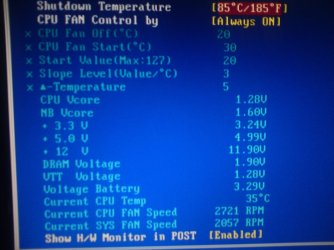
2. Please view attachment. :)

Sorry about the quality. I took it with my cell phone.
 

Attachments

  • DSC00483.JPG
    DSC00483.JPG
    123.3 KB · Views: 15

My Computer

Computer Manufacturer/Model Number
DIY
OS
Windows 7 Ultimate x86 7600
CPU
Intel Pentium Dual CPU E2180 @ 2.00 GHz
Motherboard
Gigabyte G41M Combo (rev 1.3)
Memory
1 x 2GB | 1 x 1GB Kingston 667
Graphics Card(s)
512MB Nvidia GeForce EN8500GT Silent Magic
Sound Card
Onboard HD 7.1 Audio
Monitor(s) Displays
22" LG W2242T
Screen Resolution
1680 X 1050
Hard Drives
1 x 500GB SATA Hitachi ( Internal )
1 x 1TB SATA Hitachi ( Internal )
1 x 320GB Western Digital ( External )
PSU
500W
Case
Coolermaster
Cooling
Coolermaster
Keyboard
Logitech Media Wireless Keyboard
Mouse
A4Tech G6 Wireless Mouse
Internet Speed
DL : 12MB/s | UL : 1.2MB/s
Other Info
I'm not a gamer. I don't overclock. I use my PC for web browsing, listening to music and watching HD movies.
That all looks normal actually.

Although, the 12V Rail does look a little bit low at 11.90V.
Rather see it just a hair over 12V.
Although, I'm not sure if that would cause much of an issue though honestly, as it is close to where it should be.

Sometime SpeedFan can give odd results, depending on the HW. Was just curious what your bios were reporting.
 

My Computer

Computer Manufacturer/Model Number
Custom (Self Build)
OS
Windows 7 Home Premium 64bit
CPU
Intel Core i7 2700k
Motherboard
eVGA P67 SLI
Memory
8GB Mushkin Redline Ridgebacks @1866
Graphics Card(s)
EVGA GTX570 SC
Sound Card
XiFi Titanium HD
Monitor(s) Displays
LG W2453V
Screen Resolution
1920x1080
Hard Drives
Intel 320 80GB -- Intel X25-V 40GB --WD Black 1TB x2 -- WD Blue 640GB
PSU
Seasonic x750
Case
Corsair 600T SE White
Cooling
eVGA Superclocked CPU Cooler
Keyboard
Saitek Cyborg
Antivirus
Kaspersky
Browser
IE
Other Info
LG BD/DVD
Then i guess it's got to do with the Hard Disk itself (maybe not, i'm not a professional :P ). My other (primary) hard disk is working fine (i'm on it now).
Only the secondary drive (hitachi) kept disappearing every few minutes.

I just called Hitachi and i'll probably get it replaced since my warranty is good till December 2011.
 

My Computer

Computer Manufacturer/Model Number
DIY
OS
Windows 7 Ultimate x86 7600
CPU
Intel Pentium Dual CPU E2180 @ 2.00 GHz
Motherboard
Gigabyte G41M Combo (rev 1.3)
Memory
1 x 2GB | 1 x 1GB Kingston 667
Graphics Card(s)
512MB Nvidia GeForce EN8500GT Silent Magic
Sound Card
Onboard HD 7.1 Audio
Monitor(s) Displays
22" LG W2242T
Screen Resolution
1680 X 1050
Hard Drives
1 x 500GB SATA Hitachi ( Internal )
1 x 1TB SATA Hitachi ( Internal )
1 x 320GB Western Digital ( External )
PSU
500W
Case
Coolermaster
Cooling
Coolermaster
Keyboard
Logitech Media Wireless Keyboard
Mouse
A4Tech G6 Wireless Mouse
Internet Speed
DL : 12MB/s | UL : 1.2MB/s
Other Info
I'm not a gamer. I don't overclock. I use my PC for web browsing, listening to music and watching HD movies.
Dj

Is this a prebuilt like HP or Dell or a custom?
The reason I ask is to find out if it has a stock OEM power supply or an aftermarket brand you installed.
Power supply isn't listed in your specs.

If it is an OEM PS then that would account for the 11.9v with the three HD's etc. you are running.
As Wishmaster stated looks normal.

Hope you get a new HD replacement.
Mike
 

My Computer

Computer Manufacturer/Model Number
Hopalong/ Godzilla
OS
Windows7 Pro 64bit SP-1; Windows XP Pro 32bit
CPU
Intel Core i7-870 Lynnfield 2.93GHz LGA 1156 95W Quad-Core
Motherboard
ASUS P7P55D-E PRO
Memory
8GB@1400MHz Crucial Ballistix DDR3-1600 4x2GB
Graphics Card(s)
ASUS ENGTX460 DirectCU/2DI/1GD5 1GB 256-bit GDDR5
Sound Card
VIA Onboard
Monitor(s) Displays
Asus VS248H-P 24"; Samsung SyncMaster 941BW 19"ws
Screen Resolution
1920x1080; 1440x900
Hard Drives
Samsung 830 120GB SSD
Intel 320 120GB SSD
Western Digital Caviar Black WD7501AALS 750GB 7200 RPM SATA 3.0Gb/s
Western Digital Caviar Black WD6401AALS 640GB 7200 RPM SATA 3.0Gb/s
PSU
COOLER MASTER Silent Pro RS850-AMBAJ3-US 850W Modular
Case
COOLER MASTER HAF 932 RC-932-KKN5-GP Black
Cooling
Scythe "Mugen-2 Rev.B" (2 ScytheKaze-Jyuni PWM fans)
Keyboard
Logitech K-320
Mouse
Kensington
Antivirus
Avast Inernet Suite
Browser
IE 9 ; Chrome
It's custom. Not built by me but it's custom for certain. :)
 

Attachments

  • 1.JPG
    1.JPG
    112.8 KB · Views: 16

My Computer

Computer Manufacturer/Model Number
DIY
OS
Windows 7 Ultimate x86 7600
CPU
Intel Pentium Dual CPU E2180 @ 2.00 GHz
Motherboard
Gigabyte G41M Combo (rev 1.3)
Memory
1 x 2GB | 1 x 1GB Kingston 667
Graphics Card(s)
512MB Nvidia GeForce EN8500GT Silent Magic
Sound Card
Onboard HD 7.1 Audio
Monitor(s) Displays
22" LG W2242T
Screen Resolution
1680 X 1050
Hard Drives
1 x 500GB SATA Hitachi ( Internal )
1 x 1TB SATA Hitachi ( Internal )
1 x 320GB Western Digital ( External )
PSU
500W
Case
Coolermaster
Cooling
Coolermaster
Keyboard
Logitech Media Wireless Keyboard
Mouse
A4Tech G6 Wireless Mouse
Internet Speed
DL : 12MB/s | UL : 1.2MB/s
Other Info
I'm not a gamer. I don't overclock. I use my PC for web browsing, listening to music and watching HD movies.
That should be sufficient with what you have running from my perspective.
I was afraid you had a little 250W or 300W in there. :D

Mike
 

My Computer

Computer Manufacturer/Model Number
Hopalong/ Godzilla
OS
Windows7 Pro 64bit SP-1; Windows XP Pro 32bit
CPU
Intel Core i7-870 Lynnfield 2.93GHz LGA 1156 95W Quad-Core
Motherboard
ASUS P7P55D-E PRO
Memory
8GB@1400MHz Crucial Ballistix DDR3-1600 4x2GB
Graphics Card(s)
ASUS ENGTX460 DirectCU/2DI/1GD5 1GB 256-bit GDDR5
Sound Card
VIA Onboard
Monitor(s) Displays
Asus VS248H-P 24"; Samsung SyncMaster 941BW 19"ws
Screen Resolution
1920x1080; 1440x900
Hard Drives
Samsung 830 120GB SSD
Intel 320 120GB SSD
Western Digital Caviar Black WD7501AALS 750GB 7200 RPM SATA 3.0Gb/s
Western Digital Caviar Black WD6401AALS 640GB 7200 RPM SATA 3.0Gb/s
PSU
COOLER MASTER Silent Pro RS850-AMBAJ3-US 850W Modular
Case
COOLER MASTER HAF 932 RC-932-KKN5-GP Black
Cooling
Scythe "Mugen-2 Rev.B" (2 ScytheKaze-Jyuni PWM fans)
Keyboard
Logitech K-320
Mouse
Kensington
Antivirus
Avast Inernet Suite
Browser
IE 9 ; Chrome
Is it really? Well, i guess i should be all set. Just got to deal with the HDD issue now. Not fun to deal with this early in the morning. :confused:
 

My Computer

Computer Manufacturer/Model Number
DIY
OS
Windows 7 Ultimate x86 7600
CPU
Intel Pentium Dual CPU E2180 @ 2.00 GHz
Motherboard
Gigabyte G41M Combo (rev 1.3)
Memory
1 x 2GB | 1 x 1GB Kingston 667
Graphics Card(s)
512MB Nvidia GeForce EN8500GT Silent Magic
Sound Card
Onboard HD 7.1 Audio
Monitor(s) Displays
22" LG W2242T
Screen Resolution
1680 X 1050
Hard Drives
1 x 500GB SATA Hitachi ( Internal )
1 x 1TB SATA Hitachi ( Internal )
1 x 320GB Western Digital ( External )
PSU
500W
Case
Coolermaster
Cooling
Coolermaster
Keyboard
Logitech Media Wireless Keyboard
Mouse
A4Tech G6 Wireless Mouse
Internet Speed
DL : 12MB/s | UL : 1.2MB/s
Other Info
I'm not a gamer. I don't overclock. I use my PC for web browsing, listening to music and watching HD movies.
Back
Top