Hope this is the right place to post if not please excuse.
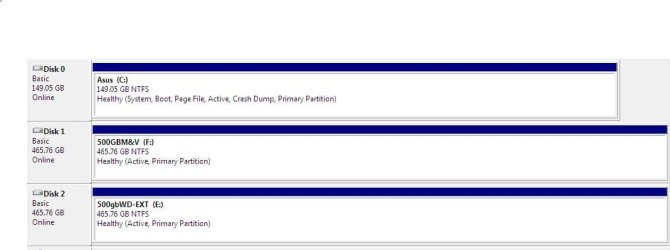
I HAVE A hdd in another macine that won't let me access it.It shows this hdd on boot up also in disk management it shows as healthy,active,etc.Ihave checked ownership & permissions & all were correct.I downloaded a file recovery program & had it recover some of the files BUT when viewing the jpg files my image viewer couldn't handle them said wrong format.I tried several more viewers with same results.Not much good to recover files you can't use.I googled file recovery & it seems that $100 is about as cheap as you can get out if you hire some one to do it.Can't afford that but some of the pictures go back several years (mostly family) & I REALLY want to recover them.I know these details are skimpy but if anone has
ANY info such any thing to try or recovery freeware to try I have orderef a new hdd & will inatall it upon arrival so if anyone needs more info I can furnish it then .All help is greatly appreciate.
Thanks
I HAVE A hdd in another macine that won't let me access it.It shows this hdd on boot up also in disk management it shows as healthy,active,etc.Ihave checked ownership & permissions & all were correct.I downloaded a file recovery program & had it recover some of the files BUT when viewing the jpg files my image viewer couldn't handle them said wrong format.I tried several more viewers with same results.Not much good to recover files you can't use.I googled file recovery & it seems that $100 is about as cheap as you can get out if you hire some one to do it.Can't afford that but some of the pictures go back several years (mostly family) & I REALLY want to recover them.I know these details are skimpy but if anone has
ANY info such any thing to try or recovery freeware to try I have orderef a new hdd & will inatall it upon arrival so if anyone needs more info I can furnish it then .All help is greatly appreciate.
Thanks
My Computer
- OS
- windows ultimate x 32