
Hard Drive Always Corrupted

LOL...I think CommonTater is my evil twin! :roflmao:
 

My Computer

Computer Manufacturer/Model Number
NVIDIA
OS
Windows 7 Enterprise x64
CPU
AMD Athlon 64X2 Dual Core 3800+
Motherboard
GeForce 6100-M9
Memory
OCZ Platinum Dual Channel - 4x1Gb
Graphics Card(s)
NVIDIA GeForce 8800 GT PCI Express x16
Sound Card
Creative Audigy Sound Blaster Extreme PCI
Monitor(s) Displays
Compaq 7500
Screen Resolution
1024x768
Hard Drives
C: Seagate ST3250318AS SataII - 250Gb

D: Seagate ST3500418AS SataII - 500Gb
PSU
OCZ 600w Dual 12v Rails
Case
Thermaltake
Cooling
OCZ Heatsinks, Fans, and Thermal Paste on CPU & Chipsets
Keyboard
Logitech
Mouse
Radio Shack PS2
Internet Speed
Cable
Other Info
Dual Pioneer DVD/RW optical drives. LG CD/RW optical drive.
Ok... try this and tell me what happens...

click Start and on the Start panel click your user name... That will open your home folder.... What happens if you click "videos" in there?

Odd..
Also a little shortcut trick ... On the start panel, drag your username out onto the desktop... Instant access to your home folder.


Odd... Oh! I think I know what it is!
Let me check.
 

My Computer

Computer Manufacturer/Model Number
Thinkpad T400
OS
Window 7
Memory
4 gig

My Computer

Computer Manufacturer/Model Number
Homebrew
OS
XP Pro SP3 X86 / Win7 Pro X86
CPU
Amd 64 x2 4200 (2.4ghz)
Motherboard
Asus M2N-MX SE Plus
Memory
Kingston DDR2 800 2gb
Graphics Card(s)
Nvidia GF-8400
Sound Card
Realtek on Motherboard
Monitor(s) Displays
Acer x-193bw
Screen Resolution
1440 x 900
Hard Drives
Western Digital 500g
PSU
350watt In-Win
Case
In-Win
Cooling
Air
Keyboard
yes
Mouse
yes
Internet Speed
5mpbs
Other Info
Also ASRock ION 330 as HTPC (on XP).
Acer Aspire as GP netbook (on XP).
Hmmm... I was able to access Videos via the start menu, and it shows the Sample Videos subfolder and the file "desktop.ini" which seems weird to me. Why would "desktop.ini" try to be in my Videos folder?
Trying to create a folder here gives me the same error as before.
Still not accessible via explorer.

When I go to my open my home folder via the start menu, my Videos folder is not visible. But when I try to create a Videos folder, it asks me to replace the old one. I have show hidden files and system files on.

I thought the problem was that I had changed the location of where Windows looks for my Libraries -- changed the file path of where it thinks the Music library is, for example. And when I did it to Videos, I thought maybe I had deleted the Videos folder but not re-pathed the Videos shortcut.

Does that make sense?

But I think my attempt to create the Videos folder again suggests that that isn't the case since it asks me to replace the existing (but not seen) Videos folder.
 

My Computer

Computer Manufacturer/Model Number
Thinkpad T400
OS
Window 7
Memory
4 gig
Hmmm... I was able to access Videos via the start menu, and it shows the Sample Videos subfolder and the file "desktop.ini" which seems weird to me. Why would "desktop.ini" try to be in my Videos folder?
The desktop initiative file should be in there with your current folder settings at show hidden system folders. That's not odd at all.

Tell me this. When you click on the "locations" link when your seeing the sample video's folder, are the directory locations correct? If not, navigate to the correct directory, and add it. Then delete the bad directory location.

Change your default location if needed. I'm beginning to think this might just be a settings problem now.
 

My Computer

Computer Manufacturer/Model Number
NVIDIA
OS
Windows 7 Enterprise x64
CPU
AMD Athlon 64X2 Dual Core 3800+
Motherboard
GeForce 6100-M9
Memory
OCZ Platinum Dual Channel - 4x1Gb
Graphics Card(s)
NVIDIA GeForce 8800 GT PCI Express x16
Sound Card
Creative Audigy Sound Blaster Extreme PCI
Monitor(s) Displays
Compaq 7500
Screen Resolution
1024x768
Hard Drives
C: Seagate ST3250318AS SataII - 250Gb

D: Seagate ST3500418AS SataII - 500Gb
PSU
OCZ 600w Dual 12v Rails
Case
Thermaltake
Cooling
OCZ Heatsinks, Fans, and Thermal Paste on CPU & Chipsets
Keyboard
Logitech
Mouse
Radio Shack PS2
Internet Speed
Cable
Other Info
Dual Pioneer DVD/RW optical drives. LG CD/RW optical drive.
Hmmm... I was able to access Videos via the start menu, and it shows the Sample Videos subfolder and the file "desktop.ini" which seems weird to me. Why would "desktop.ini" try to be in my Videos folder?

There's a desktop.ini in every folder... you're just seeing it because "View Hidden" is turned on... that's not an issue.

When I go to my open my home folder via the start menu, my Videos folder is not visible. But when I try to create a Videos folder, it asks me to replace the old one. I have show hidden files and system files on.

I thought the problem was that I had changed the location of where Windows looks for my Libraries -- changed the file path of where it thinks the Music library is, for example. And when I did it to Videos, I thought maybe I had deleted the Videos folder but not re-pathed the Videos shortcut.

OK... now we are definately getting someplace.... I had this problem on my first try at Win7... If you can't see your MyVideos icon from your home folder it's because you don't have one! I tried moving my folders the first time and totally blew up the operating system... They're using "hard links" not shortcuts and it's an effing disaster when one of them goes broken.

Turn on "Show hidden" and turn off "Hide protected" in folder options ... can you see it now?

If so... with explorer, go to a convenient folder and make a new folder called "Videos"... Now in your home folder... click the hidden My Videos link then properties... is there a Location tab? If so click it and then MOVE... select the newly created videos folder and then let it move your files...

There is also a registry path for this...

HKEY_CURRENT_USER\software\microsoft\windows\currentversion\explorer\shell folders

You can set/fix paths for all your shell folders in there...

No promises but this is what got rid of the 0x80070520 error for me....

If this isn't it... I am totally stumped... But hey... I'm still learning!
 

My Computer

Computer Manufacturer/Model Number
Homebrew
OS
XP Pro SP3 X86 / Win7 Pro X86
CPU
Amd 64 x2 4200 (2.4ghz)
Motherboard
Asus M2N-MX SE Plus
Memory
Kingston DDR2 800 2gb
Graphics Card(s)
Nvidia GF-8400
Sound Card
Realtek on Motherboard
Monitor(s) Displays
Acer x-193bw
Screen Resolution
1440 x 900
Hard Drives
Western Digital 500g
PSU
350watt In-Win
Case
In-Win
Cooling
Air
Keyboard
yes
Mouse
yes
Internet Speed
5mpbs
Other Info
Also ASRock ION 330 as HTPC (on XP).
Acer Aspire as GP netbook (on XP).
Hmmm... I was able to access Videos via the start menu, and it shows the Sample Videos subfolder and the file "desktop.ini" which seems weird to me. Why would "desktop.ini" try to be in my Videos folder?
The desktop initiative file should be in there with your current folder settings at show hidden system folders. That's not odd at all.

Tell me this. When you click on the "locations" link when your seeing the sample video's folder, are the directory locations correct? If not, navigate to the correct directory, and add it. Then delete the bad directory location.

Change your default location if needed. I'm beginning to think this might just be a settings problem now.

The error he's getting, according to msdn, indicates a broken hardlink.
 

My Computer

Computer Manufacturer/Model Number
Homebrew
OS
XP Pro SP3 X86 / Win7 Pro X86
CPU
Amd 64 x2 4200 (2.4ghz)
Motherboard
Asus M2N-MX SE Plus
Memory
Kingston DDR2 800 2gb
Graphics Card(s)
Nvidia GF-8400
Sound Card
Realtek on Motherboard
Monitor(s) Displays
Acer x-193bw
Screen Resolution
1440 x 900
Hard Drives
Western Digital 500g
PSU
350watt In-Win
Case
In-Win
Cooling
Air
Keyboard
yes
Mouse
yes
Internet Speed
5mpbs
Other Info
Also ASRock ION 330 as HTPC (on XP).
Acer Aspire as GP netbook (on XP).
Ok, so I reverted to default libraries, then changed the location of my Videos library to a new folder in my home folder called My Videos. Now it seems to be working! Thanks!

The one question that leaves me, though, is the odd behavior when I tried to create the "Videos" folder in my home folder. I'm still not sure why that happened, any ideas?
 

My Computer

Computer Manufacturer/Model Number
Thinkpad T400
OS
Window 7
Memory
4 gig
Ok, so I reverted to default libraries, then changed the location of my Videos library to a new folder in my home folder called My Videos. Now it seems to be working! Thanks!
WoooooHooooo!!!!!! Thought that might do it.

The one question that leaves me, though, is the odd behavior when I tried to create the "Videos" folder in my home folder. I'm still not sure why that happened, any ideas?
Nope. Could be a plethora of things.
 

My Computer

Computer Manufacturer/Model Number
NVIDIA
OS
Windows 7 Enterprise x64
CPU
AMD Athlon 64X2 Dual Core 3800+
Motherboard
GeForce 6100-M9
Memory
OCZ Platinum Dual Channel - 4x1Gb
Graphics Card(s)
NVIDIA GeForce 8800 GT PCI Express x16
Sound Card
Creative Audigy Sound Blaster Extreme PCI
Monitor(s) Displays
Compaq 7500
Screen Resolution
1024x768
Hard Drives
C: Seagate ST3250318AS SataII - 250Gb

D: Seagate ST3500418AS SataII - 500Gb
PSU
OCZ 600w Dual 12v Rails
Case
Thermaltake
Cooling
OCZ Heatsinks, Fans, and Thermal Paste on CPU & Chipsets
Keyboard
Logitech
Mouse
Radio Shack PS2
Internet Speed
Cable
Other Info
Dual Pioneer DVD/RW optical drives. LG CD/RW optical drive.
Ok, so I reverted to default libraries, then changed the location of my Videos library to a new folder in my home folder called My Videos. Now it seems to be working! Thanks!

The one question that leaves me, though, is the odd behavior when I tried to create the "Videos" folder in my home folder. I'm still not sure why that happened, any ideas?

Probably just a collision between names...

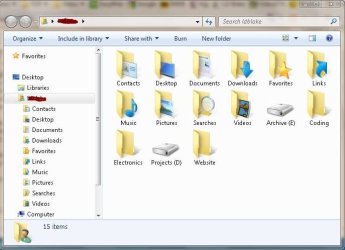
You can make shortcuts and folders in your home folder very easily... Here's mine...
Documents, Videos, Music, Pictures and Favorites have been relocated to the Projects drive and I simply deleted the Games folder (number of games on my computer == 0)


Capture.JPG

I mostly ignore the stupid libraries thing....
 

My Computer

Computer Manufacturer/Model Number
Homebrew
OS
XP Pro SP3 X86 / Win7 Pro X86
CPU
Amd 64 x2 4200 (2.4ghz)
Motherboard
Asus M2N-MX SE Plus
Memory
Kingston DDR2 800 2gb
Graphics Card(s)
Nvidia GF-8400
Sound Card
Realtek on Motherboard
Monitor(s) Displays
Acer x-193bw
Screen Resolution
1440 x 900
Hard Drives
Western Digital 500g
PSU
350watt In-Win
Case
In-Win
Cooling
Air
Keyboard
yes
Mouse
yes
Internet Speed
5mpbs
Other Info
Also ASRock ION 330 as HTPC (on XP).
Acer Aspire as GP netbook (on XP).
I was fortunate enough to see the "locations" link when I first installed Seven. So I didn't have to actually move My Music, or My Video like I did in XP. I just added the locations to those folders over on my D:\ storage drive, to the library. Glad I didn't run into this headache. YIKES!
 

My Computer

Computer Manufacturer/Model Number
NVIDIA
OS
Windows 7 Enterprise x64
CPU
AMD Athlon 64X2 Dual Core 3800+
Motherboard
GeForce 6100-M9
Memory
OCZ Platinum Dual Channel - 4x1Gb
Graphics Card(s)
NVIDIA GeForce 8800 GT PCI Express x16
Sound Card
Creative Audigy Sound Blaster Extreme PCI
Monitor(s) Displays
Compaq 7500
Screen Resolution
1024x768
Hard Drives
C: Seagate ST3250318AS SataII - 250Gb

D: Seagate ST3500418AS SataII - 500Gb
PSU
OCZ 600w Dual 12v Rails
Case
Thermaltake
Cooling
OCZ Heatsinks, Fans, and Thermal Paste on CPU & Chipsets
Keyboard
Logitech
Mouse
Radio Shack PS2
Internet Speed
Cable
Other Info
Dual Pioneer DVD/RW optical drives. LG CD/RW optical drive.
Ok, so I reverted to default libraries, then changed the location of my Videos library to a new folder in my home folder called My Videos. Now it seems to be working! Thanks!
WoooooHooooo!!!!!! Thought that might do it.

Ok... so who do we send the Excedrin bill to?
 

My Computer

Computer Manufacturer/Model Number
Homebrew
OS
XP Pro SP3 X86 / Win7 Pro X86
CPU
Amd 64 x2 4200 (2.4ghz)
Motherboard
Asus M2N-MX SE Plus
Memory
Kingston DDR2 800 2gb
Graphics Card(s)
Nvidia GF-8400
Sound Card
Realtek on Motherboard
Monitor(s) Displays
Acer x-193bw
Screen Resolution
1440 x 900
Hard Drives
Western Digital 500g
PSU
350watt In-Win
Case
In-Win
Cooling
Air
Keyboard
yes
Mouse
yes
Internet Speed
5mpbs
Other Info
Also ASRock ION 330 as HTPC (on XP).
Acer Aspire as GP netbook (on XP).
I was fortunate enough to see the "locations" link when I first installed Seven. So I didn't have to actually move My Music, or My Video like I did in XP. I just added the locations to those folders over on my D:\ storage drive, to the library. Glad I didn't run into this headache. YIKES!

In it's extreme --and I've been there-- you will get a "Server failed to start" notice and you won't have any access to anything except Winkey+R ...

The problem is caused by moving folders to locations that do not exist prior to clicking the Move button... i.e. creating the folders in the "select folder" dialog... Boom... explorer brought to it's knees by a broken hard link!

Preventing it is beyond easy... just make the folders first.
 

My Computer

Computer Manufacturer/Model Number
Homebrew
OS
XP Pro SP3 X86 / Win7 Pro X86
CPU
Amd 64 x2 4200 (2.4ghz)
Motherboard
Asus M2N-MX SE Plus
Memory
Kingston DDR2 800 2gb
Graphics Card(s)
Nvidia GF-8400
Sound Card
Realtek on Motherboard
Monitor(s) Displays
Acer x-193bw
Screen Resolution
1440 x 900
Hard Drives
Western Digital 500g
PSU
350watt In-Win
Case
In-Win
Cooling
Air
Keyboard
yes
Mouse
yes
Internet Speed
5mpbs
Other Info
Also ASRock ION 330 as HTPC (on XP).
Acer Aspire as GP netbook (on XP).
Ok... so who do we send the Excedrin bill to?
That's a toss up. I think all three of us need it by now. I feel as though I just gave birth....LOL
 

My Computer

Computer Manufacturer/Model Number
NVIDIA
OS
Windows 7 Enterprise x64
CPU
AMD Athlon 64X2 Dual Core 3800+
Motherboard
GeForce 6100-M9
Memory
OCZ Platinum Dual Channel - 4x1Gb
Graphics Card(s)
NVIDIA GeForce 8800 GT PCI Express x16
Sound Card
Creative Audigy Sound Blaster Extreme PCI
Monitor(s) Displays
Compaq 7500
Screen Resolution
1024x768
Hard Drives
C: Seagate ST3250318AS SataII - 250Gb

D: Seagate ST3500418AS SataII - 500Gb
PSU
OCZ 600w Dual 12v Rails
Case
Thermaltake
Cooling
OCZ Heatsinks, Fans, and Thermal Paste on CPU & Chipsets
Keyboard
Logitech
Mouse
Radio Shack PS2
Internet Speed
Cable
Other Info
Dual Pioneer DVD/RW optical drives. LG CD/RW optical drive.

My Computer

Computer Manufacturer/Model Number
Homebrew
OS
XP Pro SP3 X86 / Win7 Pro X86
CPU
Amd 64 x2 4200 (2.4ghz)
Motherboard
Asus M2N-MX SE Plus
Memory
Kingston DDR2 800 2gb
Graphics Card(s)
Nvidia GF-8400
Sound Card
Realtek on Motherboard
Monitor(s) Displays
Acer x-193bw
Screen Resolution
1440 x 900
Hard Drives
Western Digital 500g
PSU
350watt In-Win
Case
In-Win
Cooling
Air
Keyboard
yes
Mouse
yes
Internet Speed
5mpbs
Other Info
Also ASRock ION 330 as HTPC (on XP).
Acer Aspire as GP netbook (on XP).
The problem is caused by moving folders to locations that do not exist prior to clicking the Move button... i.e. creating the folders in the "select folder" dialog... Boom... explorer brought to it's knees by a broken hard link!
Okay, so when are you going to start coding a Hotfix for this, and submitting it to Microsoft? :P
 

My Computer

Computer Manufacturer/Model Number
NVIDIA
OS
Windows 7 Enterprise x64
CPU
AMD Athlon 64X2 Dual Core 3800+
Motherboard
GeForce 6100-M9
Memory
OCZ Platinum Dual Channel - 4x1Gb
Graphics Card(s)
NVIDIA GeForce 8800 GT PCI Express x16
Sound Card
Creative Audigy Sound Blaster Extreme PCI
Monitor(s) Displays
Compaq 7500
Screen Resolution
1024x768
Hard Drives
C: Seagate ST3250318AS SataII - 250Gb

D: Seagate ST3500418AS SataII - 500Gb
PSU
OCZ 600w Dual 12v Rails
Case
Thermaltake
Cooling
OCZ Heatsinks, Fans, and Thermal Paste on CPU & Chipsets
Keyboard
Logitech
Mouse
Radio Shack PS2
Internet Speed
Cable
Other Info
Dual Pioneer DVD/RW optical drives. LG CD/RW optical drive.
So, I should take it, the sex change operation was a success?

:zip:
*Max gives evil glare*

Okay, I gotta' get outta' here and do some household chores. Catchya' later, Bro.
 

My Computer

Computer Manufacturer/Model Number
NVIDIA
OS
Windows 7 Enterprise x64
CPU
AMD Athlon 64X2 Dual Core 3800+
Motherboard
GeForce 6100-M9
Memory
OCZ Platinum Dual Channel - 4x1Gb
Graphics Card(s)
NVIDIA GeForce 8800 GT PCI Express x16
Sound Card
Creative Audigy Sound Blaster Extreme PCI
Monitor(s) Displays
Compaq 7500
Screen Resolution
1024x768
Hard Drives
C: Seagate ST3250318AS SataII - 250Gb

D: Seagate ST3500418AS SataII - 500Gb
PSU
OCZ 600w Dual 12v Rails
Case
Thermaltake
Cooling
OCZ Heatsinks, Fans, and Thermal Paste on CPU & Chipsets
Keyboard
Logitech
Mouse
Radio Shack PS2
Internet Speed
Cable
Other Info
Dual Pioneer DVD/RW optical drives. LG CD/RW optical drive.
Okay, I gotta' get outta' here and do some household chores. Catchya' later, Bro.

Yep... me too... been hanging around for this and one other thread most of the day... at least it's a holiday... But I should get supper started...

One thing for certain... I won't get caught on this one again.

Been a slice guys....
 

My Computer

Computer Manufacturer/Model Number
Homebrew
OS
XP Pro SP3 X86 / Win7 Pro X86
CPU
Amd 64 x2 4200 (2.4ghz)
Motherboard
Asus M2N-MX SE Plus
Memory
Kingston DDR2 800 2gb
Graphics Card(s)
Nvidia GF-8400
Sound Card
Realtek on Motherboard
Monitor(s) Displays
Acer x-193bw
Screen Resolution
1440 x 900
Hard Drives
Western Digital 500g
PSU
350watt In-Win
Case
In-Win
Cooling
Air
Keyboard
yes
Mouse
yes
Internet Speed
5mpbs
Other Info
Also ASRock ION 330 as HTPC (on XP).
Acer Aspire as GP netbook (on XP).
Thanks guys! You're the best.
 

My Computer

Computer Manufacturer/Model Number
Thinkpad T400
OS
Window 7
Memory
4 gig
Are you hearing any telltail noises from the drive ? Any clicking like it sounds as if it is stopping and restarting ?
 

My Computer

Computer Manufacturer/Model Number
Myself
OS
Windows 7 Ultimate 64Bit
CPU
C2D E8200
Motherboard
XFX 750i
Memory
8GB PNY PC2-6400
Graphics Card(s)
BFG 9600GT x 2
Sound Card
Stock XFX Optical
Monitor(s) Displays
Gateway 22" HD Display
Hard Drives
C: 1 TB G: 500 GB H: 500 GB
PSU
Ultra LSP 550 Pro Lifetime Series
Case
Xion2
Cooling
ThermalTake
Back
Top