Hard Drive Back UP

Barbarian Roman

New member
Member
Local time
5:36 PM
Messages
81
My computer is f***ed and getting BSOD all the time. Thankfully, in safe mode, or in normal mode with no services or programs running at startup, it's stable enough to get my files, but the computer is useless, can't even go on the internet with it, and normal startup gives a BSOD. So I want to back up my hard drive (some 300gb) and format computer to factory settings. Question: if I choose back up my whole hard drive, will it back up those corrupted windows files (like in C/windows/system 32)? I only want to back up my data, not create a disk image of the computer or anything like that.
 

My Computer

Computer Manufacturer/Model Number
Acer Aspire 7745G
OS
Windows 7 home premium 64 bit
CPU
i5 460m
Memory
8gb
Graphics Card(s)
ATI 5650m & Integrated Intel HD
Sound Card
Realtek HD
Screen Resolution
1600x900
Hard Drives
C 450 gb
D 465 gb
Best is to just COPY your files off the PC to another or external drive.

There is a reason you are getting BSODs and if it is file corruption causing the BSODs there is a reason that happened. Files on good hardware do not get corrupted.
That is if there is no viruses on the system.
 

My Computer

Computer Manufacturer/Model Number
Built be Me
OS
Windows 7 Pro x64
CPU
i5 760
Motherboard
Asus P7P55D-E Pro
Memory
16GB
Graphics Card(s)
Nvidia GTS450
Sound Card
On board
Monitor(s) Displays
Dell 2007WFP Dell 1800FP
Screen Resolution
1680x1050 1280x1024
Hard Drives
Seagate 250GB & 750GB
WD 1TB
PSU
Antec 750
Case
In Win
Cooling
Cooler Master Hyper 212+
Keyboard
IBM
Mouse
MS
So copy only the good files? It there some way to compress them on the disk, since I would maybe need only 60 gb or so but I have only 2 8gb usb's, but lots of disks. Is there some way to compress them?
 

My Computer

Computer Manufacturer/Model Number
Acer Aspire 7745G
OS
Windows 7 home premium 64 bit
CPU
i5 460m
Memory
8gb
Graphics Card(s)
ATI 5650m & Integrated Intel HD
Sound Card
Realtek HD
Screen Resolution
1600x900
Hard Drives
C 450 gb
D 465 gb

My Computer

Computer Manufacturer/Model Number
* BFK Customs *
OS
W 7 64-bit Ultimate
CPU
Intel Q9550 Yorkfield
Motherboard
ASUS P5Q Pro
Memory
8GB Dominator 8500C5D
Graphics Card(s)
ATI : XFX 5870
Sound Card
Realtek HD Audio 7-1
Monitor(s) Displays
1x 47" LCD HDMI & 3x 26" LCD HDMI
Screen Resolution
1920x1080P & 1920x1200
Hard Drives
1x 80GB Intel X25-M G2 SSD : 1x 500GB & 1x 640GB WD Caviar Black(s)
PSU
Corsair 620HX
Case
Cooler Master RC-690
Cooling
Tuniq Tower 120, 2x 140mm and 3x 120mm case fans
Keyboard
Microsoft 500
Mouse
Razer Diamondback 3G
Internet Speed
14 Mb/s
Other Info
1x Koutech 3Gb/s SATA HDD Hot Swap Rack
Have you tried a Repair Install? That could possibly fix this issue if it's related to corrupt system files without deleting any of your personal files.
 

My Computer

OS
XP / Win7 x64 Pro
CPU
Intel Quad-Core Q9450 @ 3.2GHz
Motherboard
Asus P5-E
Memory
2x2GB GSkill DDR2
Graphics Card(s)
NVIDIA GeForce 8600 GTS (EVGA)
Monitor(s) Displays
Dell 2408WFP
Screen Resolution
1920x1200
I don't have the windows 7 disk. My computer came preloaded with windows 7 and the store gave me recovery disks which I assume windows 7 is on.
 

My Computer

Computer Manufacturer/Model Number
Acer Aspire 7745G
OS
Windows 7 home premium 64 bit
CPU
i5 460m
Memory
8gb
Graphics Card(s)
ATI 5650m & Integrated Intel HD
Sound Card
Realtek HD
Screen Resolution
1600x900
Hard Drives
C 450 gb
D 465 gb

My Computer

OS
XP / Win7 x64 Pro
CPU
Intel Quad-Core Q9450 @ 3.2GHz
Motherboard
Asus P5-E
Memory
2x2GB GSkill DDR2
Graphics Card(s)
NVIDIA GeForce 8600 GTS (EVGA)
Monitor(s) Displays
Dell 2408WFP
Screen Resolution
1920x1200
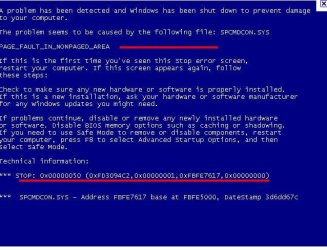
It may be something that can be corrected, if you know what the cause is. If your machine crashes and presents you with a blue screen, you can get the "stop error" from the screen. 2 pertinent bits of info are marked with red in this image:

BSOD Screen.JPG

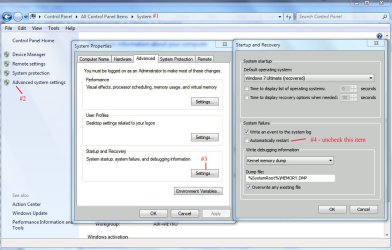
If your machine does not present the blue screen, you can force it to do so following the numbered steps in the below image:

BSOD_Auto Restart.JPG

You should follow BFKs advice and copy all of your files before doing anything else.

James
 

My Computer

OS
Win7U 64 RTM
CPU
Q9550
Motherboard
GA-EP45-UD3R
Memory
8GB Gskill
Graphics Card(s)
ASUS|EAH4850/HTDI/1GD3/A
Sound Card
xfi Plat
Monitor(s) Displays
Dell 2405fpw
Screen Resolution
1920x1200
Hard Drives
Seagate & WD sata Drives
PSU
Antec
Case
Antec
Keyboard
MS Natural Ergonomic 4000
Mouse
Logitech MX610 USB Cordless

My Computer

Computer Manufacturer/Model Number
* BFK Customs *
OS
W 7 64-bit Ultimate
CPU
Intel Q9550 Yorkfield
Motherboard
ASUS P5Q Pro
Memory
8GB Dominator 8500C5D
Graphics Card(s)
ATI : XFX 5870
Sound Card
Realtek HD Audio 7-1
Monitor(s) Displays
1x 47" LCD HDMI & 3x 26" LCD HDMI
Screen Resolution
1920x1080P & 1920x1200
Hard Drives
1x 80GB Intel X25-M G2 SSD : 1x 500GB & 1x 640GB WD Caviar Black(s)
PSU
Corsair 620HX
Case
Cooler Master RC-690
Cooling
Tuniq Tower 120, 2x 140mm and 3x 120mm case fans
Keyboard
Microsoft 500
Mouse
Razer Diamondback 3G
Internet Speed
14 Mb/s
Other Info
1x Koutech 3Gb/s SATA HDD Hot Swap Rack
Well, I posted the error report on the crashes part of this forum, but there are no results. I'll post it here too. The word document in the zip file shows the error. I will give the recovery discs a try now, repairing the os.
 

Attachments

My Computer

Computer Manufacturer/Model Number
Acer Aspire 7745G
OS
Windows 7 home premium 64 bit
CPU
i5 460m
Memory
8gb
Graphics Card(s)
ATI 5650m & Integrated Intel HD
Sound Card
Realtek HD
Screen Resolution
1600x900
Hard Drives
C 450 gb
D 465 gb
Are your crashes a recent event or have they been present since you bought the machine? If recent, a repair install may resolve your troubles, but given that your machine starts in safe mode, it's likely that it's a driver issue. Here are 2 links that may be of help. The first will likely be the most useful:

How to troubleshoot a problem by performing a clean boot in Windows Vista or in Windows 7

Microsoft Fix it Solution Center: troubleshooting software issues

Have you updated any drivers lately?

James
 

My Computer

OS
Win7U 64 RTM
CPU
Q9550
Motherboard
GA-EP45-UD3R
Memory
8GB Gskill
Graphics Card(s)
ASUS|EAH4850/HTDI/1GD3/A
Sound Card
xfi Plat
Monitor(s) Displays
Dell 2405fpw
Screen Resolution
1920x1200
Hard Drives
Seagate & WD sata Drives
PSU
Antec
Case
Antec
Keyboard
MS Natural Ergonomic 4000
Mouse
Logitech MX610 USB Cordless
If the data is important to you, and worth saving you should have a method of backing it up. Take this as a lucky break and a hint to force you to buy an external drive. They are dirt cheap now, and if that data is important, you'll get one right away. Back up what is important to you, and then use your recovery discs.
 

My Computer

OS
Windows 7 Ultimate x64 SP1
CPU
Intel Core i7-2600
Motherboard
Gigabyte GA-P67A-UD3P-B3
Memory
12 GB Patriot Extreme DDR3-1333
Graphics Card(s)
Nvidia GTX 470
Monitor(s) Displays
Dell UltraSharp 2209WA
Hard Drives
OCZ Agility3 240 GB, WD5001AALS, WD7501AALS
PSU
OCZ ModStream 700W
Case
CoolerMaster HAF 912 Advanced
Cooling
CoolerMaster Hyper 212 Plus
Back
Top