Hard Drive Cleanup

huffman

New member
Pro User
Local time
8:24 AM
Messages
715
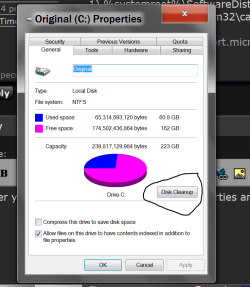
I really need to make some room on my C-drive (HDD has 3 partitions). It was suggested that I use Disk Cleanup by going to: My computer and to highlight and right click on C-drive. It said that there was an option "Cleanup System Files". In Windows 7 64bit, it is definitely not there.

Do I have any other options?
Thank you
 

My Computer

OS
Windows 7 Pro
CPU
Intel(R) Pentium(R) Duel CPU E2200 2.20 Ghz
Motherboard
GA-G41M-ES2L
Memory
4 gb 2.96 Usable
Graphics Card(s)
Onboard
Sound Card
Onboard
Hard Drives
2 - 1TB WD Sata Drives
Disk Cleanup also tells how much of total space you can get by freeing it via its services, somewhere at the top. If the value isn't high there, then it's not going to be useful to you.

However, in that same window, there is a list of items and how much of size it takes each.
There is also a description given to each.

Before using this tool, make sure you know what you're about to get rid of there.
(I don't remember it well but I think...) There were some users reporting that something got deleted and they weren't comfortable with that afterwards.

Also, you might find this source informative by the way:

Disk Cleanup - Open and Use - Windows 7 Help Forums
 

My Computer

Computer type
PC/Desktop
OS
Windows 8.1 x64
yes it does and I ran it several times and each time I gained a small amount of space.
 

My Computer

OS
Windows 7 Pro
CPU
Intel(R) Pentium(R) Duel CPU E2200 2.20 Ghz
Motherboard
GA-G41M-ES2L
Memory
4 gb 2.96 Usable
Graphics Card(s)
Onboard
Sound Card
Onboard
Hard Drives
2 - 1TB WD Sata Drives
I am under the impression that you've already done the best for freeing up space on your drives.
You could still double-check few more places manually (on drive with OS), if you believe you can still find something eating up space on your system:

1) cab_xxxx files found in WINDOWSTEMP folder - Microsoft Community
2) causes - Microsoft Community
3) Windows 7 log file compression bug can fill up your hard drive | Computerworld

+

Check these locations in explorer (copy & paste to enter) :
1) %systemroot%\SoftwareDistribution
2) %systemroot%\system32\catroot2

(Resource: https://support.microsoft.com/en-us/help/971058/how-do-i-reset-windows-update-components)
 

My Computer

Computer type
PC/Desktop
OS
Windows 8.1 x64
Tick on the Start Orb and then right tick on Computer.
Then select Open.
Then select Properties.

You should get a picture with the option to Disk Cleanup.

Disk Clean up.PNG

Jack
 

My Computer

Computer type
PC/Desktop
Computer Manufacturer/Model Number
Home made Desktop
OS
Windows 10 Pro. 64/ version 1709 Windows 7 Pro/64
CPU
Intel i7-6800K @ 4.3
Motherboard
ASUS X-99 Deluxe II
Memory
Corsair Platinum 16 gig @2400
Graphics Card(s)
EVGA GTX 1070 OC
Monitor(s) Displays
Asus 27" LED LCD/VE278Q
Screen Resolution
1920-1080 or 1280-720 HDMI
Hard Drives
INTEL SSD 730-240 Gb Sata 3.0/
PSU
EVGA Platium 1200W
Case
Phanteks Luxe Tempered Glass 8 fans/ one radiator
Cooling
XSPC/ Water Cooled CPU
Keyboard
Das 4 Professional
Mouse
Logitech M705/MX Anywhere 2-S
Internet Speed
100 mbits
Antivirus
Microsoft Security Essentials/ Malwarebytes Premium 3.0/ SAS
Browser
I.E. 11 default/Firefox/ ISP Time Warner Cable/Spectrum
Other Info
LG BluRay Burner/
Sound system-KLipsch-THX/
Icy Dock ssd Hot Swap bays.
To free up disk space, I'd run Disk Cleanup all options checked and CCleaner with default options checked.

If you have an abundance of CbsPersist_xxx.cab files you can delete those too.
Location: C:\Windows\Logs\CBS
 

My Computer

Computer type
PC/Desktop
Computer Manufacturer/Model Number
HP Desktop & Compaq Laptop
OS
Win 10 x64, Linux Lite, Win 7 x64, BlackArch, & Kali
Hard Drives
Samsung 850 Pro 256Gb,
Hitachi HDD 1Tb,
Crucial MX SSD 250Gb
Segate 3Tb USB 3.0 Ext. Backup HDD
Internet Speed
150Mbps dn, 20Mbps up
Antivirus
Avast Free, Malwarebytes Anti-Exploit & Anti-Ransomware
Browser
Firefox, Chrome, Opera, & VPN
Back
Top