Hard drive constantly read/writing

Well it's been a frustrating few days--my computer has gotten much worse. Now, the noises seem less of an issue. After all the procedures I've tried, the computer has become very unresponsive. When I turn it on it will get to the Windows logo and just stay there. Sometimes it says 'preparing security options' and nothing happens. I'll press the power button for 10 seconds to shut down and try it again. Then I'll get a black screen with a blinking cursor. Sometimes the desktop appears with a black background and all the icons, but I can't select anything. The mouse moves around but clicking or double clicking doesn't do anything. Today, I finally got my previously normal screen--but when I double click on any folders (documents, photos, etc), instead of opening the folder a window popsup showing the 'properties' dialog box for that folder. I don't know what is happening. I'm going to try and remove all my personal files and maybe try the System Recovery this weekend. Anybody know what's happening with the file folders?

Thanks,
Richard
 

My Computer

Computer type
PC/Desktop
Computer Manufacturer/Model Number
Asus CM1630
OS
Windows 7 Home Premium
CPU
AMD Phenom II X4 830
Memory
10 GB
Antivirus
Norton 360
Browser
IE 9
Well it's been a frustrating few days--my computer has gotten much worse. Now, the noises seem less of an issue. After all the procedures I've tried, the computer has become very unresponsive. When I turn it on it will get to the Windows logo and just stay there. Sometimes it says 'preparing security options' and nothing happens. I'll press the power button for 10 seconds to shut down and try it again. Then I'll get a black screen with a blinking cursor. Sometimes the desktop appears with a black background and all the icons, but I can't select anything. The mouse moves around but clicking or double clicking doesn't do anything. Today, I finally got my previously normal screen--but when I double click on any folders (documents, photos, etc), instead of opening the folder a window popsup showing the 'properties' dialog box for that folder. I don't know what is happening. I'm going to try and remove all my personal files and maybe try the System Recovery this weekend. Anybody know what's happening with the file folders?

Thanks,
Richard
Rich, from how our posts were going I had thought your next post (this one) would have told us that your recovery went well and everything is okay now, obviously I was mistaken.

Your system is so hemmed up the least you could do is a recovery to alleviate its, and your pain.

No maybe. Do it!
 

My Computer

Computer type
PC/Desktop
Computer Manufacturer/Model Number
Gateway DX4831-01e (Mid-Tower Desktop)
OS
Originally Win 7 Hm Prem x64 Ver 6.1.7600 Build 7601-SP1 | Upgraded to Windows 10 December 14, 2019
CPU
Intel i3 530 2.93GHz, 2933MHz 2 Cores 4 Logical Processors
Motherboard
Gateway H57M01 133 megahertz
Memory
6GB of 1,333MHz DDR3 SDRAM
Graphics Card(s)
32MB Intel Graphics Media Accelerator HD IGChip
Sound Card
Realtek High Definition Audio
Monitor(s) Displays
Gateway HX2000 20inch TFT active matrix TN
Screen Resolution
1600 x 900 x 59 hertz
Hard Drives
WDC WD10EADS-00M2B0 [HDD] (1000.20 GB) -- drive 0,
HL-DT-ST DVDRAM GH41N [CD-ROM dr]
Four card readers, and Four USB 2.0
PSU
300watts.
Case
Mid-Tower Desktop
Cooling
Stock from Gateway
Keyboard
Natural Ergonomic Keyboard 4000, see Other Info
Mouse
Orig. Gateway wore out now using Insignia USB wired optical
Internet Speed
Vz FIOS 10ms png 57.64Mbps down 65.53Mbps up Speedtest.org
Antivirus
Zamana Anti-logger with Anti-malware, MSE, Windows Firewall,
Browser
IE11.0.9600.19399-Upd ver11.0.135, Firefox 68.0.1 x64
Other Info
System Specs by Belarc.

BIOS: American Megatrends Inc. P01-A0 11/17/2009

Replaced the MS 'Natural' Standard PS/2 Enhanced 101-102 Keyboard with a new Natural Ergonomic Keyboard 4000 on August 1st 2014.

Canon Pixma MG3222 Printer.

Updated to IE11 on 12102015 | Fios Quantum Router g1100

Additional AV: SpywareBlaster, manual Mbam, SAS
Anak,
I'm closer to beginning the Recovery--I've been having so many issues lately, it has been difficult to get the computer working long enough to remove my personal info. The computer came with Windows 7 installed--but I haven't been able to locate the disc. Will Windows 7 be removed during the Recovery? If so, how do I install it again?

Thanks,
Richard
 

My Computer

Computer type
PC/Desktop
Computer Manufacturer/Model Number
Asus CM1630
OS
Windows 7 Home Premium
CPU
AMD Phenom II X4 830
Memory
10 GB
Antivirus
Norton 360
Browser
IE 9
It's okay Richard, getting ready for any kind of re-installation takes a lot of prep work, and if you have problems like that Hard Disk Drive (HDD) running all the time it only makes it worse. I'll be here.

Yes, it will be removed. The hard drive will be formatted before the recovery process begins. Formatting means everything will be removed so the HDD can start with a clean slate.

But don't worry, All the software and Utilities included in the Essentio CM1630 specifications will be re-installed including the Operating System.

You can try http://www.sevenforums.com/tutorials/69585-safe-mode.html Option one, to see if safe mode will make the job of removing your data easier.

Be warned, your display may look a little funny and icons may be moved around, but all your stuff should be there on the desktop.

Did you download the manual yet? The link for it is here in post #29. you'll see it near the bottom.

If safe mode works better you can even run it with networking which will allow you to get on the web.
 

My Computer

Computer type
PC/Desktop
Computer Manufacturer/Model Number
Gateway DX4831-01e (Mid-Tower Desktop)
OS
Originally Win 7 Hm Prem x64 Ver 6.1.7600 Build 7601-SP1 | Upgraded to Windows 10 December 14, 2019
CPU
Intel i3 530 2.93GHz, 2933MHz 2 Cores 4 Logical Processors
Motherboard
Gateway H57M01 133 megahertz
Memory
6GB of 1,333MHz DDR3 SDRAM
Graphics Card(s)
32MB Intel Graphics Media Accelerator HD IGChip
Sound Card
Realtek High Definition Audio
Monitor(s) Displays
Gateway HX2000 20inch TFT active matrix TN
Screen Resolution
1600 x 900 x 59 hertz
Hard Drives
WDC WD10EADS-00M2B0 [HDD] (1000.20 GB) -- drive 0,
HL-DT-ST DVDRAM GH41N [CD-ROM dr]
Four card readers, and Four USB 2.0
PSU
300watts.
Case
Mid-Tower Desktop
Cooling
Stock from Gateway
Keyboard
Natural Ergonomic Keyboard 4000, see Other Info
Mouse
Orig. Gateway wore out now using Insignia USB wired optical
Internet Speed
Vz FIOS 10ms png 57.64Mbps down 65.53Mbps up Speedtest.org
Antivirus
Zamana Anti-logger with Anti-malware, MSE, Windows Firewall,
Browser
IE11.0.9600.19399-Upd ver11.0.135, Firefox 68.0.1 x64
Other Info
System Specs by Belarc.

BIOS: American Megatrends Inc. P01-A0 11/17/2009

Replaced the MS 'Natural' Standard PS/2 Enhanced 101-102 Keyboard with a new Natural Ergonomic Keyboard 4000 on August 1st 2014.

Canon Pixma MG3222 Printer.

Updated to IE11 on 12102015 | Fios Quantum Router g1100

Additional AV: SpywareBlaster, manual Mbam, SAS
Anak,
Will the reinstallation of the operating system and original utilities be done automatically? Or will I have to locate original documents, software keys, discs, etc. I'm not sure if my son retained much of anything except the receipt. I sure don't want to buy Windows 7 or any of the other pre-installed software.

Thanks,

Richard
 

My Computer

Computer type
PC/Desktop
Computer Manufacturer/Model Number
Asus CM1630
OS
Windows 7 Home Premium
CPU
AMD Phenom II X4 830
Memory
10 GB
Antivirus
Norton 360
Browser
IE 9
Anak,
Will the reinstallation of the operating system and original utilities be done automatically?
Yes if you follow the instructions in the manual.

~~~


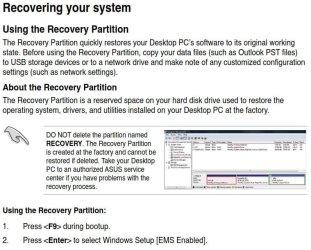
Start with steps 1 and 2:
rcan1.JPG

~~~

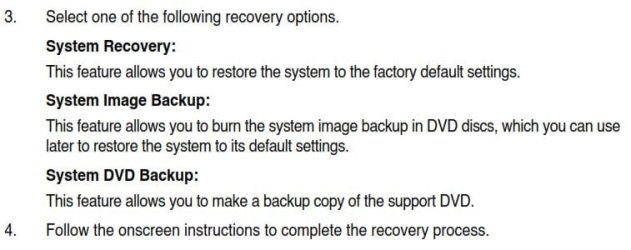
Then in step 3 select System Recovery.

You don't have to babysit during the Recovery process (step 4), usually only at the beginning and at the end, but I would remember to come back and check the process frequently in case there are questions the process may ask during it; usually a Yes, No or OK. Recovery should take maybe 15 to 30 minutes.
rcan2.JPG

When done your machine should reboot automatically back to the Desktop, and your done with that part.

~~~

1.) Go to Control Panel\All Control Panel Items\System and scroll down to the bottom you should see this:
rcan3.jpg

If you don't, post back and I'll tell you how to activate.

2.) Your next step if your Recovery is Genuine is to remove the Trend Micro Titanium Internet Security Trial, use this: Uninstalling Trend Micro Titanium using the uninstall tool

Then download, install, and update Microsoft Security Essentials (MSE)

3.) At this point your next move is to install any programs you deem necessary and copy your saved data back into them.

~~~

Or will I have to locate original documents, software keys, discs, etc. I'm not sure if my son retained much of anything except the receipt. I sure don't want to buy Windows 7 or any of the other pre-installed software.

Thanks,

Richard
You shouldn't have to, all of the other docs, and keys will already be there on the hard disk drive (HDD), except for the printer installation. Do you have a printer?

If by pre-installed software, you mean any other than what came with the machine like a word processor or other "personal" software yes you will have to have the installation material for them.


Your welcome. If at any point you have any questions please don't hesitate to post back for clarification.
 

My Computer

Computer type
PC/Desktop
Computer Manufacturer/Model Number
Gateway DX4831-01e (Mid-Tower Desktop)
OS
Originally Win 7 Hm Prem x64 Ver 6.1.7600 Build 7601-SP1 | Upgraded to Windows 10 December 14, 2019
CPU
Intel i3 530 2.93GHz, 2933MHz 2 Cores 4 Logical Processors
Motherboard
Gateway H57M01 133 megahertz
Memory
6GB of 1,333MHz DDR3 SDRAM
Graphics Card(s)
32MB Intel Graphics Media Accelerator HD IGChip
Sound Card
Realtek High Definition Audio
Monitor(s) Displays
Gateway HX2000 20inch TFT active matrix TN
Screen Resolution
1600 x 900 x 59 hertz
Hard Drives
WDC WD10EADS-00M2B0 [HDD] (1000.20 GB) -- drive 0,
HL-DT-ST DVDRAM GH41N [CD-ROM dr]
Four card readers, and Four USB 2.0
PSU
300watts.
Case
Mid-Tower Desktop
Cooling
Stock from Gateway
Keyboard
Natural Ergonomic Keyboard 4000, see Other Info
Mouse
Orig. Gateway wore out now using Insignia USB wired optical
Internet Speed
Vz FIOS 10ms png 57.64Mbps down 65.53Mbps up Speedtest.org
Antivirus
Zamana Anti-logger with Anti-malware, MSE, Windows Firewall,
Browser
IE11.0.9600.19399-Upd ver11.0.135, Firefox 68.0.1 x64
Other Info
System Specs by Belarc.

BIOS: American Megatrends Inc. P01-A0 11/17/2009

Replaced the MS 'Natural' Standard PS/2 Enhanced 101-102 Keyboard with a new Natural Ergonomic Keyboard 4000 on August 1st 2014.

Canon Pixma MG3222 Printer.

Updated to IE11 on 12102015 | Fios Quantum Router g1100

Additional AV: SpywareBlaster, manual Mbam, SAS
Can I get some help with my computers hard drive too??

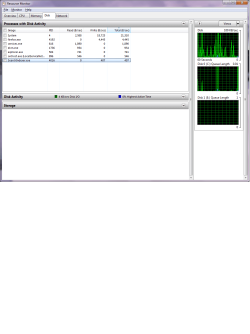
It is ALWAYS writing (or reading) while my computer is idle...

Thanks for the help!!!

D
 

Attachments

  • Running.png
    Running.png
    29.5 KB · Views: 2

My Computer

OS
windows 7 x64
You do not offer much information about your machine and why you think it is running all the time, a good place to start would be filling out your system specs. http://www.sevenforums.com/tutorials/180324-system-info-see-your-system-specs.html the Indexing service, and your Anti-Virus application would be two places to check.

Have you read through this entire thread and tried any of the suggestions? You could try Process Monitor. Please include the logs from Process Monitor and screenshots when you start your new thread.

You have one other thread from 3 and a quarter years ago and you did the same thing there as here; posted a question without much information. You would do much better if you started a new thread and included as much information as you can, no matter how insignificant you think it may be.
 

My Computer

Computer type
PC/Desktop
Computer Manufacturer/Model Number
Gateway DX4831-01e (Mid-Tower Desktop)
OS
Originally Win 7 Hm Prem x64 Ver 6.1.7600 Build 7601-SP1 | Upgraded to Windows 10 December 14, 2019
CPU
Intel i3 530 2.93GHz, 2933MHz 2 Cores 4 Logical Processors
Motherboard
Gateway H57M01 133 megahertz
Memory
6GB of 1,333MHz DDR3 SDRAM
Graphics Card(s)
32MB Intel Graphics Media Accelerator HD IGChip
Sound Card
Realtek High Definition Audio
Monitor(s) Displays
Gateway HX2000 20inch TFT active matrix TN
Screen Resolution
1600 x 900 x 59 hertz
Hard Drives
WDC WD10EADS-00M2B0 [HDD] (1000.20 GB) -- drive 0,
HL-DT-ST DVDRAM GH41N [CD-ROM dr]
Four card readers, and Four USB 2.0
PSU
300watts.
Case
Mid-Tower Desktop
Cooling
Stock from Gateway
Keyboard
Natural Ergonomic Keyboard 4000, see Other Info
Mouse
Orig. Gateway wore out now using Insignia USB wired optical
Internet Speed
Vz FIOS 10ms png 57.64Mbps down 65.53Mbps up Speedtest.org
Antivirus
Zamana Anti-logger with Anti-malware, MSE, Windows Firewall,
Browser
IE11.0.9600.19399-Upd ver11.0.135, Firefox 68.0.1 x64
Other Info
System Specs by Belarc.

BIOS: American Megatrends Inc. P01-A0 11/17/2009

Replaced the MS 'Natural' Standard PS/2 Enhanced 101-102 Keyboard with a new Natural Ergonomic Keyboard 4000 on August 1st 2014.

Canon Pixma MG3222 Printer.

Updated to IE11 on 12102015 | Fios Quantum Router g1100

Additional AV: SpywareBlaster, manual Mbam, SAS
Back
Top